
Amazon MLS-C01 Practice Exams
Last updated on Oct 23,2026- Exam Code: MLS-C01
- Exam Name: AWS Certified Machine Learning - Specialty
- Certification Provider: Amazon
- Latest update: Oct 23,2026
A Machine Learning Specialist is given a structured dataset on the shopping habits of a company’s customer base. The dataset contains thousands of columns of data and hundreds of numerical columns for each customer. The Specialist wants to identify whether there are natural groupings for these columns across all customers and visualize the results as quickly as possible.
What approach should the Specialist take to accomplish these tasks?
- A . Embed the numerical features using the t-distributed stochastic neighbor embedding (t-SNE) algorithm and create a scatter plot.
- B . Run k-means using the Euclidean distance measure for different values of k and create an elbow plot.
- C . Embed the numerical features using the t-distributed stochastic neighbor embedding (t-SNE) algorithm and
create a line graph. - D . Run k-means using the Euclidean distance measure for different values of k and create box plots for each numerical column within each cluster.
A
Explanation:
The best approach to identify and visualize the natural groupings for the numerical columns across all customers is to embed the numerical features using the t-distributed stochastic neighbor embedding (t-SNE) algorithm and create a scatter plot. t-SNE is a dimensionality reduction technique that can project high-dimensional data into a lower-dimensional space, while preserving the local structure and distances of the data points. A scatter plot can then show the clusters of data points in the reduced space, where each point represents a customer and the color indicates the cluster membership. This approach can help the Specialist quickly explore the patterns and similarities among the customers based on their numerical features.
The other options are not as effective or efficient as the t-SNE approach. Running k-means for different values of k and creating an elbow plot can help determine the optimal number of clusters, but it does not provide a visual representation of the clusters or the customers. Embedding the numerical features using t-SNE and creating a line graph does not make sense, as a line graph is used to show the change of a variable over time, not the distribution of data points in a space. Running k-means for different values of k and creating box plots for each numerical column within each cluster can provide some insights into the statistics of each cluster, but it is very time-consuming and cumbersome to create and compare thousands of box plots.
References:
Dimensionality Reduction – Amazon SageMaker
Visualize high dimensional data using t-SNE – Amazon SageMaker
A manufacturing company has structured and unstructured data stored in an Amazon S3 bucket A Machine Learning Specialist wants to use SQL to run queries on this data.
Which solution requires the LEAST effort to be able to query this data?
- A . Use AWS Data Pipeline to transform the data and Amazon RDS to run queries.
- B . Use AWS Glue to catalogue the data and Amazon Athena to run queries
- C . Use AWS Batch to run ETL on the data and Amazon Aurora to run the quenes
- D . Use AWS Lambda to transform the data and Amazon Kinesis Data Analytics to run queries
B
Explanation:
AWS Glue is a serverless data integration service that can catalogue, clean, enrich, and move data between various data stores. Amazon Athena is an interactive query service that can run SQL queries on data stored in Amazon S3. By using AWS Glue to catalogue the data and Amazon Athena to run queries, the Machine Learning Specialist can leverage the existing data in Amazon S3 without any additional data transformation or loading. This solution requires the least effort compared to the other options, which involve more complex and costly data processing and storage services.
References: AWS Glue, Amazon Athena
A Machine Learning Specialist has built a model using Amazon SageMaker built-in algorithms and is not getting expected accurate results. The Specialist wants to use hyperparameter optimization to increase the model’s accuracy
Which method is the MOST repeatable and requires the LEAST amount of effort to achieve this?
- A . Launch multiple training jobs in parallel with different hyperparameters
- B . Create an AWS Step Functions workflow that monitors the accuracy in Amazon CloudWatch Logs and relaunches the training job with a defined list of hyperparameters
- C . Create a hyperparameter tuning job and set the accuracy as an objective metric.
- D . Create a random walk in the parameter space to iterate through a range of values that should be used for each individual hyperparameter
C
Explanation:
A hyperparameter tuning job is a feature of Amazon SageMaker that allows automatically finding the best combination of hyperparameters for a machine learning model. Hyperparameters are high-level parameters that influence the learning process and the performance of the model, such as the learning rate, the number of layers, the regularization factor, etc. A hyperparameter tuning job works by launching multiple training jobs with different hyperparameters, evaluating the results using an objective metric, and choosing the next set of hyperparameters to try based on a search strategy. The objective metric is a measure of the quality of the model, such as accuracy, precision, recall, etc. The search strategy is a method of exploring the hyperparameter space, such as random search, grid search, or Bayesian optimization.
Among the four options, option C is the most repeatable and requires the least amount of effort to use hyperparameter optimization to increase the model’s accuracy. This option involves the following steps:
Create a hyperparameter tuning job: Amazon SageMaker provides an easy-to-use interface for creating a hyperparameter tuning job, either through the AWS Management Console, the AWS CLI, or the AWS SDKs. To create a hyperparameter tuning job, the Machine Learning Specialist needs to specify the following information:
The name and type of the algorithm to use, either a built-in algorithm or a custom algorithm. The ranges and types of the hyperparameters to tune, such as categorical, continuous, or integer. The name and type of the objective metric to optimize, such as accuracy, and whether to maximize or minimize it.
The resource limits for the tuning job, such as the maximum number of training jobs and the maximum parallel training jobs.
The input data channels and the output data location for the training jobs.
The configuration of the training instances, such as the instance type, the instance count, the volume size, etc.
Set the accuracy as an objective metric: To use accuracy as an objective metric, the Machine Learning Specialist needs to ensure that the training algorithm writes the accuracy value to a file called metric_definitions in JSON format and prints it to stdout or stderr. For example, the file can contain the following content:
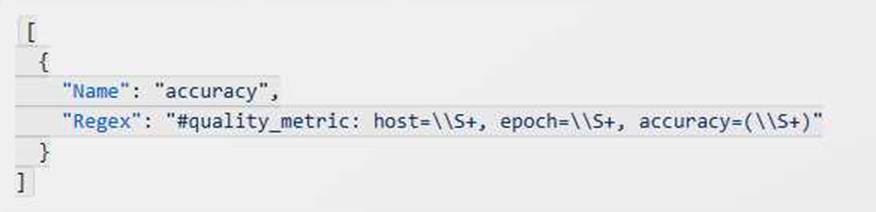
This means that the training algorithm prints a line like this:

Amazon SageMaker reads the accuracy value from the line and uses it to evaluate and compare the training jobs.
The other options are not as repeatable and require more effort than option C for the following reasons:
Option A: This option requires manually launching multiple training jobs in parallel with different hyperparameters, which can be tedious and error-prone. It also requires manually monitoring and comparing the results of the training jobs, which can be time-consuming and subjective.
Option B: This option requires writing code to create an AWS Step Functions workflow that monitors the accuracy in Amazon CloudWatch Logs and relaunches the training job with a defined list of hyperparameters, which can be complex and challenging. It also requires maintaining and updating the list of hyperparameters, which can be inefficient and suboptimal.
Option D: This option requires writing code to create a random walk in the parameter space to iterate through a range of values that should be used for each individual hyperparameter, which can be unreliable and unpredictable. It also requires defining and implementing a stopping criterion, which can be arbitrary and inconsistent.
References:
Automatic Model Tuning – Amazon SageMaker
Define Metrics to Monitor Model Performance
A machine learning (ML) specialist is using the Amazon SageMaker DeepAR forecasting algorithm to train a model on CPU-based Amazon EC2 On-Demand instances. The model currently takes multiple hours to train. The ML specialist wants to decrease the training time of the model.
Which approaches will meet this requirement7 (SELECT TWO)
- A . Replace On-Demand Instances with Spot Instances
- B . Configure model auto scaling dynamically to adjust the number of instances automatically.
- C . Replace CPU-based EC2 instances with GPU-based EC2 instances.
- D . Use multiple training instances.
- E . Use a pre-trained version of the model. Run incremental training.
CD
Explanation:
The best approaches to decrease the training time of the model are C and D, because they can improve the computational efficiency and parallelization of the training process.
These approaches have the following benefits:
C: Replacing CPU-based EC2 instances with GPU-based EC2 instances can speed up the training of the DeepAR algorithm, as it can leverage the parallel processing power of GPUs to perform matrix operations and gradient computations faster than CPUs12. The DeepAR algorithm supports GPU-based EC2 instances such as ml.p2 and ml.p33.
D: Using multiple training instances can also reduce the training time of the DeepAR algorithm, as it can distribute the workload across multiple nodes and perform data parallelism4. The DeepAR algorithm supports distributed training with multiple CPU-based or GPU-based EC2 instances3.
The other options are not effective or relevant, because they have the following drawbacks:
A: Replacing On-Demand Instances with Spot Instances can reduce the cost of the training, but not necessarily the time, as Spot Instances are subject to interruption and availability5. Moreover, the DeepAR algorithm does not support checkpointing, which means that the training cannot resume from the last saved state if the Spot Instance is terminated3.
B: Configuring model auto scaling dynamically to adjust the number of instances automatically is not applicable, as this feature is only available for inference endpoints, not for training jobs6.
E: Using a pre-trained version of the model and running incremental training is not possible, as the DeepAR algorithm does not support incremental training or transfer learning3. The DeepAR algorithm requires a full retraining of the model whenever new data is added or the hyperparameters are changed7.
References:
1: GPU vs CPU: What Matters Most for Machine Learning? | by Louis (What’s AI) Bouchard | Towards Data Science
2: How GPUs Accelerate Machine Learning Training | NVIDIA Developer Blog
3: DeepAR Forecasting Algorithm – Amazon SageMaker
4: Distributed Training – Amazon SageMaker
5: Managed Spot Training – Amazon SageMaker
6: Automatic Scaling – Amazon SageMaker
7: How the DeepAR Algorithm Works – Amazon SageMaker
A company is setting up an Amazon SageMaker environment. The corporate data security policy does not allow communication over the internet.
How can the company enable the Amazon SageMaker service without enabling direct internet access to Amazon SageMaker notebook instances?
- A . Create a NAT gateway within the corporate VPC.
- B . Route Amazon SageMaker traffic through an on-premises network.
- C . Create Amazon SageMaker VPC interface endpoints within the corporate VPC.
- D . Create VPC peering with Amazon VPC hosting Amazon SageMaker.
C
Explanation:
To enable the Amazon SageMaker service without enabling direct internet access to Amazon SageMaker notebook instances, the company should create Amazon SageMaker VPC interface endpoints within the corporate VPC. A VPC interface endpoint is a gateway that enables private connections between the VPC and supported AWS services without requiring an internet gateway, a NAT device, a VPN connection, or an AWS Direct Connect connection. The instances in the VPC do not need to connect to the public internet in order to communicate with the Amazon SageMaker service. The VPC interface endpoint connects the VPC directly to the Amazon SageMaker service using AWS PrivateLink, which ensures that the traffic between the VPC and the service does not leave the AWS network1.
References: 1: Connect to SageMaker Within your VPC – Amazon SageMaker
A machine learning (ML) engineer is preparing a dataset for a classification model. The ML engineer notices that some continuous numeric features have a significantly greater value than most other features. A business expert explains that the features are independently informative and that the dataset is representative of the target distribution.
After training, the model’s inferences accuracy is lower than expected.
Which preprocessing technique will result in the GREATEST increase of the model’s inference accuracy?
- A . Normalize the problematic features.
- B . Bootstrap the problematic features.
- C . Remove the problematic features.
- D . Extrapolate synthetic features.
A
Explanation:
In a classification model, features with significantly larger scales can dominate the model training process, leading to poor performance. Normalization scales the values of continuous features to a uniform range, such as [0, 1], which prevents large-value features from disproportionately influencing the model. This is particularly beneficial for algorithms sensitive to the scale of input data, such as neural networks or distance-based algorithms.
Given that the problematic features are informative and representative of the target distribution, removing or bootstrapping these features is not advisable. Normalization will bring all features to a similar scale and improve the model’s inference accuracy without losing important information.
A real estate company wants to create a machine learning model for predicting housing prices based on a historical dataset. The dataset contains 32 features.
Which model will meet the business requirement?
- A . Logistic regression
- B . Linear regression
- C . K-means
- D . Principal component analysis (PCA)
B
Explanation:
The best model for predicting housing prices based on a historical dataset with 32 features is linear regression. Linear regression is a supervised learning algorithm that fits a linear relationship between a dependent variable (housing price) and one or more independent variables (features). Linear regression can handle multiple features and output a continuous value for the housing price. Linear regression can also return the coefficients of the features, which indicate how each feature affects the housing price. Linear regression is suitable for this problem because the outcome of interest is numerical and continuous, and the model needs to capture the linear relationship between the features and the outcome.
References:
AWS Machine Learning Specialty Exam Guide
AWS Machine Learning Training – Regression vs Classification in Machine Learning AWS Machine Learning Training – Linear Regression with Amazon SageMaker
A data science team is planning to build a natural language processing (NLP) application. The application’s text preprocessing stage will include part-of-speech tagging and key phase extraction. The preprocessed text will be input to a custom classification algorithm that the data science team has already written and trained using Apache MXNet.
Which solution can the team build MOST quickly to meet these requirements?
- A . Use Amazon Comprehend for the part-of-speech tagging, key phase extraction, and classification tasks.
- B . Use an NLP library in Amazon SageMaker for the part-of-speech tagging. Use Amazon Comprehend for the key phase extraction. Use AWS Deep Learning Containers with Amazon SageMaker to build the custom classifier.
- C . Use Amazon Comprehend for the part-of-speech tagging and key phase extraction tasks. Use Amazon SageMaker built-in Latent Dirichlet Allocation (LDA) algorithm to build the custom classifier.
- D . Use Amazon Comprehend for the part-of-speech tagging and key phase extraction tasks. Use AWS Deep Learning Containers with Amazon SageMaker to build the custom classifier.
D
Explanation:
Amazon Comprehend is a natural language processing (NLP) service that can perform part-of-speech tagging and key phrase extraction tasks. AWS Deep Learning Containers are Docker images that are pre-installed with popular deep learning frameworks such as Apache MXNet. Amazon SageMaker is a fully managed service that can help build, train, and deploy machine learning models. Using Amazon Comprehend for the text preprocessing tasks and AWS Deep Learning Containers with Amazon SageMaker to build the custom classifier is the solution that can be built most quickly to meet the requirements.
References:
Amazon Comprehend
AWS Deep Learning Containers
Amazon SageMaker
A bank wants to launch a low-rate credit promotion. The bank is located in a town that recently experienced economic hardship. Only some of the bank’s customers were affected by the crisis, so the bank’s credit team must identify which customers to target with the promotion. However, the credit team wants to make sure that loyal customers’ full credit history is considered when the decision is made.
The bank’s data science team developed a model that classifies account transactions and understands credit eligibility. The data science team used the XGBoost algorithm to train the model. The team used 7 years of bank transaction historical data for training and hyperparameter tuning over the course of several days.
The accuracy of the model is sufficient, but the credit team is struggling to explain accurately why the model denies credit to some customers. The credit team has almost no skill in data science.
What should the data science team do to address this issue in the MOST operationally efficient manner?
- A . Use Amazon SageMaker Studio to rebuild the model. Create a notebook that uses the XGBoost
training container to perform model training. Deploy the model at an endpoint. Enable Amazon SageMaker Model Monitor to store inferences. Use the inferences to create Shapley values that help explain model behavior. Create a chart that shows features and SHapley Additive exPlanations (SHAP) values to explain to the credit team how the features affect the model outcomes. - B . Use Amazon SageMaker Studio to rebuild the model. Create a notebook that uses the XGBoost training container to perform model training. Activate Amazon SageMaker Debugger, and configure it to calculate and collect Shapley values. Create a chart that shows features and SHapley Additive exPlanations (SHAP) values to explain to the credit team how the features affect the model outcomes.
- C . Create an Amazon SageMaker notebook instance. Use the notebook instance and the XGBoost library to locally retrain the model. Use the plot_importance() method in the Python XGBoost interface to create a feature importance chart. Use that chart to explain to the credit team how the features affect the model outcomes.
- D . Use Amazon SageMaker Studio to rebuild the model. Create a notebook that uses the XGBoost training container to perform model training. Deploy the model at an endpoint. Use Amazon SageMaker Processing to post-analyze the model and create a feature importance explainability chart automatically for the credit team.
A
Explanation:
The best option is to use Amazon SageMaker Studio to rebuild the model and deploy it at an endpoint. Then, use Amazon SageMaker Model Monitor to store inferences and use the inferences to create Shapley values that help explain model behavior. Shapley values are a way of attributing the contribution of each feature to the model output. They can help the credit team understand why the model makes certain decisions and how the features affect the model outcomes. A chart that shows features and SHapley Additive exPlanations (SHAP) values can be created using the SHAP library in Python. This option is the most operationally efficient because it leverages the existing XGBoost training container and the built-in capabilities of Amazon SageMaker Model Monitor and SHAP library.
References:
Amazon SageMaker Studio
Amazon SageMaker Model Monitor
SHAP library
A media company with a very large archive of unlabeled images, text, audio, and video footage wishes to index its assets to allow rapid identification of relevant content by the Research team. The company wants to use machine learning to accelerate the efforts of its in-house researchers who have limited machine learning expertise.
Which is the FASTEST route to index the assets?
- A . Use Amazon Rekognition, Amazon Comprehend, and Amazon Transcribe to tag data into distinct categories/classes.
- B . Create a set of Amazon Mechanical Turk Human Intelligence Tasks to label all footage.
- C . Use Amazon Transcribe to convert speech to text. Use the Amazon SageMaker Neural Topic Model (NTM) and Object Detection algorithms to tag data into distinct categories/classes.
- D . Use the AWS Deep Learning AMI and Amazon EC2 GPU instances to create custom models for audio transcription and topic modeling, and use object detection to tag data into distinct categories/classes.
A
Explanation:
Amazon Rekognition, Amazon Comprehend, and Amazon Transcribe are AWS machine learning services that can analyze and extract metadata from images, text, audio, and video content. These services are easy to use, scalable, and do not require any machine learning expertise. They can help the media company to quickly index its assets and enable rapid identification of relevant content by the research team. Using these services is the fastest route to index the assets, compared to the other options that involve human intervention, custom model development, or additional steps.
References:
AWS Media Intelligence Solutions
AWS Machine Learning Services
The Best Services For Running Machine Learning Models On AWS