
VMware 2V0-32.24 Practice Exams
Last updated on Oct 21,2026- Exam Code: 2V0-32.24
- Exam Name: VMware Cloud Operations 8.x Professional V2
- Certification Provider: VMware
- Latest update: Oct 21,2026
A cloud administrator would like the VMware Cloud on AWS cluster to automatically scale-out and scale-In based on resource demand.
Which two Elastic DRS policies can be configured to meet this requirement? (Choose two.)
- A . Elastic DRS Baseline policy
- B . Optimize for Best Performance policy
- C . Optimize for Lowest Cost policy
- D . Custom Elastic DRS policy
- E . Optimize for Rapid Scale-Out policy
DE
Explanation:
The two Elastic DRS policies that can be configured to meet the requirement of automatically scaling out and in based on resource demand are the Custom Elastic DRS policy and the Optimize for Rapid Scale-Out policy. The Custom Elastic DRS policy allows you to configure the cluster to scale out when certain resource utilization thresholds are met, while the Optimize for Rapid Scale-Out policy allows you to configure the cluster to scale out when resource utilization is high and scale in when utilization is low.
Elastic DRS is a feature of VMware Cloud on AWS that enables automatic scaling of the cluster based on resource demand. To meet the requirement of automatic scaling, the administrator can configure a custom Elastic DRS policy or the Optimize for Rapid Scale-Out policy. Custom Elastic DRS policy allows administrator to define the custom rules for scale-out and scale-in based on resource utilization thresholds. Optimize for Rapid Scale-Out policy automatically scales-out the cluster when resource utilization threshold is met.
Which three types of Virtual Machine (VM) action can be scheduled in a vRealize Operations Automation Central job? (Choose three.)
- A . Downsize oversized VMs
- B . Reboot VMs
- C . Delete unused snapshots for VMs
- D . Power On VMs
- E . Move VMs
- F . Delete powered off VMs
A, C, F
Explanation:
In vRealize Operations, the Automation Central feature allows administrators to schedule and automate various actions on virtual machines (VMs) to optimize resource utilization and maintain the health of the virtual environment. The following VM actions can be scheduled in an Automation Central job:
Downsize Oversized VMs:
This action identifies VMs that have been allocated more resources than they require based on their usage patterns. Automation Central can schedule downsizing tasks to adjust CPU and memory allocations, ensuring efficient resource utilization.
Delete Unused Snapshots for VMs:
Snapshots can consume significant storage space if not managed properly. Automation Central can schedule the deletion of unused or old snapshots, freeing up storage and improving performance.
Delete Powered Off VMs:
Powered-off VMs that are no longer in use can occupy storage and other resources. Automation Central can automate the identification and deletion of such VMs, ensuring that resources are available for active workloads.
By leveraging these automated actions, administrators can maintain an optimized and efficient virtual environment with minimal manual intervention.
An organization Is running multiple applications that span different public clouds. The cloud administrator is asked to perform budget management, cost reporting and cost forecasting from a single platform.
Which VMware Cloud service can the cloud administrator use to meet this requirement?
- A . VMware vRealize Operations Cloud
- B . VMware vRealize Network Insight Cloud
- C . VMware vRealize Log Insight Cloud
- D . CloudHealth by VMware
D
Explanation:
CloudHealth by VMware is a cloud cost governance platform that provides budget management, cost reporting, and cost forecasting from a single platform. It provides comprehensive visibility and control to manage cloud costs in hybrid and multi-cloud environments. CloudHealth by VMware also provides cost optimization, resource optimization, and real-time alerting capabilities to help organizations make cost-effective decisions to reduce cloud costs.
A cloud administrator needs to configure a VM storage policy for virtual machines that will host a business critical application. The environment consists of a single cluster with six hosts. The application is storage I/O intensive and redundancy must be provided at the highest level possible.
Which VM storage policy settings should the administrator configure to meet these requirements?
- A . RAID-1 FTT = 3
- B . RAID-1 FTT = 2
- C . RAID-5
- D . RAID-6
B
Explanation:
RAID-1 is a mirror configuration that provides high availability by creating multiple copies of a VMDK. RAID-5 and RAID-6 are erasure coding configurations that provide fault tolerance by distributing data and parity across multiple hosts.
The number of failures to tolerate (FTT) determines how many copies or parity blocks are created for each VMDK. For example, RAID-1 FTT = 2 means that there are three copies of each VMDK. Therefore, based on your requirements, a possible VM storage policy setting could be RAID-1 FTT = 2,
which would provide redundancy at the highest level possible with six hosts. https://docs.vmware.com/en/VMware-Cloud-on-AWS/services/com.vmware.vsphere.vmc-aws-manage-data-center-vms.doc/GUID-EDBB551B-51B0-421B-9C44-6ECB66ED660B.html
A cloud administrator needs to extend a network and requires that routing be handled at the source.
Which network segment type does VMware HCX Network Extension create in the VMware Cloud software-defined data center (SDDC) when extending the network?
- A . Extended
- B . Routed
- C . Private
- D . Disconnected
B
Explanation:
https://docs.vmware.com/en/VMware-Validated-Design/services/sddc-extending-to-vmware-cloud-on-aws/GUID-EDF0E8DB-2195-4EC2-9CE8-1BF51C5173A5.html
https://docs.vmware.com/en/VMware-HCX/4.5/hcx-user-guide/GUID-4052AC3F-9FFC-4FA2-ACB4-18B21962F4D3.html
VMware HCX Network Extension creates a routed network segment type in the VMware Cloud software-defined data center (SDDC) when extending the network. This routed segment is used to connect the on-premises environment with the VMware Cloud SDDC, allowing traffic to flow between the two. The other options (extended, private, and disconnected segments) are not created by Network Extension.
A customer is concerned about threats propagating out to their cloud disaster recovery site.
Which VMware Cloud solution offers the capability for an operational air-gap to stop ransomware?
- A . VMware Cloud Disaster Recovery
- B . VMware Hybrid Cloud Extension
- C . VMware Site Recovery
- D . VMware Secure Access Service Edge
A
Explanation:
https://blogs.vmware.com/virtualblocks/2021/09/28/operational-air-gaps/
Operational isolation (operational “air-gapping”) is critical to DR. VMware Cloud DR was designed from the very beginning for its systems and repository to be operationally isolated and for instantiating isolated recovery environments.
Which use cases apply to NSX logical routing? (Select two options)
- A . You must provide external connectivity to VMs and containers.
- B . Your organization must provide connectivity between VMs and containers that are connected to different segments.
- C . You want to provide layer 2 connectivity between VMs and microservices.
- D . You require intrinsic security for VMs connected to different segments.
AB
Explanation:
The two use cases that apply to NSX logical routing are A. You must provide external connectivity to VMs and containers, and B. Your organization must provide connectivity between VMs and containers that are connected to different segments. NSX logical routing allows you to provide external connectivity to VMs and containers, and to provide layer 3 connectivity between VMs and containers that are connected to different segments. It does not provide layer 2 connectivity between VMs and microservices or intrinsic security for VMs connected to different segments.
When using vRealize Lifecycle Manager to capture content from a vRealize Operations endpoint, which three statements are correct regarding the content sync? (Choose three.)
- A . An auto refresh of content list runs in the background every 15 minutes.
- B . The UI retrieves the content every time from the endpoint when opening the endpoint.
- C . An auto refresh of content list runs in the background every 30 minutes.
- D . The UI retrieves the content from the endpoint when listing the content for the first time.
- E . Select the "Get latest" content option to retrieve the content in between automatic sync timers.
- F . Select the "Get latest" content option to retrieve the content, before the initial sync.
A, D, E
Explanation:
When capturing content from a vRealize Operations endpoint in vRealize Lifecycle Manager, the following statements are correct regarding content sync:
Refer to the exhibit.
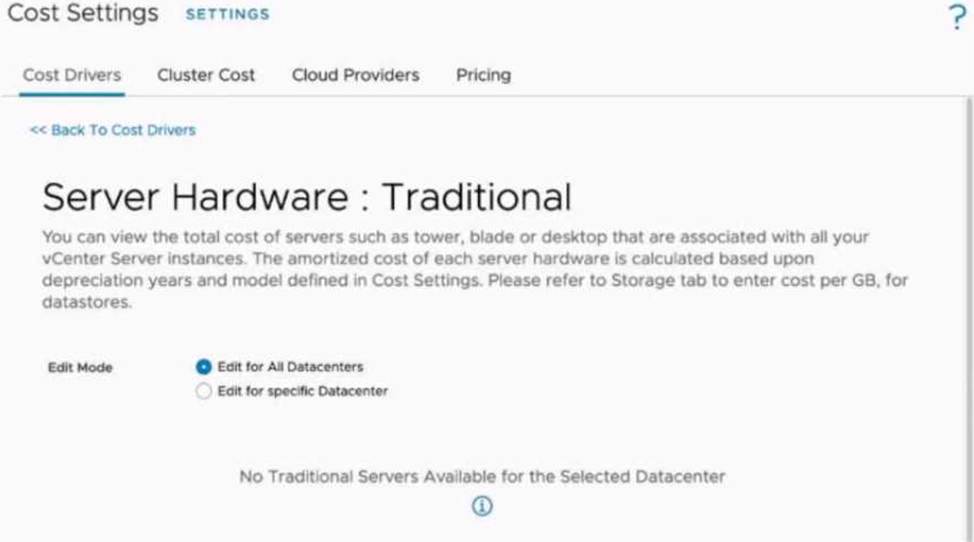
An administrator is tasked to manually upload the cost drivers of all the hosts, to obtain cost calculations accurate for their datacenter. However, when the administrator tries to update the cost drivers, the message displayed on the exhibit is shown.
W hat is the cause of this message?
- A . Reference database is being used.
- B . Cost drivers must be established on a per Datacenter basis.
- C . Cost calculation process is running at this moment.
- D . All hosts are in vSAN enabled dusters.
D
Explanation:
The message "No Traditional Servers Available for the Selected Datacenter" indicates that all the hosts in the selected datacenter are part of vSAN-enabled clusters.
In VMware vRealize Operations, traditional cost drivers apply only to server hardware that is not managed within a vSAN environment. When vSAN is enabled on clusters, the cost drivers and cost calculations for hardware are managed differently because vSAN considers storage costs as part of the software-defined infrastructure, which changes the way costs are modeled and amortized. Key Points:
Traditional Hardware vs. vSAN:
Traditional cost drivers are associated with non-vSAN environments (e.g., standard storage and compute hardware costs).
For vSAN-enabled clusters, cost calculations must include software-defined storage and are therefore
managed under different settings.
Message Meaning:
The error clearly indicates that there are no traditional servers detected because all hosts are part of
vSAN-enabled clusters in the datacenter.
Resolution:
If the administrator wants to update cost drivers for these clusters, they must refer to vSAN-specific cost models in vRealize Operations.
Navigate to the vSAN cost settings section in the interface to input appropriate cost metrics.
Reference: For more information on cost management in vRealize Operations for vSAN-enabled clusters, refer to
VMware’s official documentation:
Cost Drivers and Configuration in vRealize Operations
vSAN Cost and Capacity Management with vRealize Operations
Locate the relevant installer file to start the vRealize Suite Lifecycle Manager Easy Installer UI.
Which three additional high level steps must the administrator take to complete the task? (Choose three.)
- A . Specify the vRSLCM configuration settings
- B . Deploy VMware Identity Manager
- C . Specify the Appliance Network Configuration
- D . Specify the vRSLCM duster configuration
- E . Create an Environment
- F . Specify vCenter Server details
ACF
Explanation:
To deploy VMware vRealize Suite Lifecycle Manager (vRSLCM) using the Easy Installer, the administrator should follow these high-level steps: Download the vRealize Suite Lifecycle Manager Easy Installer:
The administrator has already completed this step by downloading the installer from the VMware Customer Connect download page.
Mount and Run the Installer:
Mount the downloaded ISO file and navigate to the appropriate installer executable based on the operating system (Windows, Linux, or Mac). Run the installer to launch the Easy Installer UI.
Specify vCenter Server Details:
In the Appliance Deployment Target section, enter the vCenter Server hostname, HTTPS port (default is 443), and administrative credentials. This allows the installer to deploy the vRSLCM appliance to the specified vCenter Server.
Specify the Appliance Network Configuration:
Provide network settings for the vRSLCM appliance, including IP address, subnet mask, gateway, DNS servers, and NTP servers. Accurate network configuration ensures proper communication within the environment.
Specify the vRSLCM Configuration Settings:
Define settings such as the virtual machine name, root password, and other appliance-specific configurations. These settings are crucial for the initial setup and secure access to the vRSLCM appliance.
Review and Complete the Deployment:
After specifying the necessary configurations, review the summary page to ensure all settings are correct. Click ‘Submit’ to initiate the deployment process. The installer will deploy the vRSLCM appliance based on the provided configurations.
By following these steps, the administrator can successfully deploy vRealize Suite Lifecycle Manager using the Easy Installer.