
VMware 2V0-32.24 Practice Exams
Last updated on Oct 21,2026- Exam Code: 2V0-32.24
- Exam Name: VMware Cloud Operations 8.x Professional V2
- Certification Provider: VMware
- Latest update: Oct 21,2026
A cloud administrator is asked to validate a proposed internetworking design that will provide connectivity to a VMware Cloud on AWS environment from multiple company locations.
The following requirements must be met:
• Connectivity to the VMware Cloud on AWS environment must support high-throughput data transfer.
• Connectivity to the VMware Cloud on AWS environment must NOT have a single point of failure.
• Any network traffic between on-premises company locations must be sent over a private IP address space.
Which design decisions should be made to meet these network connectivity requirements?
- A . • Configure a Direct Connect from headquarters to VMware Cloud on AWS.
• Use a private VIF for this connection.
• Configure a secondary, standby Direct Connect from headquarters using a public VIF.
• Configure dual, redundant, policy-based IPsec VPN connections from each regional office to VMware Cloud on AWS. - B . • Configure a Direct Connect from headquarters to VMware Cloud on AWS.
• Use a public VIF for this connection.
• Configure a route-based IPsec VPN tunnel as a secondary method of connectivity from headquarters to VMware Cloud on AWS.
• Configure dual, redundant, route-based IPsec VPN connections from each regional office to VMware Cloud on AWS. - C . • Configure a Direct Connect from headquarters to VMware Cloud on AWS.
• Use a private VIF for this connection.
• Configure a route-based IPsec VPN tunnel as a secondary method of connectivity from headquarters to VMware Cloud on AWS, taking care to enable the "Use VPN as Backup to Direct Connect" option.
• Configure dual, redundant, route-based IPsec VPN connections from each regional office to VMware Cloud on AWS. - D . • Configure a Direct Connect from headquarters to VMware Cloud on AWS.
• Use a private VIF for this connection.
• Configure a policy-based IPsec VPN tunnel as a secondary method of connectivity from headquarters to VMware Cloud on AWS, taking care to enable the "Use VPN as Backup to Direct Connect" option.
• Configure dual, redundant, policy-based IPsec VPN connections from each regional office to VMware Cloud on AWS.
C
Explanation:
Option C is the best design decision that meets the network connectivity requirements. Configuring a Direct Connect from headquarters to VMware Cloud on AWS with a private VIF will ensure high-throughput data transfer and eliminate the single point of failure. To ensure that all network traffic between on-premises company locations is sent over a private IP address space, a route-based IPsec VPN tunnel should be configured as a secondary method of connectivity from headquarters to VMware Cloud on AWS, taking care to enable the "Use VPN as Backup to Direct Connect" option. Finally, dual, redundant, route-based IPsec VPN connections should be configured from each regional office to VMware Cloud on AWS.
Which two types of pre-configured content are provided when deploying a content packs in vRealize Log Insight? (Choose two.)
- A . Recommendation
- B . Reports
- C . Dashboards
- D . Extracted fields
- E . Custom scripts
C, D
Explanation:
When deploying a content pack in vRealize Log Insight, the following pre-configured content types are provided:
Dashboards: Visual representations of log data, offering insights into system operations and performance.
Extracted Fields: Custom fields derived from log data, facilitating more detailed analysis and querying.
These components enhance the functionality of vRealize Log Insight by providing structured views and data extractions tailored to specific applications or systems.
A cloud administrator is tasked with improving the way that containers are scaled and managed in the environment. There is a currently no container orchestration solution implemented.
Which solution can the administrator leverage to achieve this?
- A . VMware NSX Container Plugin
- B . Kubernetes
- C . VMware vRealize Suite Lifecycle Manager
- D . etcd
B
Explanation:
Kubernetes is an open-source container orchestration system for automating application deployment, scaling, and management, which provides features such as self-healing, auto-scaling, and service discovery. With Kubernetes, cloud administrators are able to easily scale and manage containers across multiple clusters and nodes, allowing them to more effectively manage container-based applications. Additionally, Kubernetes provides advanced features such as container scheduling, resource management, and service discovery, which are all essential for managing container-based applications in a production environment. For more information on Kubernetes, you can refer to the official VMware documentation here. or is encount
An administrator wants to have a global view of all managed Tanzu Kubernetes clusters and manage the policies across them.
Which solution would the administrator use?
- A . VMware Tanzu Mission Control
- B . VMware Tanzu Observability by Wavefront
- C . VMware Tanzu Service Mesh
- D . VMware Tanzu Kubernetes Grid
A
Explanation:
VMware Tanzu Mission Control provides a central platform to manage and view all Tanzu Kubernetes clusters and workloads running in the environment. It allows administrators to set policies across multiple clusters, set up cluster identities, monitor cluster health and performance, and much more. Tanzu Mission Control also provides access to a variety of cloud-native tools, such as Kubernetes
Dashboard, Helm, and Kubeapps.
https://vcdx.vmware.com/content/dam/digitalmarketing/vmware/ru/pdf/techpaper/vmware-
horizon-7-application-publishing.pdf
Publishing Applications with VMware Horizon 7
https://vcdx.vmware.com/content/dam/digitalmarketing/vmware/ru/pdf/techpaper/vmware-
horizon-7-application-publishing.pdf
https://www.vmware.com/pdf/techsupportguide.pdf
VMware Technical Support Guide
https://www.vmware.com/pdf/techsupportguide.pdf
https://techzone.vmware.com/resource/quick-start-tutorial-vmware-dynamic-environment-manager
Quick-Start Tutorial for VMware Dynamic Environment Manager … https://techzone.vmware.com/resource/quick-start-tutorial-vmware-dynamic-environment-manager "VMware Tanzu® Mission ControlTM is a centralized management platform for consistently operating, managing, and securing Kubernetes infrastructure and modern applications across teams and clouds. It provides a global view of all of the Kubernetes clusters. You can use the resource hierarchy to manage and enforce consistent policies across Kubernetes clusters. "
What must a cloud administrator configure in order to allow a company’s on-premises data center to access the VMware Cloud on AWS vCenter Server.
- A . Management network segment
- B . Compute gateway firewall
- C . Management gateway firewall
- D . Compute network segment
C
Explanation:
https://docs.vmware.com/en/VMware-Cloud-on-AWS/services/com.vmware.vmc-aws-networking-security/GUID-2D31A9A6-4A80-4B5B-A382-2C5B591F6AEB.html
An administrator has been asked to provide their internal support team Network Operations Center (NOC) live information of their existing vSphere infrastructure for only one (1) day, which will expire automatically. The support team does not have access to vRealize Operations.
Using vRealize Operations features and capabilities, which approach is best suited for this task?
- A . Scheduled Reports which include Views and Dashboard information.
- B . Configure vRealize Operations Access Control to allow support team members access to vROps and then restrict access to the appropriate areas in vRealize Operations.
- C . Download a custom NOC Dashboard from the VMware vRealize Sample Exchange.
- D . Share predefined or custom dashboards using URL or Email.
D
Explanation:
vRealize Operations allows administrators to share dashboards with users who may not have direct access to the platform. This feature is particularly useful for providing temporary access to live information without creating new user accounts or modifying access controls.
Procedure:
Share Dashboard via URL:
In vRealize Operations, navigate to Visualize > Dashboards.
Select the dashboard you wish to share.
Click on the Share Dashboard icon (usually represented by a link or share symbol).
In the sharing options, choose to generate a URL.
Set the expiration period for the link to 1 day to meet the requirement.
Copy the generated URL and provide it to the Network Operations Center (NOC) team.
Share Dashboard via Email:
Follow the same initial steps to select and share the dashboard.
In the sharing options, choose to send an Email.
Set the link expiration to 1 day.
Enter the email addresses of the NOC team members and send the email directly from vRealize Operations.
These methods provide the NOC team with live access to the dashboard for the specified duration without requiring direct access to vRealize Operations. For more detailed instructions, refer to VMware’s documentation on sharing dashboards:
Additionally, VMware’s blog post on dashboard sharing provides practical insights:
By utilizing these sharing features, you can efficiently provide temporary access to live infrastructure information, ensuring operational visibility while maintaining security and access controls.
Which two support bundle types are available in vRealize Log Insight? (Choose two.)
- A . Light Support Bundle
- B . Static Support Bundle
- C . Standard Support Bundle
- D . Streaming Support Bundle
- E . Full Support Bundle
A, D
Explanation:
In vRealize Log Insight, when generating support bundles for troubleshooting or support purposes, two types are available:
Light Support Bundle:
Description: A minimal support bundle that includes essential log and configuration files.
Use Case: Suitable for initial diagnostics where only basic information is required.
Streaming Support Bundle:
Description: A support bundle that streams data directly to the client without storing it locally on the vRealize Log Insight appliance.
Use Case: Ideal for environments with limited disk space or when immediate data transfer is necessary.
These support bundle types assist administrators in efficiently collecting diagnostic information
tailored to specific needs.
Reference: Download a vRealize Log Insight Support Bundle
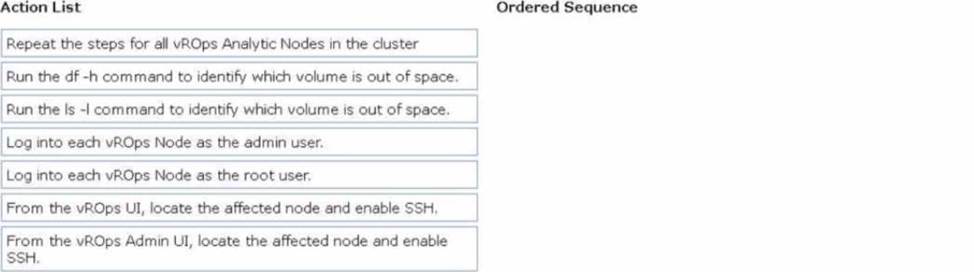
DRAG DROP
An administrator is unable to log into the vRealize Operations (vROps) UI and therefore logs into the vROps Admin Ul to begin troubleshooting.
Once logged into the Admin UI, the Mowing error message has been displayed:
The Cluster was shut down because one or more nodes were out of disk space.
The following information has been provided on the vROps deployment:
• The vROps cluster contains three nodes.
• Each node in the vROps duster has been hardened.
• Continuous Availability (CA) and High Availability (HA) is not configured.
Drag and drop the four correct actions the administrator must complete to troubleshoot the cause of the issue from the action list on the left and place the actions into the correct sequence on the right. (Choose four.)
Explanation:
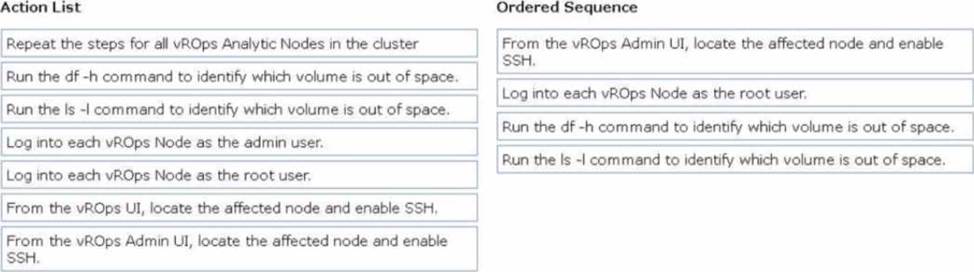
To troubleshoot the "Cluster shut down because one or more nodes were out of disk space" error in vRealize Operations (vROps), the correct sequence of actions is:
From the vROps Admin UI, locate the affected node and enable SSH
Log into each vROps Node as the root user
Run the df -h command to identify which volume is out of space
Run the ls -l command to identify which volume is out of space
From the vROps Admin UI, locate the affected node and enable SSH:
Since SSH is typically disabled on hardened nodes, you must first enable
SSH access via the vROps Admin UI.
Log into each vROps Node as the root user:
Access each vROps node directly using SSH with the root user to troubleshoot disk space issues.
Run the df -h command to identify which volume is out of space:
The df -h command displays the disk usage of all volumes on the node. It helps identify which filesystem is running out of space.
Run the ls -l command to identify which volume is out of space:
Use the ls -l command to investigate large files or directories that may be consuming disk space on the identified volume.
An administrator has been tasked with optimizing capacity and overall performance in their existing virtual infrastructure.
How can the capabilities of vRealize Operations help complete this task?
- A . It adjusts the queue depth for datastores presented by storage arrays.
- B . It automatically migrates virtual machines into a public cloud.
- C . It enforces IT regulatory standards, integrated compliance, and automated drift remediation.
- D . It determines recommendations for oversized and undersized virtual machines.
D
Explanation:
= vRealize Operations can help optimize capacity and performance in a virtual infrastructure by determining recommendations for oversized and undersized virtual machines . It analyzes resource usage patterns and provides recommendations for right-sizing VMs, ensuring that they have the appropriate resources to meet their performance requirements without wasting resources.
What is the purpose or the VMware cloud on AWS management gateway (MGW)?
- A . A Tier-0 router that handles network traffic for workload virtual machines connected to routed computer network segments
- B . A Tier-0 router that handles routing and firewalling for the VMware vCenter Server and other management appliances running in the software-defined datacenter (SDDC).
- C . A Tier-1 router that handles network traffic for workload virtual machines connected to routes compute network segments
- D . A Tier-1 router handles routing and firewalling for the VMware vCenter Server and Other management appliances running in the software-defined datacenter (SDDC).
D
Explanation:
Management Gateway (MGW) The MGW is a Tier 1 router that handles routing and firewalling for vCenter Server and other management appliances running in the SDDC. Management gateway firewall rules run on the MGW and control access to management VMs. In a new SDDC, the Internet connection is labelled Not Connected in the Overview tab and remains blocked until you create a Management Gateway Firewall rule allowing access from a trusted source.