
VMware 2V0-32.24 Practice Exams
Last updated on Oct 22,2026- Exam Code: 2V0-32.24
- Exam Name: VMware Cloud Operations 8.x Professional V2
- Certification Provider: VMware
- Latest update: Oct 22,2026
What is a prerequisite step to adding additional users to a Google Cloud VMware Engine’s vCenter (GCVE)?
- A . Change the default administrator password.
- B . Add a user in Google Cloud Platform Identity and Access Management.
- C . Open a support ticket to escalate VMware vSphere privileges.
- D . Escalate VMware vSphere privileges In the GCVE portal.
B
Explanation:
The prerequisite step to adding additional users to a Google Cloud VMware Engine’s vCenter (GCVE) is to add a user in Google Cloud Platform Identity and Access Management. This will allow for the user to be added to the vCenter and properly authenticated.
A cloud administrator wants to migrate a virtual machine using VMware vSphere vMotlon from their on-premises data center to their VMware Cloud on AWS software-defined data center (SDDC), using an existing private line to the cloud SDDC.
Which two requirements must be met before the migration can occur? (Choose two.)
- A . The versions of VMware vSphere need to match between the on-premises data center and the cloud SDDC.
- B . A Layer 2 connection is configured between the on-premises data center and the cloud SDDC.
- C . AWS Direct Connect is configured between the on-premises data center and the cloud SDDC.
- D . IPsec VPN is configured between the on-premises data center and the cloud SDDC.
- E . Cluster-level Enhanced vMotion Compatibility (EVC) is configured in the on-premises data center and the cloud SDDC.
CD
Explanation:
https://docs.vmware.com/en/VMware-Cloud-on-AWS/services/com.vmware.vmc-aws-operations/GUID-1A175E91-2317-4261-A63E-B398D92ECE8D.html
vMotion Requirements for SDDCs With NSX: Networking speed and latency: Migration with vMotion requires sustained minimum bandwidth of 250 Mbps between source and destination vMotion vMkernel interfaces, and a maximum latency of 100 ms round trip between source and destination.
On-premises vSphere version: Your on-premises vSphere installation must be vSphere 6.7U2 or higher. See VMware Knowledge Base article 56991 for more information. On-premises DVS version: 6.0 or higher.
On-premises NSX version: any
Note: SDDCs configured with NSX do not support hot vMotion to or from on-premises VXLAN encapsulated networks (NSX for vSphere) or Geneve Datacenter Overlay networks (NSX). IPsec VPN: Configure an IPsec VPN for the management gateway.
See Configure a VPN Connection Between Your SDDC and On-Premises Data Center in the VMware Cloud on AWS Networking and Security guide.
Direct Connect: Direct Connect over a private virtual interface between your on-premise data center and your VMware Cloud on AWS SDDC is required for migration with vMotion. See Using AWS Direct Connect with VMware Cloud on AWS.
Hybrid Linked Mode: Hybrid Linked Mode is required to initiate migration from the vSphere Client. It is not required to initiate migration using the API or PowerCLI.
See "Hybrid Linked Mode" in Managing the VMware Cloud on AWS Data Center.
L2 VPN: Configure a Layer 2 VPN to extend virtual machine networks between your on-premises data center and cloud SDDC. Routed networks are not supported. See VMware Cloud on AWS Networking and Security. VMware Cloud on AWS firewall rules Ensure that you have created the necessary firewall rules as described in Required Firewall Rules for vMotion.
On-premises firewall rules: Ensure that you have created the necessary firewall rules as described in Required Firewall Rules for vMotion.
Virtual machine hardware and settings: Ensure that these requirements are met for virtual machine hardware.
Virtual machine hardware version 9 or later is required for migration with vMotion from the on-premises data center to the cloud SDDC.
EVC is not supported in the VMware Cloud on AWS SDDC.
VMs that are created in the cloud SDDC or that have been power-cycled after migration to the cloud SDDC can’t be migrated back to the on-premises data center with vMotion unless the on-premises EVC baseline is Broadwell. You can relocate these VMs after powering them off, as long as their virtual machine hardware version is compatible with the on-premises data center.
Migration of VMs with DRS or HA VM overrides is not supported. For more information on VM overrides, see Customize an Individual Virtual Machine.
Important: Source switch configurations (including NIOC, spoofguard, distributed firewall, and Switch Security) and runtime state are not applied at the destination as part of migration in either dir ection. Before you initiate vMotion, apply the source switch configuration to the destination network.
In order for a virtual machine to be migrated using VMware vSphere vMotion, the versions of VMware vSphere need to match between the on-premises data center and the cloud SDDC, and a Layer 2 connection needs to be configured between them. Additionally, cluster-level Enhanced vMotion Compatibility (EVC) must be configured in both the on-premises data center and the cloud SDDC. IPsec VPN and AWS Direct Connect do not need to be configured for the migration to occur.
A Cloud Administrator is looking to migrate several dozen workloads from their on-premises location to a VMware public cloud using VMWare — need to be stretched for the migration. They will also be utilizing the capabilities of the WAN application for the migration.
HCX appliance requirements are as follows:
HCX Manager: 4 vCPU, 128GB Memory
HCX-IX Interconnect: 8 vCPU, 3GB Memory
HCX network Extension: 8 vCPU, 3GB Memory
HCX WAN Optimization: 8 vCPU, 14GB Memory
What are the on-premises vCPU and Memory component requirements for the VMWare HCX deployment?
- A . 36 vCPUs, 35GB of memory
- B . 32 vCPUs, 40GB of memory
- C . 30 vCPUs, 36GB of memory
- D . 28 vCPUs, 32GB of memory
A
Explanation:
https://docs.vmware.com/en/VMware-HCX/4.6/hcx-user-guide/GUID-D64901F4-6AB4-4820-9303-27927648A34D.html
When preparing to deploy VMware Cloud on Dell EMC or VMware Cloud on AWS Outposts in a data center, which two networking constrains must be considered? (Choose two.)
- A . Fiber Channel connectivity
- B . Creating a direct connect to the nearest AWS Region
- C . Compatible top of rack switches
- D . Uplinks for local network connectivity
- E . Dedicated subnets for SDDC management network
C, E
Explanation:
Compatible top of rack switches are necessary to ensure that the data center is able to support the VMware Cloud on Dell EMC or VMware Cloud on AWS Outposts deployments [1]. The switches must support 10GE and 25GE ports, as well as Layer 3 routing protocols such as OSPF and BGP.
Dedicated subnets for SDDC management network are also needed for the deployment of VMware Cloud on Dell EMC or VMware Cloud on AWS Outposts [1]. The SDDC management network will be used for communication between the VMware Cloud components and the data center, and must be isolated from the customer network.
Reference: [1] https://docs.vmware.com/en/VMware-Cloud-on-AWS/services/VMware-Cloud-on-AWS-Outposts/GUID-prerequisites-network.html
Which two steps should an administrator take to allow HTTPS access to a specific virtual machine (VM) through the public Internet for VMware Cloud on AWS? (Choose two.)
- A . Create a custom service called HTTPS using port 443.
- B . Configure AWS Direct Connect.
- C . Configure a SNAT rule translating an internal IP address to a public IP address.
- D . Request a public IP address in the VMware Cloud console.
- E . Configure a DNAT rule translating a public IP address to an internal IP address.
AD
Explanation:
To allow HTTPS access to a specific VM through the public Internet for VMware Cloud on AWS, the administrator must first create a custom service called HTTPS using port 443. They must then request a public IP address in the VMware Cloud console.
Which three types of gateways can be found in VMware cloud on AWS (Choose three?)
- A . Distributed Tier-1
- B . Standard Tier-1
- C . Tire-0
- D . Compute Tier-1
- E . Management Tire-1
- F . Management Tire-0
ABD
Explanation:
The three types of gateways that can be found in VMware Cloud on AWS are Option A: Distributed
Tier-1, Option B: Standard Tier-1, and Option D: Compute Tier-1.
Distributed Tier-1 gateways are used for secure access between on-premises networks and the VMware Cloud on AWS SDDC network. Standard Tier-1 gateways are used for secure access between the VMware Cloud on AWS SDDC network and the public internet. Compute Tier-1 gateways are used for secure access between the workloads running on the VMware Cloud on AWS SDDC and the public internet.
For more information, please refer to the official VMware documentation on VMware Cloud on AWS
Gateways: https://docs.vmware.com/en/VMware-Cloud-on-AWS/services/com.vmware.vmc-aws.networking/GUID-1F2D1BFC-F5C7-4534-8B49-39F9D08E7F1A.html
Which statement represents a use case for VMware Skyline?
- A . Provide a single point of management for customer’s licenses across different VMware on-premises and cloud products.
- B . Provide a single management pane of glass for customer’s assets across multiple VMware cloud
solutions. - C . Proactively identify potential problems and help improve the resolution time by collecting, aggregating, and analyzing product usage data.
- D . Collect and analyze logs from VMware products and automatically notify the customer about any potential issues.
C
Explanation:
VMware Skyline proactively identifies potential problems and helps improve resolution time by collecting, aggregating, and analyzing product usage data. 1 This allows it to provide recommendations and insights to avoid issues and optimize your environment. 2
A cloud administrator is planning to migrate 1,000 VMs from their existing on-premises location into VMware Cloud on AWS. The migration will need to be completed as quickly as possible. Upon completion, the users will need the most reliable, lowest latency connection possible.
Which on-premises data center connectivity option will meet these requirements?
- A . Layer 2 VPN
- B . AWS Direct Connect
- C . VMware Transit Connect
- D . IPsec VPN
B
Explanation:
The best option to meet the requirements of quickly migrating 1,000 VMs with the lowest latency and most reliable connection possible is to use AWS Direct Connect. AWS Direct Connect provides a dedicated network connection between an on-premises data center and the Amazon Web Services (AWS) cloud, allowing for the transfer of data across the two locations. It is more reliable and has lower latency than other options such as Layer 2 VPN, VMware Transit Connect, and IPsec VPN.
Additionally, AWS Direct Connect provides the highest performance and throughput of any of the on-premises data center connectivity options.
https://communities.vmware.com/t5/VMware-Education-Services/Why-does-VMware-refuse-to-educate-their-customers/td-p/2005973
Why does VMware refuse to educate their customers … – VMware …
https://communities.vmware.com/t5/VMware-Education-Services/Why-does-VMware-refuse-to-educate-their-customers/td-p/2005973
https://www.vmware.com/pdf/techsupportguide.pdf
VMware Technical Support Guide
https://www.vmware.com/pdf/techsupportguide.pdf
https://vcdx.vmware.com/content/dam/digitalmarketing/vmware/ru/pdf/techpaper/vmware-horizon-7-application-publishing.pdf
Publishing Applications with VMware Horizon 7 https://vcdx.vmware.com/content/dam/digitalmarketing/vmware/ru/pdf/techpaper/vmware-horizon-7-application-publishing.pdf
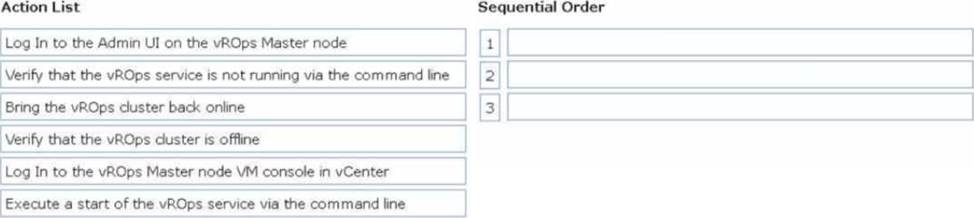
DRAG DROP
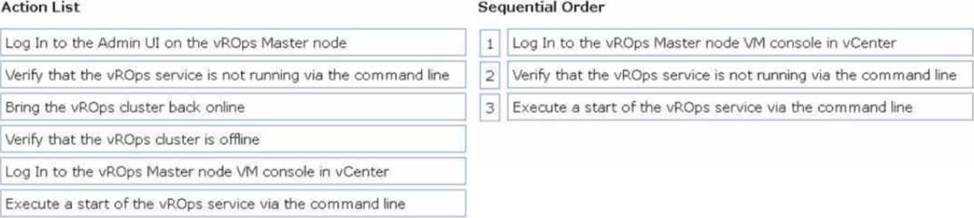
A user reports that when browsing to the vRealize Operations (vROps) user interface a 503 error is displayed. An administrator determines that the vROps duster is offline.
Drag and drop the three correct actions the administrator must complete to troubleshoot the issue from the action list on the left and place the action into the correct sequence on the right. (Choose three.)
Explanation:
Log in to the vROps Master node VM console in vCenter:
Since the vROps cluster is offline, direct access to the Master node’s console in vCenter is required for troubleshooting.
Verify that the vROps service is not running via the command line:
From the Master node console, check the status of the vROps service to confirm that it is not running. Use the appropriate command (e.g., service vmware-vcops status or similar). Execute a start of the vROps service via the command line:
Start the vROps service using the command line (service vmware-vcops start) to bring the cluster back online.
A cloud administrator with an existing virtual private cloud (VPC) needs to create a dedicated connection to VMware Cloud on AWS.
Which connection type would meet this requirement?
- A . Public virtual interface
- B . AWS Direct Connect
- C . Transit virtual interface
- D . Private virtual interface
B
Explanation:
The best option to meet the requirements of creating a dedicated connection to VMware Cloud on AWS is to use AWS Direct Connect. AWS Direct Connect provides a dedicated network connection between an on-premises data center and the Amazon Web Services (AWS) cloud, allowing for the transfer of data across the two locations. It is more reliable and has lower latency than other options such as public virtual interface, transit virtual interface, and private virtual interface. Additionally, AWS Direct Connect provides the highest performance and throughput of any of the on-premises data center connectivity options.
https://communities.vmware.com/t5/VMware-Education-Services/Why-does-VMware-refuse-to-educate-their-customers/td-p/2005973
Why does VMware refuse to educate their customers … – VMware …
https://communities.vmware.com/t5/VMware-Education-Services/Why-does-VMware-refuse-to-educate-their-customers/td-p/2005973
https://www.vmware.com/pdf/techsupportguide.pdf
VMware Technical Support Guide
https://www.vmware.com/pdf/techsupportguide.pdf
https://vcdx.vmware.com/content/dam/digitalmarketing/vmware/ru/pdf/techpaper/vmware-horizon-7-application-publishing.pdf
Publishing Applications with VMware Horizon 7 https://vcdx.vmware.com/content/dam/digitalmarketing/vmware/ru/pdf/techpaper/vmware-horizon-7-application-publishing.pdf