
VMware 2V0-32.24 Practice Exams
Last updated on Oct 22,2026- Exam Code: 2V0-32.24
- Exam Name: VMware Cloud Operations 8.x Professional V2
- Certification Provider: VMware
- Latest update: Oct 22,2026
What is a use case for vRealize Operations in a hybrid cloud infrastructure?
- A . Infrastructure as a service automaton and governance
- B . Unified visibility across on-premises environments and public clouds
- C . Holistic network visibility across overlay and physical networks with detailed information about Cisco switches and NSX-T
- D . Central log collector for public clouds
B
Explanation:
A key use case for vRealize Operations in a hybrid cloud infrastructure is providing unified visibility across on-premises environments and public clouds . It can monitor and manage both on-premises vSphere environments and public cloud platforms like AWS and Azure, offering a centralized view of performance, capacity, and health across the entire hybrid infrastructure
What is a use case for vRealize Operations in a hybrid cloud infrastructure?
- A . Infrastructure as a service automaton and governance
- B . Unified visibility across on-premises environments and public clouds
- C . Holistic network visibility across overlay and physical networks with detailed information about Cisco switches and NSX-T
- D . Central log collector for public clouds
B
Explanation:
A key use case for vRealize Operations in a hybrid cloud infrastructure is providing unified visibility across on-premises environments and public clouds . It can monitor and manage both on-premises vSphere environments and public cloud platforms like AWS and Azure, offering a centralized view of performance, capacity, and health across the entire hybrid infrastructure
A cloud administrator Is managing a VMware Cloud on AWS environment consisting of a single cluster with six hosts. There have been no changes made to the Elastic DRS configuration.
In which two situations will Elastic DRS add another a host to the cluster? (Choose two.)
- A . When availability zone failure occurs
- B . When memory utilization reaches 90%
- C . When network utilization reaches 90%
- D . When CPU utilization reaches 90%
- E . When storage utilization reaches 80%
AE
Explanation:
https://docs.vmware.com/en/VMware-Cloud-on-AWS/services/com.vmware.vmc-aws-operations/GUID-961C4B32-6093-4C2E-AFE5-5B1F56BF4EEE.html
https://docs.vmware.com/en/VMware-Cloud-on-AWS/services/com.vmware.vmc-aws-operations/GUID-961C4B32-6093-4C2E-AFE5-5B1F56BF4EEE.html#:~:text=In%20a%20new%20SDDC%2C%20Elastic,AWS%20Availability%20Zone
%20failure%20occurs.
A cloud administrator is asked to validate a proposed internetworking design that will provide connectivity to a VMware Cloud on AWS environment from multiple company locations. The following requirements must be met:
- A . Connectivity the VMware Cloud on AWS environment must NOT have a single point of failure.
- B . Any network traffic between on-premises company locations must be sent over a private IP address space.
- C . Connectivity the VMware Cloud on AWS environment must support high-throughput data transfer.
A
Explanation:
A cloud administrator is asked to configure access to the VMware Cloud Services Console based on the following requirement:
• Groups and users should be synchronized from the internal Active Directory
Which two options should the administrator configure to meet this requirement? (Choose two.)
- A . Workspace ONE Access connector
- B . Enterprise federation with dynamic (connectorless) authentication setup
- C . SAML 2.0 Identity Provider
- D . Enterprise federation with connector-based authentication setup
- E . Workspace ONE Assist
AC
Explanation:
The Workspace ONE Access connector is used to synchronize groups and users from the internal Active Directory to the VMware Cloud Services Console. Additionally, the administrator should configure a SAML 2.0 Identity Provider to enable single sign-on (SSO) capability and secure access to the VMware Cloud Services Console.
Which three components can be part of a virtual machine template? (Choose three.)
- A . Installed applications, tools, and patches
- B . vSphere tags
- C . Custom attributes
- D . Virtual Machine hardware configuration
- E . Guest operating system
- F . Virtual machine snapshots
ADE
Explanation:
To create a virtual machine template, you will need to configure the virtual machine hardware configuration, install the necessary applications, tools, and patches, and select the guest operating system. The template can also include vSphere tags and custom attributes to further customize the virtual machine. Additionally, the template can include virtual machine snapshots which will save the current state of the virtual machine and can be used to quickly restore the machine to the same state.
https://www.vmware.com/pdf/techsupportguide.pdf
VMware Technical Support Guide
https://www.vmware.com/pdf/techsupportguide.pdf
https://vcdx.vmware.com/content/dam/digitalmarketing/vmware/ru/pdf/techpaper/vmware-
horizon-7-application-publishing.pdf
Publishing Applications with VMware Horizon 7
https://vcdx.vmware.com/content/dam/digitalmarketing/vmware/ru/pdf/techpaper/vmware-
horizon-7-application-publishing.pdf
https://www.vmware.com/topics/glossary/content/server-virtualization.html
What is Server Virtualization? | VMware Glossary
https://www.vmware.com/topics/glossary/content/server-virtualization.html
A user is assigned the CloudAdmin role in a VMware Cloud on AWS software-defined data center (SDDC). At which level in the inventory hierarchy can the user deploy virtual machines?
- A . Compute-ResourcePool in the Hosts and Clusters view
- B . Discovered virtual machine folder in the VMs and Templates view
- C . vsanDatastore in the Storage view
- D . Mgmt-ResourcePool in the Hosts and Clusters view
B
Explanation:
This would enable the user to have the necessary permissions to deploy virtual machines – and thus, would ensure that all of the necessary virtual machines are deployed in a timely and efficient manner. VMware Cloud on AWS Documentation: "Deployment of virtual machines"
VMware Cloud on AWS Documentation: "Creating virtual machines with the VMware Cloud on AWS console"
VMware Cloud on AWS Documentation: "Managing virtual machines with the VMware Cloud on AWS console"
A cloud administrator is managing a VMware Cloud on AWS environment containing of a single cluster with three hosts.
Which acts recovery site for the on-premises environment. The on-premises environment consists of eight hosts. what should the cloud administrator configure to optimize scaling for full disaster recovery?
- A . Configure an Elastic DRS policy and set the maximum cluster Size to 8.
- B . No Additional configuration is required Default Elastic DRS will fulfill the requirement
- C . Configure an Elastic DRS policy and select ‘Optimize for Rapid scale-out’.
- D . Configure an Elastic DRS policy and set minimum cluster size to 8.
C
Explanation:
According to the VMware official documentation, in order to optimize scaling for full disaster recovery in a VMware Cloud on AWS environment, it is necessary to configure an Elastic DRS policy and select ‘Optimize for Rapid scale-out’ as the policy type. This option allows for a rapid increase in the number of hosts within the cluster, which is necessary for full disaster recovery. For more information, please refer to the VMware Cloud on AWS Disaster Recovery Guide, which can be found
here: https://docs.vmware.com/en/VMware-Cloud-on-AWS/services/VMware-Cloud-on-AWS-Disaster-Recovery-Guide.html.
A cloud administrator is asked to evaluate a number of disaster recovery solutions for the business.
The current on-premises environment Is built around the latest version of VMware vSphere 7.0.
The following requirements must be met:
• Follow an on-demand cloud consumption model
• Must be a managed offering
• Deliver a recovery point objective (RPO) of no more than 30 minutes
• Rapid power-on of recovered virtual machines/ assuming cloud capacity availability
• Must accommodate for single region failure
Which solution would meet these requirements?
- A . VMware Cloud Disaster Recovery
- B . VMware Cloud on AWS Stretched Cluster
- C . VMware vSphere Replication
- D . VMware Site Recovery Manager
A
Explanation:
VMware Cloud Disaster Recovery is a managed disaster recovery-as-a-service offering that is built on the latest version of VMware vSphere 7.0. It provides an on-demand cloud consumption model, allowing administrators to rapidly power-on recovered virtual machines in the cloud, assuming cloud capacity availability. Additionally, VMware Cloud Disaster Recovery delivers a recovery point objective (RPO) of no more than 30 minutes, and can accommodate for single region failure. https://vcdx.vmware.com/content/dam/digitalmarketing/vmware/ru/pdf/techpaper/vmware-horizon-7-application-publishing.pdf
Publishing Applications with VMware Horizon 7
https://vcdx.vmware.com/content/dam/digitalmarketing/vmware/ru/pdf/techpaper/vmware-horizon-7-application-publishing.pdf
https://www.vmware.com/pdf/techsupportguide.pdf
VMware Technical Support Guide
https://www.vmware.com/pdf/techsupportguide.pdf
https://techzone.vmware.com/resource/quick-start-tutorial-vmware-dynamic-environment-manager
Quick-Start Tutorial for VMware Dynamic Environment Manager …
https://techzone.vmware.com/resource/quick-start-tutorial-vmware-dynamic-environment-manager
VMware Cloud Disaster Recovery ——————————————————— * Protect your workloads
running on VMware Cloud on AWS SDDC using high-frequency snapshots to achieve RPOs as low as 30 minutes. * Availability Zone Failure Handling https://docs.vmware.com/en/VMware-Cloud-Disaster-Recovery/services/vmware-cloud-disaster-recovery/GUID-067EE6DF-80CC-44D2-94E6-D7183A239D9A.html
https://docs.vmware.com/en/VMware-Cloud-Disaster-Recovery/services/rn/vmware-cloud-disaster-recovery-release-notes/index.html
Refer to the exhibit.
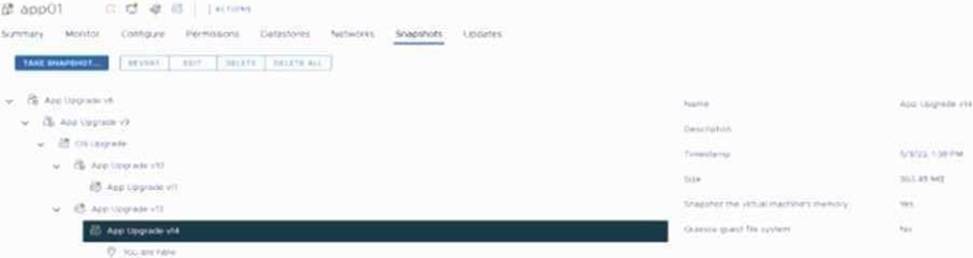
A cloud administrator is investigating a reported performance issue on a virtual machine (VM). The administrator observes low latency on the datastore but high latency within the VM. The administrator notes that it is a standard operating procedure to take a snapshot of the VM whe never there is an application or operating system upgrade on this VM.
Based on the exhibit, which snapshot characteristic will result in performance degradation?
- A . Snapshot chain length
- B . Snapshot size
- C . Snapshot type
- D . Snapshot age
A
Explanation:
https://www.nakivo.com/blog/vmware-snapshots-vsphere-how-to/#title-12
Follow these recommendations to get the best performance when using snapshots:
・ Use snapshots as a temporary measure only.
The presence of snapshots can have a significant impact on guest application performance, especially in a VMFS environment, for I/O intensive workloads. The guest applications fully recover performance after snapshots are deleted.
・ Keep the snapshot chain length short when possible, to minimize the guest application
performance impact.
Performance degradation is higher as the snapshot chain length increases.
・ If you need to increase the size of a virtual disk that has snapshots associated with it, you must delete the snapshots first before you can increase the virtual disk’s size.