
VMware 2V0-32.24 Practice Exams
Last updated on Oct 21,2026- Exam Code: 2V0-32.24
- Exam Name: VMware Cloud Operations 8.x Professional V2
- Certification Provider: VMware
- Latest update: Oct 21,2026
A cloud Administrator is receiving complaints about an application experiencing intermittent network connectivity.
Which VMware Cloud tools can help the administrator check if packets are being dropped?
- A . VRealize Log Insight
- B . Port mirroring
- C . IPFIX
- D . Traceflow
D
Explanation:
IPFIX (Internet Protocol Flow Information Export) is a standard for the format and export of network flow information for troubleshooting, auditing, or collecting analytics information. Port mirroring lets you replicate and redirect all of the traffic coming from a source. The mirrored traffic is sent encapsulated within a Generic Routing Encapsulation (GRE) tunnel to a collector so that all of the original packet information is preserved while traversing the network to a remote destination.
Use Traceflow to inspect the path of a packet. Traceflow traces the transport node-level path of a packet. The trace packet traverses the logical switch overlay, but is not visible to interfaces attached to the logical switch. In other words, no packet is actually delivered to the test packet’s intended recipients.
vRealize Log Insight is a log collection and analytics virtual appliance that enables administrators to collect, view, manage and analyze syslog data. Log Insight provides real-time monitoring of application logs, network traces, configuration files, messages and performance data.
What three types of authentication sources are valid in vRealize Operations? (Choose three.)
- A . OAuth2
- B . RADIUS
- C . VMware Identity Manager
- D . LocalOS
- E . OpenLDAP
- F . Active Directory
C, E, F
Explanation:
vRealize Operations supports the following authentication sources:
VMware Identity Manager (vIDM) : vIDM is a platform for identity and access management, allowing you to manage users, groups, and authentication policies.
OpenLDAP : OpenLDAP is an open-source implementation of the Lightweight Directory Access Protocol (LDAP), providing access to directory services for user authentication.
Active Directory (AD) : Active Directory is a Microsoft directory service that provides authentication and authorization services for users and computers in a network.
The following authentication sources are not supported in vRealize Operations:
OAuth2: While OAuth2 is a widely used authorization framework, it is not directly supported as an authentication source in vRealize Operations.
RADIUS: RADIUS is primarily used for network access authentication and is not a standard authentication source for vRealize Operations.
LocalOS: LocalOS authentication refers to authenticating users against the local operating system of the vRealize Operations appliance, which is not a recommended practice for production environments.
Which two steps does a cloud administrator need to take when protecting a VMware Cloud on AWS software-defined data center (SDDC) with VMware site Recovery? (Choose Two.)
- A . Deploy the vSphere Replication virtual appliance.
- B . Deploy the Site Recovery manager virtual Appliance.
- C . Connect the Site Recovery manager instance on the protected recovery site.
- D . Register the vSphere Replication appliance with vCenter Single Sign-On
- E . Set the NSX-T Edge management gateway firewall rules.
A, C
Explanation:
A cloud administrator needs to deploy the vSphere Replication virtual appliance and the Site Recovery manager virtual appliance when protecting a VMware Cloud on AWS software-defined data center (SDDC) with VMware Site Recovery.
The vSphere Replication virtual appliance is responsible for replicating the virtual machines from the source to the target site. Site Recovery Manager virtual appliance acts as the central management and orchestration platform for the entire disaster recovery process.
Reference: https://docs.vmware.com/en/VMware-Site-Recovery/index.html
In order to protect a VMware Cloud on AWS software-defined data center (SDDC) with VMware Site Recovery [1][2], a cloud administrator needs to take the following two steps:
A) Deploy the vSphere Replication virtual appliance – This can be done by logging into the vSphere Client, navigating to the vCenter Server, and then selecting the Deploy OVF Template option. From here, the cloud administrator can upload the OVF template for the vSphere Replication appliance and configure it.
B) Connect the Site Recovery manager instance on the protected recovery site – This involves logging into the Site Recovery Manager (SRM) and setting up the connection between the protected recovery site and the SRM instance. This can be done by going to the SRM dashboard and then selecting the Connect Remote Site option.
Reference: [1] https://docs.vmware.com/en/VMware-Site-Recovery/services/vmc-dr-deployment/GUID-DBF6CD69-6F7E-47E2-9417-91D5C5F5AC5E.html
[2] https://docs.vmware.com/en/VMware-Site-Recovery/services/vmc-dr-deployment/GUID-1C8B7BCA-D4BE-4EAF-9A8A-4B42E2B7236A.html
Which two steps does a cloud administrator need to take when protecting a VMware Cloud on AWS software-defined data center (SDDC) with VMware site Recovery? (Choose Two.)
- A . Deploy the vSphere Replication virtual appliance.
- B . Deploy the Site Recovery manager virtual Appliance.
- C . Connect the Site Recovery manager instance on the protected recovery site.
- D . Register the vSphere Replication appliance with vCenter Single Sign-On
- E . Set the NSX-T Edge management gateway firewall rules.
A, C
Explanation:
A cloud administrator needs to deploy the vSphere Replication virtual appliance and the Site Recovery manager virtual appliance when protecting a VMware Cloud on AWS software-defined data center (SDDC) with VMware Site Recovery.
The vSphere Replication virtual appliance is responsible for replicating the virtual machines from the source to the target site. Site Recovery Manager virtual appliance acts as the central management and orchestration platform for the entire disaster recovery process.
Reference: https://docs.vmware.com/en/VMware-Site-Recovery/index.html
In order to protect a VMware Cloud on AWS software-defined data center (SDDC) with VMware Site Recovery [1][2], a cloud administrator needs to take the following two steps:
A) Deploy the vSphere Replication virtual appliance – This can be done by logging into the vSphere Client, navigating to the vCenter Server, and then selecting the Deploy OVF Template option. From here, the cloud administrator can upload the OVF template for the vSphere Replication appliance and configure it.
B) Connect the Site Recovery manager instance on the protected recovery site – This involves logging into the Site Recovery Manager (SRM) and setting up the connection between the protected recovery site and the SRM instance. This can be done by going to the SRM dashboard and then selecting the Connect Remote Site option.
Reference: [1] https://docs.vmware.com/en/VMware-Site-Recovery/services/vmc-dr-deployment/GUID-DBF6CD69-6F7E-47E2-9417-91D5C5F5AC5E.html
[2] https://docs.vmware.com/en/VMware-Site-Recovery/services/vmc-dr-deployment/GUID-1C8B7BCA-D4BE-4EAF-9A8A-4B42E2B7236A.html
Which three deployment architectures are valid for vRealize Log Insight listed below? (Choose three.)
- A . Ten node deployment with the integrated load balancer
- B . Single node deployment with an external load balancer
- C . Single node deployment with no load balancer
- D . Three node deployment with an external load balancer
- E . Single node deployment with the integrated load balancer
- F . Two node deployment with the integrated load balancer
C, D, F
Explanation:
vRealize Log Insight offers flexible deployment architectures to suit various needs.
Single node deployment with no load balancer : This is suitable for smaller environments with limited log volume. A single vRealize Log Insight node handles all log management tasks.
Three node deployment with an external load balancer : This architecture provides high availability and scalability. An external load balancer distributes incoming traffic across the nodes. This offers flexibility in load balancer selection and configuration.
Clustered deployment with integrated load balancer : This architecture also provides high availability and scalability. In this configuration, a minimum of three vRealize Log Insight nodes are deployed. The integrated load balancer distributes incoming log traffic across the nodes, preventing a single point of failure.
The following architectures are not valid for vRealize Log Insight:
Ten node deployment with the integrated load balancer: The maximum number of nodes in a cluster is limited, and ten nodes with an integrated load balancer is not a supported configuration.
Single node deployment with an external load balancer: A single node deployment does not require a load balancer.
Single node deployment with the integrated load balancer: The integrated load balancer is designed for clustered deployments with a minimum of three nodes.
Two node deployment with the integrated load balancer: The integrated load balancer requires a minimum of three nodes for cluster functionality.
A company needs to Increase its Infrastructure capacity quickly to accommodate their rapid business growth.
Which cloud use case describes their requirement?
- A . Maintain and Modernize
- B . Consolidate and Migrate
- C . Disaster Recovery
- D . Maintain and Expand
A
Explanation:
https://www.vmware.com/mena/topics/glossary/content/digital-transformation.html
Which two Tanzu Kubernetes Grid service component must an administrator configure within VMware Cloud to enable to deploy a namespace or their Kubernetes Application developments? (Choose two)
- A . Tanzu Service Mesh
- B . Tanzu Application Platform
- C . Tanzu Kubernetes Cluster
- D . Management cluster
- E . Tanzu Observability by Wavefront
CD
Explanation:
Tanzu Kubernetes Grid is a service from VMware Cloud that enables customers to deploy and manage Kubernetes applications in the cloud. In order to deploy a namespace or their Kubernetes Application developments, an administrator must configure a Tanzu Kubernetes Cluster and a Management Cluster.
A Tanzu Kubernetes Cluster is a cluster of nodes that are used to run applications and services. The nodes are connected to the Management Cluster, where administrators can manage and monitor deployments.
The Management Cluster is a cluster of nodes that are used to manage and monitor the Tanzu Kubernetes Cluster nodes. It provides the tools to manage and monitor deployments, as well as to configure and maintain the Tanzu Kubernetes Cluster nodes.
According to VMware’s official website, "Tanzu Kubernetes Grid is a service that provides a simplified way to deploy and manage Kubernetes applications in the cloud. It provides a single control plane for managing multiple Kubernetes clusters, allowing customers to easily deploy and manage their applications across multiple clusters and environments." [1]
[1] https://www.vmware.com/products/tanzu-kubernetes-grid.html
DRAG DROP
An administrator is tasked with installing vRealize Log Insight via vRealize Suite Lifecycle Manager in an environment without internet connectivity.
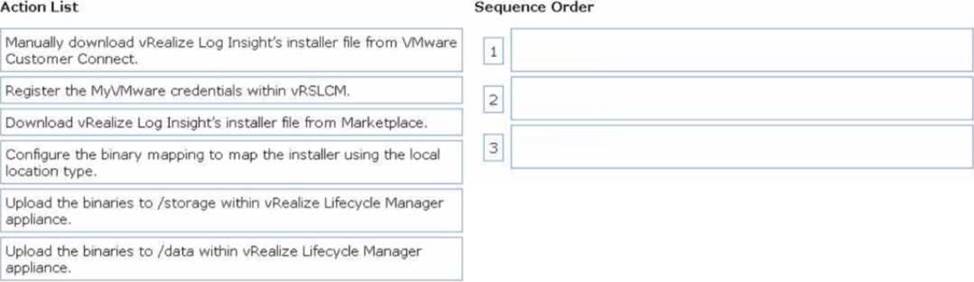
Drag and drop the three correct actions the administrator must complete from the action list on the left and place the actions into the correct sequence on the right. (Choose three.)
Explanation:
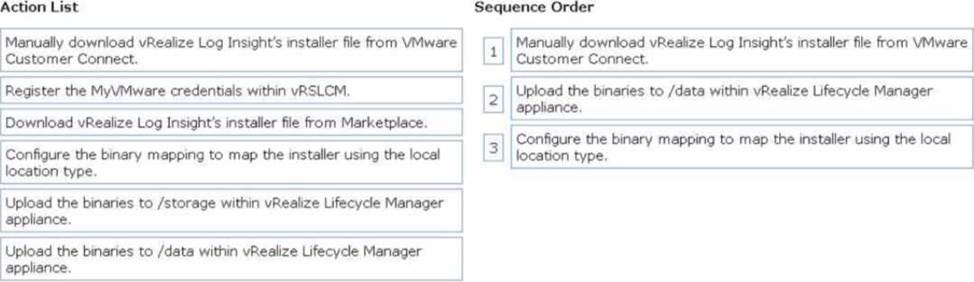
Manually download vRealize Log Insight’s installer file from VMware Customer Connect:
In an environment without internet connectivity, the installer file must be manually downloaded from VMware Customer Connect to your local system.
Upload the binaries to /data within vRealize Lifecycle Manager appliance:
After obtaining the installer file, upload the binaries to the /data directory in the vRSLCM appliance.
This ensures the installer is locally available.
Configure the binary mapping to map the installer using the local location type:
Map the uploaded installer binaries in vRSLCM using the local location type so that vRSLCM can reference the binaries during the installation process.
Which two steps must an administrator take in order to deploy an instance of Azure VMware Solutions? (Choose two.)
- A . Create a support request with Microsoft Azure Support to create a host quota.
- B . Deploy and configure Microsoft Enterprise Edge (MSEE) appliances.
- C . Create a support request with VMware Support to create a private cloud.
- D . Associate the subscription with a Microsoft Enterprise Agreement.
- E . Deploy and Configure Microsoft Azure ExpressRoute.
AD
Explanation:
According to the VMware Cloud Professional Administration guide, to deploy an instance of Azure VMware Solutions, an administrator must first create a support request with VMware Support to create a private cloud. This will enable the administrator to access the Azure VMware Solutions environment.
The guide also states that an administrator must associate the subscription with a Microsoft Enterprise Agreement in order to use Azure VMware Solutions. This will ensure that the administrator has the necessary permissions and access to the environment in order to configure and manage it.
Search results: [1] VMware Cloud Professional is a cloud service that provides a secure, reliable, and cost-effective way to deliver cloud-based solutions for organizations. [2] This guide provides step-by-step instructions to deploy and configure Microsoft Azure VMware Solutions [1], a cloud-based solution that enables organizations to run VMware workloads in the public cloud. [3] To deploy an Azure VMware Solution instance, the customer must have an active Microsoft Enterprise Agreement (EA) and a valid subscription associated with it. [4] The customer must also create a support request with VMware support to create a private cloud. This will enable the customer to access the Azure VMware Solutions environment. [5] Once the customer has created a support request and associated their
https://techzone.vmware.com/resource/manually-creating-optimized-windows-images-vmware-horizon-vms
What is the purpose of the VMware Cloud on AWS Compute Gateway (CGW)?
- A . A Tier-1 router that handles routing and firewalling for the VMware vCenter Server and other management appliances running in the software-defined data center (SDDC)
- B . A Tier-1 router that handles workload traffic that is connected to routed compute network segments
- C . A Tier-0 router that handles routing and firewalling for the VMware vCenter Server and other management appliances running in the software-defined data center (SDDC)
- D . A Tier-0 router that handles workload traffic that is connected to routed compute network segments
B
Explanation:
Compute Gateway (CGW) The CGW is a Tier 1 router that handles network traffic for workload VMs connected to routed compute network segments. Compute gateway firewall rules, along with NAT rules, run on the Tier 0 router. In the default configuration, these rules block all traffic to and from compute network segments (see Configure Compute Gateway Networking and Security). https://docs.vmware.com/en/VMware-Cloud-on-AWS/services/vmc-on-aws-networking-security.pdf