
VMware 2V0-11.25 Practice Exams
Last updated on Nov 16,2026- Exam Code: 2V0-11.25
- Exam Name: VMware Cloud Foundation 5.2 Administrator
- Certification Provider: VMware
- Latest update: Nov 16,2026
An alert in SDDC Manager indicates that the health status of the vSAN cluster is degraded.
Which tool within VMware Cloud Foundation should be used to gather detailed logs and perform in-depth troubleshooting for the vSAN issues?
- A . Aria Operations for Logs
- B . SDDC Manager
- C . vCenter Server
- D . Aria Operations for Networks
A
Explanation:
Aria Operations for Logs (formerly known as vRealize Log Insight) is used to collect, analyze, and troubleshoot logs from various components within VMware Cloud Foundation, including the vSAN cluster. It provides detailed insights into the logs, allowing administrators to perform in-depth troubleshooting of issues like degraded health statuses.
DRAG DROP
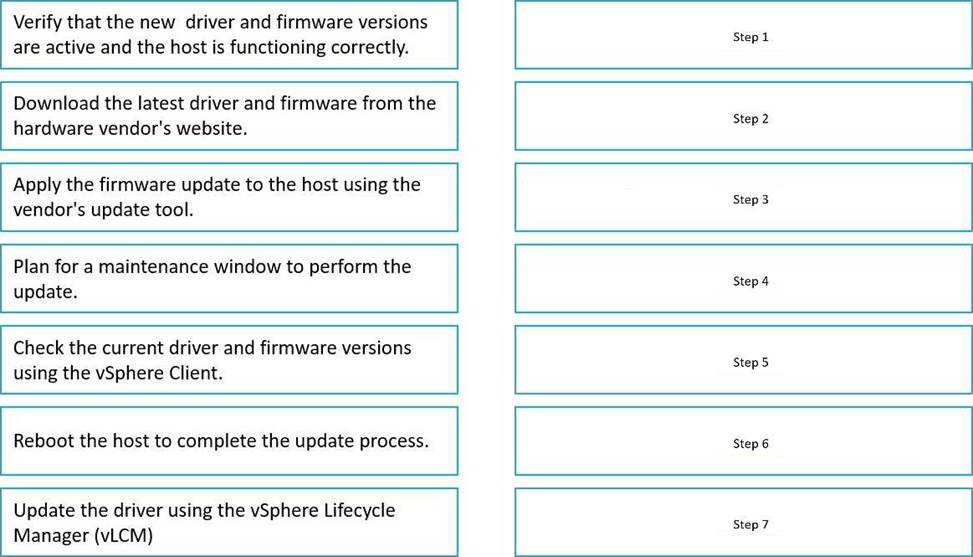
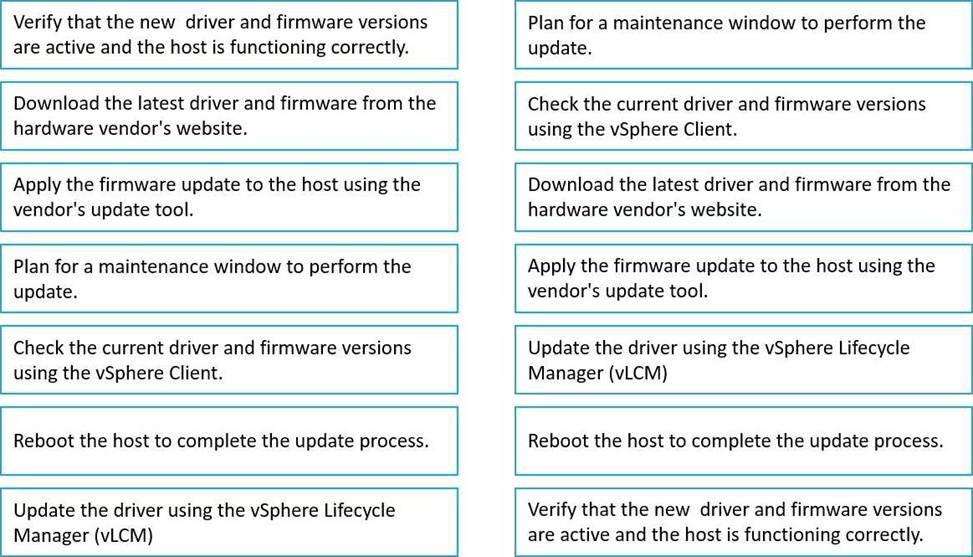
Put the following steps in the correct order to update the driver/firmware in vSAN.
Which two SDDC Manager operations can be executed on an NSX Edge cluster after it has been deployed? (Choose two.)
- A . Redeploy
- B . |Sync
- C . Expand
- D . Delete
- E . Shrink
B, D
Explanation:
After an NSX Edge cluster has been deployed, you can perform a sync operation to ensure the NSX Edge cluster is in sync with the configuration in SDDC Manager.
Deleting an NSX Edge cluster can be done after it has been deployed if it is no longer required or needs to be removed from the environment.
A specific VM is unable to communicate with other VMs in the same network. An administrator needs to identify and resolve the network connectivity issue.
What three steps should the administrator follow? (Choose three.)
- A . Verify the port group settings and VLAN configuration
- B . Use the ESXi command line to check the status of the VM Kernel adapter
- C . Verify that the VM is connected to the correct port group
- D . Check the network adapter settings in vCenter Server
- E . Restart the VM to reset its network connections
A, C, D
Explanation:
Port group settings and VLAN configurations need to be correct for VMs to communicate with each other on the same network. Ensuring they are properly configured is essential.
It’s important to check that the VM is connected to the correct port group that matches the network configuration of the other VMs.
The network adapter settings in vCenter Server should be reviewed to ensure there are no misconfigurations that could prevent network communication.
What is the impact of consolidating snapshots on a virtual machine?
- A . It reverts the VM to the state of the first snapshot taken.
- B . It disconnects the VM from the network temporarily.
- C . It temporarily increases the available disk space consumption on the datastore while merging data.
- D . It changes the VM’s hardware compatibility settings.
C
Explanation:
When consolidating snapshots, the data from the snapshot files is merged back into the original virtual disk. This process temporarily increases the disk space usage on the datastore because of the additional space required to merge the snapshot data into the primary disk.
Which vSphere component is essential for providing persistent storage to Kubernetes workloads deployed on IaaS Control Plane?
- A . Container Image Virtual Disks
- B . Control Plane Storage Policy
- C . Pod Service
D vSAN
C
Explanation:
The vSphere Pod Service is essential for providing persistent storage to Kubernetes workloads deployed on IaaS Control Plane (formerly vSphere with Tanzu). It enables the integration of Kubernetes with vSphere, allowing the creation of persistent volumes and the management of storage resources for Kubernetes workloads, ensuring that they can utilize vSphere’s storage capabilities like vSAN.
An Administrator is configuring the network within their VCF management domain in preparation to deploy VMware Aria Suite Lifecycle.
What are the two types of virtual networks that the Administrator could configure to support the deployment? (Choose two.)
- A . VLAN-backed Port Groups
- B . Overlay-backed NSX Segments
- C . VXLAN-backed Network Pools
- D . VLAN-backed NSX Segments
A, B
Explanation:
VLAN-backed Port Groups are used in traditional network environments where VLANs are configured on the physical switches. These port groups can be configured in the management domain to support network connectivity.
Overlay-backed NSX Segments use NSX to create virtual networks overlaid on existing physical networks, which is essential for network virtualization and communication between virtual machines, especially in a VMware Cloud Foundation environment.
Which feature of VMware Lifecycle Manager allows an administrator to manage the lifecycle of ESXi hosts by applying a consistent image across the hosts in a cluster? (Choose three.)
- A . Configure a Key Management Server (KMS) and add it to vCenter
- B . Create an encryption policy in vCenter.
- C . Enable SSH on the ESXi hosts to manage encryption keys.
- D . Enable the encryption feature on the ESXi hosts.
- E . Apply the encryption policy to the existing VMs.
A, B, E
Explanation:
A Key Management Server (KMS) is required to manage encryption keys in the environment, ensuring that encrypted data is securely managed across ESXi hosts.
Creating an encryption policy in vCenter allows administrators to define how encryption is applied to virtual machines and data.
Applying the encryption policy to the existing VMs ensures that the encryption settings are enforced on virtual machines that require protection.
An organization is planning to manage a diverse set of databases across multiple VMware Cloud Foundation environments.
Which three capabilities of Data Services Manager would help in managing these databases efficiently? (Choose three.)
- A . Centralized monitoring and alerting for all managed databases.
- B . Policy-based backup and recovery for databases.
- C . Automated VM migration between on-premises and cloud environments.
- D . Automated database provisioning and deployment.
- E . Integration with vSAN for optimized storage management
A, B, D
Explanation:
Centralized monitoring and alerting for all managed databases: Data Services Manager enables centralized monitoring and alerting for databases across multiple environments, providing visibility and proactive management.
Policy-based backup and recovery for databases: Data Services Manager allows for the implementation of backup and recovery policies to ensure the safety and availability of databases.
Automated database provisioning and deployment: With Data Services Manager, administrators can automate the deployment and provisioning of databases, streamlining the management process.
An administrator has deployed a new VMware Cloud Builder appliance using the downloaded OVF file. While attempting to use the VMware Cloud Builder interface, the administrator discovers that no connection can be established to the appliance.
Which three configuration errors may have occurred? (Choose three.)
- A . VLAN misconfiguration.
- B . Incorrect DNS settings or inaccessible DNS servers.
- C . Incorrect NTP settings or inaccessible NTP servers.
- D . Incorrect Static IP configuration.
- E . BGP routing misconfiguration.
- F . Incorrect Dynamic IP configuration.
A, B, D
Explanation:
A VLAN misconfiguration could prevent proper network connectivity, particularly if the appliance is not in the correct VLAN or if there is a misalignment in network segmentation.
Incorrect DNS settings or inaccessible DNS servers can prevent the VMware Cloud Builder appliance from being able to resolve hostnames, leading to connection issues.
Incorrect Static IP configuration would result in the appliance being unreachable because it won’t have the correct IP address or network configuration to communicate with other components.