
VMware 2V0-11.25 Practice Exams
Last updated on Oct 01,2026- Exam Code: 2V0-11.25
- Exam Name: VMware Cloud Foundation 5.2 Administrator
- Certification Provider: VMware
- Latest update: Oct 01,2026
An organization requires granular control over vCenter permissions and they need to assign roles to specific user groups.
Which three steps must be followed to assign roles to users or groups in vCenter? (Choose three.)
- A . Manually add each user to the role.
- B . Navigate to the vSphere Client and choose the object for which they want to assign permissions.
- C . Choose ‘Add Permission’ from the context menu.
- D . Choose the role to assign from the predefined list of roles.
- E . Assign the role to a user or group from the identity source.
B, C, D
Explanation:
To assign roles to users or groups in vCenter, you first need to navigate to the vSphere Client and select the object (such as a datacenter, cluster, or host) where the permissions will be applied.
After selecting the object, you use the ‘Add Permission’ option from the context menu to start the process of assigning permissions.
You then select the role you want to assign, which will be from the predefined list of roles in vCenter.
These roles define the level of access for the user or group.
An administrator needs to ensure that network traffic is protected from interception and tampering during VM migration activities.
What feature or setting should the administrator enable to achieve this?
- A . Encrypted vSphere vMotion
- B . vSphere Virtual Machine Encryption
- C . vSphere DRS
- D . vSphere HA
A
Explanation:
Encrypted vSphere vMotion ensures that network traffic is protected from interception and tampering during VM migration activities by encrypting the vMotion traffic. This feature secures the transfer of virtual machines across hosts in the vSphere environment.
An organization needs to perform maintenance on a specific host in a vSAN cluster. An administrator is required to put the host into maintenance mode whilst ensuring that all VMs in the cluster remain accessible.
Which three steps should the administrator take to correctly set a vSAN host into maintenance mode? (Choose three.)
- A . Migrate all VMs manually from the host before enabling maintenance mode.
- B . Choose the "Ensure Accessibility" option to maintain data accessibility.
- C . Navigate to the vSAN cluster in the vSphere Client and select the host.
- D . Right-click the host and select "Enter Maintenance Mode."
- E . Select the "No Data Migration" option to speed up the process.
B, C, D
Explanation:
The "Ensure Accessibility" option ensures that all data remains accessible during maintenance while minimizing the impact on performance and data migration.
The administrator must navigate to the vSAN cluster in the vSphere Client to select the host for maintenance mode.
Right-clicking the host and selecting "Enter Maintenance Mode" is the standard action for placing a host into maintenance mode.
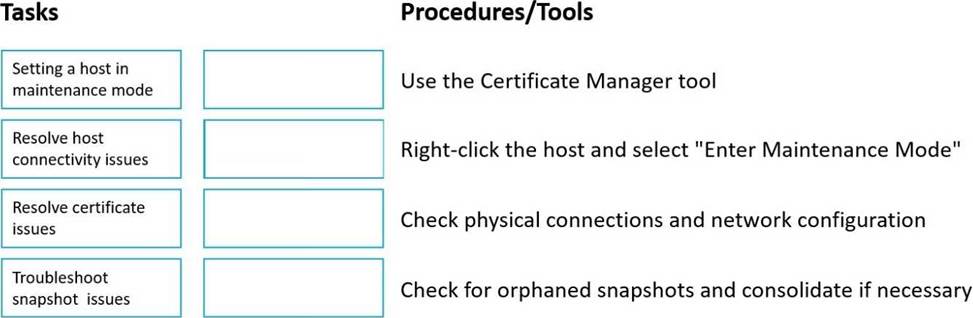
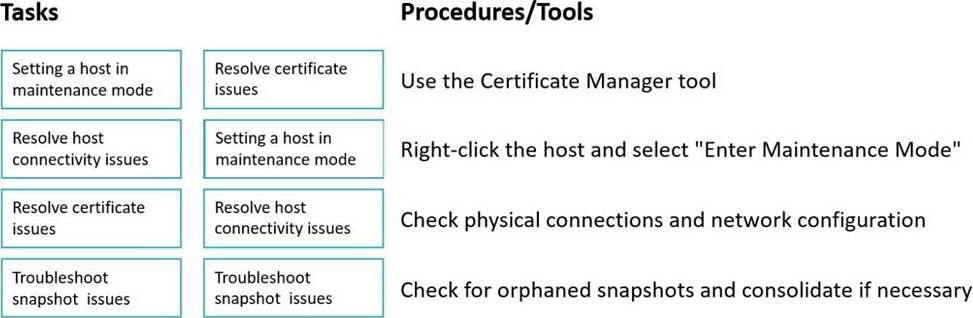
DRAG DROP
Match each troubleshooting task with its relevant procedure or tool.
An administrator needs to configure and manage storage resources and policies to optimize performance of a VCF environment configured with vSAN.
What two steps should the administrator take? (Choose two.)
- A . Enable vSphere HA to ensure high availability and resource distribution.
- B . Monitor the vSAN performance service for insights into the performance issues.
- C . Analyze the current vSAN storage policies and adjust them as needed.
- D . Disable vSAN health alerts to reduce administrative overhead.
- E . Decrease the number of disk groups per host to improve performance.
B, C
Explanation:
The vSAN performance service provides valuable insights into the storage performance, helping identify potential bottlenecks or areas for improvement.
Analyzing and adjusting vSAN storage policies is crucial for ensuring optimal performance. Policies such as RAID levels, storage encryption, and other settings can be tweaked to better match the environment’s performance requirements.
An administrator needs to deploy a Kubernetes cluster on a vSphere IaaS control plane (formerly vSphere with Tanzu) to host a new application.
Which three steps should be followed to successfully deploy the Kubernetes cluster? (Choose three.)
- A . Configure a Load Balancer for the Kubernetes control plane nodes.
- B . Create a new VM template for the Kubernetes nodes.
- C . Configure a vSphere Namespace and assign resource quotas.
- D . Enable Workload Management on the vSphere Cluster.
- E . , Deploy a vSphere Pod Service.
A, C, D
Explanation:
A Load Balancer is needed for the Kubernetes control plane nodes to distribute traffic across the control plane and ensure high availability for the Kubernetes management layer.
A vSphere Namespace must be configured to define a logical boundary for Kubernetes workloads, and resource quotas help ensure that resources are allocated appropriately for the workloads.
Enabling Workload Management on the vSphere Cluster is necessary to integrate Kubernetes with vSphere and manage the lifecycle of Kubernetes clusters using vSphere with Tanzu.
Which feature of VMware Lifecycle Manager allows an administrator to manage the lifecycle of ESXi hosts by applying a consistent image across the hosts in a cluster?
- A . Host Profiles
- B . Lifecycle Manager Images
- C . Update Manager Baselines
- D . vSphere Auto Deploy
B
Explanation:
VMware Lifecycle Manager (vLCM) enables administrators to manage the lifecycle of ESXi hosts by applying a consistent image across the hosts in a cluster. These images include the ESXi version, firmware, drivers, and settings, ensuring consistency and simplifying updates and patches across all hosts in a cluster.
A company plans to enhance its DevOps practices by implementing Kubernetes as part of VMware Cloud Foundation environment.
Which three steps should an administrator complete to achieve this integration? (Choose three.)
- A . Deploy HCX to migrate existing VMs to Kubernetes.
- B . Configure Aria Automation to automate the deployment of Kubernetes clusters.
- C . Deploy NSX to manage the networking for Kubernetes clusters.
- D . Configure vSAN to provide storage for Kubernetes workloads.
- E . Enable IaaS Control Plane on existing vSphere clusters.
B, C, D
Explanation:
Aria Automation (formerly vRealize Automation) can be configured to automate the deployment of Kubernetes clusters, which aligns with DevOps practices by enabling the self-service and automation of Kubernetes infrastructure.
NSX is used to manage networking for Kubernetes clusters, providing features such as network segmentation and micro-segmentation, which are essential for secure and scalable Kubernetes deployments.
vSAN provides the storage infrastructure for Kubernetes workloads, offering distributed and scalable storage that integrates with Kubernetes.
What is the primary benefit of enabling Workload Management on a vSphere Cluster?
- A . It integrates vSphere with third-party cloud providers.
- B . It enhances the security of the vSphere environment.
- C . It allows the deployment of traditional VMs with enhanced performance.
- D . It enables the use of Kubernetes for container orchestration on the vSphere platform.
D
Explanation:
Enabling Workload Management on a vSphere Cluster allows the use of VMware vSphere with Tanzu, which enables the deployment and management of Kubernetes clusters directly on vSphere. This integration allows for container orchestration, making it easier to deploy, manage, and scale containerized applications alongside traditional VMs in the same environment.
After a scheduled maintenance window, users report that they are unable to access the vCenter Server. The administrator notices that the vSphere Client is not responding.
What step should the administrator take to troubleshoot this issue?
- A . Review the firewall rules on the vCenter Server.
- B . Check the network connectivity between the vCenter Server and the ESXi hosts.
- C . Verify that the vCenter Server is powered on and its services are running.
- D . Restart the vSphere Client service on the vCenter Server.
C
Explanation:
When users are unable to access the vCenter Server and the vSphere Client is not responding, the first step is to check if the vCenter Server is powered on and whether its essential services are running. This can include services like the vCenter Server service, vSphere Web Client service, and other related services that enable access to the vCenter Server. If the services are stopped or unresponsive, restarting them may resolve the issue.