
UiPath UiPath-TAEPv1 Practice Exams
Last updated on Oct 21,2026- Exam Code: UiPath-TAEPv1
- Exam Name: UiPath Test Automation Engineer Professional v1.0 Exam
- Certification Provider: UiPath
- Latest update: Oct 21,2026
What is the scope of custom fields in UiPath Test Suite?
- A . Define custom attributes unique to the project and the set of APIs, test cases, and test sets.
- B . Define project-specific custom attributes for the requirements, test cases, and test sets.
- C . Define project-specific custom attributes for the requirements workflows, test sets, and test executions.
- D . Define project-specific custom attributes for the requirements, test cases, test sets, and reports.
B
Explanation:
The scope of custom fields in UiPath Test Suite is to define project-specific custom attributes for requirements, test cases, and test sets. These custom fields allow for better categorization and management of test data and help tailor the test management process to the project’s specific needs.
How can activity coverage scenarios for different automation needs be created in UiPath?
- A . Create one comprehensive test case that covers all scenarios in one execution.
- B . Alter the workflow to ensure a single test case covers all scenarios.
- C . Create separate test cases to cover each scenario during the execution.
- D . Use the same test case, but execute it in different workflows.
C
Explanation:
To ensure thorough activity coverage in UiPath, it’s best to create separate test cases for each automation scenario. This allows targeted validation, improves clarity in test results, and ensures that all logic branches are adequately tested.
What are the available actions that can be taken to manage test sets in UiPath Orchestrator?
- A . View, Duplicate, Delete
- B . View, Clone, Delete
- C . Edit, Duplicate, Delete
- D . Edit, Clone, Delete
D
Explanation:
In UiPath Orchestrator, the available actions to manage test sets are:
– Edit C to modify the test set configuration
– Clone C to create a copy of the test set
– Delete C to remove the test set
These options support efficient maintenance and reuse of test configurations.
Which are the types of coded automations in UiPath?
- A . Workflows, Test cases, Source files.
- B . Coded workflows, Coded test cases, Coded functions.
- C . Coded workflows, Coded test cases, Code source files.
- D . Coded workflows, Coded databases, Code source files.
B
Explanation:
The types of coded automations in UiPath include Coded Workflows, Coded Test Cases, and Coded Functions. These enable developers to write automation logic using code (e.g., C#) within a UiPath project, enhancing flexibility and control beyond drag-and-drop activities.
How can the results of a test case be overridden in Test Manager?
- A . Navigate to Test Results, open a test result, open a test case log and then select Tasks > Override result.
- B . Select the test case from the Results tab and click on Override result.
- C . Navigate to Test Results, click on Test Manager settings and then select Override test results feature.
- D . Go to Test Results, select a test case and then use the Override tool in the toolbar.
A
Explanation:
To override the results of a test case in Test Manager, navigate to Test Results, open a specific test result, then open the related test case log, and select Tasks > Override result. This allows manual correction of results if needed for traceability or reporting accuracy.
Given a Verify activity that has the ContinueOnFailure property set to False, what will the outcome be if the verification performed fails?
- A . Test case execution is stopped and any subsequent verification is failed.
- B . Test case execution is stopped and an exception is thrown.
- C . Test case execution continues and any subsequent verification is skipped.
- D . Test case execution is stopped and the applications used are closed gracefully.
B
Explanation:
If a Verify activity has ContinueOnFailure set to False and the verification fails, the test case execution stops immediately and an exception is thrown. This ensures that failures are treated as critical and halt further execution.
How are test cases added dynamically to a Test Set based on labels in UiPath Test Manager?
- A . Test Cases with all of the selected labels are assigned to the Test Set.
- B . Only the manual and automated labels are used to assign Test Cases to the Test Set.
- C . Test Cases with a specified number of the selected labels are assigned to the Test Set.
- D . Test Cases with any of the selected labels are assigned to the Test Set.
D
Explanation:
In UiPath Test Manager, when using labels to dynamically assign test cases to a Test Set, any test case that matches any of the selected labels will be added. This enables flexible grouping based on shared characteristics.
When creating a new test set in UiPath Orchestrator, what is the purpose of using a wildcard symbol (*) for the project version?
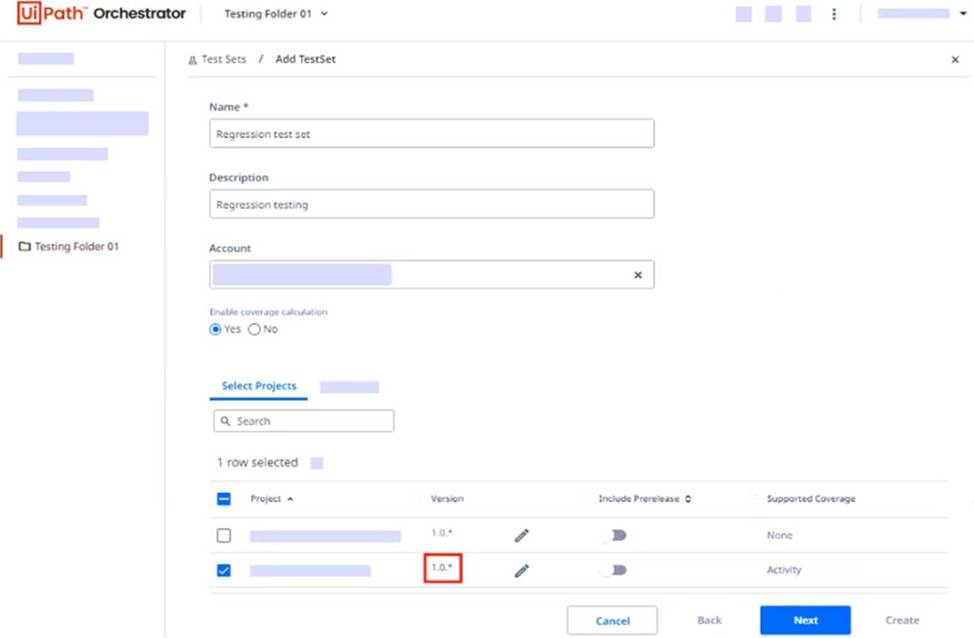
- A . The latest project version starting with 1.0. will be used.
- B . A validation error will be displayed after clicking on the Next button.
- C . The first project version starting with 1.0. will be used.
- D . Any project version starting with 1.0. will be used.
A
Explanation:
In UiPath Orchestrator, using a wildcard symbol (*) in the project version (e.g., 1.0.*) means that the latest available version that starts with 1.0. will be used when the test set is executed. This helps ensure the most recent compatible package is always selected.
What conclusions can be drawn from the exhibit?
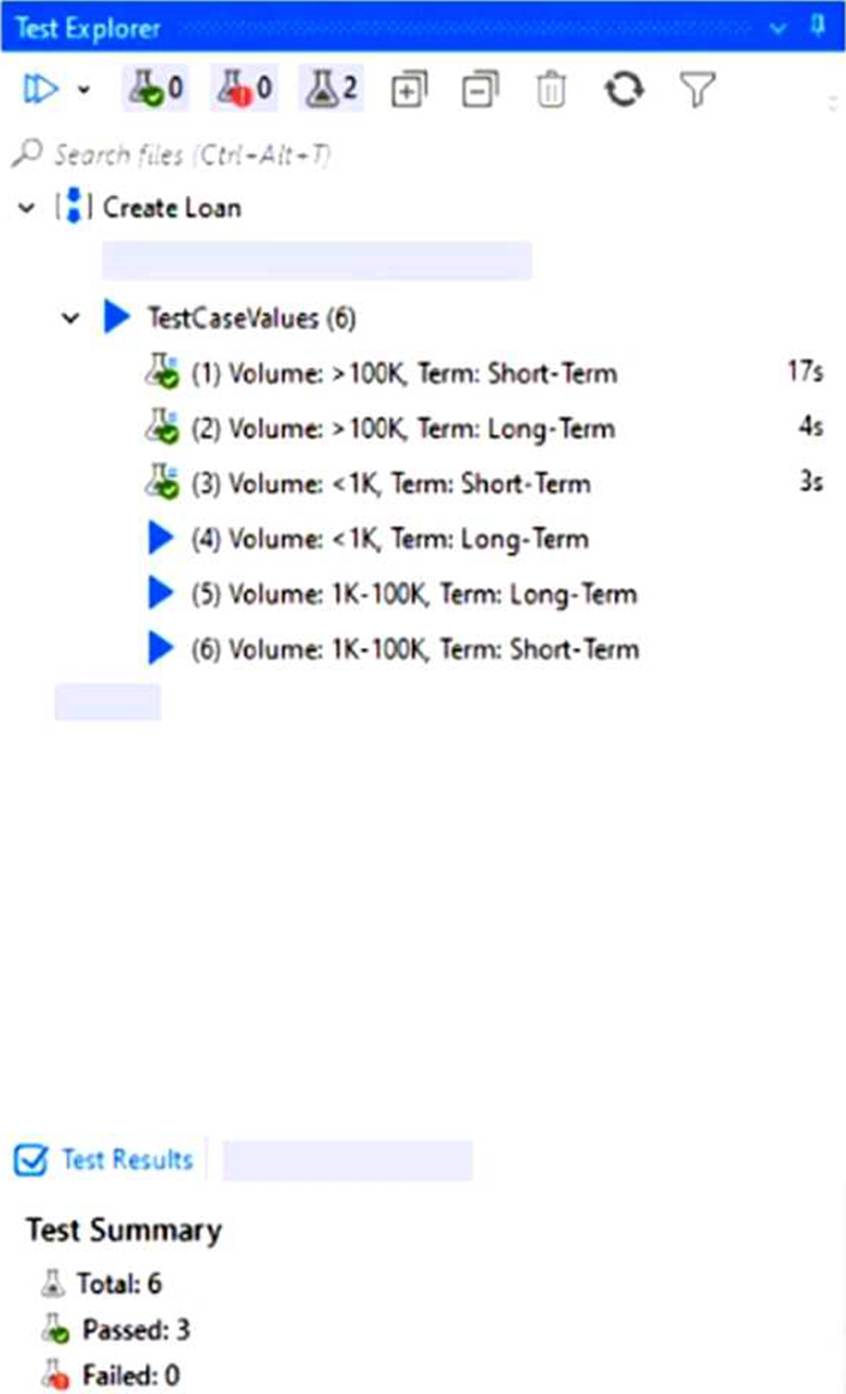
- A . It’s a data-driven test case with 2 variations, 2 variations were run and 2 not yet run.
- B . It’s a data-driven test case with 3 variations, 3 variations were run and 3 not yet run.
- C . It’s a data-driven test case with 6 variations, 3 variations were run and 3 not yet run.
- D . It’s an automated test case with 8 variations.
C
Explanation:
The Test Explorer shows a data-driven test case named "Create Loan" with 6 variations under TestCaseValues. Out of these, 3 have green flask icons (indicating they were run and passed), while 3 have blue play icons (indicating they have not yet been executed).
A developer needs to design a coded automation that approves or denies a loan application based on the loan rate.
How should the Execute() entry point method be declared if it needs to return the value for (IsLoanApproved), based on the loan rate (LoanRate)?
- A . public (int LoanRate) Execute(bool IsLoanApproved)
- B . public int Execute (bool IsLoanApproved)
- C . public bool Execute (bool IsLoanApproved, int loanRate)
- D . public (bool IsLoanApproved) Execute(int LoanRate)
C
Explanation:
The correct method signature for a coded automation in UiPath that needs to process input (loanRate) and return a value (IsLoanApproved) is:
**public bool Execute(bool IsLoanApproved, int loanRate)**
This follows the standard format where input parameters are passed to the method, and the result is returned via the method’s return type.