
UiPath UiPath-TAEPv1 Practice Exams
Last updated on Oct 21,2026- Exam Code: UiPath-TAEPv1
- Exam Name: UiPath Test Automation Engineer Professional v1.0 Exam
- Certification Provider: UiPath
- Latest update: Oct 21,2026
According to best practices, what is an acceptable way of validating an application’s state before proceeding with certain steps in a process during testing?
- A . Consider applying validation measures which include using extra activities that wait for the desired application state before other interactions.
- B . Use as many hardcoded delays as needed to ensure the application has reached the desired state before proceeding with other interactions.
- C . Validate an application’s state by implementing hardcoded delays before proceeding with other interactions.
- D . Avoid waiting for the desired application state and directly proceed with other interactions.
A
Explanation:
According to best practices, it is important to apply validation measures such as using activities that wait for the desired application state to be reached before proceeding with other interactions. This ensures stability and reduces the risk of errors, as waiting for a specific condition or state before continuing ensures that the application is ready for the next action.
What should be ensured before uploading items to test data queues?
- A . All the items in the queue are set as consumed.
- B . The creation of a test data queue with a corresponding JSON schema.
- C . The administrator permissions for Orchestrator is obtained.
- D . The test data queue was uploaded to the server.
B
Explanation:
Before uploading items to test data queues, it is essential to ensure that the test data queue is created with a corresponding JSON schema. This schema defines the structure of the data to be uploaded, ensuring that the items are correctly formatted and compatible with the test case execution.
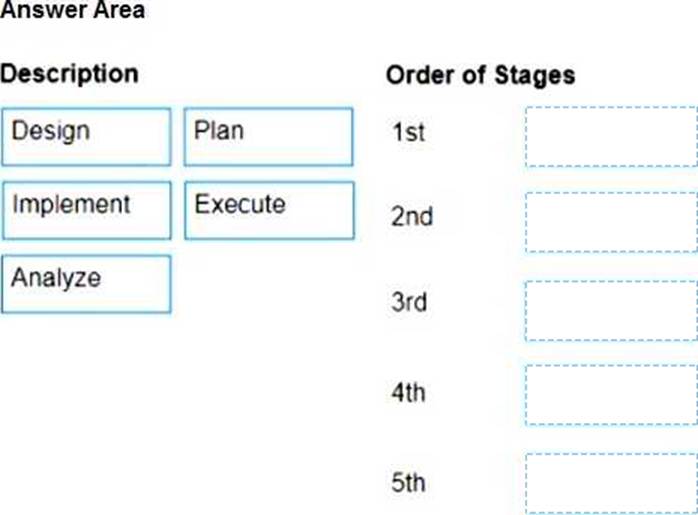
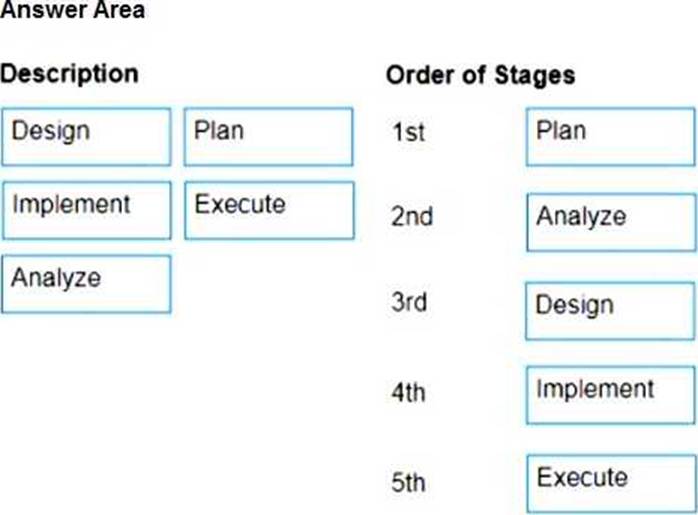
DRAG DROP
What is the correct order of stages of the Testing process?
Instructions: Drag the Description found on the left and drop on the correct order of stages found on the right.
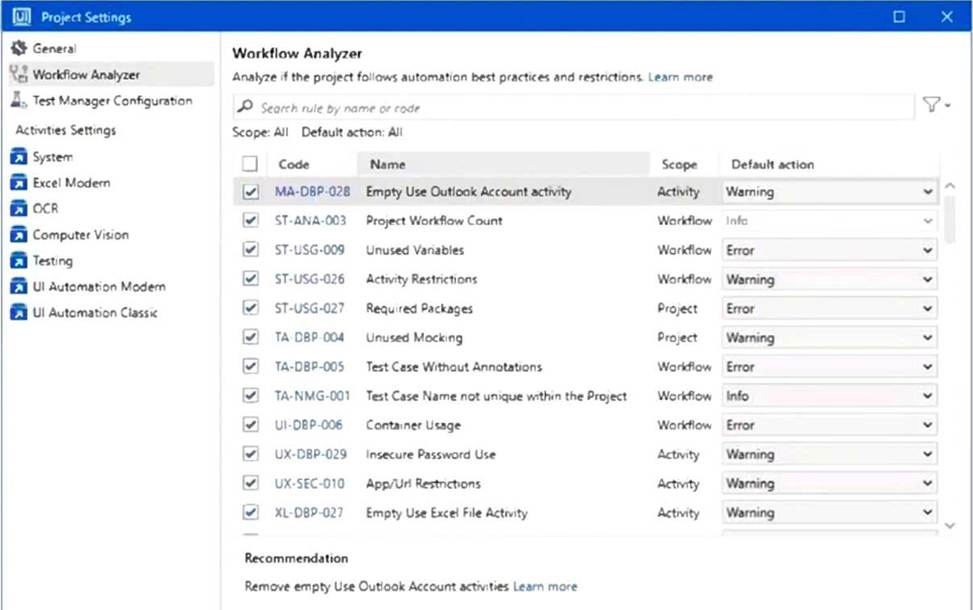
Considering the provided configuration for Workflow Analyzer Settings, which of the testing rules applied will be classified as a "Warning"?
- A . Test Case Name not unique within the Project
- B . Activity Restrictions
- C . Unused Mocking
- D . Test Case Without Annotations
C
Explanation:
According to the Workflow Analyzer Settings shown in the image "Unused Mocking" (code TA-DBP-
004) has its Default action set to "Warning".
If during the importing process in Test Manager, a file attachment exceeds the size limits, what happens to this attachment?
- A . The attachment gets skipped.
- B . The file gets automatically compressed.
- C . The user is prompted to manually reduce the file size.
- D . The entire import process is aborted.
A
Explanation:
If a file attachment exceeds the size limits during the importing process in UiPath Test Manager, the attachment gets skipped. The import process will continue for the other valid attachments, but the oversized file will not be included.
What are the key features of UiPath Test Manager and its integration with ALM solutions, facilitated by UiPath Test Manager Connect?
- A . UiPath Test Manager Connect offers a one-way synchronization of objects and supports a limited number of ALM tools.
- B . UiPath Test Manager is only compatible with ALM solutions for defect management, and the integration is facilitated by an external provider.
- C . UiPath Test Manager is compatible with leading ALM solutions, and the UiPath Test Manager Connect, provided by Planview, ensures bidirectional synchronization for seamless data exchange.
- D . UiPath Test Manager excludes agile planning and requirement management, and the integration is facilitated by UiPath itself.
C
Explanation:
UiPath Test Manager integrates with leading ALM solutions, and the UiPath Test Manager Connect (provided by Planview) enables bidirectional synchronization for requirements, defects, test cases, and results―ensuring seamless and real-time data exchange between UiPath and ALM platforms.
Consider the following testing setup in Orchestrator:
Orchestrator folder "FolderA" which contains test data queue "TestData"
Orchestrator folder "FolderB" which contains test data queue "TestData" Data-driven test case "TestCase123" linked with "TestData" queue from Orchestrator folder "FolderA" "TestCase123" is published to Orchestrator and executed from "FolderB".
What will be the result?
- A . Execution will not start.
- B . ‘TestCase123" will execute aqainst the data in test data queue ‘TestData" from "FolderB".
- C . Execution will be stuck in Pending state.
- D . ‘TestCase123" will execute aqainst the data in test data queue ‘TestData" from "FolderA".
A
Explanation:
Execution will not start because TestCase123 is linked to the "TestData" queue in FolderA, but it’s being executed from FolderB. In UiPath, test data queues are folder-scoped, and a mismatch between the folder context of the test case and the data queue will prevent execution.
By default, how are test executions sorted in Test Manager?
- A . Passed executions are placed at the top.
- B . Based on the date on which the execution was finished.
- C . Manual executions are placed at the top.
- D . Running and pending executions are placed at the bottom.
B
Explanation:
By default, test executions in Test Manager are sorted based on the date on which the execution was finished, allowing users to see the most recent test results first for efficient tracking and analysis.
Which of the following descriptions matches the concept of Integration Testing?
- A . Evaluate the system’s compliance with the business requirements and assess whether it is acceptable for delivery.
- B . Validates the complete and fully integrated system. The purpose of a system test is to evaluate the end-to-end system specifications.
- C . Individual units of a system are tested. The purpose is to validate that each unit of the system
code performs as expected. - D . Individual units are combined and tested as a group. The purpose of this level of testing is to expose faults in the interaction between integrated units.
D
Explanation:
Integration Testing focuses on testing combined units of a system to ensure they work together correctly. The goal is to detect issues in the interaction between modules or components after they are integrated.
Which is an activity in UiPath Studio?
- A . Verify Data Table
- B . Verify Image
- C . Verify Control Attribute
- D . Verity UiElement
C
Explanation:
Verify Control Attribute is a built-in activity in UiPath Studio’s testing pack, used to validate properties of UI elements during application testing to ensure they meet expected values.