
UiPath UiPath-STEPv1 Practice Exams
Last updated on Oct 21,2026- Exam Code: UiPath-STEPv1
- Exam Name: UiPath Software Testing Engineer Professional Exam
- Certification Provider: UiPath
- Latest update: Oct 21,2026
What should be ensured before uploading items to test data queues?
- A . All the items in the queue are set as consumed.
- B . The creation of a test data queue with a corresponding JSON schema.
- C . The administrator permissions for Orchestrator is obtained.
- D . The test data queue was uploaded to the server.
B
Explanation:
Before uploading items to test data queues, it is essential to ensure that the test data queue is created with a corresponding JSON schema. This schema defines the structure of the data to be uploaded, ensuring that the items are correctly formatted and compatible with the test case execution.
According to best practices, how should the renaming, moving, or deleting of test cases in the project be handled?
- A . Test cases should be renamed or moved outside of Studio and then re-imported.
- B . Do not rename move or delete the test cases outside of Studio.
- C . The renaming, moving or deleting of test cases can be handled either inside or outside Studio, there is no preferred way.
- D . Test cases can be renamed, moved or deleted outside of Studio.
B
Explanation:
According to best practices, test cases should not be renamed, moved, or deleted outside of UiPath Studio. Making such changes externally can lead to discrepancies in the project structure and potentially break links or references within the testing framework. Performing these actions within Studio ensures that all changes are properly tracked and synchronized across the test suite.
What is the role of the JSON schema in test data queue creation?
- A . It is used to encode the data into a format that can be easily read and processed by the UiPath Orchestrator.
- B . It is used to connect UiPath Studio with Orchestrator during test data queue creation.
- C . It usually describes the default values for the queue items.
- D . It formats the data properly to support uploading items to the test data queue.
D
Explanation:
The JSON schema in test data queue creation is used to format the data properly so that it can be uploaded to the test data queue. It defines the structure of the data and ensures that the data conforms to the expected format, enabling seamless integration between UiPath Studio and Orchestrator during the execution of data-driven tests.
How are test cases added dynamically to a Test Set based on labels in UiPath Test Manager?
- A . Test Cases with all of the selected labels are assigned to the Test Set.
- B . Only the manual and automated labels are used to assign Test Cases to the Test Set.
- C . Test Cases with a specified number of the selected labels are assigned to the Test Set.
- D . Test Cases with any of the selected labels are assigned to the Test Set.
D
Explanation:
In UiPath Test Manager, when using labels to dynamically assign test cases to a Test Set, any test case that matches any of the selected labels will be added. This enables flexible grouping based on shared characteristics.
How can the test data queue items be uploaded to a queue?
- A . Only through Orchestrator.
- B . Directly in Orchestrator or through Test manager.
- C . Only through Studio.
- D . Directly in Orchestrator or through Studio.
D
Explanation:
The test data queue items can be uploaded directly in Orchestrator or through Studio. These two platforms allow users to manage and upload test data to the test data queue, enabling integration and execution of data-driven tests.
What are the two methods for executing tests and where are they invoked??
- A . Manual and semi-automated: invoked in Studio.
- B . Manual and Automated; invoked in Test Manager only.
- C . Manual and Scripted; invoked in Orchestrator only
- D . Manual and Automated; invoked in Test Manager and Orchestrator.
D
Explanation:
The two methods for executing tests in UiPath are Manual and Automated. These can be invoked from both Test Manager and Orchestrator, depending on whether the execution is user-triggered or scheduled/triggered via CI/CD.
What are the two methods for executing tests and where are they invoked??
- A . Manual and semi-automated: invoked in Studio.
- B . Manual and Automated; invoked in Test Manager only.
- C . Manual and Scripted; invoked in Orchestrator only
- D . Manual and Automated; invoked in Test Manager and Orchestrator.
D
Explanation:
The two methods for executing tests in UiPath are Manual and Automated. These can be invoked from both Test Manager and Orchestrator, depending on whether the execution is user-triggered or scheduled/triggered via CI/CD.
What type of data can be added to the Tester Comment field?
- A . Text and Screenshot
- B . Text and documents
- C . Text and Video recording
- D . Only text
D
Explanation:
The Tester Comment field in UiPath Test Manager supports only text input. It is used to provide notes, observations, or explanations related to a test case execution.
What are the possible scenarios where Test Manager API can be used to integrate UiPath Test Manager with other tools?
- A . Fetch results into external tools.
- B . Assign test cases to external automations.
- C . Synchronize test sets with external automations.
- D . Create requirements in external tools.
A
Explanation:
The Test Manager API can be used to fetch test execution results into external tools, enabling integration with dashboards, reporting systems, or other ALM platforms for analysis and traceability.
When creating a new test set in UiPath Orchestrator, what is the purpose of using a wildcard symbol (*) for the project version?
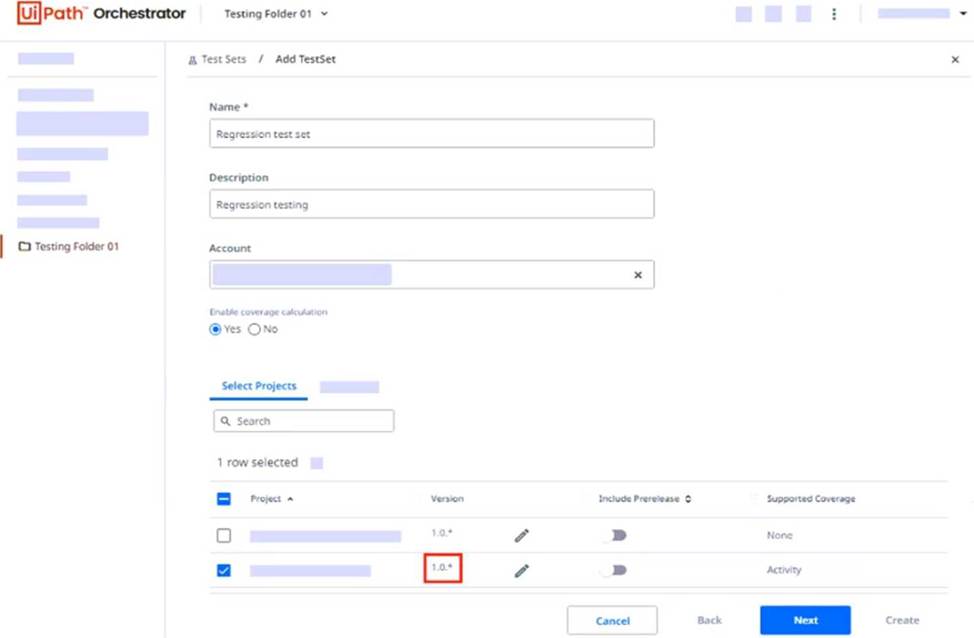
- A . The latest project version starting with 1.0. will be used.
- B . A validation error will be displayed after clicking on the Next button.
- C . The first project version starting with 1.0. will be used.
- D . Any project version starting with 1.0. will be used.
A
Explanation:
In UiPath Orchestrator, using a wildcard symbol (*) in the project version (e.g., 1.0.*) means that the latest available version that starts with 1.0. will be used when the test set is executed. This helps ensure the most recent compatible package is always selected.