
UiPath UiPath-STEPv1 Practice Exams
Last updated on Oct 21,2026- Exam Code: UiPath-STEPv1
- Exam Name: UiPath Software Testing Engineer Professional Exam
- Certification Provider: UiPath
- Latest update: Oct 21,2026
How does the licensing model work for Testing runtimes in UiPath?
- A . It counts the total number of licenses available and divides them amongst the Testing robots.
- B . It counts the maximum number of Testing robots that are able to execute tests simultaneously, given by the total number of runtimes allocated to all the online machines.
- C . It counts the individual testing robots on a machine and assigns each of them an equal number of licenses.
- D . It works by allocating a fixed number of licenses per testing robot, regardless of the maximum number that can execute tests simultaneously.
B
Explanation:
The licensing model for Testing runtimes in UiPath is based on the maximum number of Testing robots that can execute tests simultaneously, which is determined by the total number of runtimes allocated to all online machines. This ensures efficient utilization of available resources.
How does the licensing model work for Testing runtimes in UiPath?
- A . It counts the total number of licenses available and divides them amongst the Testing robots.
- B . It counts the maximum number of Testing robots that are able to execute tests simultaneously, given by the total number of runtimes allocated to all the online machines.
- C . It counts the individual testing robots on a machine and assigns each of them an equal number of licenses.
- D . It works by allocating a fixed number of licenses per testing robot, regardless of the maximum number that can execute tests simultaneously.
B
Explanation:
The licensing model for Testing runtimes in UiPath is based on the maximum number of Testing robots that can execute tests simultaneously, which is determined by the total number of runtimes allocated to all online machines. This ensures efficient utilization of available resources.
Which is an activity in UiPath Studio?
- A . Verify Data Table
- B . Verify Image
- C . Verify Control Attribute
- D . Verity UiElement
C
Explanation:
Verify Control Attribute is a built-in activity in UiPath Studio’s testing pack, used to validate properties of UI elements during application testing to ensure they meet expected values.
How can the activities covered during a test case execution in UiPath Studio be checked?
- A . By checking the Run tab under Robot Executor.
- B . By opening the Activity Coverage panel and double-clicking the test case.
- C . By checking the Output tab in UiPath Studio.
- D . By opening the Descriptor Coverage panel and double-clicking the test case.
B
Explanation:
The Activity Coverage panel in UiPath Studio shows which activities were executed during a test case run. By double-clicking the test case in this panel, you can review coverage and identify untested or redundant activities.
What type of license is used for an Unattended Robot in development and testing mode, enabling it to execute both test cases and RPA processes?
- A . Citizen Developer
- B . RPA Developer
- C . Testing
- D . NonProduction
D
Explanation:
A NonProduction license is used for an Unattended Robot in development and testing mode, allowing it to execute both test cases and RPA processes. It is ideal for scenarios that simulate production without affecting live environments.
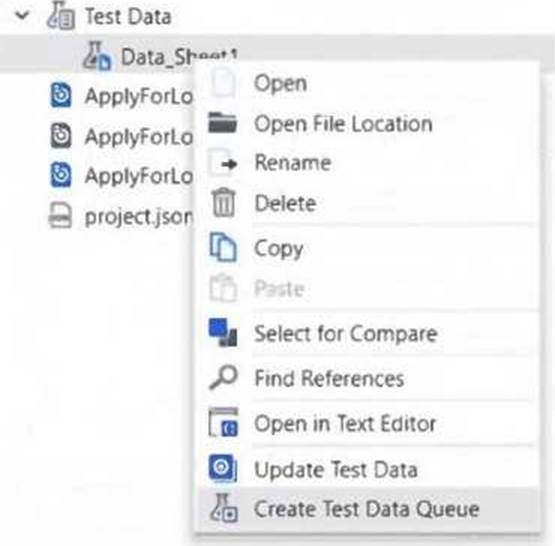
What needs to be provided in order to create a Test Data Queue from static Test Data in UiPath Studio?
- A . No additional information is necessary.
- B . Only the Test Data Queue name.
- C . Test Data Queue name and JSON schema.
- D . Only the JSON schema.
C
Explanation:
To create a Test Data Queue from static test data in UiPath Studio, you need to provide both the Test Data Queue name and the corresponding JSON schema. The schema ensures the structure of the data is defined correctly for the queue items.
There is a test case that performs multiple verifications.
How can the test case be configured so that the execution stops when a verification fails?
- A . Set the property ContinueOnFailure of the first Verify activity to False.
- B . Use a Stop Job activity after each verification.
- C . Set the property ContinueOnFailure of the Verify activities to False.
- D . Use a Terminate Workflow activity after each verification.
C
Explanation:
To ensure that the test case stops execution when a verification fails, you should set the ContinueOnFailure property of the Verify activities to False. This way, any failed verification will halt the test case immediately.
How can the results of a test case be overridden in Test Manager?
- A . Navigate to Test Results, open a test result, open a test case log and then select Tasks > Override result.
- B . Select the test case from the Results tab and click on Override result.
- C . Navigate to Test Results, click on Test Manager settings and then select Override test results feature.
- D . Go to Test Results, select a test case and then use the Override tool in the toolbar.
A
Explanation:
To override the results of a test case in Test Manager, navigate to Test Results, open a specific test result, then open the related test case log, and select Tasks > Override result. This allows manual correction of results if needed for traceability or reporting accuracy.
Where can the variations that have passed or failed for a data-driven test case in UiPath Studio be viewed?
- A . On the parent test cases in the Test Results panel.
- B . On the individual test case data variations in the Test Results panel.
- C . In the Test Manager configuration.
- D . In the Assertions tab of the corresponding test case result.
B
Explanation:
In UiPath Studio, the Test Results panel displays the outcome of individual data variations for a data-driven test case. This allows users to see exactly which data inputs passed or failed during execution.
What is a limitation when re-executing test case executions for data-driven test cases?
- A . Only one test case execution can be re-executed at a time.
- B . There is no limitation when re-executing data-driven test case executions.
- C . Multiple data-driven test case executions can be re-executed at once.
- D . Data-driven test case executions cannot be re-executed.
A
Explanation:
A limitation when re-executing data-driven test case executions is that only one test case execution can be re-executed at a time. This is due to the unique data sets tied to each execution, which require individual handling.