
UiPath UiPath-STEPv1 Practice Exams
Last updated on Oct 22,2026- Exam Code: UiPath-STEPv1
- Exam Name: UiPath Software Testing Engineer Professional Exam
- Certification Provider: UiPath
- Latest update: Oct 22,2026
What are the available actions that can be taken to manage test sets in UiPath Orchestrator?
- A . View, Duplicate, Delete
- B . View, Clone, Delete
- C . Edit, Duplicate, Delete
- D . Edit, Clone, Delete
D
Explanation:
In UiPath Orchestrator, the available actions to manage test sets are:
– Edit C to modify the test set configuration
– Clone C to create a copy of the test set
– Delete C to remove the test set
These options support efficient maintenance and reuse of test configurations.
What happens if a Test Execution is re-executed?
- A . A log with all the previous executions is kept.
- B . A log with only the previous execution is kept.
- C . New test execution results are generated, independent from the previous ones.
- D . The old execution results are deleted and replaced with the new results.
C
Explanation:
When a Test Execution is re-executed in UiPath, it generates new test execution results that are independent of previous ones. This allows for historical tracking and comparison between multiple runs.
Consider the following testing setup in Orchestrator:
Orchestrator folder "FolderA" which contains test data queue "TestData"
Orchestrator folder "FolderB" which contains test data queue "TestData" Data-driven test case "TestCase123" linked with "TestData" queue from Orchestrator folder "FolderA" "TestCase123" is published to Orchestrator and executed from "FolderB".
What will be the result?
- A . Execution will not start.
- B . ‘TestCase123" will execute aqainst the data in test data queue ‘TestData" from "FolderB".
- C . Execution will be stuck in Pending state.
- D . ‘TestCase123" will execute aqainst the data in test data queue ‘TestData" from "FolderA".
A
Explanation:
Execution will not start because TestCase123 is linked to the "TestData" queue in FolderA, but it’s being executed from FolderB. In UiPath, test data queues are folder-scoped, and a mismatch between the folder context of the test case and the data queue will prevent execution.
Consider the following testing setup in Orchestrator:
Orchestrator folder "FolderA" which contains test data queue "TestData"
Orchestrator folder "FolderB" which contains test data queue "TestData" Data-driven test case "TestCase123" linked with "TestData" queue from Orchestrator folder "FolderA" "TestCase123" is published to Orchestrator and executed from "FolderB".
What will be the result?
- A . Execution will not start.
- B . ‘TestCase123" will execute aqainst the data in test data queue ‘TestData" from "FolderB".
- C . Execution will be stuck in Pending state.
- D . ‘TestCase123" will execute aqainst the data in test data queue ‘TestData" from "FolderA".
A
Explanation:
Execution will not start because TestCase123 is linked to the "TestData" queue in FolderA, but it’s being executed from FolderB. In UiPath, test data queues are folder-scoped, and a mismatch between the folder context of the test case and the data queue will prevent execution.
What happens with the attachment if an Attach Document activity in a workflow is run, as part of an automation job?
- A . The attachments are available only if the workflow is run as part of a job.
- B . The attachment is unavailable.
- C . The attachment is available.
- D . Attachments support only the following type of files: JSON, TXT, XML, PNG and JPEG formats.
B
Explanation:
When an Attach Document activity is run as part of an automation job, the attachment is unavailable. This activity is intended for test case execution contexts where attachments are linked to test results, not regular automation jobs.
What is a primary distinction between manual and automated test execution in UiPath Test Manager?
- A . Automated test executions can be performed only in UiPath Orchestrator, while manual executions can only be performed in UiPath Test Manager.
- B . Manual and automated test executions do not have specific distinctions and can be executed interchangeably.
- C . Manual executions require user interaction for each test step, while automated executions are self-running without any manual intervention.
- D . Manual executions are done for test sets created in UiPath Test Manager or linked from Orchestrator with manual steps, while automated executions are invoked through Orchestrator for test cases linked from Studio.
C
Explanation:
The primary distinction is that manual executions require user interaction for each test step, making them suitable for scenarios like exploratory testing or steps requiring human validation. In contrast, automated executions are fully self-running, executed via Orchestrator without manual involvement.
According to the troubleshooting Test Manager tips, what is one of the ways to resolve the following issue?

- A . Duplicate the faulty test case within Studio.
- B . Re-link the faulty test case to the test set.
- C . Re-publish the project to Orchestrator.
- D . Unlink the automation in Test Manager.
C
Explanation:
The warning message indicates that the test cases were not available in the latest published package version. To resolve this, you need to re-publish the project to Orchestrator to ensure all test cases are included and executable.
Which are the sub-tasks available under test task in UiPath CLI?
- A . Convert: converts test results written as CSV to another format.
Run: tests a given package, or runs an existing Test Set on Orchestrator. - B . Convert: converts test results written in JSON or CSV to another format.
Run: tests a given package, or runs an existing Test Set on Orchestrator. - C . Convert: converts test results written in JSON to another format.
Run: tests a given package, or runs an existing Test Set on Orchestrator. - D . Convert: converts test results written in JSON to another format.
Test: tests a given package.
Run: runs an existing Test Set on Orchestrator.
B
Explanation:
In the UiPath CLI, the test task includes the following sub-tasks:
– Convert: Converts test results written in JSON or CSV to another format (e.g., JUnit or NUnit).
– Run: Executes tests from a given package or runs an existing Test Set on Orchestrator.
These enable integration of test execution and reporting into CI/CD pipelines.
Considering the provided configuration for Workflow Analyzer Settings, which of the testing rules applied will be classified as a "Warning"?
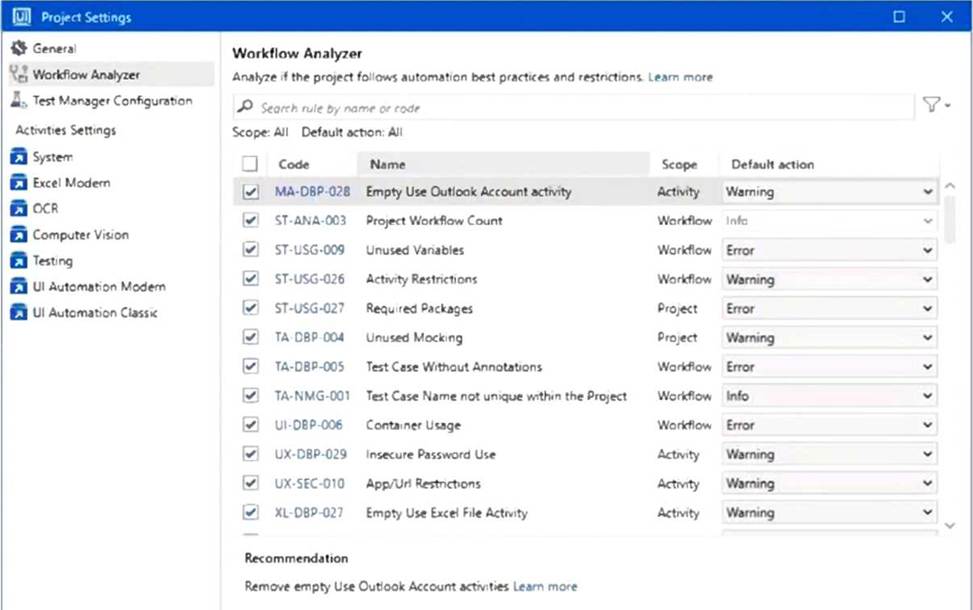
- A . Test Case Name not unique within the Project
- B . Activity Restrictions
- C . Unused Mocking
- D . Test Case Without Annotations
C
Explanation:
According to the Workflow Analyzer Settings shown in the image "Unused Mocking" (code TA-DBP-
004) has its Default action set to "Warning".
Which are the available actions that enable a user to examine the test execution results in UiPath Orchestrator?
- A . View execution details, View automation rate, and View logs.
- B . View execution details, View assertions, and View logs.
- C . View execution details, View logs, and View requirements.
- D . View execution details, View assertions, and View attachments.
B
Explanation:
In UiPath Orchestrator, users can examine test execution results through the following actions:
– View execution details C to see overall test run information
– View assertions C to review the pass/fail conditions of test cases
– View logs C to analyze runtime logs for debugging and validation