
Tableau TCC-C01 Practice Exams
Last updated on Oct 21,2026- Exam Code: TCC-C01
- Exam Name: Tableau Certified Consultant
- Certification Provider: Tableau
- Latest update: Oct 21,2026
An executive-level workbook leverages 37 of the 103 fields included in a data source. Performance for the workbook is noticeably slower than other workbooks on the same Tableau Server.
What should the consultant do to improve performance of this workbook while following best practice?
- A . Split some visualizations on the dashboard into many smaller visualizations on the same dashboard.
- B . Connect to the data source via a custom SQL query.
- C . Use filters, hide unused fields, and aggregate values.
OD. Restrict users from accessing the workbook to reduce server load.
C
Explanation
To improve the performance of a Tableau workbook, it is best practice to streamline the data being used. This can be achieved by using filters to limit the data to only what is necessary for analysis, hiding fields that are not being used to reduce the complexity of the data model, and aggregating values to simplify the data and reduce the number of rows that need to be processed. These steps can help reduce the load on the server and improve the speed of the workbook.
References: The best practices for optimizing workbook performance in Tableau are well-documented in Tableau’s official resources, including the Tableau Help Guide and the Designing Efficient Workbooks whitepaper, which provide detailed recommendations on how to streamline workbooks for better performance12.
A consultant plans a Tableau deployment for a client that uses Salesforce. The client wants users to
automatically see Tableau views of regional sales filtered by customer as soon as the users sign into Salesforce.
Which approach should the consultant use to deliver the final visualization?
- A . Embed views into Salesforce.
- B . Create a list of URLs that the users can click in Salesforce.
- C . Publish to Tableau Mobile for viewing.
- D . Create subscriptions for each view to deliver reports by email.
A
Explanation
To ensure that users automatically see Tableau views of regional sales filtered by customer as they sign into Salesforce, embedding the views directly into Salesforce is most effective:
– Embedding Views: Tableau provides capabilities to embed its dashboards into web applications such as Salesforce. This approach ensures that the visualization is part of the Salesforce user interface, enhancing user experience by not requiring users to navigate away from Salesforce to view the data.
– Implement this by using Tableau’s embedding code, which can be generated from the Tableau Server for each specific view. Place this embed code into the Salesforce Visualforce pages or use Salesforce Canvas to integrate these views seamlessly.
– This setup allows the Tableau views to inherit user credentials from Salesforce, enabling personalized data visualization based on the user’s access rights and region, directly aligned with their Salesforce login session.
References: The embedding technique is documented in both Tableau’s and Salesforce’s official integration guides, which provide step-by-step instructions on embedding Tableau views into Salesforce platforms.
A client wants to provide sales users with the ability to perform the following tasks:
– Access published visualizations and published data sources outside the company network.
– Edit existing visualizations.
– Create new visualizations based on published data sources.
– Minimize licensing costs.
Which site role should the client assign to the sales users?
- A . Explorer (can publish)
- B . Site Administrator
- C . Viewer
- D . Creator
A
Explanation
The Explorer (can publish) site role in Tableau is designed for users who need to access, edit, and create visualizations based on published data sources, even when they are outside the company network. This role allows users to perform web editing and save their work, making it suitable for sales users who need these capabilities. It is also a cost-effective option as it does not require the full capabilities and associated costs of the Creator license.
References: The information about the Explorer (can publish) role and its capabilities can be found in the official Tableau documentation on site roles and permissions12.This role is appropriate for users who need to interact with published content and create new visualizations without the need for full site administration or advanced content creation tools that come with the Creator role3.
A client has a published data source in Tableau Server and they want to revert to the previous version of the data source. The solution must minimize the impact on users.
What should the consultant do to accomplish this task?
- A . Request that a server administrator restore a Tableau Server backup.
- B . Delete and recreate the data source manually.
- C . Select a previous version from Tableau Server, download it, and republish that data source.
- D . Select a previous version from Tableau Server, and then click Restore.
D
Explanation
To minimize the impact on users when reverting to a previous version of a published data source in Tableau Server, the consultant should use the built-in revision history feature. By selecting a previous version from the revision history and clicking ‘Restore’, the data source will revert to that version without the need for a full server backup restoration or manual recreation of the data source. This process is quick and has the least amount of disruption to users.
References: The functionality and process for reverting to a previous version of a data source are outlined in Tableau’s official documentation on working with content revisions1.This feature is part of Tableau Server’s capabilities to manage and maintain data sources effectively21.
A new Tableau user created a simple dashboard on Tableau Server using supply chain data. Now, the user wants to know if they created the dashboard in
accordance with specific performance best practices.
Which approach should the consultant recommend for the client to make this determination?
- A . Use inbuilt dashboards in Tableau Server to troubleshoot the performance.
- B . Use Performance Recording on Tableau Server.
- C . Use Performance Recording in Tableau Desktop.
- D . Run Workbook Optimizer.
D
Explanation
The Workbook Optimizer is a tool specifically designed to evaluate a workbook against performance best practices. It provides feedback on key design characteristics and offers concrete guidance on how to improve workbook performance. This tool is beneficial for both new and experienced Tableau users to ensure their dashboards are optimized for performance1.
References: The Workbook Optimizer’s functionality is detailed in Tableau’s official documentation, which explains how it assesses workbooks against a set of rules derived from best practices1.Additionally, the Performance Recording feature in Tableau Desktop and Server can be used to identify performance issues, but the Workbook Optimizer gives a more comprehensive analysis of the workbook’s adherence to best practices23.
A client is considering migrating from Tableau Server to Tableau Cloud.
Which two elements are determining factors of whether the client should use Tableau Server or Tableau Cloud? Choose two.
- A . Whether or not the client plans to leverage single sign-on (SSO)
- B . Whether or not there are large numbers of concurrent extract refreshes
- C . Whether or not the client needs the ability to connect to public, cloud-based data sources
- D . Amount of data storage used on the client’s existing server
A B
Explanation
When considering a migration from Tableau Server to Tableau Cloud, two critical factors to consider are the client’s need for single sign-on (SSO) and the volume of concurrent extract refreshes.
Single Sign-On (SSO): Tableau Cloud supports SSO, which can streamline user authentication and enhance security.If the client plans to leverage SSO, Tableau Cloud may be a suitable choice1.
Concurrent Extract Refreshes:The number of concurrent extract refreshes is a significant factor because it impacts performance and resource allocation.Tableau Server might be more appropriate if the client
has a high volume of concurrent extract refreshes, as it allows for more control over the infrastructure to manage these workloads2.
References: The decision between Tableau Server and Tableau Cloud should be based on specific organizational needs, including security, compliance, performance, and scalability.The official Tableau resources provide guidance on these factors12.Additionally, discussions in the Tableau Community highlight the importance of considering these elements when choosing between Tableau Server and Tableau Cloud1.
A client has a database that stores widget inventory by day and it is updated on a nonstandard schedule as shown below.
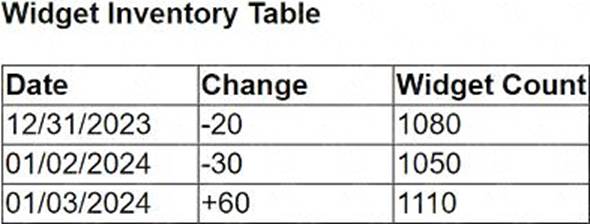
They want a data visualization that shows widget inventory daily, however their business unit does not have the ability to modify the data warehouse structure.
What should the client do to achieve the desired result?
- A . Create a temporary table in the database.
- B . Use Tableau Desktop to visualize null values.
- C . Update the Widget Inventory Table to be a daily snapshot.
- D . Use Tableau Prep to add new rows.
D
Explanation
For a client who needs a daily visualization of widget inventory but cannot modify the data warehouse structure, the best approach is to use Tableau Prep to add new rows. Tableau Prep can be used to manipulate the existing dataset by adding missing date entries and appropriately adjusting inventory counts based on available data. This allows the creation of a complete daily snapshot for visualization without needing changes to the underlying database structure.
A consultant creates a histogram that presents the distribution of profits across a client’s customers. The labels on the bars show percent shares. The consultant used a quick table calculation to create the labels.
Now, the client wants to limit the view to the bins that have at least a 15% share. The consultant creates a profit filter but it changes the percent labels.
Which approach should the consultant use to produce the desired result?
- A . Use a calculation with TOTAL() function instead of a quick table calculation.
- B . Add the [Profit] filter to the context.
- C . Filter with a table calculation WINDOW_AVG(MIN([Profit]), first(), last())
- D . Filter with the table calculation used to create labels.
B
Explanation
When a filter is applied directly to the view, it can affect the calculation of percentages in a histogram because it changes the underlying data that the quick table calculation is based on. To avoid this, adding the [Profit] filter to the context will maintain the original calculation of percent shares while filtering out bins with less than a 15% share. This is because context filters are applied before any other calculations, so the percent shares calculated will be based on the context-filtered data, thus preserving the integrity of the original percent labels.
References: The solution is based on the principles of context filters and their order of operations in Tableau, which are documented in Tableau’s official resources and community discussions123.
When a histogram is created showing the distribution of profits with labels indicating percent shares using a quick table calculation, and a need arises to limit the view to bins with at least a 15% share, applying a standard profit filter directly may undesirably alter how the percent labels calculate because they depend on the overall distribution of data. Placing the [Profit] filter into the context makes it a "context filter," which effectively changes how data is filtered in calculations:
Create a Context Filter: Right-click on the profit filter and select "Add to Context". This action changes the order of operations in filtering, meaning the context filter is applied first.
Adjust the Percent Calculation: With the profit filter set in the context, it first reduces the data set to only those profits that meet the filter criteria. Subsequently, any table calculations (like the percent share labels) are computed based on this reduced data set.
View Update: The view now updates to display only those bins where the profits are at least 15%, and the percent share labels recalculated to reflect the distribution of only the filtered (contextual) data.
References:
Context Filters in Tableau: Context filters are used to filter the data passed down to other filters, calculations, the marks card, and the view. By setting the profit filter as a context filter, it ensures that calculations such as the percentage shares are based only on the filtered subset of the data.
A client notices that while creating calculated fields, occasionally the new fields are created as strings, integers, or Booleans. The client asks a consultant if there is a performance difference among these three data types.
What should the consultant tell the customer?
- A . Strings are fastest, followed by integers, and then Booleans.
- B . Integers are fastest, followed by Booleans, and then strings.
- C . Strings, integers, and Booleans all perform the same.
- D . Booleans are fastest, followed by integers, and then strings.
B
Explanation
In Tableau, the performance of calculated fields can vary based on the data type used. Calculations involving integers and Booleans are generally faster than those involving strings. This is because numerical operations are typically more efficient for a computer to process than string operations, which can be more complex and time-consuming. Therefore, when performance is a consideration, it is advisable to use integers or Booleans over strings whenever possible.
References: The performance hierarchy of data types in Tableau calculations is documented in resources that discuss best practices for optimizing Tableau performance1.
A client notices that several groups are sharing content across divisions and are not complying with their data governance strategy. During a Tableau Server audit, a consultant notices that the asset permissions for the client’s top-level projects are set to "Locked," but that "Apply to Nested Projects" is not checked.
The consultant recommends checking "Apply to Nested Projects" to enforce compliance.
Which impact will the consultant’s recommendation have on access to the existing nested projects?
- A . Current custom access will be maintained, but new custom permissions will not be granted.
- B . Access will be automatically rolled back to the top-level project permissions immediately.
- C . Users will be prompted to manually update permissions for all nested projects.
- D . Users will be notified that they will automatically lose access to content after 30 days.
B
Explanation
When “Apply to Nested Projects” is checked in Tableau Server, the permission rules set at the top-level project are enforced for all assets in the project and all nested projects. This means that any custom access previously granted to nested projects will be overridden, and the permissions will revert to those defined at the top-level project. This action ensures consistent application of the data governance strategy across all divisions.
References: The impact of checking “Apply to Nested Projects” is detailed in Tableau’s official documentation, which explains how locked nested projects can be used to govern site content with greater flexibility and efficiency12.