
Salesforce CRM Analytics and Einstein Discovery Consultant Practice Exams
Last updated on Oct 22,2026- Exam Code: CRM Analytics and Einstein Discovery Consultant
- Exam Name: Salesforce Certified CRM Analytics and Einstein Discovery Consultant Exam
- Certification Provider: Salesforce
- Latest update: Oct 22,2026
Cloud Kicks (CK) has a dashboard that is still showing 10 former account managers. CK has since expanded, and some have moved from their former roles. CK wants the dashboard to reflect current account managers and stay up to date as new team members join.
How should the CRM Analytics developer accomplish this?
- A . Use a Repeater Widget that updates automatically as the data flows through the system.
- B . Create @ Watchlist and when the number of account manager updates, update the dashboard to reflect the same.
- C . Build a report and get notified when a new account manager joins, and then edit the dashboard to add the account manager.
A
Explanation:
The Repeater Widget in CRM Analytics allows dynamic updates to be reflected on the dashboard automatically as data flows are updated. This means that as new account managers join or existing account managers change roles, the data in the widget will automatically reflect the latest information without manual updates. This is the most efficient way to keep the dashboard up-to-date with the current list of account managers.
Reference: The functionality of Repeater Widgets and their ability to dynamically update based on live data is covered in the Wave Analytics Explorer documentation, particularly when dealing with team structures and dynamic datasets.
A versioning feature allows CRM Analytics users to be added as Publishers and make changes separately while a ‘Live’ version is still being used by other users. Once the changes are complete, the user can then set their updated version as the Live version.
Which CRM Analytics item is this leveraged for?
- A . App
- B . Dataset
- C . goats
A
Explanation:
In CRM Analytics, the versioning feature described is typically leveraged for Apps. This feature allows:
Parallel Development: Users can work on changes in a separate version without affecting the live version being accessed by others.
Controlled Publishing: Once changes are finalized, the user can then promote their version to be the new live version, ensuring seamless updates without disrupting ongoing usage. Collaborative Workflows: Facilitates teamwork by allowing multiple users to propose and test
changes in a controlled environment before making those changes live.
This approach ensures that CRM Analytics apps remain dynamic and can evolve over time while maintaining stability and continuity for end-users.
Donut chart widget associated to the query "Query_pie_3" and grouped by the dimension "Type" The team wants any selection in the List widget to filter the Donut chart and vice versa. Users should be able to choose more than one Type (multi-selection).
What is the recommended way to accomplish the required filtering?
- A . Use "Connect Data Sources" to create a mapping of the two fields from the two datasets.
- B . Create a selection based Interaction and apply It to the query of "Query ple 3".
- C . Set up a result and selection based interaction for each query.
A CRM Analytics consultant at Cloud Kicks wants to create a new dashboard that uses custom
GeoJSON to display data; however, they are unable to upload the file via the user interface (UI).
Which action should the consultant take?
- A . Add the system permission "Manage Analytics Custom Maps" to the permission set used.
- B . Enable Custom maps with GeoJSON"” in the analytics settings.
- C . Upload the GeoJSON via the API because it is NOT a function in the UI.
C
Explanation:
If a consultant at Cloud Kicks needs to use custom GeoJSON files for dashboard visualization and cannot upload the file via the CRM Analytics user interface (UI), the recommended action is to use the API for this purpose.
Here’s why this approach is suggested:
Functionality Limitation in UI: Currently, the CRM Analytics UI does not support direct uploads of GeoJSON files, which necessitates an alternative method.
API Flexibility: The API provides a more flexible route for uploading custom GeoJSON files, allowing consultants to integrate more complex or larger datasets that are not supported through standard UI functionalities.
Customization and Control: Using the API also offers greater control over how GeoJSON data is handled, processed, and utilized within CRM Analytics, catering to more advanced customization needs.
This method ensures that the consultant can fully utilize CRM Analytics’ capabilities for creating highly customized geographic visualizations, thereby enhancing the analytical value of the dashboards.
The CRM Analytics consultant at Universal Containers (UC) has set up data sync for the Salesforce Opportunity object with the Amount currency field added. This is being used in multiple datasets and dashboards, as UC is a multi-currency organization.
The currency used in Salesforce records is set up in GBP but the data on the dashboard is converting to USD. Conversion logic is not set up on any of the recipes.
Why is the currency converting?
- A . The ANS local currency is set up as USD.
- B . The Integration User currency is set up as USD.
- C . The org corporate currency is set up as USD.
C
Explanation:
In Salesforce CRM Analytics, when dealing with multi-currency environments, the system relies on the organization’s corporate currency setting for reporting, unless explicitly overridden. In this case, even though the Opportunity data is stored in GBP in Salesforce, the dashboards are showing USD because the corporate currency for the org is set to USD. This behavior is expected unless currency conversion logic is implemented in the datasets or recipes.
The corporate currency serves as the default for currency fields in datasets and dashboards unless configured otherwise. This can be confirmed under the "Manage Currencies" settings in Salesforce.
Reference: The currency handling rules in CRM Analytics, including how the corporate currency affects reporting, are detailed in Salesforce documentation on multi-currency organizations and the Einstein Discovery training materials.
A CRM Analytics consultant wants to move a dataflow to a recipe in order to use aggregation nodes.
To do so, they use the Dataflow to Recipe convertor and the recipe runs successfully.
However, they are unable to see the aggregated data in the dataset.
What is causing the issue?
- A . The recipe has to be turned off and only the dataflow should run.
- B . The dataflow has to be turned off and only the recipe should run.
- C . The convertor has created a new dataset with a new ID.
Universal Containers has a dashboard for sales managers. They need to visualize the percentage of their opportunities in the pipeline in a Gauge chart. They want to customize the chart to keep track if they are below or beyond the target.
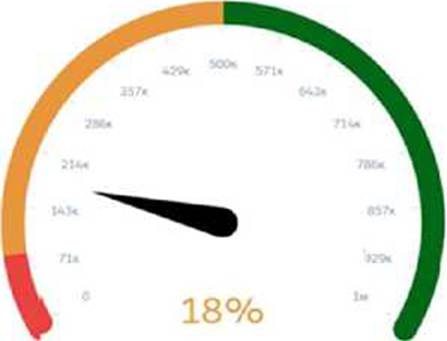
Which widget parameters should a consultant use?
- A . Range Values, Angle, Conditional Formatting
- B . Reference Line, Angle, Range Values
- C . Reference Line, Markers, Conditional Formatting
C
Explanation:
In the scenario described, the sales managers at Universal Containers require a Gauge chart that not only shows the current percentage of opportunities in their pipeline but also indicates whether they are below or beyond their set targets. The appropriate widget parameters to achieve this visualization in Salesforce CRM Analytics (formerly known as Einstein Analytics) are:
Reference Line: This parameter is crucial for defining a specific target value on the gauge chart. It visually marks a point that represents the target goal, providing an immediate visual cue as to whether the current percentage is below or above this point.
Markers: Markers are used to represent and highlight specific values on the gauge chart. They can be utilized to emphasize the current percentage level of the pipeline, making it instantly visible how close or far the current value is from the reference line or target.
Conditional Formatting: This feature allows the chart to change color or style based on whether the current values meet, exceed, or fall below the target. It is a critical visual tool for quickly communicating performance against targets. Conditional formatting can be set to alter the appearance of the gauge’s fill color based on whether the values are above, equal to, or below the reference line, thereby providing an intuitive visual representation of performance relative to targets.
The combination of these three parameters enables a highly effective visualization for sales managers to monitor their performance against key metrics and targets directly on their dashboards. This setup is aligned with Salesforce’s best practices for creating meaningful and actionable insights within CRM dashboards, ensuring that users can easily interpret and react to the data presented. For more details on configuring these parameters, you can refer to Salesforce documentation and specific Trailhead modules that cover dashboard creation and customization:
Wave Analytics Explorer
Building Lenses, Dashboards, and Apps in CRM Analytics
These resources provide in-depth training and examples to help users effectively use Salesforce CRM Analytics for a wide range of data visualization needs.
AW Computing will start using Tableau Online to report on some of its Salesforce data to users who do NOT have an SFDC license.
What is the first step the CRM Analytics consultant should take?
- A . Use MuleSoft to generate an API ta connect and push data from SFDC to Tableau.
- B . Select the output connection in the “write to” option of the recipe.
- C . Enable the Tableau output connection in the Analytics settings.
Universal Containers (UC) is looking to create a dashboard for whitespace analysis. UC wants to view a particular customer and see what similar customers have bought.
Which recipe transformation is helpful for the consultant to use while creating the dataset?
- A . Timeseries Forecasting
- B . Cluster
- C . Predict Missing Values
B
Explanation:
Cluster transformation is a powerful tool in CRM Analytics recipes used for grouping similar records together based on shared attributes. In this scenario, Universal Containers (UC) wants to perform whitespace analysis by viewing a particular customer and comparing their purchase history with similar customers. The Cluster transformation would help in identifying groups of customers who have made similar purchases. This can then be used to provide insights into what the viewed customer might also be interested in purchasing, based on similar customer behaviors.
Reference: CRM Analytics Recipes and Transformation
CRM Analytics uses permissions of the Integration User to extract data from Salesforce objects and
fields when a dataflow/recipe job runs.
Why should a consultant be cautious while syncing objects and fields containing sensitive data?
- A . The Integration User has Create and Modify All Data access.
- B . The Integration User has Modify All Data access.
- C . The Integration User has View All Data access.