
Salesforce CRM Analytics and Einstein Discovery Consultant Practice Exams
Last updated on Oct 22,2026- Exam Code: CRM Analytics and Einstein Discovery Consultant
- Exam Name: Salesforce Certified CRM Analytics and Einstein Discovery Consultant Exam
- Certification Provider: Salesforce
- Latest update: Oct 22,2026
Universal Containers (UC) is rolling out CRM Analytics to its field sales that include dashboards withorder data from an external source.
UC has a well-defined role hierarchy where everyone is assigned to an appropriate node on the hierarchy. In addition, the order data has a reference to a Salesforce opportunity.
An individual sales rep should be able to view all orders that they own or as part of the account team or opportunity team. The sales manager should be able to view all orders for the entire sales team. Similarly, the VP of sales should be able to view orders for everyone who rolls up in that hierarchy. The dataset has a field called Ownerld which represents the order owner.
Given this information, how should a CRM Analytics consultant implement the above requirements?
- A . As part of the recipe, use a formula on the Roleid fild to create an attribute called ‘ParentRolelDs’ on the dataset, and apply the following security predicate: ‘ParentRolelDs’ == ‘’$UserRoleId’’ || Owned == ‘$User,id\,
- B . As part of the recipe, use the flatten operation on the role hierarchy, create a multi-value attribute called ‘ParentRoleIDs’ on the dataset, and apply the following security predicate: ‘ParentRoleIDs’ == "$User.UserRoleld" || ‘TeamMember.Id’ ‘$User, Id" || ‘Ownerld’ == "$User.Id".
- C . As part of the recipe, use a multi row formula on the Roleld field to create an attribute called ‘ParentRoleIDs’ on the dataset, and apply the following security predicate: “$User.UserRoleld” || ‘Ownerld’ == “$User.Id".
B
Explanation:
In addressing the requirements of Universal Containers to ensure proper visibility of order data across different levels of the sales hierarchy, the use of a security predicate based on role hierarchies is paramount. Here’s why Option B is the ideal approach:
Flatten Operation on Role Hierarchy: This operation is essential as it allows for the creation of a simplified or "flattened" view of the hierarchical relationships within the organization. This flattened view enables the dataset to understand and respect the hierarchical structure in security implementations.
Creating a Multi-value Attribute (‘ParentRoleIDs’): By creating this attribute, the recipe can hold multiple role IDs that a particular user has visibility permissions for. This is crucial in a hierarchical organization like UC where data visibility needs to cascade down the hierarchy.
Security Predicate: The predicate (‘ParentRoleIDs’ == "$User.UserRoleld" || ‘TeamMember.Id’ == ‘$User.Id’ || ‘Ownerld’ == "$User.Id") effectively enforces that:
A user can see all orders where their role matches any of the role IDs in the ‘ParentRoleIDs’ list (hierarchical visibility).
A user can see all orders where they are specifically listed as a team member.
A user can see all orders where they are the owner.
This approach aligns with best practices for implementing row-level security in CRM Analytics, ensuring data visibility is managed correctly according to the defined organizational hierarchy and individual data ownership.
Universal Containers builds a new sales dashboard and wants to make sure account managers can access the dashboard while traveling.
What should the consultant consider doing in this process?
- A . A Set the optimal Dashboard width for the Phone layout to get a more accurate preview.
- B . Make sure the dashboard automatically is optimized for mobile viewing.
- C . Enable mobile optimization in the analytics settings under Setup.
The administrator at Cloud Kicks has been asked to sync data from an external object created in Salesforce into CRM Analytics.
What should the administrator keep in mind?
- A . Salesforce external objects are unsupported in RM Analytics recipes digest transformations.
- B . Using a custom connector to connect to the external objects will load it into CRM Analytics.
- C . Loading the external object data into CRM Analytics will help join objects in the recipes.
A dashboard designer at Cloud Kicks creates a dashboard in CRM Analytics. The designer notices fields display on the dashboard with their API labels, such as "AccountId.Industry", and wants to change this behavior.
The designer also notices that the fields and their order appear to randomly change when a values table is created.
What should the CRM Analytics consultant explain to help the designer?
- A . The default fields in a values table can be changed by reordering how fields appear in the JSON of the value table.
- B . The default fields In a values table and the field labels can be modified in the dataset explorer.
- C . The field labels can only be changed in the widget properties in the dashboard edit mode.
B
Explanation:
For the scenario at Cloud Kicks where fields display with their API labels and the fields in a values table seem to change order randomly, the correct approach is to modify these settings in the dataset explorer within CRM Analytics. This allows for a more intuitive display and control over how data is presented in dashboards.
Here’s how these adjustments help:
Modifying Field Labels: Changing the field labels from their API names to more user-friendly names enhances readability and user experience. This can be done directly in the dataset explorer, which affects how fields appear across all dashboards utilizing that dataset.
Controlling Field Order: The order of fields in a values table can seem random if not explicitly set. By using the dataset explorer, a designer can specify the order in which fields appear, which then reflects consistently in the dashboard’s values table.
This functionality is part of CRM Analytics’ aim to provide flexible and customizable data visualization tools. Training on these features is available through various Salesforce Trailhead modules that discuss dashboard and dataset customization techniques, providing practical insights and guided tutorials to enhance dashboard design and user interaction.
Both these explanations are consistent with best practices as outlined in Salesforce’s CRM Analytics documentation and the Trailhead educational content, ensuring that users are well-equipped to leverage the full capabilities of CRM Analytics for effective data management and presentation.
A CRM Analytics administrator is working on deploying a dataflow and a dataset (generated by this dataflow) to another org.
While creating a change set, they notice that the components are NOT visible to be included in the change set.
What is the reason for this?
- A . The administrator does NOT have system administrator permission to include the assets In the change set,
- B . Assets are kept in the Private App and are unavailable to include in the change set.
- C . The administrator does NOT have access to the assets on CRM Analytics.
Exhibit.
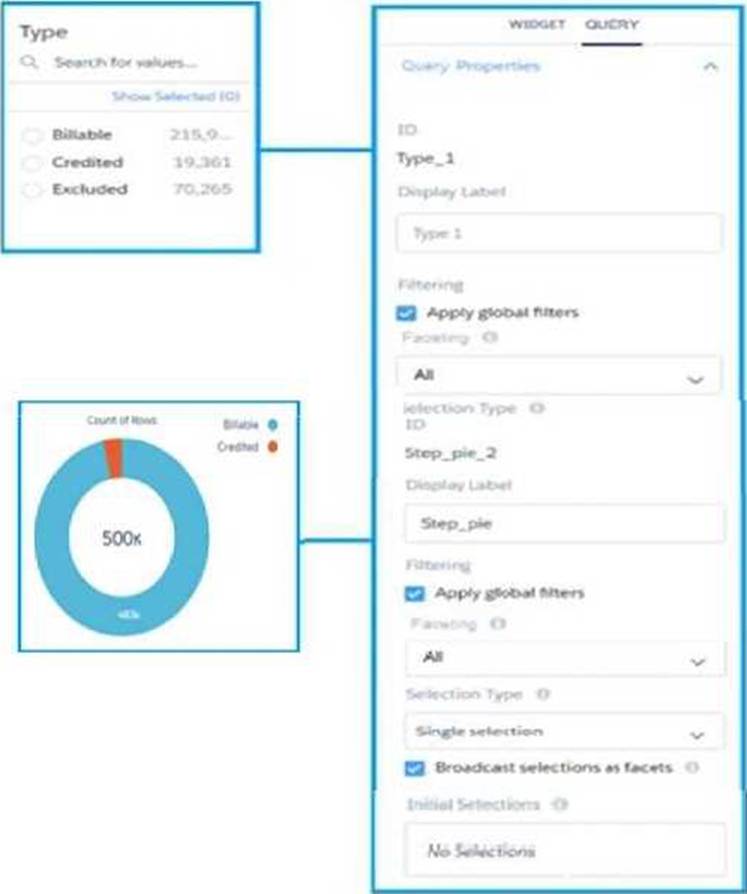
Given that the queries are using different datasets, which change should a CRM Analytics consultant make to solve this issue?
- A . Use "Connect Data Sources" and create a connection to connect the two datasets.
- B . Use “Connect Data Sources" and create a connection to connect the two widgets.
- C . Use result binding/Interaction in the filters section of the query "Type 1”.
CRM Analytics team plans to enable data sync.
Which limit specific to data syne should the team consider before enabling the feature because it may impact existing jobs?
- A . Maximum number of data sync jobs cannot exceed the limit
- B . Maximum number of Full Sync connection mode enabled
- C . Maximum number of objects that can be enabled for data sync
C
Explanation:
In CRM Analytics, when planning to enable data sync, one of the critical considerations is the limit
on the number of objects that can be enabled for data sync. This limit is essential because it
determines how many different Salesforce objects (like Accounts, Opportunities, etc.) can be
synchronized concurrently. Exceeding this limit could impact the performance of existing sync jobs or
prevent new sync jobs from being configured.
Key points to consider include:
Performance Impact: Syncing too many objects simultaneously can lead to increased load times and potential delays in data availability, impacting users’ ability to access up-to-date information. Resource Allocation: CRM Analytics allocates resources based on the number of objects being synchronized, and there are practical limits to these resources to ensure stable and efficient operation.
For a more detailed understanding and to manage these limits effectively, Salesforce provides documentation and guidelines within the CRM Analytics resources, which can be further explored in the Trailhead modules specifically focusing on data management and synchronization practices.
CRM Analytics team plans to enable data sync.
Which limit specific to data syne should the team consider before enabling the feature because it may impact existing jobs?
- A . Maximum number of data sync jobs cannot exceed the limit
- B . Maximum number of Full Sync connection mode enabled
- C . Maximum number of objects that can be enabled for data sync
C
Explanation:
In CRM Analytics, when planning to enable data sync, one of the critical considerations is the limit
on the number of objects that can be enabled for data sync. This limit is essential because it
determines how many different Salesforce objects (like Accounts, Opportunities, etc.) can be
synchronized concurrently. Exceeding this limit could impact the performance of existing sync jobs or
prevent new sync jobs from being configured.
Key points to consider include:
Performance Impact: Syncing too many objects simultaneously can lead to increased load times and potential delays in data availability, impacting users’ ability to access up-to-date information. Resource Allocation: CRM Analytics allocates resources based on the number of objects being synchronized, and there are practical limits to these resources to ensure stable and efficient operation.
For a more detailed understanding and to manage these limits effectively, Salesforce provides documentation and guidelines within the CRM Analytics resources, which can be further explored in the Trailhead modules specifically focusing on data management and synchronization practices.
A data architect wants to use a recipe transformation to implement row level security based on role hierarchy in Salesforce.
Which transformation should the architect use to level the dataset hierarchy?
- A . Aggregate
- B . Flatten
- C . Join
Universal Containers intends to use a custom Salesforce big object in its org and visualize the data using CRM Analytics. As the number of rows to be synced is quite large, the CRM Analytics consultant is looking to set up an incremental sync with additional filters added as part of the data sync to improve performance.
What should the consultant keep in mind while implementing this?
- A . Incremental data syne Is NOT supported for big objects.
- B . Custom big objects are NOT supported by CRM Analytics.
- C . Only SOSL queries can be used as data syne filters.