
Salesforce CRM Analytics and Einstein Discovery Consultant Practice Exams
Last updated on Oct 22,2026- Exam Code: CRM Analytics and Einstein Discovery Consultant
- Exam Name: Salesforce Certified CRM Analytics and Einstein Discovery Consultant Exam
- Certification Provider: Salesforce
- Latest update: Oct 22,2026
The CRM Analytics project team at Universal Containers is creating an app with dashboards, datasets, and lenses. The app has been shared with multiple users with Viewer, Editor, and/or Manager access.
One end user is unable to view the dashboard watchlist that was previously set up. They are receiving a “Resource not found” error while trying to access the dashboard. The team confirms that the end user has Viewer access to the app but the project team is able to view the dashboard.
What is the reason for this error?
- A . The dashboard is deleted by a user with Manager access to the App.
- B . The dashboard has been hidden by a user with Manager access to the App.
- C . The dashboard or App permission needs to be updated to Editor.
A client has two datasets that are used across seven different dashboards. Three of these dashboards are used by marketing and four are used by sales. The client requires that only marketing can access the marketing dashboards and only sales can access the sales dashboards.
Which solution should a consultant recommend?
- A . Create three custom apps: one for marketing dashboards with marketing as "viewer", one for sales dashboards with sales as "viewer", and one for datasets where marketing and sales are "viewer".
- B . Duplicate the datasets and create two custom apps: one for marketing dashboards and datasets with marketing as “editor” and one for sales dashboards and datasets with sales as "editor".
- C . Use two custom apps: one for marketing dashboards with marketing as "viewer" and one for sales dashboards with sales as “viewer". Add the datasets as references to both custom apps.
CRM Analytics consultant receives a new project from a client that wants to implement CRM Analytics. They do not currently have CRM Analytics but want guidance on how to ensure their users have the correct access.
They have 1,000 users with a small team of three people who will build both datasets and dashboards. An additional 15 people should be able to only create dashboards. The remaining users should only be able to view dashboards.
Which recommendation should the consultant give the client?
- A . Assign the app permissions "viewer", "editor", and "manager" to the three types of roles defined.
- B . Create and assign three new Salesforce profiles according to the three types of roles defined.
- C . Create and assign Salesforce permission sets according to the three types of roles defined.
C
Explanation:
For a client implementing CRM Analytics with a variety of user roles, creating and assigning
Salesforce permission sets is the most flexible and scalable solution.
Here’s why:
Flexibility and Customization: Permission sets allow for specific access rights to be compiled and assigned based on user roles without altering their existing profiles.
Scalability: As the organization grows or roles change, permission sets can be easily adjusted or reassigned to accommodate new requirements or users.
Simplified Management: Managing access via permission sets simplifies the administration of user rights, making it easier to ensure that each group has the appropriate level of access.
consultant is reviewing a model that is set to maximize the daily sales quantity of consumer products in stores, and they see this recommendation.
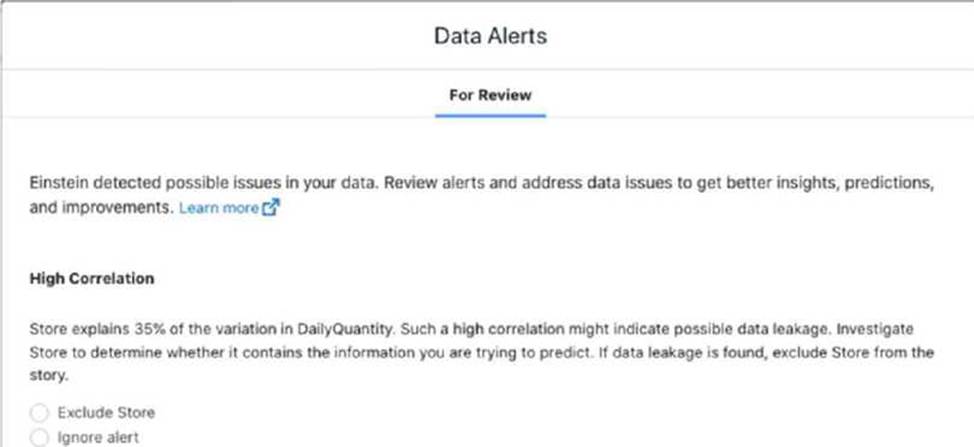
Which action should the consultant take?
- A . Verify client expectations that Store is a strong predictor for daily sales quantity.
- B . Remove the Store field from the model definition, because that is the recommended action.
- C . Ignore alert; the explanation of variation is only 35%, which is below 50%,
A
Explanation:
Upon reviewing the data model and noticing the high correlation alert between ‘Store’ and daily sales quantity, the appropriate action is to verify with the client their expectations regarding the influence of the Store field on daily sales. Here’s the rationale:
Understanding the Role of ‘Store’ in the Model: Before making any changes to the model, it’s crucial to understand whether the ‘Store’ field is expected to be a strong predictor based on the business context. If the client expects that different stores inherently have different sales volumes due to factors like location, size, or customer base, this correlation may be both meaningful and desired. Potential Data Leakage: High correlation warnings can sometimes indicate data leakage, where a predictor (like ‘Store’) might inadvertently include information about the outcome variable (daily sales quantity). It’s essential to verify whether this correlation makes sense logically or if it’s skewing the model predictions.
Client Consultation: Consulting with the client helps ensure that any modeling decisions align with their business knowledge and expectations. It’s about validating the model against real-world expectations and ensuring it remains a useful tool for decision-making.
By taking these steps, the consultant not only adheres to best practices in data science by validating model inputs and their implications but also ensures that the model aligns with the client’s business strategies and operational realities.
CRM Analytics users at Cloud Kicks are granted access to an app with specific dashboards.
When trying to download a specific widget, they are unable to do so.
- A . The users have access to the dashboard but not the dataset.
- B . The dashboard has been created for internal use and the users have a view only license.
- C . The permission set for the users is missing the download data permission.
C
Explanation:
In CRM Analytics, even if users are granted access to view an app and its dashboards, their ability to download data is controlled by permissions assigned via permission sets. Specifically, users need the "Download Data" permission to download data from widgets or dashboards. If this permission is missing from their permission set, they will be unable to download the specific widget, even though they can view the data.
Reference: The role of permission sets in granting access to data features, such as downloading data, is detailed in Salesforce’s CRM Analytics permissions documentation and is emphasized in the module "Building Lenses, Dashboards, and Apps in CRM Analytics."
CRM Analytics users at Cloud Kicks are granted access to an app with specific dashboards.
When trying to download a specific widget, they are unable to do so.
- A . The users have access to the dashboard but not the dataset.
- B . The dashboard has been created for internal use and the users have a view only license.
- C . The permission set for the users is missing the download data permission.
C
Explanation:
In CRM Analytics, even if users are granted access to view an app and its dashboards, their ability to download data is controlled by permissions assigned via permission sets. Specifically, users need the "Download Data" permission to download data from widgets or dashboards. If this permission is missing from their permission set, they will be unable to download the specific widget, even though they can view the data.
Reference: The role of permission sets in granting access to data features, such as downloading data, is detailed in Salesforce’s CRM Analytics permissions documentation and is emphasized in the module "Building Lenses, Dashboards, and Apps in CRM Analytics."
A project team member uploads a CSV file to CRM Analytics, and they notice a few records failed during the upload. The manager wants to view the error log generated so this can be fixed and uploaded again. The manager has the CRM Analytics administrator permission but is unable to download the error log details.
Why is the manager unable to download the log details?
- A . They do not have the Upload External Data to CRM Analytics permission enabled.
- B . They do not have the Download CRM Analytics Data permission enabled.
- C . Only the user who uploaded the external data file can download the error log.
C
Explanation:
In CRM Analytics, when a CSV file is uploaded and errors occur during the upload process, an error log is generated. However, only the user who uploaded the external data file can download the error log, even if other users have administrative permissions. This restriction ensures that only the user responsible for the data upload can access the details to resolve the issues.
Reference: The limitations and permissions surrounding external data uploads and error logs are outlined in CRM Analytics permissions documentation.
Universal Containers’ sales team is looking to build a dashboard that shows the total revenue from their top 10 accounts (based on revenue) and make it dynamic with the filters of the dashboard.
Which action is required to accomplish this?
- A . Create a query and sort descending by revenue and limit it to 10 results.
- B . Create a query with a results based interaction as a filter using the limit query to pass in the 10 Account IDs.
- C . Create 2 query with a selection based interaction as a filter using the limit query to pass in the 10 Account IDs.
A
Explanation:
To create a dashboard showing the top 10 accounts by revenue dynamically, the best approach is to create a query that sorts the accounts in descending order by revenue and limits the results to the top 10. This query can then be used as the data source for the widget, ensuring that it dynamically adjusts based on the filters applied to the dashboard.
This method efficiently handles the task because sorting by revenue and limiting the results to 10 ensures that only the top accounts are displayed, and it remains dynamic with dashboard filters.
Reference: This approach is covered in the Building Lenses, Dashboards, and Apps in CRM Analytics module, where techniques for creating dynamic queries are discussed.
A system administrator and a CRM Analytics consultant are working together on deploying arecipe/dataflow and a dataset to another org. Prior to this deployment, a package was deployed with all the custom fields used in the dataflow and dataset.
While running the recipe/dataflow in the target environment, the consultant encounters multiple errors related to these custom fields.
How should this be resolved?
- A . Check whether the system administrator has been provided access to these custom fields on the target org.
- B . Check whether the Analytics Integration user has been provided access to these custom fields on the target org.
- C . Check whether the consultant has been provided access to these custom fields on the target org.
Universal Containers wants to create two dashboards and has two user groups. The ‘Regional Performance’ dashboard should be accessible to sales reps and managers/executives to keep track of how sales reps are performing in each region. Sales reps must only be able to see data pertaining to their respective region. The ‘National Performance’ dashboard is using the same data as the other dashboard but should only be accessible to managers/executives to compare data across all regions.
In addition to row-level security to view only regional data, how should a consultant ensure that sales reps are unable to view the ‘National Performance’ dashboard?
- A . Create one dataset, two apps; store ‘Regional Performance’ dashboard and dataset In one app;
and provide access to both user groups to this app. Store ‘National Performance’ dashboard in
another app and only provide access to
managers/executives. - B . Create two datasets, one app; store both ‘Regional Performance’ dashboard, ‘National
Performance’ dashboard, and dataset in the app; and provide access to both user groups to this app. - C . Create one dataset, one app; store both ‘Regional Performance’ dashboard, ‘National
Performance’ dashboard, and dataset in the app; and provide access to both user groups to this app.
Use row-level security to restrict sales reps from seeing data in ‘National Performance’ dashboard.