
Salesforce CRM Analytics and Einstein Discovery Consultant Practice Exams
Last updated on Oct 22,2026- Exam Code: CRM Analytics and Einstein Discovery Consultant
- Exam Name: Salesforce Certified CRM Analytics and Einstein Discovery Consultant Exam
- Certification Provider: Salesforce
- Latest update: Oct 22,2026
Universal Containers (UC) creates a dataset, "Book11", containing a budget per region per month for the first 6 months of the year, as shown in the graphic below. Now, UC wants to create a lens showing the total budget for each region for each month. Every combination of region and month must be shown in the lens, even if there is no data.
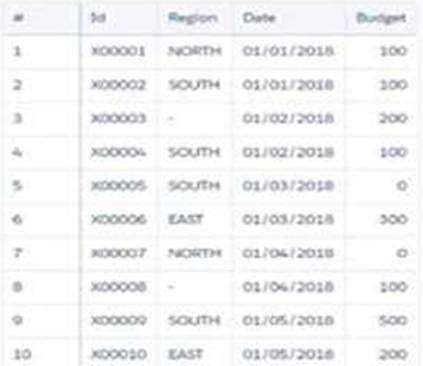
How should a CRM Analytics consultant help UC build this lens?
- A . Use a "fill" statement in SAQL query with a "partition" parameter.
- B . Use a “Compare Table" and add a column leveraging the “Running Total” function.
- C . Use a "Compare Table" and use the "Show Totals" option.
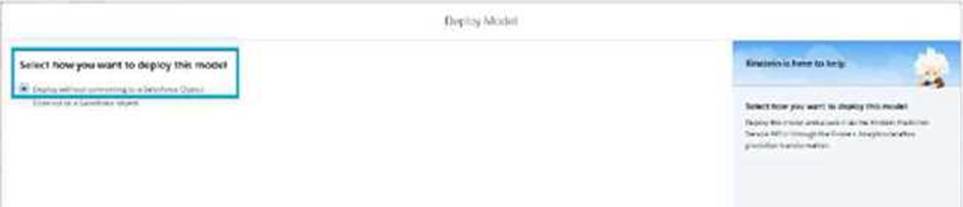
Which capability can a consultant use if “Deploy without connecting to a Salesforce Object” is selected while deploying the model?
- A . Einstein Predictions Component score
- B . Predict Function in Salesforce flows
- C . No-Code Writeback to SFDC objects
B
Explanation:
When deploying a model with the option "Deploy without connecting to a Salesforce Object", the suitable capabilities include:
Use of Predict Function in Salesforce Flows: This capability allows the deployed model to be used within Salesforce Flow as a predictive tool, enabling automation flows to include predictions without directly writing back to Salesforce objects.
Flexibility in Application: This method provides flexibility in how predictions are utilized across various Salesforce processes and workflows, without the need for direct data manipulation within Salesforce objects.
Enhanced Workflow Integration: By integrating predictive insights directly into flows, organizations can automate decision-making processes, enhance user interactions, and streamline operations based on predictive outcomes.
This setup aligns with Salesforce’s best practices for leveraging CRM Analytics to enhance operational efficiency and decision accuracy across different business functions.
Donut chart widget associated to the query "Step_pie_3" and grouped by the dimension "Type" The team wants to use bindings/interactions so any selection in the List widget will filter the Donut chart. The queries use different datasets, and users should be able to choose more than one Type (multi-selection).
What is the right syntax for the binding/interaction?
A)

B)

C)

- A . Option A
- B . Option B
- C . Option C
A
Explanation:
For the given requirement where a selection in a list widget needs to filter data displayed on a donut chart, and considering the list allows for multi-selection of the ‘Type’, the correct binding/interaction would be to use a syntax that captures the multi-select aspect and passes it appropriately.
The right syntax, as indicated in Option A, looks like this:
"{{column(Type_2.selection, ["Type"]).asObject()}}"
This syntax ensures:
Multi-selection: The column() function in combination with .asObject() ensures that multiple
selected values from the ‘Type_2’ query can be passed as an object, which the donut chart can utilize
to filter its content.
Correct Data Type Handling: By using .asObject(), the binding ensures the data passed between widgets maintains the correct structure expected by the CRM Analytics dashboard, thereby ensuring accurate filtering.
Donut chart widget associated to the query "Step_pie_3" and grouped by the dimension "Type" The team wants to use bindings/interactions so any selection in the List widget will filter the Donut chart. The queries use different datasets, and users should be able to choose more than one Type (multi-selection).
What is the right syntax for the binding/interaction?
A)
B)
C)
- A . Option A
- B . Option B
- C . Option C
A
Explanation:
For the given requirement where a selection in a list widget needs to filter data displayed on a donut chart, and considering the list allows for multi-selection of the ‘Type’, the correct binding/interaction would be to use a syntax that captures the multi-select aspect and passes it appropriately.
The right syntax, as indicated in Option A, looks like this:
"{{column(Type_2.selection, ["Type"]).asObject()}}"
This syntax ensures:
Multi-selection: The column() function in combination with .asObject() ensures that multiple
selected values from the ‘Type_2’ query can be passed as an object, which the donut chart can utilize
to filter its content.
Correct Data Type Handling: By using .asObject(), the binding ensures the data passed between widgets maintains the correct structure expected by the CRM Analytics dashboard, thereby ensuring accurate filtering.
Universal Containers (UC) uses a Microsoft Azure SQL Data Warehouse to gather information about sales reps’ objectives. UC wants to use CRM Analytics to gain insights from this data and automatically load it into a CRM Analytics dataset daily. The data also needs to be transformed and merged with data from the company’s org.
Which CRM Analytics user interface features should be used to complete these requirements?
- A . Analytics REST API used in conjunction with dataflows/recipes.
- B . Microsoft Azure SQL Data Warehouse Connector used in Conjuction with dataflows/recipes
- C . CRM Analytics Connector for Excel used in conjunction with dataflows/recipes
B
Explanation:
CRM Analytics provides out-of-the-box connectors for integrating external data sources like Microsoft Azure SQL Data Warehouse. To meet the requirement of daily automated data loading, the Microsoft Azure SQL Data Warehouse Connector can be used to pull data into CRM Analytics. Once the data is imported, dataflows or recipes can be used to transform and merge this data with the organization’s Salesforce data. Recipes allow for merging datasets and applying any necessary transformations, ensuring the data from Azure is combined and transformed appropriately before analysis.
Reference: CRM Analytics Connectors and Dataflows
A CRM Analytics consultant has prepared a CSV file to be uploaded to CRM Analytics. By mistake, one of the column headers is modified as random non-alphanumeric characters "*&**(&*(%", which went unnoticed prior to uploading the file.
What is the expected behavior of the uploaded CSV column?
- A . The column header is prefixed with "X" upon upload.
- B . The column header is auto-updated to “Column” + column number.
- C . The column header Is set to *&**(&*(%.
A
Explanation:
When uploading CSV files into CRM Analytics, column headers must follow certain formatting rules. Headers containing non-alphanumeric characters, such as "&**(&(%", will automatically be adjusted. Specifically, if the column header starts with non-alphanumeric characters or contains such characters, CRM Analytics will prefix the header with "X" to ensure compatibility with internal naming conventions. This behavior ensures that the column can be referenced in the platform without causing errors or conflicts.
Reference: You can find the CSV upload rules, including naming conventions and auto-formatting behaviors, outlined in the Salesforce CRM Analytics documentation provided during training, particularly under the module "Wave Analytics Explorer."
The CRM Analytics consultant at Cloud Kicks is asked to a dashboard displaying Opportunities data on the account’s record page. The dashboard should display only opportunity data related to the current account viewed.
How should the consultant accomplish this?
- A . Create the dashboard, insert in the account’s record page, and apply a filter based on the opportunity’s Id field.
- B . Create the dashboard, insert in the account’s record page, and apply a filter based on the account’s Id field.
- C . Create a dashboard, clone it and filter It for each account record, and embed them into the account’s record pages accordingly.
Exhibit.
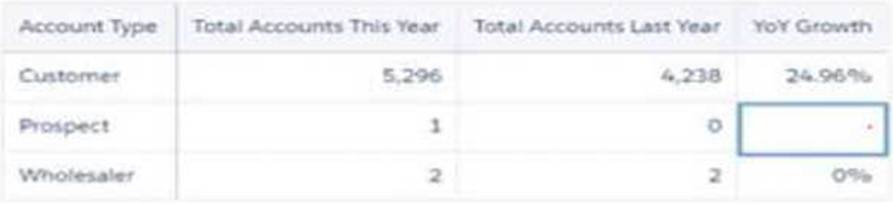
Universal Containers has a dashboard for sales managers to visualize the Year Over Year (YoY) growth of their customers.
The formula used is:
YoY = [(This Year ― Last Year) / Last Year] %
Based on the graphic, when there is not an account in the Last Year column, the YoY Growth shows null results. The sales managers want to replace it with 100% value.
What is the correct function to use?
- A . substr()
- B . coalesce()
- C . replace()
CXOs and VPs should have access to all data irrespective of the region (APAC, EMEA, etc.).
Which sharing method works for this scenario?
- A . Create two sets of dashboards; one for EMEA, and one for CXOs and VPs while filtering the dashboard on the region.
- B . Use a field on the user record like Department/Region, and apply row-level security based on that field.
- C . Create two separate datasets; one for EMEA, and one for CXOs and VPs.
B
Explanation:
For Cloud Kicks’ requirements regarding access to data based on roles and geographic regions, the most efficient and scalable approach is to implement row-level security using fields on the user record, like Department or Region.
Here’s the rationale for choosing this approach:
Scalability and Maintenance: By applying security rules based on user record fields, Cloud Kicks can manage access dynamically without needing to maintain multiple dashboards or datasets. This reduces administrative overhead and simplifies updates as roles or regional structures change. Flexibility: Using a field on the user record to control access allows for easy expansion or modification of security policies as new regions or roles are added.
Simplicity: This method ensures a clear and straightforward security model that can be easily audited and understood by administrators and compliance teams.
A CRM Analytics consultant has been asked to bring data from an external database as well as five external Salesforce environments into CRM Analytics. Twenty-five objects have been enabled from the local Salesforce connector.
The requirements are:
* 10 objects should be enabled from an external database
* 12 objects each from three of the external Salesforce environments
* 15 objects each from the remaining two external Salesforce environments
The consultant estimates each connector will, per object, bring between 1,000 and 1 million rows of data.
Which limit will be exceeded?
- A . Total number of enabled objects
- B . Salesforce external connector number of synced rows
- C . Storage rows of data
A
Explanation:
In evaluating the scenario presented where multiple external sources and objects are being integrated into CRM Analytics, we need to consider the total number of enabled objects across all connections.
Here’s a breakdown:
10 objects from an external database
12 objects each from three external Salesforce environments, totaling 36 objects
15 objects each from two external Salesforce environments, totaling 30 objects
25 objects already enabled from the local Salesforce connector
This brings us to a total of 101 objects enabled, which may exceed typical limits on the number of objects that can be enabled in a CRM Analytics environment, depending on the specific Salesforce licensing and platform limits.