
Paloalto Networks SSE Engineer Practice Exams
Last updated on Oct 22,2026- Exam Code: SSE Engineer
- Exam Name: Palo Alto Networks Security Service Edge Engineer
- Certification Provider: Paloalto Networks
- Latest update: Oct 22,2026
A company has four branch offices between Canada Central and Canada East which use the same IPSec termination node and have QoS configured with customized bandwidth per site. An engineer wants to onboard a new branch office on the same IPSec termination node.
What is the QoS behavior for the new branch office?
- A . Automatically distributed to 25% for each site
- B . Unallocated until manually assigned
- C . Automatically distributed to 20% for each site
- D . Cannot be added to existing QoS configuration
B
Explanation:
When onboarding a new branch office to an existing IPSec termination node in Prisma Access, the QoS bandwidth is not automatically assigned. Instead, the newly added branch remains unallocated until the administrator manually assigns bandwidth within the QoS configuration settings. This ensures that customized bandwidth per site remains intact and allows for fine-tuned traffic management based on business needs.
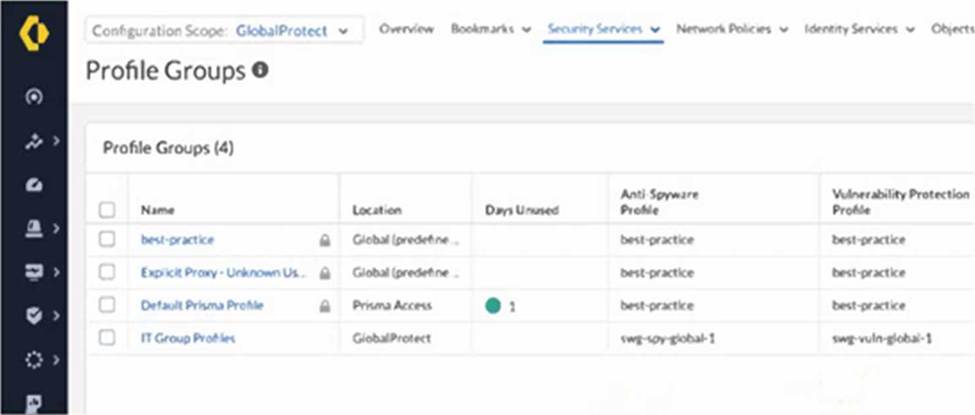
An intern is tasked with changing the Anti-Spyware Profile used for security rules defined in the GlobalProtect folder. All security rules are using the Default Prisma Profile. The intern reports that the options are greyed out and cannot be modified when selecting the Default Prisma Profile.
Based on the image below, which action will allow the intern to make the required modifications?
- A . Request edit access for the GlobalProtect scope.
- B . Change the configuration scope to Prisma Access and modify the profile group.
- C . Create a new profile, because default profile groups cannot be modified.
- D . Modify the existing anti-spyware profile, because best-practice profiles cannot be removed from a group.
C
Explanation:
Palo Alto Networks best practices and the behavior of Strata Cloud Manager (SCM) dictate that predefined or default objects, including profile groups like "Default Prisma Profile," cannot be directly modified. These default objects serve as baseline configurations and are often locked to prevent accidental or unintended changes that could impact the overall security posture.
The intern’s experience of the options being greyed out when selecting "Default Prisma Profile" is a direct indication of this immutability of default objects. Therefore, the correct action is to:
Create a new Profile Group: The intern should create a new profile group within the appropriate configuration scope (likely GlobalProtect, given the task).
Configure the new Profile Group: In this new profile group, the intern can select the desired Anti-Spyware Profile (which might be an existing custom profile or a new one they create).
Modify Security Rules: The security rules currently using the "Default Prisma Profile" in the GlobalProtect folder need to be modified to use this newly created profile group. Let’s analyze why the other options are incorrect based on official documentation:
Which two configurations must be enabled to allow App Acceleration for SaaS applications? (Choose two.)
- A . Acceleration agent for the client machines
- B . QoS for user traffic
- C . Trusted Root CA for the CA certificate
- D . Forward Trust Certificate for the CA certificate
C, D
Explanation:
To enable App Acceleration for SaaS applications in Prisma Access, the following configurations must be enabled:
Trusted Root CA for the CA certificate ensures that Prisma Access can validate and trust the SaaS application’s certificates, allowing seamless inspection and acceleration of traffic without security warnings.
Forward Trust Certificate for the CA certificate enables SSL decryption for SaaS applications, allowing Prisma Access to optimize traffic and apply acceleration techniques while maintaining security policies.
How can a senior engineer use Strata Cloud Manager (SCM) to ensure that junior engineers are able to create compliant policies while preventing the creation of policies that may result in security gaps?
- A . Use security checks under posture settings and set the action to “deny” for all checks that do not meet the compliance standards.
- B . Configure role-based access controls (RBACs) for all junior engineers to limit them to creating policies in a disabled state, manually review the policies, and enable them using a senior engineer role.
- C . Configure an auto tagging rule in SCM to trigger a Security policy review workflow based on a security rule tag, then instruct junior engineers to use this tag for all new Security policies.
- D . Run a Best Practice Assessment (BPA) at regular intervals and manually revert any policies not meeting company compliance standards.
A
Explanation:
By using security checks under posture settings in Strata Cloud Manager (SCM), the senior engineer can enforce policy compliance standards by automatically denying any security policy that does not align with best practices. This ensures that junior engineers can create policies while preventing configurations that might introduce security gaps. This proactive approach eliminates manual oversight and enforces compliance at the time of policy creation, reducing risk and ensuring consistent security enforcement.
A customer is implementing Prisma Access (Managed by Strata Cloud Manager) to connect mobile users, branch locations, and business-to- business (B2B) partners to their data centers.
The solution must meet these requirements:
The mobile users must have internet filtering, data center connectivity, and remote site connectivity to the branch locations.
The branch locations must have internet filtering and data center connectivity.
The B2B partner connections must only have access to specific data center internally developed applications running on non-standard ports.
The security team must have access to manage the mobile user and access to branch locations.
The network team must have access to manage only the partner access.
Which two options will allow the engineer to support the requirements? (Choose two.)
- A . Configure the CPE with Static Routes pointing to Prisma Access Infrastructure and Mobile User routes.
- B . Enable eBGP for dynamic routing and configure RemoteNetworks.
- C . Configure Remote Networks and define the branch IP subnets using Static Routes.
- D . Enable Remote Networks Advertise Default Route.
B, C
Explanation:
Enabling eBGP for dynamic routing and configuring Remote Networks ensures seamless connectivity between branch locations, mobile users, and the data center. eBGP allows Prisma Access to dynamically exchange routes with the Customer Premises Equipment (CPE), optimizing path selection without requiring manual updates. Configuring Remote Networks and defining branch IP subnets using static routes ensures controlled and segmented routing, aligning with security policies. This setup provides proper internet filtering, data center connectivity, and restricted access for B2B partners while keeping management responsibilities aligned.
A customer is implementing Prisma Access (Managed by Strata Cloud Manager) to connect mobile users, branch locations, and business-to- business (B2B) partners to their data centers.
The solution must meet these requirements:
The mobile users must have internet filtering, data center connectivity, and remote site connectivity to the branch locations.
The branch locations must have internet filtering and data center connectivity.
The B2B partner connections must only have access to specific data center internally developed applications running on non-standard ports.
The security team must have access to manage the mobile user and access to branch locations.
The network team must have access to manage only the partner access.
How can the engineer configure mobile users and branch locations to meet the requirements?
- A . Use GlobalProtect and Remote Networks to filter internet traffic and provide access to data center resources using service connections.
- B . Use Explicit Proxy to filter internet traffic and provide access to data center resources using service connections.
- C . Use GlobalProtect to filter internet traffic and provide access to data center resources using service connections.
- D . Use Explicit Proxy and Remote Networks to filter internet traffic and provide access to data center resources using service connections.
A
Explanation:
To meet the customer’s requirements, GlobalProtect and Remote Networks should be used as follows:
GlobalProtect: This enables secure access for mobile users, ensuring internet filtering, data center connectivity, and access to branch locations.
Remote Networks: This is used to provide security and connectivity for branch locations, ensuring internet filtering and data center access.
Service Connections: These allow both mobile users and branch locations to securely connect to the data center for internal resources.
This configuration ensures that mobile users and branch locations can securely access the internet while maintaining a segregated and secure connection to internal resources. It also aligns with Prisma Access’s best practices for security enforcement, traffic filtering, and centralized management.
Which feature can help address a customer concern about the length of time it takes to update their SaaS-allowed IP addresses while onboarding to Prisma Access?
- A . Dynamic IP pooling
- B . DNS-based load balancing
- C . Traffic steering
- D . Dedicated IP addresses
C
Explanation:
When onboarding to Prisma Access, using Dedicated IP addresses helps address concerns about the time required to update SaaS-allowed IP lists. With dedicated egress IPs, the customer receives fixed, predictable IP addresses that do not change dynamically. This eliminates the need to frequently
update SaaS providers’ allowlists, ensuring seamless access to cloud applications without interruptions due to IP address changes.
Which feature will fetch user and group information to verify whether a group from the Cloud Identity Engine is present on a security processing node (SPN)?
- A . SASE Health Dashboard
- B . User Activity Insights
- C . Prisma Access Locations
- D . Region Activity Insights
A
Explanation:
The SASE Health Dashboard provides visibility into user and group synchronization between the Cloud Identity Engine and the Security Processing Nodes (SPNs). It allows administrators to verify whether a group from the Cloud Identity Engine is properly fetched and available on the SPN for policy enforcement. This feature helps in troubleshooting identity-based access control issues and ensures that user group mappings are correctly applied within Prisma Access.
What must be configured to accurately report an application’s availability when onboarding a discovered application for ZTNA Connector?
- A . icmp ping
- B . https ping
- C . tcp ping
- D . udp ping
C
Explanation:
When onboarding a discovered application for ZTNA Connector, configuring a TCP ping allows Prisma Access to accurately report the application’s availability. TCP ping (also known as a TCP connection check) verifies whether the application’s service port is open and responsive, ensuring that the application is reachable before allowing user connections. This method is more reliable than ICMP ping, as many cloud and SaaS applications block ICMP traffic for security reasons.
Which Cloud Identity Engine capability will create a Security policy that uses Entra ID attributes as the source identification?
- A . Entra ID Group Attribute
- B . Attribute Group Mapping
- C . Entra ID Cloud Group
- D . Cloud Dynamic User Group
D
Explanation:
The Cloud Dynamic User Group capability in Cloud Identity Engine enables the creation of Security policies that use Entra ID (formerly Azure AD) attributes for user identification. This allows Prisma Access to dynamically apply user-based security rules based on real-time Entra ID attributes, ensuring that access policies adapt to user changes such as group membership, device compliance, or role updates.