
Paloalto Networks SSE Engineer Practice Exams
Last updated on Oct 22,2026- Exam Code: SSE Engineer
- Exam Name: Palo Alto Networks Security Service Edge Engineer
- Certification Provider: Paloalto Networks
- Latest update: Oct 22,2026
Which two actions can a company with Prisma Access deployed take to use the Egress IP API to automate policy rule updates when the IP addresses used by Prisma Access change? (Choose two.)
- A . Configure a webhook to receive notifications of IP address changes.
- B . Copy the Egress IP API Key in the service infrastructure settings.
- C . Enable the Egress IP API endpoint in Prisma Access.
- D . Download a client certificate to authenticate to the Egress IP API.
A, D
Explanation:
Configuring a webhook allows the company to receive real-time notifications when Prisma Access changes its egress IP addresses, ensuring that policy rules are updated automatically. Downloading a client certificate is necessary for authentication to the Egress IP API, allowing secure API access for retrieving updated IP addresses. These actions ensure that security policies remain effective without manual intervention.
How can role-based access control (RBAC) for Prisma Access (Managed by Strata Cloud Manager) be used to grant each member of a security team full administrative access to manage the Security policy in a single tenant while restricting access to other tenants in a multitenant deployment?
- A . Add the team to the Parent Tenant, select the Prisma Access Configuration Scope, and set the role to Security Administrator.
- B . Add the team to the Child Tenant, select All Apps & Services, and set the role to Security Administrator.
- C . Add the team to the Parent Tenant, select Prisma Access & NGFW Configuration, and set the role to Security Administrator.
- D . Add the team to the Child Tenant, select Prisma Access & NGFW Configuration, and set the role to Security Administrator.
D
Explanation:
In a multitenant deployment, access control must be configured at the Child Tenant level to ensure that security administrators have full control over Security policy only within their assigned tenant while restricting access to other tenants. By selecting Prisma Access & NGFW Configuration, the assigned users gain full administrative access only for security policy management within the designated tenant, aligning with RBAC best practices for controlled access in Prisma Access Managed by Strata Cloud Manager.
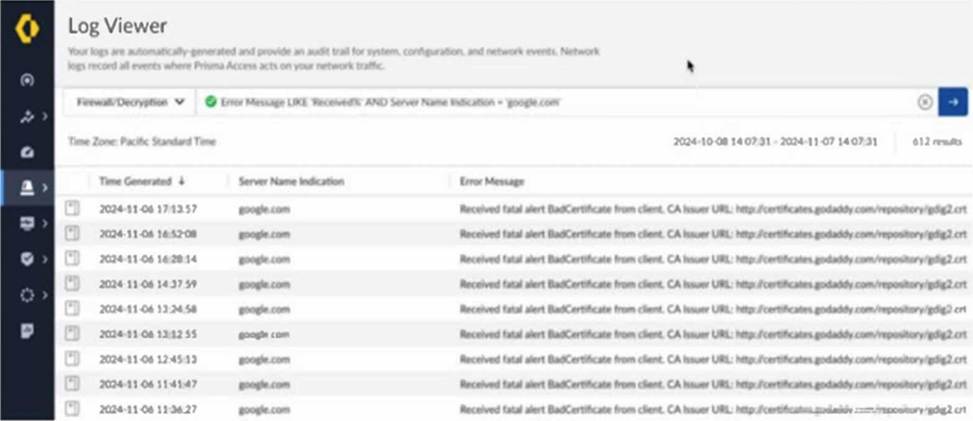
Based on the image below, which two statements describe the reason and action required to resolve the errors? (Choose two.)
- A . The client is misconfigured.
- B . Create a do not decrypt rule for the hostname “google.com.”
- C . The server has pinned certificates.
- D . Create a do not decrypt rule for the hostname “certificates.godaddy.com.”
B, C
Explanation:
The error messages indicate that Prisma Access is encountering certificate issues while attempting to decrypt traffic to "google.com." This suggests that the server has pinned certificates, meaning it does not allow man-in-the-middle (MITM) decryption by Prisma Access. Since pinned certificates prevent traffic decryption, a solution is to create a "do not decrypt" rule for the hostname "google.com." This will allow traffic to flow without triggering certificate errors while maintaining secure communication with Google’s servers.
Which statement applies when enabling multitenancy in Prisma Access (Managed by Panorama)?
- A . Service connection licenses will be assigned only to the first tenant, and these service connections can be shared with the other tenants.
- B . A single tenant cannot consist solely of mobile users or solely of remote networks.
- C . Each tenant is allocated its own dedicated Prisma Access instances, with compute resources that are not shared across tenants.
- D . There is flexibility to manage different tenants using separate Panoramas, which allows for better organization and management of the multiple tenants.
C
Explanation:
When multitenancy is enabled in Prisma Access (Managed by Panorama), a key characteristic is the isolation of resources between tenants. Palo Alto Networks documentation emphasizes that each tenant operates within its own logically separate Prisma Access environment. This includes dedicated compute instances, ensuring that the performance and security of one tenant are not impacted by the activities of another.
Let’s analyze why the other options are incorrect based on official documentation:
Where are tags applied to control access to Generative AI when implementing AI Access Security?
- A . To Generative AI applications for identifying sanctioned, tolerated, or unsanctioned applications
- B . To security rules for defining which types of Generative AI applications are allowed or blocked
- C . To user devices for identifying and controlling which Generative AI applications they can access
- D . To Generative AI URL categories for classifying trusted and untrusted Generative AI websites
A
Explanation:
When implementing AI Access Security, tags are applied to Generative AI applications to classify them as sanctioned, tolerated, or unsanctioned. This allows organizations to enforce policy-based access control over AI tools, ensuring that only approved applications are accessible while restricting or monitoring usage of untrusted or high-risk AI platforms. This classification helps security teams manage AI-related risks and compliance effectively.
A company has a Prisma Access deployment for mobile users in North America and Europe. Service connections are deployed to the data centers on these continents, and the data centers are connected by private links.
With default routing mode, which action will verify that traffic being delivered to mobile users traverses the service connection in the appropriate regions?
- A . Configure BGP on the customer premises equipment (CPE) to prefer the assigned community string attribute on the mobile user prefixes in its respective Prisma Access region.
- B . Configure each service connection to filter out the mobile user pool prefixes from the other region in the advertisements to the data center.
- C . Configure BGP on the customer premises equipment (CPE) to prefer the MED attribute on the mobile user prefixes in its respective Prisma Access region.
- D . Configure each service connection to prepend the BGP ASN five times for mobile user pool prefixes originating from the other region.
B
Explanation:
In Prisma Access’s default routing mode, the service connections establish BGP sessions with the customer premises equipment (CPE) in the data centers. To ensure traffic destined for mobile users in a specific region (e.g., North America) traverses the service connection in that same region, you need to control the route advertisements.
Filtering out the mobile user pool prefixes from the other region on each service connection achieves this by:
Preventing the data center in one region from learning the specific mobile user prefixes of the other region. For example, the North American service connection would filter out the mobile user pool prefixes allocated to European users.
Ensuring that when a data center needs to send traffic to a mobile user, it will only see and use the route advertised by the service connection in the appropriate geographical region. This forces the traffic to enter the Prisma Access infrastructure through the intended regional service connection. Let’s analyze why the other options are incorrect based on official documentation regarding default routing mode:
What is the impact of selecting the “Disable Server Response Inspection” checkbox after confirming that a Security policy rule has a threat protection profile configured?
- A . Only HTTP traffic from the server to the client will bypass threat inspection.
- B . The threat protection profile will override the ‘Disable Server Response Inspection1 only for HTTP traffic from the server to the client.
- C . All traffic from the server to the client will bypass threat inspection.
- D . The threat protection profile will override the ‘Disable Server Response Inspection1 for all traffic from the server to the client.
C
Explanation:
Selecting the “Disable Server Response Inspection” checkbox means that traffic flowing from the server to the client will not be inspected for threats, even if a threat protection profile is applied to the Security policy rule. This setting can reduce processing overhead but may expose the network to threats embedded in server responses, such as malware or exploits.
How can an engineer use risk score customization in SaaS Security Inline to limit the use of unsanctioned SaaS applications by employees within a Security policy?
- A . Lower the risk score of sanctioned applications and increase the risk score for unsanctioned applications.
- B . Increase the risk score for all SaaS applications to automatically block unwanted applications.
- C . Build an application filter using unsanctioned SaaS as the category.
- D . Build an application filter using unsanctioned SaaS as the characteristic.
A
Explanation:
SaaS Security Inline allows engineers to customize the risk scores assigned to different SaaS applications based on various factors. By manipulating these risk scores, you can influence how these applications are treated within Security policies.
To limit the use of unsanctioned SaaS applications:
Lower the risk score of sanctioned applications: This makes them less likely to trigger policies designed to restrict high-risk activities.
Increase the risk score of unsanctioned applications: This elevates their perceived risk, making them more likely to be caught by Security policies configured to block or limit access based on risk score thresholds.
Then, you would create Security policies that take action (e.g., block access, restrict features) based on these adjusted risk scores. For example, a policy could be configured to block access to any SaaS application with a risk score above a certain threshold, which would primarily target the unsanctioned applications with their inflated scores.
Let’s analyze why the other options are incorrect based on official documentation:
B. Increase the risk score for all SaaS applications to automatically block unwanted applications. Increasing the risk score for all SaaS applications, including sanctioned ones, would lead to unintended blocking and disruption of legitimate business activities. Risk score customization is intended for differentiation, not a blanket increase.
C. Build an application filter using unsanctioned SaaS as the category. While creating an application filter based on the "unsanctioned SaaS" category is a valid way to identify these applications, it directly filters based on the category itself, not the risk score. Risk score customization provides a more nuanced approach where you can define thresholds and potentially allow some low-risk activities within unsanctioned applications while blocking higher-risk ones.
D. Build an application filter using unsanctioned SaaS as the characteristic. Similar to option C, using "unsanctioned SaaS" as a characteristic in an application filter allows you to directly target these applications. However, it doesn’t leverage the risk score customization feature to control access based on a graduated level of risk.
Therefore, the most effective way to use risk score customization to limit unsanctioned SaaS application usage is by lowering the risk scores of sanctioned applications and increasing the risk scores of unsanctioned ones, and then building Security policies that act upon these adjusted risk scores.
An engineer has configured IPSec tunnels for two remote network locations; however, users are experiencing intermittent connectivity issues across the tunnels.
What action will allow the engineer to receive notifications when the IPSec tunnels are down or experiencing instability?
- A . Create a new notification profile specifying conditions for remote network IPSec tunnels.
- B . Create a tunnel log notification rule to alert on specified remote network IPSec tunnel conditions.
- C . Set up the operational health dashboard to email alerts for remote Network IPSec tunnel issues.
- D . Select the IPSec tunnel monitoring and notifications checkbox when configuring the remote network IPSec tunnels.
A
Explanation:
In Prisma Access, configuring a notification profile allows engineers to receive alerts when IPSec tunnels experience downtime or instability. By defining specific conditions for remote network IPSec tunnels, the notification profile ensures that the engineer is proactively informed about tunnel failures, flapping, or degraded performance. This approach enables timely troubleshooting and minimizes disruptions for users relying on the IPSec tunnels.
Which two statements apply when a customer has a large branch office with employees who all arrive and log in within a five-minute time period? (Choose two.)
- A . DNS results are only cached for frequently used hostnames.
- B . Maximum pending TCP DNS requests is 64.
- C . Maximum number of TCP DNS retries is 3.
- D . DNS results are cached for 300 seconds.
B, C
Explanation:
When a large branch office experiences a high volume of employees logging in within a short time frame, the following apply:
Maximum pending TCP DNS requests is 64 C This means that Prisma Access can queue up to 64 pending DNS requests over TCP before dropping additional requests. If more requests are received simultaneously, some may fail or experience delays.
Maximum number of TCP DNS retries is 3 C If a DNS request fails over TCP, Prisma Access will attempt to retry the request up to three times before failing over to another method or returning an error.