
Nutanix NCP-MCI-6.10 Practice Exams
Last updated on Oct 07,2026- Exam Code: NCP-MCI-6.10
- Exam Name: Nutanix Certified Professional - Multicloud Infrastructure (NCP-MCI v6.10)
- Certification Provider: Nutanix
- Latest update: Oct 07,2026
An administrator is trying to configure Metro Availability between Nutanix ESXi-based clusters.
However, the Compatible Remote Sites screen does not list all required storage containers.
Which two reasons could be a cause for this issue? (Choose two.)
- A . Source and destination hardware are from different vendors.
- B . The remote site storage container has compression enabled.
- C . The destination storage container is not empty.
- D . Both storage containers must have the same name.
C, D
Explanation:
For Metro Availability to work properly, the storage containers at both the primary and secondary sites must meet certain requirements:
The storage containers must have the same name (Option D). This ensures that replication and failover work seamlessly. If the names do not match, the storage containers will not be listed as compatible.
The destination storage container must be empty (Option C). Metro Availability requires a clean storage container at the secondary site to receive data. If the container already contains data, it cannot be used.
Option A is incorrect: Different vendor hardware does not affect Metro Availability compatibility.
Option B is incorrect: Compression does not affect Metro Availability compatibility. However, it is recommended to keep compression settings aligned between sites.
Reference: Nutanix Documentation: Metro Availability Deployment Guide Nutanix Best Practices for Metro Availability
Nutanix KB 2093: Troubleshooting Metro Availability Storage Container Issues
A company is evaluating Nutanix Disaster Recovery (DR) to protect multiple business-critical applications. Some applications are built using a 3-tier architecture and have interdependencies. After failover, the VM’s static IP address is retained, but DNS configuration is lost.
How should an administrator proceed to resolve this issue?
- A . Configure Self-Service Restore.
- B . Create custom in-guest scripts to preserve the statically assigned DNS IP addresses.
- C . Install Network Manager command-line tool (nncli) in the protected Windows VMs.
- D . Configure a Protection Domain.
B
Explanation:
During failover in Nutanix Disaster Recovery, VMs retain their static IPs but may lose DNS settings if the network configuration at the DR site is different from the primary site.
Option B (Create custom in-guest scripts) is correct:
Custom scripts allow Windows or Linux VMs to restore DNS settings automatically after failover.
These scripts can be executed using post-failover automation in Nutanix DR policies.
Option A (Self-Service Restore) is incorrect:
Self-Service Restore is used for end-user recovery of deleted files, not for network settings.
Option C (nncli tool) is incorrect:
The nncli tool is used for network troubleshooting, but it does not automatically restore DNS settings.
Option D (Configure a Protection Domain) is incorrect:
Protection Domains define replication policies, but they do not fix DNS settings after failover.
Reference: Nutanix Disaster Recovery Guide → Failover Automation and Network Configuration Nutanix Bible → VM Recovery and IP Management in DR Scenarios Nutanix KB → Preserving DNS Settings in Disaster Recovery
An administrator needs to ensure that a VM is powered on before the rest of the VMs when starting a host.
Which configuration option allows this behavior?
- A . Recovery Plan
- B . Host Affinity
- C . High Availability
- D . Agent VM
C
Explanation:
High Availability (HA) in Nutanix provides priority-based VM restart capabilities to ensure that certain
VMs are powered on before others in the event of a host reboot or failure.
Option C (High Availability) is correct:
Nutanix HA policies allow administrators to prioritize VM startup order to ensure that critical services (such as database VMs or management VMs) are available before others.
Option A (Recovery Plan) is incorrect:
Recovery Plans are used in Disaster Recovery (DR) scenarios and do not control boot order during normal host restarts.
Option B (Host Affinity) is incorrect:
Host Affinity is used to keep a VM pinned to a specific host, but it does not control boot sequencing.
Option D (Agent VM) is incorrect:
Agent VMs (such as Witness VMs) are specialized virtual machines used for Metro Availability, not
general boot priority settings.
Reference: Nutanix Prism Element Guide → Configuring HA Reservation and VM Priority Nutanix Bible → High Availability (HA) and VM Failover
Nutanix KB → VM Restart Priority in High Availability Configurations
An administrator wants to ensure that user VMs on AHV hosts can take advantage of bandwidth beyond a single adapter in a bond.
Which uplink Bond Type should the administrator configure to accomplish this?
- A . No Uplink Bond
- B . Active-Active
- C . Active-Active with MAC pinning
- D . Active-Backup
B
Explanation:
Active-Active bonding allows multiple network interfaces to be used simultaneously, improving
bandwidth and redundancy.
Option B (Active-Active) is correct:
This mode enables load balancing across all available adapters, providing higher throughput and fault tolerance.
Option A (No Uplink Bond) is incorrect:
Without a bond, VMs cannot benefit from multiple adapters.
Option C (Active-Active with MAC pinning) is incorrect:
MAC pinning binds traffic to a single NIC, limiting bandwidth distribution.
Option D (Active-Backup) is incorrect:
This mode only provides failover, not increased bandwidth.
Reference: Nutanix AHV Networking Guide → Bonding Modes and Load Balancing Nutanix KB → Optimizing Network Throughput in AHV
Refer to Exhibit:
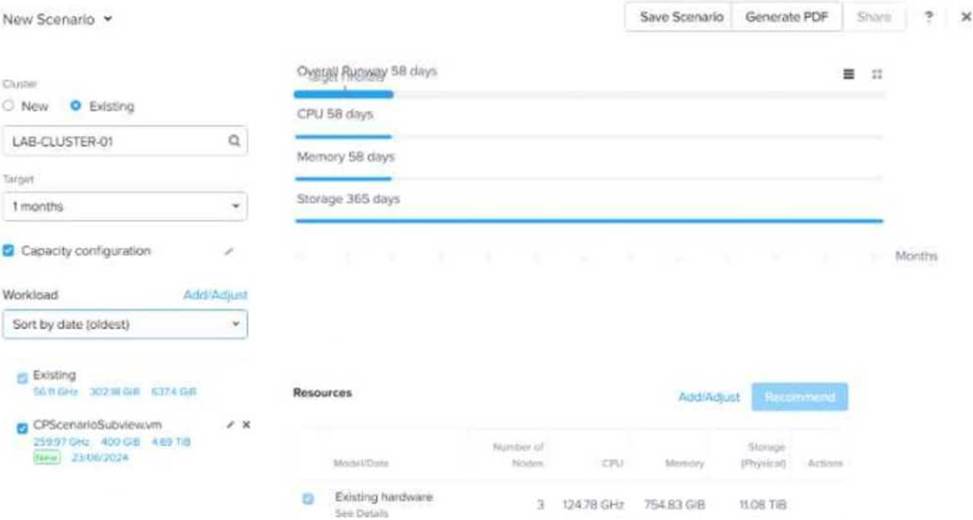
After adding new workloads, why is Overall Runway below 365 days and the scenario still shows the cluster is in good shape?
- A . Because Storage Runway is still good.
- B . Because new workloads are sustainable.
- C . Because there are recommended resources.
- D . Because the Target is 1 month.
B
Explanation:
In Nutanix Capacity Planning, Overall Runway represents how long the cluster can support current and new workloads before resources are exhausted.
Even if the runway is below 365 days, the system considers the cluster to be in good shape if new workloads are sustainable (Option B).
Option A is incorrect: Storage runway alone is not the only factor; CPU and memory are equally important.
Option C is incorrect: The presence of recommended resources does not mean the cluster is in good
shape.
Option D is incorrect: The target of 1 month affects projections but does not explain why the cluster
is in good shape.
Reference: Nutanix Prism Central → Capacity Runway and Planning
Nutanix Bible → Workload Placement and Cluster Sizing
Nutanix Support KB → Capacity Planning Best Practices
An administrator has been tasked with performing firmware upgrades for all Nutanix sites.
When attempting to perform firmware upgrades via Life Cycle Manager (LCM) at a remote site with a single-node cluster, no firmware updates are listed as available. The administrator confirmed that the currently installed firmware is several revisions behind.
Why are no firmware upgrades listed in LCM for this cluster?
- A . Single-node clusters only support one-disk firmware upgrades.
- B . LCM is not supported on single-node clusters.
- C . LCM cannot perform firmware upgrades on single-node clusters.
- D . LCM does not have connectivity to the internet.
B
Explanation:
LCM (Life Cycle Manager) does not support automatic firmware upgrades for single-node clusters because firmware updates require cluster-wide operations, which are not possible with only one node.
Option B (LCM is not supported on single-node clusters) is correct: Single-node clusters lack failover capability, making firmware upgrades unsafe without manual intervention.
Option A (Single-node clusters only support one-disk firmware upgrades) is incorrect:
This limitation does not apply to LCM as a whole.
Option C (LCM cannot perform firmware upgrades) is incorrect:
LCM can perform manual firmware upgrades, but automatic updates are not supported.
Option D (LCM lacks internet connectivity) is incorrect:
Even if the cluster is in a dark site (no internet), LCM can use local update bundles.
Reference: Nutanix LCM Guide → Firmware Upgrade Considerations for Single-Node Clusters
Nutanix KB → Why LCM Updates Are Not Available for Single-Node Deployments