
Nutanix NCP-MCI-6.10 Practice Exams
Last updated on Oct 07,2026- Exam Code: NCP-MCI-6.10
- Exam Name: Nutanix Certified Professional - Multicloud Infrastructure (NCP-MCI v6.10)
- Certification Provider: Nutanix
- Latest update: Oct 07,2026
An administrator is configuring Protection Policies to replicate VMs to a Nutanix Cloud Cluster (NC2) over the internet.
To comply with security policies, how should data be protected during transmission?
- A . Configure Data on a self-encrypting drive.
- B . Configure VMs to use UEFI Secure Boot.
- C . Enable Data-at-Rest Encryption.
- D . Enable Data-in-Transit Encryption.
D
Explanation:
Data-in-Transit Encryption ensures that replication traffic is encrypted while being sent over the internet.
Option D (Enable Data-in-Transit Encryption) is correct:
This encrypts replicated data between clusters, ensuring security against man-in-the-middle attacks.
Option A (Self-encrypting drive) is incorrect:
This protects data at rest, not during transmission.
Option B (UEFI Secure Boot) is incorrect:
Secure Boot prevents unauthorized OS modifications, but does not encrypt network traffic.
Option C (Data-at-Rest Encryption) is incorrect:
This encrypts stored data but does not secure replication traffic.
Reference: Nutanix Security Guide → Configuring Data-in-Transit Encryption
Nutanix KB → Protecting Replication Traffic Over Public Networks
Refer to Exhibit:
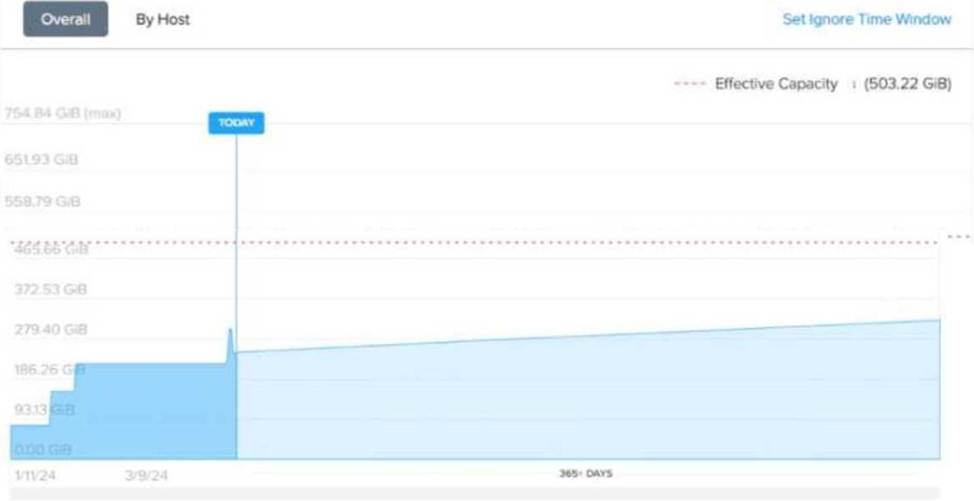
An administrator is looking at the memory cluster runway diagram as shown in exhibit, in Prism Central.
The environment has three hosts with the following configuration:
CPU: 2x Intel Xeon Gold (8 cores, 2.6 GHz)
RAM: 256 GB per host
Storage: SSDs and HDDs
The Intelligent Operations feature has been active for one month, but no further configurations were applied.
What does the dotted red line mean?
- A . It is the default trend analysis static threshold that can be manually set.
- B . It is the maximum memory the administrator can assign to VMs.
- C . It is the calculated memory oversubscription limit for currently running VMs.
- D . It is the usable capacity based on cluster configuration options.
D
Explanation:
he Prism Central Memory Cluster Runway Diagram provides insights into memory usage trends, predicting how long the cluster can sustain workloads before exhausting resources. The solid blue area represents the actual memory consumption over time.
The dotted red line represents the effective memory capacity limit based on the cluster’s current configuration.
Analyzing the Dotted Red Line
The dotted red line is labeled "Effective Capacity: 503.22 GiB", which means:
It is the total usable memory capacity in the cluster after considering hypervisor overhead, redundancy settings, and failover capacity.
This value is not a hard limit but an indication of the available memory before potential performance issues occur.
Evaluating the Answer Choices
❌ (A) It is the default trend analysis static threshold that can be manually set. (Incorrect) The dotted red line is not a static threshold that an administrator can manually configure. Trend analysis in Prism is dynamic and based on workload history and projections.
❌ (B) It is the maximum memory the administrator can assign to VMs. (Incorrect)
Administrators can oversubscribe memory beyond the dotted red line if memory overcommitment is enabled.
However, oversubscribing memory beyond effective capacity may impact performance.
❌ (C) It is the calculated memory oversubscription limit for currently running VMs. (Incorrect) The dotted red line does not represent oversubscription limits.
Memory oversubscription depends on hypervisor memory ballooning, compression, and swapping mechanisms, which are not directly shown here.
✅ (D) It is the usable capacity based on cluster configuration options. (Correct Answer)
The dotted red line (503.22 GiB) represents the actual usable memory available in the cluster after
factoring in system overhead.
This value is determined by:
Total physical memory (256 GB per host × 3 hosts = 768 GB) Memory reserved for hypervisor and system processes Cluster failover and redundancy settings Intelligent Operations capacity analysis
Multicloud Infrastructure Reference & Best Practices
Prism Central’s "Runway" feature provides AI-driven trend analysis for memory, CPU, and storage capacity.
The effective capacity limit helps administrators make proactive scaling decisions before resources become critical.
To increase the memory runway, administrators can:
Optimize VM memory allocation.
Add more hosts to the cluster.
Enable memory deduplication and compression (if available).
An administrator wants to disable password-based SSH access for the nutanix user on a CVM to improve security.
What action should the administrator take?
- A . Rename the nutanix user.
- B . Block port 22 on the CVM firewall.
- C . Enable Cluster Lockdown.
- D . Delete the nutanix user.
C
Explanation:
Enabling "Cluster Lockdown" in Nutanix is the best security measure to prevent password-based SSH logins.
Option C (Enable Cluster Lockdown) is correct:
Cluster Lockdown disables password-based SSH and requires key-based authentication.
Option A (Rename the nutanix user) is incorrect:
The Nutanix user is a system account and cannot be renamed.
Option B (Block port 22) is incorrect:
This would prevent all SSH connections, including key-based logins, making administration difficult.
Option D (Delete the nutanix user) is incorrect:
The nutanix user is required for system operations and cannot be removed.
Reference: Nutanix Security Guide → Implementing Cluster Lockdown Nutanix KB → Best Practices for SSH Security on CVMs
Which storage attributes do Storage Policies manage?
- A . Storage Containers and Volume Groups
- B . Replication Factor and Encryption
- C . Shares and Object Stores
- D . Data Protection and Security
B
Explanation:
Storage Policies in Nutanix allow administrators to configure data protection and performance settings at the storage container level.
Replication Factor (RF) defines the number of copies of data stored across nodes for fault tolerance.
Encryption ensures that data at rest is protected via Nutanix-native encryption methods.
Option A (Storage Containers and Volume Groups) refers to storage organization, not policies.
Option C (Shares and Object Stores) applies to file and object storage services, not VM storage policies.
Option D (Data Protection and Security) is a broad term but does not define specific policy attributes.
Reference: Nutanix Prism Element → Storage Policies and Replication Factor (RF)
Nutanix Bible → Storage Fabric and Data Resiliency
Nutanix KB → Enabling Encryption in Storage Policies
An administrator wants to live-migrate a vGPU-enabled VM from one host to another within the same cluster.
What requirements must be met before initiating the migration?
- A . The target host has sufficient resources to support the VM.
- B . The vGPU profile needs to be changed.
- C . The VM must be configured as an agent VM.
- D . The host affinity for the VM must be set to a specific host.
A
Explanation:
vGPU-enabled VMs can only be migrated if the destination host has a compatible GPU and sufficient resources.
Option A (Target host must have sufficient resources) is correct:
The target host must have the same GPU model and enough available resources to support the VM.
vGPU cannot be live-migrated across incompatible hardware.
Option B (vGPU profile change) is incorrect:
The profile does not need to be changed as long as the target host has the same configuration.
Option C (Agent VM required) is incorrect:
Agent VMs are not necessary for vGPU migration.
Option D (Host affinity) is incorrect:
Host affinity limits movement, but is not a prerequisite for migration.
Reference: Nutanix AHV Best Practices → Migrating vGPU-Enabled VMs Nutanix KB → Requirements for Live-Migrating vGPU VMs
An administrator receives complaints about VM performance.
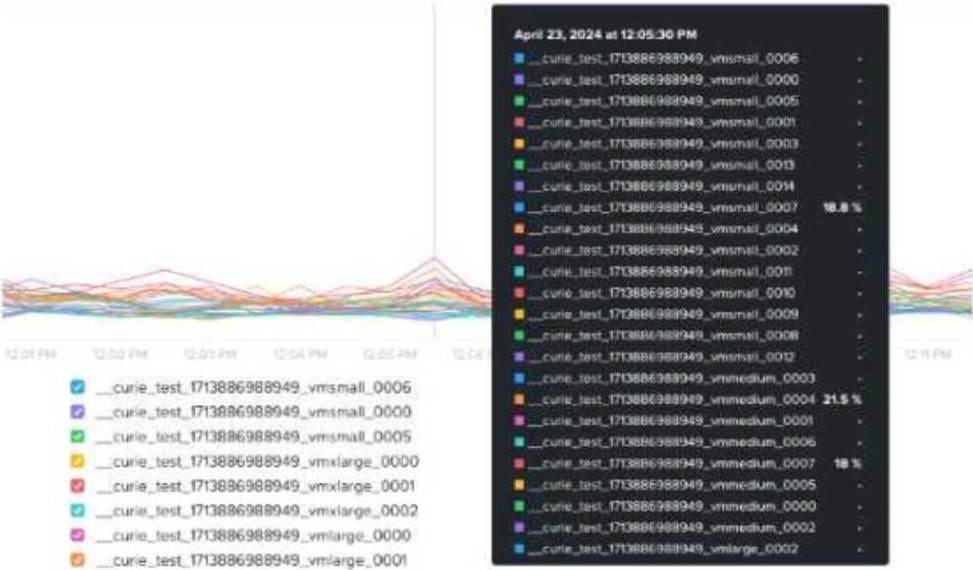
After reviewing the VM’s CPU Ready Time data shown in the exhibit, which step should the administrator take to diagnose the issue further?
- A . Check the number of vCPUs assigned to each CVM.
- B . Review host CPU utilization.
- C . Assess cluster SSD capacity.
- D . Enable VM memory oversubscription.
B
Explanation:
Understanding the Issue
The administrator is investigating VM performance complaints and is analyzing CPU Ready Time data.
CPU Ready Time is a crucial metric in Nutanix and virtualization environments (AHV, ESXi, or Hyper-V).
It measures the amount of time a VM is waiting for CPU scheduling due to resource contention.
High CPU Ready Time indicates that VMs are ready to run but are waiting because the host lacks
available CPU resources.
Analysis of the Exhibit
The graph shows CPU Ready Time spikes for multiple VMs.
Some VMs have CPU Ready Time exceeding 18% to 21.5%, which is very high.
A healthy CPU Ready Time should be below 5%.
Values above 10% indicate CPU contention, and anything above 20% is critical and requires
immediate troubleshooting.
Evaluating the Answer Choices
❌ (A) Check the number of vCPUs assigned to each CVM. (Incorrect)
CVMs (Controller VMs) have fixed CPU allocation, and modifying their vCPU count is not recommended unless advised by Nutanix Support.
The issue is related to VM CPU contention, not CVM configuration.
✅ (B) Review host CPU utilization. (Correct Answer)
High CPU Ready Time suggests CPU overcommitment or host saturation.
The administrator should check host CPU usage in Prism Central to determine if the cluster is overloaded.
If host CPU usage is consistently above 85C90%, VMs are competing for CPU resources, leading to high CPU Ready Time.
❌ (C) Assess cluster SSD capacity. (Incorrect)
SSD capacity impacts storage performance (latency, read/write speeds) but does not affect CPU Ready Time.
High CPU Ready Time is a CPU scheduling issue, not a storage bottleneck.
❌ (D) Enable VM memory oversubscription. (Incorrect) Memory oversubscription does not impact CPU scheduling.
Enabling memory oversubscription affects RAM allocation, but CPU Ready Time is strictly related to CPU contention.
Next Steps to Diagnose & Resolve the Issue Review Host CPU Utilization:
Navigate to Prism Central → Analysis → CPU Usage per Host. Identify hosts experiencing high CPU load.
Check VM vCPU Allocation:
Ensure that VMs do not have excessive vCPUs assigned, which can lead to scheduling inefficiencies. Overprovisioning vCPUs can cause unnecessary contention.
Balance Workload Across Hosts:
Use Nutanix AHV DRS (Dynamic Scheduling) or VMware DRS to redistribute VMs across hosts. Check if certain hosts are overloaded while others have spare CPU capacity.
Consider Scaling Out the Cluster:
If CPU usage is consistently high, adding more nodes may be required to reduce CPU contention. Multicloud Infrastructure Reference & Best Practices
CPU Ready Time Best Practices: Keep CPU Ready Time below 5%.
Avoid overcommitting vCPUs on heavily loaded hosts.
Monitor Prism Central Runway Metrics to predict future CPU resource needs. Nutanix AHV CPU Scheduling Optimization:
Ensure proper VM sizing (avoid excessive vCPU allocation). Balance workloads using Nutanix AHV DRS.
Reference: Nutanix Prism Central: Performance Analysis and CPU Metrics
Nutanix Bible: VM Performance and Resource Management
Nutanix KB: Troubleshooting High CPU Ready Time in AHV
An administrator is trying to configure Metro Availability between Nutanix ESXi-based clusters.
However, the Compatible Remote Sites screen does not list all required storage containers.
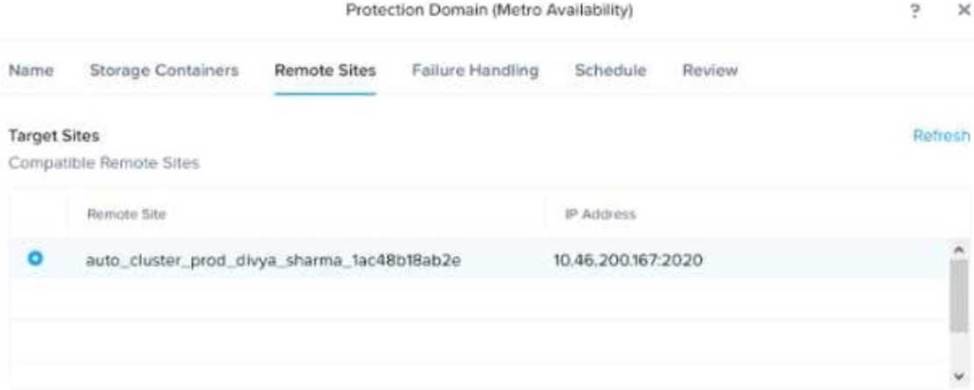
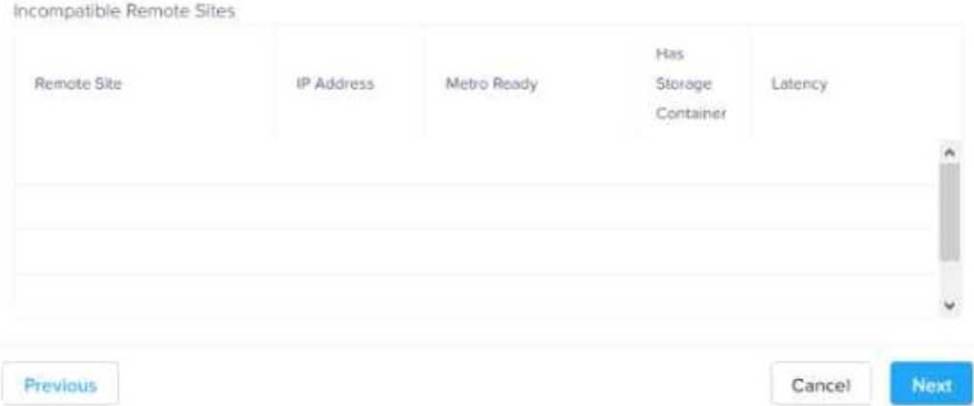
Which two reasons could be a cause for this issue? (Choose two.)
- A . Source and destination hardware are from different vendors.
- B . The remote site storage container has compression enabled.
- C . The destination storage container is not empty.
- D . Both storage containers must have the same name.
C, D
Explanation:
Metro Availability in Nutanix requires that the primary and secondary storage containers be configured identically to ensure data replication consistency.
Option C (The destination storage container is not empty) is correct:
The remote storage container must be empty before Metro Availability can be enabled.
Existing data can cause conflicts and prevent it from appearing in the "Compatible Remote Sites" list.
Option D (Both storage containers must have the same name) is correct:
Metro Availability requires that storage containers have identical names across clusters.
If names do not match, the storage container will not be listed as compatible.
Option A is incorrect: Metro Availability works regardless of hardware vendor differences.
Option B is incorrect: Compression does not affect compatibility but may impact performance.
Reference: Nutanix Metro Availability Deployment Guide
Nutanix Best Practices for Configuring Remote Sites for Metro Availability Nutanix KB → Troubleshooting Storage Container Issues in Metro Availability
Refer to Exhibit:

An administrator notices the message shown in the exhibit when navigating to LCM from Prism Central.
Which action should the administrator take to update LCM to the latest version?
- A . Run an AOS upgrade.
- B . Run an AHV upgrade.
- C . Perform an Inventory Scan.
- D . Download and install the latest LCM version from a CVM.
C
Explanation:
When Life Cycle Manager (LCM) reports that a newer framework version is available, the correct action is to perform an inventory scan (Option C).
Performing an inventory scan updates the available firmware/software versions and allows LCM to download required updates.
Option A (Run an AOS upgrade) is unrelated to the LCM framework update process.
Option B (Run an AHV upgrade) is a separate component update and does not affect the LCM framework.
Option D (Download manually from a CVM) is not necessary because LCM updates are automatically pulled after an inventory scan.
Reference: Nutanix LCM User Guide → Updating LCM Framework and Performing Inventory Scans Nutanix KB → Best Practices for LCM Updates Nutanix Prism Central → LCM Update Workflow
An administrator needs to create a single chart showing multiple storage bandwidth metrics a VM is consuming.
Which type of chart should the administrator create?
- A . Metric Chart
- B . Entity Chart
- C . Hypervisor Performance Chart
- D . VM Summary Chart
B
Explanation:
Entity Charts in Nutanix Prism Central allow multiple metrics from a single entity (e.g., VM, storage
container) to be displayed on a single graph.
Option B (Entity Chart) is correct:
This allows the administrator to track multiple performance metrics (e.g., read/write bandwidth, IOPS) for a specific VM.
Option A (Metric Chart) is incorrect:
Metric Charts track a single metric across multiple entities, which does not meet the requirement of displaying multiple metrics for a single VM.
Option C (Hypervisor Performance Chart) is incorrect:
Hypervisor Performance Charts track host-level metrics, not VM-specific bandwidth metrics.
Option D (VM Summary Chart) is incorrect:
VM Summary Charts only provide an overview and do not support custom multi-metric tracking.
Reference: Nutanix Prism Central Guide → Entity vs. Metric Charts for Performance Analysis Nutanix KB → Creating Custom Charts in Prism Central
In an RF2 cluster, what is the minimum number of nodes required to allow a host removal?
- A . 2
- B . 3
- C . 4
- D . 5
B
Explanation:
Replication Factor (RF2) means that each piece of data is stored twice across different nodes to ensure availability.
Option B (3 nodes) is correct:
In an RF2 cluster, data redundancy requires at least three nodes to ensure data protection when one node is removed.
If a node is removed from a 3-node cluster, Nutanix automatically redistributes data across the remaining nodes.
Option A (2 nodes) is incorrect:
RF2 requires at least three nodes to maintain fault tolerance.
A 2-node cluster cannot provide full redundancy without a Witness node.
Option C (4 nodes) and
Option D (5 nodes) are incorrect:
While larger clusters provide more redundancy, the minimum requirement is 3 nodes.
Reference: Nutanix Bible → Replication Factor (RF) and Fault Tolerance
Nutanix Prism Element Guide → Managing Node Failures and Removals