
Nutanix NCP-MCI-6.10 Practice Exams
Last updated on Oct 07,2026- Exam Code: NCP-MCI-6.10
- Exam Name: Nutanix Certified Professional - Multicloud Infrastructure (NCP-MCI v6.10)
- Certification Provider: Nutanix
- Latest update: Oct 07,2026
An administrator needs to enable Windows Defender Credential Guard to comply with company policy.
The new VM configurations include:
Legacy BIOS
4 vCPUs
8 GB RAM Windows Server 2019
What must be changed in order to properly enable Windows Defender Credential Guard?
- A . Update vCPU to 8.
- B . Enable UEFI with Secure Boot.
- C . Use Windows Server 2022.
- D . Update Memory to 16GB.
B
Explanation:
Windows Defender Credential Guard requires UEFI firmware and Secure Boot to function properly.
Option B (Enable UEFI with Secure Boot) is correct:
Credential Guard requires a UEFI-based boot mode rather than Legacy BIOS.
Secure Boot ensures only trusted OS components load, reducing attack surface for credential theft.
Option A (Update vCPU to 8) is incorrect:
Increasing vCPUs does not impact Credential Guard compatibility.
Option C (Use Windows Server 2022) is incorrect:
Windows Server 2019 supports Credential Guard; upgrading to 2022 is not required.
Option D (Update Memory to 16GB) is incorrect:
Credential Guard has no minimum RAM requirement beyond general OS needs.
Reference: Microsoft Docs → Requirements for Windows Defender Credential Guard
Nutanix AHV VM Management Guide → Enabling Secure Boot & UEFI for Windows VMs
Which two actions occur by default on a node that is placed in Maintenance Mode? (Choose two.)
- A . Non-migratable VMs are powered off and restarted on other hosts in the cluster.
- B . All eligible VMs on the host are migrated to other hosts in the cluster.
- C . All eligible VMs on the host are powered off.
- D . Non-migratable VMs are powered off.
B, D
Explanation:
When a node is placed into Maintenance Mode, Nutanix follows a structured process to ensure service continuity and data integrity.
Option B (All eligible VMs on the host are migrated to other hosts) is correct:
Live Migration automatically moves VMs to other hosts to avoid downtime.
This ensures workloads remain operational during maintenance.
Option D (Non-migratable VMs are powered off) is correct:
Some VMs, such as those using GPU pass-through or local storage dependencies, cannot be live-migrated.
These VMs must be powered off before placing the host into Maintenance Mode.
Option A is incorrect:
Non-migratable VMs are not automatically restarted on other hosts―they remain powered off until
manually restarted.
Option C is incorrect:
Eligible VMs are live-migrated, not powered off.
Reference: Nutanix AHV Best Practices → Understanding Maintenance Mode Behavior Nutanix KB → VM Migration and Power-Off Scenarios in Maintenance Mode
An administrator is preparing for a firmware upgrade on a host and wants to manually migrate VMs before executing the LCM upgrade. However, one VM is unable to migrate while others migrate successfully.
Which action would fix the issue?
- A . Enable Acropolis Dynamic Scheduling (ADS) at the cluster level.
- B . Update Link Layer Discovery Protocol (LLDP).
- C . Disable Agent VM within the VM configuration options.
- D . Configure backplane port groups that are assigned to the CVM.
C
Explanation:
If a VM is unable to migrate, the most likely cause is that it is an Agent VM (such as a Nutanix Witness VM or a VM with special dependencies).
Option C (Disable Agent VM) is correct:
Some Agent VMs are configured to prevent migration due to critical roles (e.g., a Witness VM for Metro Availability).
Disabling Agent VM restrictions allows it to migrate before a host enters maintenance mode.
Option A (Enable ADS) is incorrect:
Acropolis Dynamic Scheduling (ADS) helps with VM placement after migration, but it does not force
an unmigratable VM to move.
Option B (Update LLDP) is incorrect:
LLDP is used for network discovery, but it does not impact VM migration behavior.
Option D (Configure backplane port groups) is incorrect:
Backplane settings impact CVM communication, not VM migration.
Reference: Nutanix Prism Element Guide → Managing Agent VM Settings Nutanix Bible → Host Maintenance and VM Live Migration Nutanix KB → Troubleshooting VM Migration Failures in AHV
How can a VM or Volume Group (VG) be associated with a Storage Policy?
- A . Assign the Storage Policy directly on the VM or VG.
- B . Assign the VM or VG directly to the Storage Policy.
- C . Migrate the VM or VG to the Storage Container assigned to the Storage Policy.
- D . Assign the VM or VG to the same Category as the Storage Policy.
D
Explanation:
Storage Policies in Nutanix are applied through Categories, allowing policy-based automation and enforcement.
Option D (Assign the VM or VG to the same Category as the Storage Policy) is correct:
Nutanix applies Storage Policies based on VM Categories, enabling flexibility in policy enforcement.
Option A is incorrect:
Storage Policies are not directly assigned at the VM or VG level―they apply through Categories.
Option B is incorrect:
Policies must be assigned to Categories, not directly to individual VMs/VGs.
Option C is incorrect:
Migrating to a storage container does not automatically apply a Storage Policy.
Reference: Nutanix Storage Management Guide → Using Categories for Policy-Based Storage Management Nutanix KB → Best Practices for Applying Storage Policies to VMs
Refer to the Exhibit:
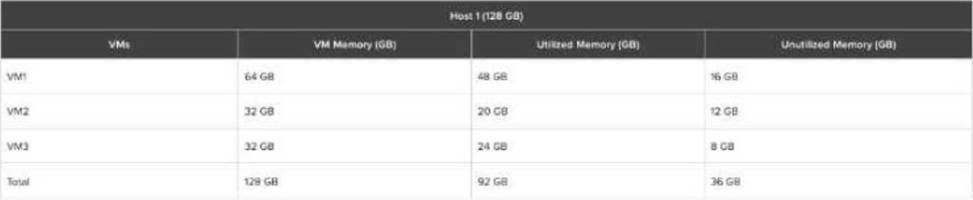
An administrator needs to create two virtual machines: VM4 and VM5 that leverage the memory over-commit feature.
Once VM4 is created and running, the administrator notices that it uses only 28GB of RAM.
What will be the maximum RAM that can be allocated to VM5 so that it can be powered on?
- A . 4GB
- B . 8GB
- C . 16GB
- D . 32GB
B
Explanation:
Understanding the Exhibit & Memory Allocation
The host has 128GB of physical RAM.
The current memory allocation across three VMs (VM1, VM2, VM3) is 128GB, but only 92GB is actually utilized.
This means there is 36GB of unutilized memory available for allocation.
Step-by-Step Breakdown
Existing Memory Usage Before Adding VM4
Total Physical RAM: 128GB
Used by running VMs (VM1, VM2, VM3): 92GB
Unutilized Memory Available: 36GB
After Creating and Running VM4
VM4 is allocated memory but only utilizes 28GB.
The table does not show VM4’s allocated RAM, but assuming it was given a reasonable allocation, it must have been taken from the 36GB unutilized memory pool.
If VM4 uses 28GB, the remaining unutilized memory is now (36GB – 28GB) = 8GB.
Maximum Memory Allocation for VM5
Since only 8GB remains unutilized, the maximum memory VM5 can be allocated while still allowing
it to power on is 8GB.
Evaluating the Answer Choices
(A) 4GB ❌ (Incorrect)
More memory (8GB) is available, so limiting to 4GB is unnecessary.
(B) 8GB ✅ (Correct)
The remaining unutilized memory after VM4 is 8GB, so VM5 can be allocated up to 8GB while
ensuring it can power on.
(C) 16GB ❌ (Incorrect)
Only 8GB is left, so 16GB is not possible.
(D) 32GB ❌ (Incorrect)
There is not enough unutilized memory to allocate 32GB.
Key Concept: Nutanix Memory Overcommit
Nutanix AHV supports memory overcommit, meaning VMs can be allocated more memory than physically available using memory ballooning and swapping.
However, to power on VM5 without impacting performance, it must fit within the available unutilized memory, which is 8GB.
In a scale-out Prism Central deployment, what additional functionality does configuring an FQDN instead of a Virtual IP provide?
- A . Load balancing
- B . Resiliency
- C . Segmentation
- D . SSL Certificate
A
Explanation:
In a scale-out Prism Central deployment, using an FQDN (Fully Qualified Domain Name) enables load
balancing across multiple Prism Central instances.
Option A (Load balancing) is correct:
When an FQDN is used, Nutanix automatically distributes traffic between multiple Prism Central
nodes, improving performance.
Option B (Resiliency) is incorrect:
Resiliency is achieved through cluster redundancy, not by using an FQDN.
Option C (Segmentation) is incorrect:
Segmentation relates to network isolation rather than FQDN-based load balancing.
Option D (SSL Certificate) is incorrect:
SSL certificates can be applied to both FQDN and Virtual IP configurations.
Reference: Nutanix Prism Central Guide → Configuring Scale-Out Deployment
Nutanix KB → How FQDN Enhances Load Balancing in Scale-Out Prism Central
An administrator using a dark site deployment for LCM is attempting to upgrade to the latest BIOS. After completing an inventory scan, the administrator does not see the expected BIOS version available for upgrade.
What is the most likely reason the latest BIOS is not shown?
- A . AOS needs to be upgraded first.
- B . The latest compatibility bundle has not been uploaded.
- C . The BMC version needs to be upgraded first.
- D . The dark site webserver is not accessible.
B
Explanation:
In a dark site deployment, LCM does not automatically fetch updates from the internet. The administrator must manually upload compatibility bundles.
Option B (The latest compatibility bundle has not been uploaded) is correct:
The compatibility bundle contains firmware mappings, allowing LCM to detect the correct BIOS version.
Option A is incorrect:
AOS does not need to be upgraded first for a BIOS update.
Option C is incorrect:
The BMC firmware does not always need updating before BIOS updates.
Option D is incorrect:
In a dark site deployment, LCM does not rely on an internet connection, so webserver access is not
required.
Reference: Nutanix LCM Guide → Using Compatibility Bundles in Dark Sites
Nutanix KB → Troubleshooting Firmware Updates in Dark Site Deployments
Refer to Exhibit:
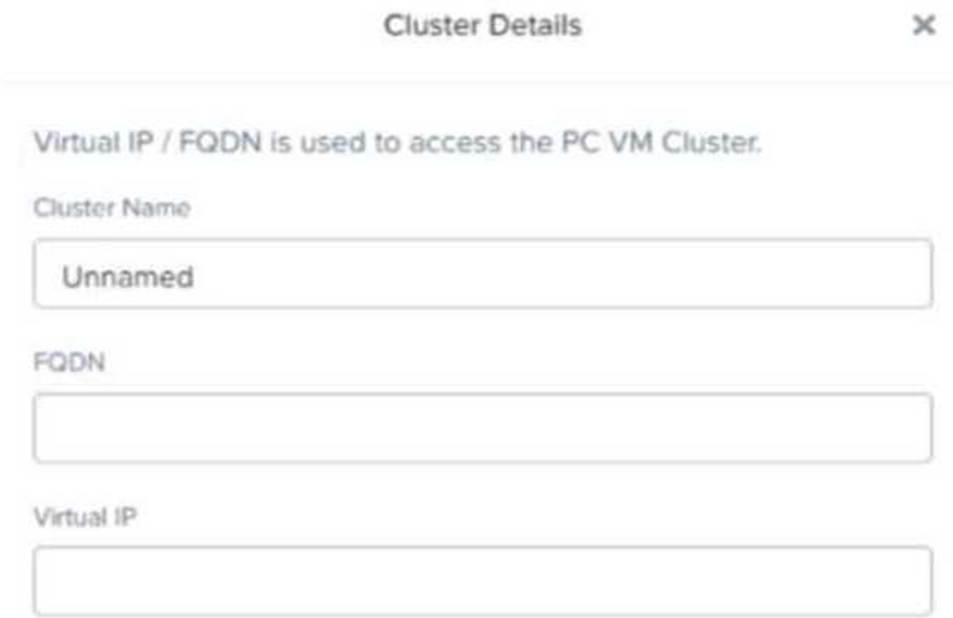
In a scale-out Prism Central deployment, what additional functionality does configuring an FQDN instead of a Virtual IP provide?
- A . Load balancing
- B . Resiliency
- C . Segmentation
- D . SSL Certificate
A
Explanation:
When using FQDN instead of a Virtual IP in a scale-out Prism Central deployment, Nutanix enables load balancing across multiple Prism Central instances.
Option A (Load balancing) is correct because it ensures that requests are distributed among multiple Prism Central nodes, improving performance and redundancy.
Option B (Resiliency) is incorrect because resiliency is achieved through HA and replication, not through FQDN configuration.
Option C (Segmentation) is incorrect because network segmentation is handled at the VLAN or security policy level.
Option D (SSL Certificate) is incorrect because SSL certificates can be applied regardless of whether
FQDN or Virtual IP is used.
Reference: Nutanix Prism Central Deployment Guide
Nutanix Best Practices for Scale-Out Prism Central
Nutanix Support KB: Configuring FQDN for Prism Central
An administrator is experiencing storage performance issues on a Windows Server 2019 VM with the following configuration:
vCPU: 1
VRAM: 8 GB
vSCSI: VirtIO SCSI Controller
vDisk: 2 (100 GB, 250 GB)
vNIC: VirtIO Fast Ethernet
The AHV cluster is healthy, and other Windows VMs are performing well.
Which configuration change should be reviewed to enhance VM performance?
- A . Add a second virtual storage controller (vSCSI).
- B . Enable Balance-TCP on bridge (br0).
- C . Increase Controller VM (CVM) resources.
- D . Increase the VM’s number of vCPUs.
D
Explanation:
A single vCPU is likely causing a bottleneck, limiting the VM’s ability to process I/O requests efficiently.
Option D (Increase the VM’s number of vCPUs) is correct:
Windows requires sufficient CPU resources to handle disk and network operations.
Adding more vCPUs allows the VM to process more I/O operations simultaneously, improving
performance.
Option A is incorrect:
Additional vSCSI controllers are only useful for very high disk I/O workloads.
Option B is incorrect:
Balance-TCP applies to network traffic, not storage performance.
Option C is incorrect:
CVM resources do not directly affect individual VM performance.
Reference: Nutanix AHV Performance Tuning Guide
Nutanix KB → Optimizing Windows VM Performance on AHV
An administrator migrated a physical MySQL database from a legacy 3-tier environment to a Nutanix cluster.
After migration, the administrator finds that at peak load, the number of IOPS is lower than expected, and latency is higher.
Which two steps should the administrator take to improve performance? (Choose two.)
- A . Ensure that the SQL data vDisks are thick provisioned.
- B . Create additional vDisks for SQL data.
- C . Use LVM to stripe the SQL data across multiple vDisks.
- D . Ensure that the SQL data vDisks are thin provisioned.
B, C
Explanation:
For high-performance databases like MySQL, optimizing storage access is critical.
Option B (Create additional vDisks for SQL data) is correct:
Multiple vDisks allow better parallelism in Nutanix DSF (Distributed Storage Fabric), improving IOPS.
Option C (Use LVM to stripe SQL data across multiple vDisks) is correct:
Striping across multiple disks distributes the load, reducing latency.
Option A (Thick provisioned vDisks) is incorrect:
Nutanix always provisions vDisks thinly, and thick provisioning does not improve IOPS.
Option D (Thin provisioned vDisks) is incorrect:
All Nutanix vDisks are thin-provisioned by default.
Reference: Nutanix Bible → Optimizing SQL Performance on Nutanix Nutanix KB → Best Practices for Running MySQL on Nutanix