
Nutanix NCP-MCA Practice Exams
Last updated on Oct 06,2026- Exam Code: NCP-MCA
- Exam Name: Nutanix Certified Professional - Multicloud Automation (NCP-MCA) 6 Exam
- Certification Provider: Nutanix
- Latest update: Oct 06,2026
An administrator needs to restore a snapshot from a VM running in AWS that was created with a single VM blueprint Within.
which Calm tab should the administrator perform this task?
- A . Manage
- B . Snapshots
- C . Recovery
B
Explanation:
According to the Nutanix Calm documentation1, the Snapshots tab allows the administrator to view, create, and restore snapshots of the VMs that are part of a blueprint. The Manage tab only shows the status and actions of the blueprint, and the Recovery tab is used for disaster recovery operations2.
Reference:
1 Nutanix Calm: Introducing Snapshot and Restore Actions3
2 Nutanix Calm User Guide: Blueprint Operations
An application deployment failed, and a correction was implemented.
What is the most optimal way to correct the failed deployment?
- A . Redeploy the application.
- B . Create a Run book to retry.
- C . Rewrite blueprint to have error handling.
- D . Retry the failed deployment
D
Explanation:
The most optimal way to correct the failed deployment is to retry the failed deployment. This option allows the administrator to resume the deployment from the point of failure, without having to redeploy the entire application or create a new runbook. Retrying the failed deployment also preserves the application state and configuration, and avoids creating duplicate resources or conflicts.
Redeploying the application is not the best option, because it requires the administrator to delete the existing application and launch a new one from scratch. This option wastes time and resources, and may result in data loss or inconsistency.
Creating a runbook to retry is also not the best option, because it requires the administrator to write a custom script or workflow to handle the retry logic. This option adds complexity and overhead to the automation process, and may not be compatible with the original blueprint or application. Rewriting the blueprint to have error handling is a valid option, but it is not the most optimal one. This option requires the administrator to modify the blueprint code and add logic to handle different types of errors and exceptions. This option improves the robustness and reliability of the blueprint, but it does not correct the failed deployment itself. The administrator still has to redeploy the application or retry the failed deployment after rewriting the blueprint.
Reference: Nutanix Calm User Guide: Chapter 6: Managing Applications
Nutanix Calm DSL User Guide: Chapter 4: Blueprints
Nutanix Certified Professional – Multicloud Automation (NCP-MCA) Exam Blueprint Guide: Section 3:
Validate Blueprints, Runbooks, Playbooks, and Automation Settings
An administrator is deploying a Windows VM from a Blueprint. As a step in the Blueprint, a PowerShell script needs to run on the target. VM. The communication between Calm and the VM is secured.
Which inbound port need to be opened for the PowerShell script to run on the VM?
- A . 1433
- B . 3389
- C . 5986
- D . 5985
C
Explanation:
The port 5986 is used for PowerShell Remoting over HTTPS, which is a secure way of executing PowerShell commands on a remote Windows VM. Calm uses PowerShell Remoting to run scripts on Windows VMs as part of the blueprint actions. Therefore, the port 5986 needs to be opened on the VM firewall to allow the communication between Calm and the VM. The other ports are not related to PowerShell Remoting, as they are used for SQL Server (1433), Remote Desktop Protocol (3389), and PowerShell Remoting over HTTP (5985).
Reference: Nutanix Certified Professional – Multicloud
Automation (NCP-MCA) 6.5 Exam Blueprint Guide, page 10; Nutanix Certified Professional – Multicloud Automation (NCP-MCA), section 3; Nutanix Calm User Guide, page 93.
An administrator has noticed an increasing number of inactive VMS being left powered on within the environment over the course of OS migrations, using Playbooks, which two Actions should the administrator use to start documenting which VMS are marked as inactive to take future Automated actions on? (Choose two.)
- A . Assign the VMS to an Inactive:VM Category as an Action.
- B . Trigger Playbook on Powered Off VM for all applicable VMS.
- C . Trigger Playbook on Alert with the Inactive VM Alert Policy.
- D . Send an Email with the Source Entity Name Parameter in the body.
A, C
Explanation:
The administrator should assign the VMs to an Inactive:VM category as an action and trigger a playbook on alert with the Inactive VM alert policy. By doing this, they can create a custom category to group and identify the inactive VMs and use a custom alert policy to trigger a playbook that can perform automated actions on them, such as powering them off, deleting them, or sending notifications. This is based on the general practices in managing VMs in a multicloud environment, as well as the specific features and requirements of Nutanix X-Play and Nutanix Calm.
Reference: How to create custom categories | Prism central | Nutanix Community
Nutanix Certified Professional – Multicloud Automation (NCP-MCA) v6.5 Exam Blueprint Guide, Section 1: Describe and Differentiate Automation Concepts and Principles, Objective 1.4: List how to implement categories for the appropriate use cases
Nutanix Multicloud Automation Administration (NMCAA) course, Module 3: Nutanix X-Play, Lesson 2:
Nutanix X-Play Playbooks
Nutanix Multicloud Automation Administration (NMCAA) course, Module 4: Nutanix Calm
Governance, Lesson 2: Nutanix Calm Alerts
Which two platforms does Calm support for Cost Showback? (Choose two.)
- A . SCVMM
- B . vCenter
- C . AHV
- D . AWS Account
BC
Explanation:
Scaling VM replica settings allow you to specify the minimum, maximum, and default number of VMs that can be created from a blueprint service. The minimum and default values must be equal to or greater than the number of VMs needed at any time and at time of deployment, which is 2 in this case. The maximum value must be equal to or less than the project quota divided by the VM resources, which is 100/12 = 8 for vCPUs and 300/24 = 12 for memory. The lowest of these two values is the limit for the maximum value, which is 8. Therefore, the only option that meets all the requirements is B. MIN: 2, MAX: 7, Default: 2.
Reference: Nutanix Certified Professional – Multicloud Automation (NCP-MCA) Exam Blueprint Guide, page 10, Objective 3.1: Given a scenario, create a blueprint to deploy infrastructure and applications using Self-Service
Nutanix Multicloud Automation Administration (NMCAA), Module 5: Self-Service, Lesson 5.2:
Blueprint Design, slide 23: Scaling VM Replica Settings
Nutanix Certified Professional Multicloud Automation (NCP-MCA) 6 Exam, page 10, Objective 3.1:
Given a scenario, create a blueprint to deploy infrastructure and applications using Self-Service
An administrator is unable to launch a Calm blueprint (new and old).
Launching an existing blueprint under this condition fails with the error message:
The project for this blueprint does not have any associated Nutanix account.
Downloading and uploading the new blueprint also fails with
Launch with Variables’ Profile expected to fall as Windows Server VWs attached with deleted Account.
Please modify them to use different account and try again.
Why is the administrator seeing this issue?
- A . The account is in a failed state.
- B . The has not been created.
- C . The account is not verified.
- D . The account been deleted.
D
Explanation:
The error messages indicate that the blueprint is trying to use a Nutanix account that no longer exists. This could happen if the account was deleted by another administrator or by a playbook action. The administrator should check the project settings and verify that the Nutanix account is still available and associated with the project. If not, the administrator should create a new account or use an existing one and update the blueprint accordingly.
Reference: Nutanix Certified Professional – Multicloud Automation (NCP-MCA) 6.5 Exam Blueprint Guide, page 9; Nutanix Certified Professional
– Multicloud Automation (NCP-MCA), section 3; Nutanix NCP-MCA Certification Exam Sample Questions, question 80.
An administrator is configuring Playbooks and is concerned about adding or reducing CPU and memory resources to VMs.
Which two prerequisites should an administrator take into consideration when configuring the Playbooks? (Choose two.)
- A . CPU can be added to a powered on VM if the guest OS supports it
- B . VM must be powered off to add CPU
- C . VM must be powered off to reduce memory
- D . Memory can be removed from a powered on VM if the guest OS supports it
A, D
Explanation:
When configuring Playbooks to automate the scaling of CPU and memory resources for VMs, the administrator should consider the following prerequisites:
CPU can be added to a powered on VM if the guest OS supports it. This is also known as hot-plug CPU. The administrator should check the compatibility of the guest OS and the hypervisor before enabling this feature. For example, Windows Server 2019 supports hot-plug CPU on AHV, ESXi, and Hyper-V, but not on XenServer1.
Memory can be removed from a powered on VM if the guest OS supports it. This is also known as hot-unplug memory. The administrator should check the compatibility of the guest OS and the hypervisor before enabling this feature. For example, Linux supports hot-unplug memory on AHV, ESXi, and XenServer, but not on Hyper-V2.
VM must be powered off to add CPU if the guest OS does not support hot-plug CPU. This is also known as cold-plug CPU. The administrator should plan for the downtime required to power off and power on the VM after adding CPU.
VM must be powered off to reduce memory if the guest OS does not support hot-unplug memory. This is also known as cold-unplug memory. The administrator should plan for the downtime required to power off and power on the VM after reducing memory.
Reference: Nutanix Multicloud Automation Administration (NMCAA), page 10; Nutanix Certified Professional – Multicloud
Automation (NCP-MCA), section 3; Nutanix Support Portal – Guest OS Compatibility Matrix
Reference: https://portal.nutanix.com/page/documents/details?targetId=Prism-Central-Guide-Prism-v6_0:mul-vm-prerequisites-playbook-actions-pc-r.html#vm-prerequisites-playbook-actions-pc-r
Refer to the exhibit.
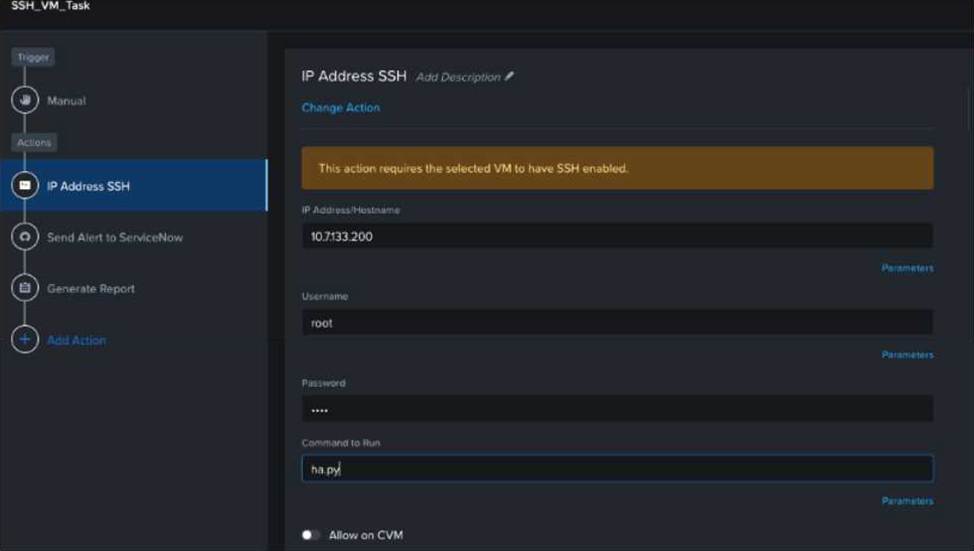

An administrator has run a multi-step Playbook. but sees the Failed status, as shown in the exhibit.
What could be causing the playbook to fail?
- A . VM action has a timeout of 5 minutes.
- B . puppet action has a timeout of 5 minutes.
- C . IP Address SSH action has a timeout of 5 minutes.
- D . PowerShell action has a timeout of 5 minutes.
C
Explanation:
The image shows a failed status for an SSH_VM_Task, which is manually triggered. Since the task involves SSH, it’s likely that the IP Address SSH action has a timeout of 5 minutes, causing the playbook to fail if it cannot complete within this time frame. The IP Address SSH action is used to execute commands on a remote VM using SSH. It requires the IP address, username, password, and command to run as inputs. The timeout parameter specifies how long the action will wait for the command to finish before aborting. If the timeout is too short, the action may fail due to network latency, slow execution, or other factors.
Reference: Nutanix Certified Professional – Multicloud Automation (NCP-MCA) 6.5 Exam, page 16, section 1.3.2.2: “Playbooks”
[Nutanix University: NCP-MCA 6.5 Exam Prep – Playbooks], video 4: “Playbooks”
When creating a Playbook using alerts, which types of actions can be executed?
- A . Task alert end communication actions
- B . VM, alert and communication actions
- C . VM, notification, and report actions
- D . Task notification. and report actions
B
Explanation:
Playbooks are a feature of X-Play that allow you to automate tasks based on events or alerts. You can use the actions gallery to select from a variety of actions that can be executed by a playbook. These actions are categorized into three types: VM, alert, and communication1. VM actions allow you to perform operations on virtual machines, such as power on, power off, snapshot, clone, etc. Alert actions allow you to create, update, or close alerts in Prism Central. Communication actions allow you to send messages to various channels, such as email, Slack, or Microsoft Teams2. Therefore, the correct answer is B.
Reference:
1: Nutanix Certified Professional – Multicloud Automation (NCP-MCA) Exam Blueprint Guide
2: Playbooks C Nutanix.dev
An administrator manages two Nutanix clusters: Cluster01 and Cluster02 and has needs to automate similar workload types using these images that are located on Cluster01:
ImageA
ImageB
ImageC
The administrator needs to deploy ImageA and ImageC within the Cluster02 environment.
How this can be achieved?
- A . Configure a Protection Domain to replicate images.
- B . Clone the images from the Cluster01 to Cluster02.
- C . All images are available to all clusters managed by a single Prism Central.
- D . Utilize Prism Central image placement policies.
A
Explanation:
Protection Domains are a Nutanix feature that allows you to replicate data across clusters or to a remote site. You can use Protection Domains to replicate images from one cluster to another, and then use them for workload automation. This is one of the methods documented in the Nutanix Solutions Portal for Citrix MCS on Nutanix AHV1. Alternatively, you can also use Prism Central to manage multiple clusters and use Protection Policies to replicate images across clusters2. However, this option is not listed in the question, so the best answer is A.
Reference:
1: Multi Cluster Image Replication for Citrix MCS on Nutanix
2: Nutanix Certified Professional – Multicloud Automation (NCP-MCA) Exam Blueprint Guide
Reference: https://portal.nutanix.com/page/documents/details?targetId=Prism-Central-Guide-Prism-v6_0:mul-image-placement-policy-pc-c.html