
Nutanix NCP-DB-6.5 Practice Exams
Last updated on Oct 06,2026- Exam Code: NCP-DB-6.5
- Exam Name: Nutanix Certified Professional - Database Automation (NCP-DB) v6.5
- Certification Provider: Nutanix
- Latest update: Oct 06,2026
What does a Time Machine frozen status indicate?
- A . The database is paused on the database VM.
- B . The database was de-registered from NDB without removing the associated time machine.
- C . The NDB agent is stopped on the database VM.
- D . The Time Machine is paused and all automatic snapshot and log catch-up activities are halted.
B
Explanation:
A Time Machine frozen status indicates that the database that was associated with the Time Machine has been de-registered from NDB, but the Time Machine itself has not been deleted. This means that the Time Machine still contains the snapshots and logs of the de-registered database, but it cannot perform any further operations on it. To resume the normal functioning of the Time Machine, the administrator can either re-register the database with NDB, or delete the Time Machine and free up the storage space.
Reference: Nutanix Support & Insights, section “Resolving All Alerts for a Time Machine”
A database admin logs into Era to manage an Oracle Database VM and sees a message Update Available on the Status of the Software Profile Version.
What should the database admin do?
- A . Manually update the software profile to the latest version
- B . Create and update to the latest software profile version
- C . Era autocratically updates the software profile to the latest version
- D . Schedule Ere to update the software profile to the latest version
A
Explanation:
In Nutanix Database Automation (NCP-DB), when an administrator logs into Era and sees a message “Update Available” on the Status of the Software Profile Version, it indicates that a newer version of the software profile is available1. The administrator should manually update the software profile to the latest version12. This process ensures that the database VM is running the most recent and compatible version of the software12.
In an Oracle upgrade scenario using Era. if the source database is on a nor-Nutanix platform, is it possible to upgrade it with an Era workflow?
- A . Yes, it is possible to upgrade database instance on a non-Nutanix platform.
- B . Yes, only if the nan-Nutanix platform is big-endian platform,
- C . No, the database instaru:e must be Era managed to Be upgraded
- D . Yes, only if the nori-Nutanix platform is little-endian platform.
C
Explanation:
According to the Nutanix Database Automation (NCP-DB) learning documents, Nutanix Era is a database management tool that automates and simplifies database operations, including provisioning, patching, upgrading, and more1. However, for a database to be managed by Era, it must be registered with Era1. This means that if a database is on a non-Nutanix platform, it cannot be directly upgraded using an Era workflow. It must first be migrated to a Nutanix platform and registered with Era before it can be managed and upgraded using Era1.
In an Oracle upgrade scenario using Era. if the source database is on a nor-Nutanix platform, is it possible to upgrade it with an Era workflow?
- A . Yes, it is possible to upgrade database instance on a non-Nutanix platform.
- B . Yes, only if the nan-Nutanix platform is big-endian platform,
- C . No, the database instaru:e must be Era managed to Be upgraded
- D . Yes, only if the nori-Nutanix platform is little-endian platform.
C
Explanation:
According to the Nutanix Database Automation (NCP-DB) learning documents, Nutanix Era is a database management tool that automates and simplifies database operations, including provisioning, patching, upgrading, and more1. However, for a database to be managed by Era, it must be registered with Era1. This means that if a database is on a non-Nutanix platform, it cannot be directly upgraded using an Era workflow. It must first be migrated to a Nutanix platform and registered with Era before it can be managed and upgraded using Era1.
Refer to the exhibit.
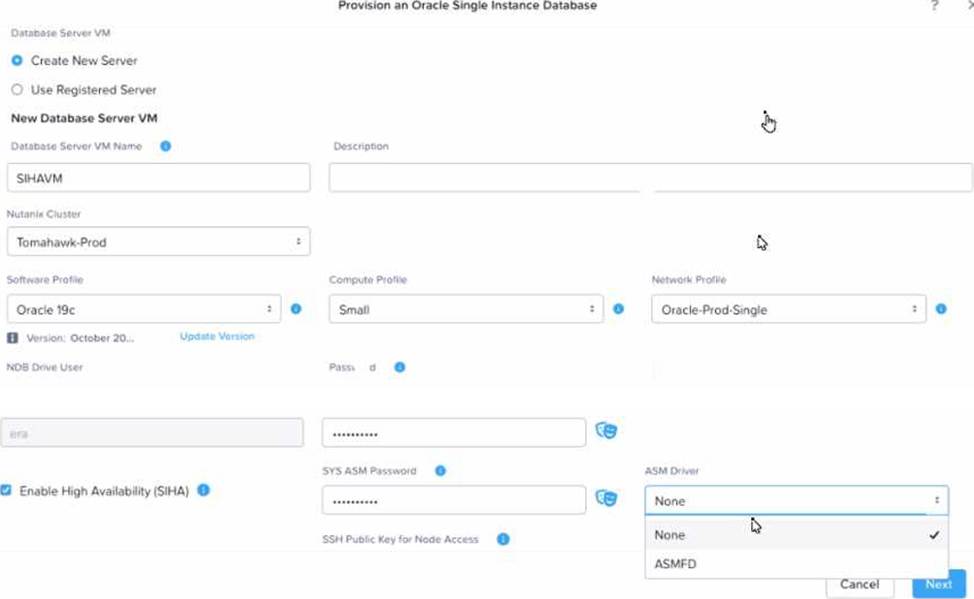
A request is received to provision a new Oracle SIHA DB & VM to test ASMLIB on OEL79 and Oracle 19c. When walking through the provisioning workflow, only ASMFD is available in the ASM Driver drop down.
What is necessary to provision the requested SIHA DB and DB VM with ASMLIB?
- A . Update the software profile to include the ASMLIB driver.
- B . Install ASMLIB on the NDB server.
- C . Update the NDB driver config to enable ASMLIB for Oracle.
- D . Install ASMLIB on the database server.
A
Explanation:
In the context of Nutanix Database Automation (NCP-DB), when provisioning a new Oracle SIHA DB & VM, if only ASMFD is available in the ASM Driver drop-down, it indicates that ASMLIB is not included in the current software profile. To provision the requested SIHA DB and DB VM with ASMLIB, it’s essential to update the software profile to include the ASMLIB driver. This action will enable ASMLIB as an option in the ASM Driver drop-down during the provisioning workflow.
Reference: Nutanix Database Automation (NCP-DB) Course Details, Section 2.3: Provisioning Oracle Databases
Nutanix Database Automation (NCP-DB) Certification Details, Objective 2.3: Provision Oracle Databases
Nutanix Database Automation (NCP-DB) YouTube Playlist, Video 2.3: Provisioning Oracle Databases
[Nutanix Database Automation (NCP-DB) User Guide], Section 2.3: Provision Oracle Databases
An administrator needs to restore a source database from a snapshot. The database shares the source volume with multiple other databases.
How does NDB handle this database restore operation?
- A . Copies the specific database files to the source volume
- B . Replaces source volume with specific db disks
- C . Replaces the source volume with the snapshot volume
- D . Copies all database files to the source volume
A
Explanation:
The correct answer is A because NDB handles the database restore operation by copying the specific database files from the snapshot volume to the source volume, without affecting the other databases that share the same source volume. NDB uses a copy-on-write mechanism to create snapshots and clones, which means that only the changes made to the database files are stored in the snapshot or clone volume, while the original files are kept in the source volume. Therefore, when restoring a source database from a snapshot, NDB only needs to copy the specific database files that have been modified since the snapshot was taken, and overwrite them on the source volume. The other options are not correct because they either cause data loss or unnecessary data transfer. Option B is not correct because replacing the source volume with specific db disks would erase the other databases that share the same source volume, which is not desirable. Option C is not correct because replacing the source volume with the snapshot volume would also erase the other databases that share the same source volume, as well as any changes made to the source database after the snapshot was taken, which is not desirable. Option D is not correct because copying all database files to the source volume would be inefficient and unnecessary, as only the modified files need to be copied, and the other files are already present on the source volume.
Reference: Nutanix Database Management & Automation (NDMA) course, Nutanix Certified Professional – Database Automation (NCP-DB) certification, Nutanix NCP-DB Certification Exam Syllabus and Study Guide, [Nutanix Support & Insights]
An administrator would like to use Era for Copy Data Management operations on an Availability Group (AG) database.
The AG database is hosted on replicas with different named instances, as shown below:
• SQLAGNIEMR
• SQLAGN2EMR
• SQLAGN3DW
SQLAGN3DW is running the Analytics service that needs real-time data.
How should the administrator register the database in Era?
- A . Register the database as an Availability database.
- B . Register the database as a Standalone database,
- C . Register the SQLAGN3 from AG cluster and register the database as Availability database,
A
Explanation:
According to the Nutanix Database Automation (NCP-DB) learning documents, when dealing with an Availability Group (AG) database, the database should be registered as an Availability database1. This is because the AG database is hosted on replicas with different named instances, and registering it as an Availability database allows for Copy Data Management operations to be performed across all instances. This is particularly important when services such as the Analytics service running on SQLAGN3DW require real-time data1.
Which disk is omitted from a Software Profile?
- A . System Page File
- B . SQL Installation
- C . User Database
- D . System Database
A
Explanation:
According to the Nutanix Database Automation (NCP-DB) course, a Software Profile is a template that defines the configuration of the database engine, such as the version, edition, features, and parameters1. It also specifies the disk layout for the database installation, such as the size, type, and mount point of each disk1. However, the System Page File disk is omitted from the Software Profile, as it is automatically created by the NDB service based on the memory size of the database server VM1. The other options are included in the Software Profile, as they are essential for the database operation and performance1.
Reference: 1: Nutanix Database Automation (NCP-DB) course, Module 2: Database Provisioning, Lesson 2.3:
Software Profiles, slide 5
An administrator created a database clone that is scheduled for removal on the last day of the month.
A request has been received to keep the clone for an additional 14 days.
After selecting the desired clone, how should the administrator satisfy this task?
- A . Update the Removal schedule to the desired date.
- B . Update the Removal schedule to the end of the month.
- C . Remove the Removal schedule, then add the desired removal schedule.
- D . Select Update and modify the Removal schedule.
D
Explanation:
The Removal schedule is a feature of Nutanix Era that allows you to specify when a database clone will be automatically deleted. You can modify the Removal schedule of an existing clone by selecting the clone from the Clones page, clicking on the Update button, and changing the Removal schedule option to the desired date. This way, you can extend or shorten the lifespan of a clone as per your requirements. You do not need to remove the existing Removal schedule and add a new one, as this would be an unnecessary step. You also do not need to update the Removal schedule to the end of the month, as this would not meet the request of keeping the clone for an additional 14 days.
Reference: Nutanix Database Management & Automation Training Course, Module 4: Protecting Databases
Using Time Machine, Lesson 3: Cloning Databases, Slide 10: Clone Removal Schedule Nutanix Certified Professional – Database Automation (NCP-DB) 5 Exam, Section 5: Protect NDB-managed Databases Using Time Machine, Objective 5.3: Given business requirements, perform a database clone
An administrator enables NDB Multi-Cluster on Cluster A. Cluster B is then registered with NDB.
What are the different NDB Service VMs present in each Nutanix cluster?
- A . Cluster A: 1 NDB Server
Cluster B: 1 NDB Agent - B . Cluster A: 1 NDB Agent
Cluster B: 1 NDB Server, 1 NDB Agent - C . Cluster A: 1 NDB Server, 1 NDB Agent
Cluster B: 1 NDB Agent - D . Cluster A: 1 NDB Agent
Cluster B: 1 NDB Server
C
Explanation:
NDB Multi-Cluster is a feature that allows multiple Nutanix clusters to share a common NDB service for database management and automation. NDB service consists of two components: NDB Server and NDB Agent. NDB Server is the central component that provides the web UI, REST API, and database orchestration logic. NDB Agent is the component that runs on each Nutanix cluster and communicates with the NDB Server to perform database operations.
When NDB Multi-Cluster is enabled on Cluster A, it becomes the primary cluster that hosts the NDB
Server VM. Cluster B, which is registered with NDB, becomes a secondary cluster that hosts only the
NDB Agent VM. Therefore, Cluster A has both NDB Server and NDB Agent, while Cluster B has only
NDB Agent. This configuration allows Cluster B to leverage the NDB service running on Cluster A for
database management and automation.
Reference: Nutanix Database Automation (NCP-DB) Course Details, Section 3.1: NDB Multi-Cluster Overview Nutanix Database Automation (NCP-DB) Certification Details, Objective 3.1: Configure NDB Multi-Cluster
Nutanix Database Automation (NCP-DB) YouTube Playlist, Video 3.1: NDB Multi-Cluster Overview