
Nutanix NCP-DB-6.5 Practice Exams
Last updated on Oct 06,2026- Exam Code: NCP-DB-6.5
- Exam Name: Nutanix Certified Professional - Database Automation (NCP-DB) v6.5
- Certification Provider: Nutanix
- Latest update: Oct 06,2026
Refer to the exhibit.
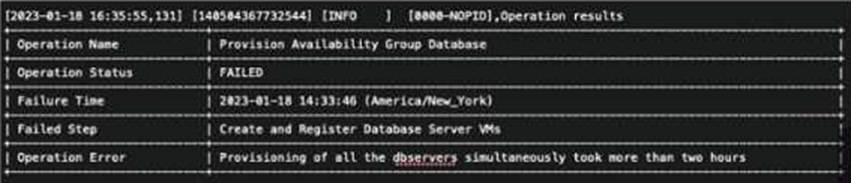
An administrator attempts to provision their first clustered database environment with NDB. The operation fails with the Operation Error shown in the exhibit.
Which database engine was being deployed during this operation?
- A . Oracle
- B . MySQL
- C . Microsoft SQL
- D . PostgreSQL
B
Explanation:
The error message in the exhibit indicates that the operation failed during the “Create and Register Database Server VMs” step because “Provisioning of all the observers simultaneously took more than two hours.” This type of error is associated with MySQL, as it involves observers which are a part of MySQL Group Replication, used for ensuring high availability1. The other options are not related to the error message, as they do not use observers or Group Replication for clustering.
Reference: 1: Nutanix Database Automation (NCP-DB) course, Module 5: Database High Availability, Lesson 5.2: MySQL Group Replication, slide 7
What step should be taken to make the profile available to all users:
- A . Create an Access Control role with the Create Profile right and assign to all users.
- B . Create an Access Control group with the desired users and grant it the Database Admin role.
- C . Update the profile and set the status to Published.
- D . Update the profile and set available state to All.
D
Explanation:
The correct answer is D because it allows the administrator to make the profile available to all users without requiring any additional permissions or roles. A profile is a collection of settings that define how NDB manages a database server or a database. By default, a profile is only available to the user who created it and the Database Admin role. To make a profile available to all users, the administrator can update the profile and set the available state to All. This will enable all users to view and use the profile for their database operations. The other options are not correct because they either require additional steps or do not achieve the desired outcome. Option A is not correct because creating an Access Control role with the Create Profile right and assigning it to all users will only allow them to create their own profiles, not use the existing one. Option B is not correct because creating an Access Control group with the desired users and granting it the Database Admin role will only make the profile available to those users, not all users. Option C is not correct because updating the profile and setting the status to Published will not change the availability of the profile, only the state of the profile. A published profile is a profile that has been tested and verified by the administrator and is ready for use. A draft profile is a profile that is still under development or testing and is not ready for use.
Reference: Nutanix Database Management & Automation (NDMA)
course, Nutanix Certified Professional – Database Automation (NCP-DB) certification, Nutanix NCP-DB
Certification Exam Syllabus and Study Guide, Nutanix Certified Professional – Database Automation
(NCP-DB) datasheet
How should an administrator modify the Alert Severity level within Era?
- A . From the dropdown menu choose Alerts Policies. Choose the Policy to be modified and set the desired severity level.
- B . From the dropdown menu choose Alerts > List. Select the message to be changed end choose Set Status to Resolved or Set Status to Acknowledged.
- C . From the dropdown menu choose Alerts Policies. Chose the Poliq to be modified and chose either Set Enabled or Set Disabled,
- D . From the dropdown menu choose Alerts > Policies. Then choose Update next to Alert Retention,
A
Explanation:
In Nutanix Era, an administrator can modify the Alert Severity level by navigating to the Alerts Policies from the dropdown menu. Once there, they can select the Policy that needs to be modified and set the desired severity level1. This allows the administrator to customize the alerts according to their requirements, ensuring that they are notified of the most critical events in their environment21.
When trying to restore a database via Time Machine (TM), the option to restore data to a Point in Time is not available.
What should the administrator do to enable Point in Time Recovery?
- A . Use an SLA that supports Continuous Log retention.
- B . Update the TM schedule to perform DB Log catch up.
- C . Take a Manual snapshot and use it for DB recovery.
- D . Use Brass SLA & update the Log catch up frequency.
A
Explanation:
Point in Time Recovery (PITR) is a feature of NDB that allows restoring a database to any point in time within the retention period of the SLA. To enable PITR, the SLA must support Continuous Log retention, which means that NDB captures and stores the database logs continuously. This allows NDB to replay the logs from the last snapshot to the desired point in time during the restore process. The other options do not enable PITR, but rather affect the frequency and timing of the snapshots and log catch up operations.
Reference: Nutanix Support & Insights, section “NDB Time Machine Point in Time Recovery”
An administrator needs to replace the default Nutanix self-signed certificates in Era.
Which SSL Certificate file format is supported?
- A . PKCS#7
- B . DER encoded binary X.509
- C . Base-64 encoded X 509
- D . PKCS#12
C
Explanation:
According to the Nutanix Database Automation (NCP-DB) learning documents, Nutanix Era supports x509 certificates in Base-64 encoded PEM format1. This format is used when an administrator needs to replace the default Nutanix self-signed certificates in Era1.
An administrator needs to replace the default Nutanix self-signed certificates in Era.
Which SSL Certificate file format is supported?
- A . PKCS#7
- B . DER encoded binary X.509
- C . Base-64 encoded X 509
- D . PKCS#12
C
Explanation:
According to the Nutanix Database Automation (NCP-DB) learning documents, Nutanix Era supports x509 certificates in Base-64 encoded PEM format1. This format is used when an administrator needs to replace the default Nutanix self-signed certificates in Era1.
An administrator needs to replace the default Nutanix self-signed certificates in Era.
Which SSL Certificate file format is supported?
- A . PKCS#7
- B . DER encoded binary X.509
- C . Base-64 encoded X 509
- D . PKCS#12
C
Explanation:
According to the Nutanix Database Automation (NCP-DB) learning documents, Nutanix Era supports x509 certificates in Base-64 encoded PEM format1. This format is used when an administrator needs to replace the default Nutanix self-signed certificates in Era1.
What must be completed within NDB before patching a Linux OS?
- A . Update the database.
- B . Configure the repository.
- C . Configure database high availability.
- D . Update the software profile version.
B
Explanation:
Before patching a Linux OS on a database server VM provisioned using NDB, you must configure the repository for the OS updates. This can be done by creating a Repository Profile in NDB and specifying the URL, username, and password for the repository. The Repository Profile can be applied to one or more database server VMs during the provisioning process or later. By configuring the repository, you ensure that NDB can access and download the latest OS patches from a trusted source.
Reference: Nutanix Database Automation (NCP-DB) Course Details, Nutanix Database Automation (NCP-DB) Certification Details, Nutanix Database Automation (NCP-DB) YouTube Playlist, Nutanix Database Automation User Guide.
For which database engine does Era support rolling back a patch using CLI?
- A . PostgreSQL
- B . Oracle
- C . Microsoft SQL Server
- D . MongoDB
B
Explanation:
Nutanix Era supports a variety of database engines, including Oracle, PostgreSQL, MySQL, and Microsoft SQL Server1. However, when it comes to rolling back a patch using the Command Line Interface (CLI), this feature is specifically supported for the Oracle database engine1. This allows for efficient validation of critical database updates and simplifies database rollback1. Please note that while Era does provide support for other database engines, the ability to rollback a patch using CLI is currently specific to Oracle1.
Which action should be completed before updating Oracle Database software?
- A . Verify CVMs have the required memory allocated.
- B . Perform rolling reboots of the Oracle Database VMs.
- C . Verify the Oracle OS version is supported on AHV.
- D . Download the PSU from Oracle support.
D
Explanation:
Before updating Oracle Database software, you need to download the Patch Set Update (PSU) from Oracle support. A PSU is a collection of critical and security patches for Oracle products. You need to have a valid Oracle account and access to the My Oracle Support portal to download the PSU. You also need to check the compatibility and prerequisites of the PSU before applying it to your Oracle Database software. NDB uses out-of-place patching for Oracle, which means you need to create a new software profile version with the patched Oracle software and use it to update your existing databases.
Reference: Patch Oracle Database Software, Nutanix Support & Insights Nutanix Certified Professional – Database Automation (NCP-DB), Section 4 – Operate and Maintain an NDB Environment Nutanix Database Management & Automation (NDMA) course, Module 4, Lesson 4.4 – Patching Databases