
Network Appliance NS0-304 Practice Exams
Last updated on Oct 21,2026- Exam Code: NS0-304
- Exam Name: NetApp Certified Hybrid Cloud Administrator
- Certification Provider: Network Appliance
- Latest update: Oct 21,2026
An administrator is using the NetApp BlueXP API to perform actions within an CI/CD process.
What information is needed for authentication?
- A . API endpoint and Java web token
- B . API endpoint and API token
- C . API endpoint and username/password
- D . API endpoint with bearer token
D
Explanation:
For authenticating with the NetApp BlueXP API, particularly within a CI/CD process, you will need the
API endpoint and a bearer token.
Here’s why this is important:
API Endpoint: The API endpoint is the URL where the API requests are sent. It serves as the access point for the BlueXP services.
Bearer Token: A bearer token is a type of access token that is often used in OAuth 2.0 authentication. It must be included in the header of each API request to authenticate and authorize the request. This token ensures that the person or system making the API request has the correct permissions. Setup Authentication: To set up authentication, you must first obtain a bearer token, typically through a login API endpoint that provides this token after verifying your credentials. Subsequently, include this token in the "Authorization" header of your API requests.
For more information on using APIs with NetApp BlueXP, including obtaining and using bearer tokens, refer to the NetApp BlueXP API documentation: NetApp API Documentation.
Refer to the exhibit.
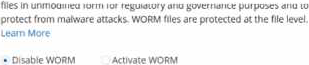
An administrator is deploying the latest version of CVO via BlueXP.
What will be the result of leaving the option disabled?
- A . After applying a license, the feature will automatically be activated.
- B . BlueXP will automatically configure new volumes with encryption.
- C . BlueXP will include this option again during new volume creation.
- D . BlueXP will automatically create future volumes as non-SnapLock.
D
Explanation:
In the context of deploying Cloud Volumes ONTAP (CVO) via BlueXP, if the administrator chooses to leave the WORM (Write Once Read Many) option disabled, the default behavior for newly created volumes will be as non-SnapLock volumes.
Here’s what this implies:
Non-SnapLock Volumes: Leaving the WORM feature disabled means that new volumes will not be created with the SnapLock compliance feature activated. SnapLock is used to ensure data immutability for compliance and regulatory purposes, protecting files from being altered or deleted before a predetermined retention period expires.
Volume Configuration Flexibility: Administrators will have the option to activate SnapLock or other data protection features on a per-volume basis in the future if needed, but this would need to be explicitly configured.
Impact on Data Management: This choice affects how data is managed in terms of compliance and security. Without SnapLock enabled by default, the volumes will operate under standard data management policies, which do not include immutability protections.
For more information on the implications of enabling or disabling SnapLock and how it affects volume creation in Cloud Volumes ONTAP, please refer to the NetApp BlueXP and SnapLock documentation: NetApp SnapLock Documentation.
An administrator wants to automate the configuration of SnapMirror policies between cloud and on-premises deployments in AWS using Ansible.
What must the administrator do first?
- A . Set up AWS Control Tower for automation
- B . Subscribe to Ansible Automation Platform
- C . Install the ONTAP collection using Ansible Galaxy
- D . Install the Ansible plugin for aws_ec2 inventory
C
Explanation:
To automate the configuration of SnapMirror policies between cloud and on-premises deployments in AWS using Ansible, the administrator needs to begin by installing the NetApp ONTAP collection from Ansible Galaxy. This collection contains modules specifically designed to manage NetApp ONTAP storage systems, including the management of SnapMirror configurations.
Here are the steps to do this:
Installation of ONTAP Collection: Open your command line interface and run the command ansible-galaxy collection install netapp.ontap. This command pulls the ONTAP collection from Ansible Galaxy, which includes all necessary modules for managing NetApp ONTAP, including SnapMirror. Configuration of Ansible Environment: Ensure that your Ansible environment is set up to connect to both your AWS environment and the on-premises NetApp ONTAP systems. This typically involves configuring the appropriate credentials and network settings in your Ansible playbooks and inventory files.
Writing Ansible Playbooks: With the ONTAP collection installed, you can now write Ansible playbooks that utilize the SnapMirror modules to automate the configuration of SnapMirror policies as required.
For further information on using the NetApp ONTAP Ansible collection, please refer to the official documentation available at: NetApp ONTAP Ansible Collection Documentation.
An administrator wants to automate the creation of several new volumes on an existing aggregate in a NetApp Cloud Volumes ONTAP instance.
What should the administrator use?
- A . Heat Orchestration Template
- B . Puppet Manifest
- C . Ansible Playbook
- D . BlueXP AppTemplate
C
Explanation:
To automate the creation of several new volumes on an existing aggregate in a NetApp Cloud Volumes ONTAP instance, the administrator should use an Ansible Playbook.
Here’s how it benefits the task:
Automation with Ansible: Ansible is a powerful automation tool that can manage infrastructure as code. Using Ansible Playbooks, administrators can script the configuration of new volumes, including size, protocols, and other settings, ensuring consistent and repeatable deployments.
NetApp Module for Ansible: NetApp provides specific Ansible modules for ONTAP that allow administrators to automate various storage operations, including volume creation. This integration streamlines the process and ensures compatibility with NetApp technologies.
Ease of Use and Scalability: Ansible Playbooks can be run from a central location and can manage multiple configurations across different environments, making them ideal for large-scale deployments or routine operations.
For instructions on creating Ansible Playbooks for NetApp ONTAP, refer to the NetApp Automation and Ansible documentation: NetApp Developer Network – Ansible.
An administrator needs to set up a FlexCache volume on a Cloud Volumes ONTAP HA pair. The origin cluster is an AFF HA pair at a company data center.
How many intercluster LIFs are required at each site?
- A . 8
- B . 6
- C . 2
- D . 4
C
Explanation:
To set up a FlexCache volume on a Cloud Volumes ONTAP (CVO) HA pair where the origin cluster is an AFF HA pair at a company data center, each site typically needs at least two intercluster Logical Interface (LIFs).
Here’s why:
Purpose of Intercluster LIFs: Intercluster LIFs are used for communication between different clusters,
especially for operations involving data replication and FlexCache. Each cluster needs to have its intercluster LIFs configured to ensure proper communication across clusters.
Configuration Requirement: For a basic setup involving one origin and one destination cluster, at least one intercluster LIF per node is recommended to provide redundancy and ensure continuous availability, even if one node or one network path fails.
Best Practices: While two intercluster LIFs (one per node in an HA pair) are typically sufficient, larger deployments or environments requiring higher redundancy might opt for more intercluster LIFs. For detailed guidance on setting up intercluster LIFs and configuring FlexCache volumes, consult the NetApp documentation on FlexCache and cluster peering: NetApp FlexCache Documentation.
An administrator is adding a new AFF A250 to an existing 4-node cluster that has cloud tiering enabled to AWS.
What is the minimum number of LIFs that must be added for tiering?
- A . 4
- B . 8
- C . 2
- D . 6
C
Explanation:
When adding a new AFF A250 to an existing 4-node cluster with cloud tiering enabled to AWS, a minimum of two logical interface (LIF) configurations are necessary for the tiering process.
Here’s the rationale:
LIF Configuration for Cloud Tiering: Each node in a NetApp cluster typically requires a minimum of one data LIF for client access and an additional LIF for inter-cluster communication. However, for cloud tiering purposes specifically, at least one data LIF per node is essential to manage the data movement to and from AWS.
Purpose of Additional LIFs: Since the AFF A250 is being added to an existing cluster, it will share the cluster’s existing infrastructure but will still need its data LIFs configured to participate in cloud tiering.
Best Practices: It’s advisable to configure multiple LIFs across different subnets or network paths to ensure redundancy and optimal data flow, especially in a cloud-tiered environment to maintain performance and availability.
For more specific instructions on configuring LIFs for cloud tiering in a NetApp environment, refer to NetApp’s technical documentation on cloud tiering and cluster networking: NetApp Cloud Tiering Documentation.
An administrator wants to use BlueXP Observability to generate notifications whenever a volume in a FlexGroup on a GCP CVO system is nearing capacity.
Which option should the administrator use?
- A . Data Collection API
- B . Service Level Annotation
- C . Log Monitor
- D . AIQ ConfigAdvisor
A
Explanation:
To generate notifications whenever a volume in a FlexGroup on a GCP CVO system is nearing capacity using BlueXP Observability, the Data Collection API should be utilized. This option allows for the configuration of customized monitoring and alerting based on specific data points and thresholds.
Here’s the process:
Setup Data Collection API: Configure the Data Collection API to monitor volume capacity metrics within your FlexGroup. This involves setting up the API to pull or receive data points related to storage utilization.
Define Alerts: Set thresholds for when capacity is considered nearing its limit (e.g., 80% full). Configure alerts to be triggered when these thresholds are approached, ensuring administrators are notified in advance to take necessary actions.
Implement Notification System: Integrate the alerting mechanism with your organization’s notification system (e.g., email alerts, SMS, or a dashboard) to inform the relevant stakeholders or administrators promptly.
For detailed instructions on configuring the Data Collection API and setting up monitoring and alerting in BlueXP Observability, refer to the NetApp BlueXP documentation and API guides: NetApp BlueXP Documentation.
Which two network connections are required by the Connector to enable Cloud Tiering from on-premises to a public cloud? (Choose two.)
- A . An HTTPS connection to the ONTAP cluster management LIF
- B . An SSH connection to the ONTAP cluster management LIF
- C . An inbound Internet connection to the Cloud Tiering service
- D . An outbound Internet connection to the Cloud Tiering service
A, D
Explanation:
To enable Cloud Tiering from on-premises to a public cloud, the Connector requires two specific network connections:
HTTPS Connection to ONTAP Cluster Management LIF: This connection allows the Connector to communicate securely with the management interface of the ONTAP cluster. It’s essential for managing storage operations and configuring cloud tiering.
Outbound Internet Connection to the Cloud Tiering Service: This is necessary for the Connector to reach the Cloud Tiering service hosted in the cloud. It ensures that data can be moved between the on-premises environment and the cloud tiering service, facilitating storage tiering operations.
These connections ensure that the on-premises systems can effectively interact with cloud services, maintaining operational continuity and enabling efficient data management.
For additional information on setting up network connections for Cloud Tiering, you can refer to the NetApp Cloud Tiering documentation: NetApp Cloud Tiering Documentation.
An administrator is configuring Cloud Volumes ONTAP (CVO). The CVO instance does not have outbound network connectivity to send AutoSupport messages.
What will BlueXP automatically configure as the proxy server for AutoSupport?
- A . Page blob
- B . Mediator
- C . Collector
- D . Connector
D
Explanation:
In a scenario where a Cloud Volumes ONTAP (CVO) instance lacks outbound network connectivity to send AutoSupport messages, BlueXP (formerly known as NetApp Cloud Manager) will automatically configure the Connector as the proxy server for AutoSupport. The Connector serves as a bridge between the customer’s environment and NetApp cloud services, facilitating communication and data transfer, including AutoSupport messages, when direct connectivity is unavailable. Page blob is a type of storage in Azure, not related to network functions.
Mediator and Collector are not standard terms used within NetApp for describing components involved in managing or proxying AutoSupport messages.
BlueXP’s configuration to use the Connector as a proxy ensures that all monitoring and telemetry data crucial for the health and performance diagnostics of the CVO instance are relayed effectively, even in environments with restrictive outbound network policies. More details on this setup can be explored in the BlueXP or Cloud Volumes ONTAP documentation available on NetApp’s website.
An administrator is configuring a Red Hat Enterprise Linux system as a Workload Security Agent and wants to make sure that it meets requirements.
Which two changes should the administrator make to the system? (Choose two.)
- A . Disable SELinux
- B . Install the ansible-core application
- C . Disable the system firewall
- D . Install the unzip application
A, D
Explanation:
When configuring a Red Hat Enterprise Linux system as a Workload Security Agent, there are specific system requirements and preparations needed to ensure compatibility and functionality of the security agent.
Among the potential adjustments:
Disable SELinux: Security-Enhanced Linux (SELinux) can interfere with the operation of various security agents due to its strict access controls. Disabling SELinux may be recommended by certain security applications to ensure they can function without restrictions. This should be carefully considered in the context of overall system security policies.
Install the unzip application: Many security agents require unzip to extract and install necessary files. Ensuring that unzip is installed on the system can facilitate the installation and updating of the security agent.
Install the ansible-core application and Disable the system firewall are not typically required or recommended universally for configuring a Workload Security Agent:
Ansible-core is used for automation and configuration management but is not a prerequisite for most security agents unless specifically stated.
Disabling the system firewall can significantly reduce the system’s security posture and is generally not advisable unless specifically required by the security agent, and even then, such advice should be critically evaluated.
For specific guidelines and requirements, the installation documentation of the Workload Security Agent should be consulted.