
Netskope NSK300 Practice Exams
Last updated on Oct 22,2026- Exam Code: NSK300
- Exam Name: Netskope Certified Cloud Security Architect Exam
- Certification Provider: Netskope
- Latest update: Oct 22,2026
You built a number of DLP profiles for different sensitive data types. If a file contains any of this sensitive data, you want to take the most restrictive policy action but also create incident details for all matching profiles.
Which statement is correct in this scenario?
- A . Create a Real-time Protection policy for each DLP profile; each matched profile will generate a unique DLP incident.
- B . Create a Real-time Protection policy for each DLP profile; all matched profiles will show up in a single DLP incident
- C . Create a single Real-time Protection policy and include all of the DLP profiles; each matched profile will generate a unique DLP incident
- D . Create a single Real-time Protection policy and include all of the DLP profiles; all matched profiles will show up in a single DLP incident.
D
Explanation:
When configuring a Real-time Protection policy with multiple DLP profiles, if the content matches multiple profiles, the policy performs the most restrictive action associated with the DLP profiles that match for that policy. The resulting incident lists all the profiles that matched along with their corresponding forensic information. This means that even though the most restrictive action is taken, details for all matching profiles are created and included in a single DLP incident12.
Reference: The explanation is based on the best practices and detailed descriptions provided in the Netskope Knowledge Portal and Community discussions, which outline the process of handling multiple DLP profile matches within a single Real-time Protection policy
Your company purchased Netskope’s Next Gen Secure Web Gateway You are working with your network administrator to create GRE tunnels to send traffic to Netskope Your network administrator has set up the tunnel, keepalives. and a policy-based route on your corporate router to send all HTTP and HTTPS traffic to Netskope. You want to validate that the tunnel is configured correctly and that traffic is flowing.
In this scenario, which two statements are correct? (Choose two.)
- A . You can use your local router or network device to verify that keepalives are being received and traffic is flowing to Netskope.
- B . You must use your own monitoring tools to verify that the tunnel is up.
- C . You can verify that the tunnel is up and receiving traffic in the Netskope Ul under Settings > Security Cloud Platform > GRE.
- D . You can verify that the tunnel is up in the Netskope Trust portal at https://trust netskope.com/.
AC
Explanation:
To validate that the GRE tunnel is configured correctly and that traffic is flowing to Netskope, the correct statements are:
A: You can use your local router or network device to verify that keepalives are being received and traffic is flowing to Netskope. This is a standard method for checking the health and activity of a GRE tunnel.
C: You can verify that the tunnel is up and receiving traffic in the Netskope UI under Settings > Security Cloud Platform > GRE. This is a feature provided by Netskope to monitor the status of GRE tunnels directly from the Netskope interface12.
Statement B is incorrect because Netskope provides its own tools for monitoring the status of the tunnel. Statement D is incorrect because the Netskope Trust portal provides information on the overall service status and updates, not specific tunnel status3.
Reference: The references for these answers can be found in the Netskope Knowledge Portal, which provides detailed guidance on configuring and validating GRE tunnels12. Additionally, the Netskope Community Forum offers insights and solutions for deploying and monitoring GRE tunnels
Review the exhibit.
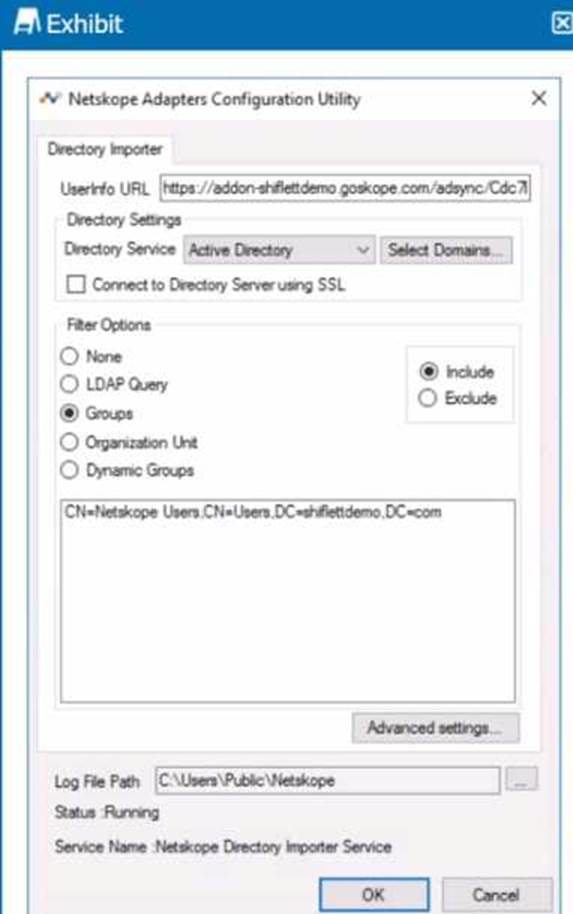
You installed Directory Importer and configured it to import specific groups ot users into your Netskope tenant as shown in the exhibit. One hour after a new user has been added to the domain, the user still has not been provisioned to Netskope.
What are three potential reasons for this failure? (Choose three.)
- A . Directory Importer does not support ongoing user syncs; you must manually provision the user.
- B . The server that the Directory Importer is installed on is unable to reach Netskope’s add-on endpomt.
- C . The user is not a member of the group specified as a filter
- D . Active Directory integration is not enabled on your tenant.
- E . The default collection interval is 180 minutes, therefore a sync may not have run yet.
BCE
Explanation:
The three potential reasons for the failure of a new user not being provisioned to Netskope an hour after being added to the domain could be:
B. The server that the Directory Importer is installed on is unable to reach Netskope’s add-on endpoint: If the server cannot connect to Netskope’s endpoint, it cannot sync the user data. This could be due to network issues, incorrect configuration, or firewall restrictions1.
C. The user is not a member of the group specified as a filter: The Directory Importer may be configured to import users from specific groups only. If the new user is not a member of these groups, they will not be imported into Netskope1.
E. The default collection interval is 180 minutes, therefore a sync may not have run yet: The Directory Importer may be scheduled to sync every 180 minutes. If only an hour has passed, the sync process might not have occurred yet, and the user would not be provisioned until the next sync interval1.
Reference: These potential reasons are based on the standard operation and configuration of the Netskope Directory Importer as described in the Netskope Knowledge Portal and documentation
A company’s architecture includes a server subnet that is logically isolated from the rest of the network with no Internet access, no default gateway, and no access to DNS. New resources can only be provisioned on virtual resources in that segment and there is a firewall that is tunnel-capable securing the perimeter of the segment. The only requirement is to have content filtering for any server that might access the Internet using a browser.
Which two Netskope deployment methods would achieve this requirement? (Choose two.)
- A . Deploy a mobile profile on the servers.
- B . Deploy Data Plane on Premises (DPoP) with a proxy configuration on the servers.
- C . Deploy IPsec or GRE tunnels in the segment to steer traffic from the servers to Netskope.
- D . Install the Netskope Client on the servers
BC
Explanation:
For a server subnet that is isolated and requires content filtering for any server that might access the Internet using a browser, the two Netskope deployment methods that would meet this requirement are:
B. Deploy Data Plane on Premises (DPoP) with a proxy configuration on the servers: Deploying DPoP would allow the isolated servers to connect to the Netskope cloud for content filtering through a proxy configuration. This setup would enable the servers to have controlled access to the Internet for content filtering purposes without requiring direct Internet access1.
C. Deploy IPsec or GRE tunnels in the segment to steer traffic from the servers to Netskope: By deploying IPsec or GRE tunnels, the traffic from the servers can be securely directed to Netskope for content filtering. This method is suitable for environments where servers do not have direct Internet access, as the tunnel provides a secure path for traffic to reach Netskope’s cloud services1.
These deployment methods are designed to work in environments with strict network isolation and provide the necessary content filtering capabilities for servers accessing the Internet.
Reference: The deployment methods and their suitability for isolated server subnets are based on Netskope’s documentation and resources, which detail various deployment options and their use cases21.
You are deploying the Netskope Client to Windows devices.
The following command line would be used to install the client MSI file:

In this scenario, what is <token> referring to in the command line?
- A . a Netskope user identifier
- B . the Netskope organization ID
- C . the URL of the IdP used to authenticate the users
- D . a private token given to you by the SCCM administrator
B
Explanation:
In the context of deploying the Netskope Client to Windows devices, <token> in the command line refers to the Netskope organization ID. This is a unique identifier associated with your organization’s account within the Netskope security cloud. It is used during the installation process to ensure that client devices are registered and managed under the correct organizational account, enabling appropriate security policies and configurations to be applied.
Reference: The answer can be inferred from general knowledge about installing software clients and isn’t directly available on Netskope’s official resources.
Review the exhibit.

You are the proxy administrator for a medical devices company. You recently changed a pilot group of users from cloud app steering to all Web traffic. Pilot group users have started to report that they receive the error shown in the exhibit when attempting to access the company intranet site that is publicly available. During troubleshooting, you realize that this site uses your company’s internal certificate authority for SSL certificates.
Which three statements describe ways to solve this issue? (Choose three.)
- A . Import the root certificate for your internal certificate authority into Netskope.
- B . Bypass SSL inspection for the affected site(s).
- C . Create a Real-time Protection policy to allow access.
- D . Change the SSL Error Settings from Block to Bypass in the Netskope tenant.
- E . Instruct the user to proceed past the error message
ABD
Explanation:
You configured a pair of IPsec funnels from the enterprise edge firewall to a Netskope data plane. These tunnels have been implemented to steer traffic for a set of defined HTTPS SaaS applications accessed from end-user devices that do not support the Netskope Client installation. You discover that all applications steered through this tunnel are non-functional.
According to Netskope. how would you solve this problem?
- A . Restart the tunnel to stop the tunnel from flapping.
- B . Downgrade from IKE v2 to IKE v1.
- C . Install the Netskope root and intermediate certificates on the end-user devices.
- D . Disable Perfect Forward Secrecy on the tunnel configuration.
C
Explanation:
When applications steered through an IPsec tunnel are non-functional, it is often due to the lack of proper trust establishment between the end-user devices and the Netskope data plane. The solution is to install the Netskope root and intermediate certificates on the end-user devices ©. This ensures that the devices recognize and trust the encrypted connection established by the IPsec tunnel, allowing the HTTPS SaaS applications to function correctly. Without these certificates, the devices may not be able to verify the security of the connection, leading to application failures.
Reference: This solution is based on standard practices for securing IPsec tunnels and ensuring device compatibility with encrypted traffic steering, as outlined in Netskope’s documentation on traffic steering and IPsec configuration
How does Netskope Private Access enhance security for remote workers accessing internal applications?
- A . By providing a VPN-like tunnel
- B . By encrypting end-to-end user data
- C . By ensuring only authorized access to applications
- D . By increasing the network bandwidth
Your CISO asks that you to provide a report with a visual representation of the top 10 applications (by number of objects) and their risk score. As the administrator, you decide to use a Sankey visualization in Advanced Analytics to represent the data in an efficient manner.
In this scenario, which two field types are required to produce a Sankey Tile in your report? {Choose two.)
- A . Dimension
- B . Measure
- C . Pivot Ranks
- D . Period of Type
AB
Explanation:


To produce a Sankey Tile in a report that visually represents the top 10 applications by number of objects and their risk score, you would need:
Dimension (A): This field type would be used to represent the nodes in the Sankey visualization, which could be the applications in this case1.
Measure (B): This field type would provide the weight of the links between the nodes, representing the number of objects or the risk score associated with each application1.
These two field types are essential for creating a Sankey visualization as they define the structure and flow of data between different stages or categories within the visualization.
Reference: The requirements for creating a Sankey visualization are based on the general principles of data visualization and the specific features of Sankey diagrams, which typically involve dimensions and measures to represent the flow of data1.
You are troubleshooting an issue with users who are unable to reach a financial SaaS application when their traffic passes through Netskope. You determine that this is because of IP restrictions in place with the SaaS vendor. You are unable to add Netskope’s IP ranges at this time, but need to allow the traffic.
How would you allow this traffic?
- A . Use NPAto implement Source IP anchonng so the traffic will egress from the corporate data center.
- B . Use Explicit Proxy Over Tunnel (EPoT) so the traffic will egress from the corporate data center.
- C . Use Cloud Explicit Proxy so the traffic will egress from the corporate data center
- D . Use an IPsec tunnel to forward traffic so it will egress from the corporate data center
C
Explanation:
To allow traffic to a financial SaaS application that is being blocked due to IP restrictions, the best option is to use Cloud Explicit Proxy. This method allows traffic to egress from the corporate data center without requiring Netskope’s IP ranges to be added to the SaaS vendor’s allowlist. By configuring an allowlist in the Cloud Explicit Proxy settings, you can add any source egress IP addresses for your on-premises users, and Netskope will allow the traffic from the added user and IP address without authenticating1.
Reference: The process for configuring an allowlist in Cloud Explicit Proxy to manage unauthenticated traffic from specific IP addresses is detailed in the Netskope Knowledge Portal1. This solution is suitable for scenarios where adding Netskope’s IP ranges to the SaaS vendor’s IP restrictions is not feasible.