
Netskope NSK200 Practice Exams
Last updated on Oct 21,2026- Exam Code: NSK200
- Exam Name: Netskope Certified Cloud Security Integrator (NCCSI)
- Certification Provider: Netskope
- Latest update: Oct 21,2026
You are comparing the behavior of Netskope’s Real-time Protection policies to API Data Protection
policies.
In this Instance, which statement is correct?
- A . All real-time policies are enforced, regardless of sequential order, while API policies are analyzed sequentially from top to bottom and stop once a policy Is matched.
- B . Both real-time and API policies are analyzed sequentially from top to bottom and stop once a policy Is matched.
- C . All API policies are enforced, regardless of sequential order, while real-time policies are analyzed sequentially from top to bottom and stop once a policy Is matched.
- D . Both real-time and API policies are all enforced, regardless of sequential order.
C
Explanation:
Netskope’s Real-time Protection policies and API Data Protection policies have different ways of applying actions based on the policy order. Real-time Protection policies are analyzed sequentially from top to bottom and stop once a policy is matched. This means that only one policy action is applied per transaction. API Data Protection policies are all enforced, regardless of sequential order. This means that multiple policy actions can be applied per file or email. Therefore, the correct statement is that all API policies are enforced, regardless of sequential order, while real-time policies are analyzed sequentially from top to bottom and stop once a policy is matched.
Reference: Real-time Protection Policies1, API Data Protection Policies2
Review the exhibit.
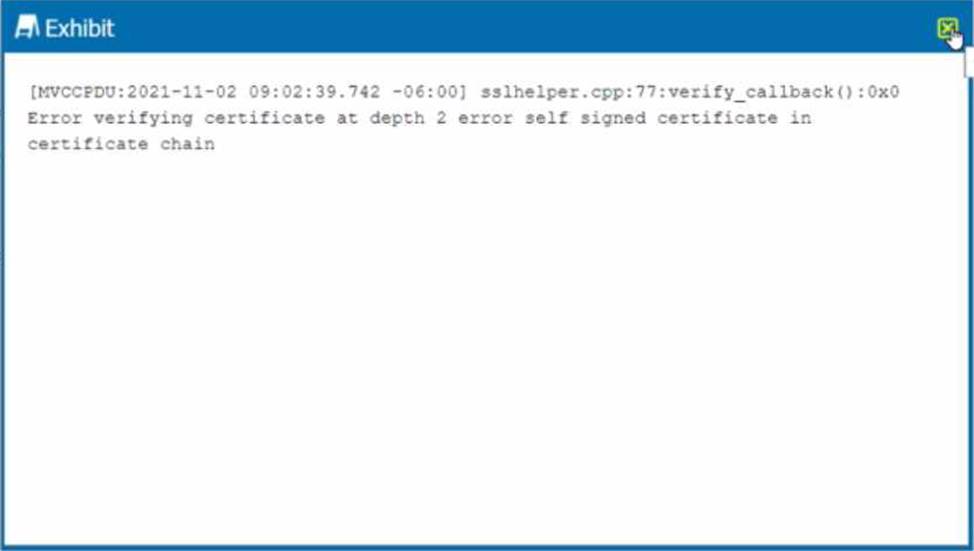
While diagnosing an NPA connectivity issue, you notice an error message in the Netskope client logs.
Referring to the exhibit, what does this error represent?
- A . The Netskope client has been load-balanced to a different data center.
- B . The primary publisher is unavailable or cannot be reached.
- C . There Is an EDNS or LDNS resolution error.
- D . There Is an upstream device trying to intercept the NPA TLS connection.
D
Explanation:
The error message in the exhibit represents that there is an upstream device trying to intercept the NPA TLS connection. The error message is “ERROR SSL certificate verification failed: self signed certificate in certificate chain”. This means that the Netskope client is receiving a certificate that is not issued by Netskope, but by a device that is intercepting and decrypting the traffic between the client and the Netskope cloud. This can cause the client to fail to establish a secure connection to the NPA service and access the private applications4. To solve this problem, you need to either bypass or trust the upstream device that is performing SSL decryption, such as a firewall or proxy5. Therefore, option D is correct and the other options are incorrect.
Reference: Troubleshooting Netskope Client – Netskope Knowledge Portal, Netskope Client Troubleshooting Guide – The Netskope Community
You discover the ongoing use of the native Dropbox client in your organization. Although Dropbox is not a corporate-approved application, you do not want to prevent the use of Dropbox. You do, however, want to ensure visibility into its usage.
- A . Change Windows and Mac steering exception actions to use Tunnel mode and set Netskope as the source IP address for SSO services.
- B . Modify the existing tenant steering exception configuration to block the Dropbox native application to force users to use the Dropbox website.
- C . Remove all Dropbox entries from the tenant steering SSL configuration entirely.
- D . Create a new tenant steering exception type of Destination Locations that contains the Dropbox application.
D
Explanation:
To allow the usage of Dropbox while maintaining visibility, create a new tenant steering exception of type "Destination Locations" for Dropbox. This will enable traffic visibility for Dropbox while avoiding a block, as requested.
You are given an MD5 hash of a file suspected to be malware by your security incident response team. They ask you to offer insight into who has encountered this file and from where was the threat initiated.
In which two Skope IT events tables would you search to find the answers to these questions? (Choose two.)
- A . Application Events
- B . Network Events
- C . Alerts
- D . Page Events
AC
Explanation:
To find the answers to the questions posed by the security incident response team, you need to search in the Application Events and Alerts tables in Skope IT. The Application Events table shows the details of the cloud application activities performed by the users, such as upload, download, share, etc. You can filter the Application Events table by the MD5 hash of the file to find out who has encountered this file and from which cloud service it was downloaded1. The Alerts table shows the details of the policy violations triggered by the users, such as DLP, threat protection, anomaly detection, etc. You can filter the Alerts table by the MD5 hash of the file to find out if this file was detected as malware by Netskope and what action was taken2. Therefore, options A and C are correct and the other options are incorrect.
Reference: Application Events – Netskope Knowledge Portal, Alerts – Netskope Knowledge Portal
Review the exhibit.
add log-upload syslogng parserconfig set log-upload syslogng parserconfig 0 logsource <log-source>.
You are asked to deploy a virtual appliance OPLP to accept syslog messages directly from the enterprise Palo Alto Networks firewall. You believe that you have configured the OPLP to accept the firewall logs, yet they are not appearing in Risk Insights.
Referring to the exhibit, which parser name would be required to complete the new configuration?
- A . panw-syslog
- B . sfwder
- C . custom-csv
- D . squid
A
Explanation:
The correct parser name to process syslog messages from Palo Alto Networks firewalls is "panw-syslog." Using the appropriate parser ensures that the logs are correctly interpreted and ingested by Netskope, making them available in Risk Insights.
You are an administrator writing Netskope Real-time Protection policies and must determine proper policy ordering.
Which two statements are true in this scenario? (Choose two.)
- A . You must place DLP policies at the bottom.
- B . You do not need to create an "allow all" Web Access policy at the bottom.
- C . You must place Netskope private access malware policies in the middle.
- D . You must place high-risk block policies at the top.
BD
Explanation:
Placing high-risk block policies at the top ensures that critical blocks are enforced first, protecting against the most severe threats. Additionally, an "allow all" Web Access policy at the bottom is not necessary, as policy defaults can handle remaining traffic not explicitly addressed by other rules.
You are provisioning Netskope users from Okta with SCIM Provisioning, and users are not showing up in the tenant.
In this scenario, which two Netskope components should you verify first In Okta for accuracy? (Choose two.)
- A . IdP Entity ID
- B . OAuth token
- C . Netskope SAML certificate
- D . SCIM server URL
BD
Explanation:
To provision Netskope users from Okta with SCIM Provisioning, and users are not showing up in the tenant, the two Netskope components that you should verify first in Okta for accuracy are B. OAuth token and D. SCIM server URL. The OAuth token is a credential that allows Okta to authenticate with the Netskope SCIM server and perform user provisioning operations4. The SCIM server URL is the endpoint that Okta uses to communicate with the Netskope SCIM server and send user data5. Both of these components must be configured correctly in Okta for the SCIM Provisioning to work. You can find them in the Netskope UI under Settings > Tools > Directory Tools > SCIM Integration6. Therefore, options B and D are correct and the other options are incorrect.
Reference: SCIM-Based User Provisioning – Netskope Knowledge Portal, Netskope + Okta Use Case: Provisioning Users and Managing Groups Using SCIM – Netskope, Netskope Partner Okta – Netskope
You are implementing tenant access security and governance controls for privileged users. You want to start with controls that are natively available within the Netskope Cloud Security Platform and do not require external or third-party integration.
Which three access controls would you use in this scenario? (Choose three.)
- A . IP allowlisting to control access based upon source IP addresses.
- B . Login attempts to set the number of failed attempts before the admin user is locked out of the Ul.
- C . Applying predefined or custom roles to limit the admin’s access to only those functions required for their job.
- D . Multi-factor authentication to verify a user’s authenticity.
- E . History-based access control based on past security actions.
ABC
Explanation:
To implement tenant access security and governance controls for privileged users, you can use the following access controls that are natively available within the Netskope Cloud Security Platform and do not require external or third-party integration:
IP allowlisting to control access based upon source IP addresses. This allows you to specify the IP addresses that are allowed to access your Netskope tenant2. This can prevent unauthorized access from unknown or malicious sources.
Login attempts to set the number of failed attempts before the admin user is locked out of the UI. This allows you to configure how many times an admin can enter an incorrect password before being locked out for a specified period of time3. This can prevent brute-force attacks or password guessing attempts.
Applying predefined or custom roles to limit the admin’s access to only those functions required for their job. This allows you to assign different levels of permissions and access rights to different admins based on their roles and responsibilities4. This can enforce the principle of least privilege and reduce the risk of misuse or abuse of admin privileges. Therefore, options A, B, and C are correct and the other options are incorrect.
Reference: Secure Tenant Configuration and Hardening – Netskope Knowledge Portal, Admin Settings – Netskope Knowledge Portal, Create Roles – Netskope Knowledge Portal
A city uses many types of forms, including permit applications. These forms contain personal and financial information of citizens. Remote employees download these forms and work directly with the citizens to complete them. The city wants to be able to identify and monitor the specific forms and block the employees from downloading completed forms.
Which feature would you use to accomplish this task?
- A . exact data match (EDM)
- B . regular expressions (regex)
- C . document fingerprinting
- D . optical character recognition (OCR)
C
Explanation:
To identify and monitor the specific forms used by the city and block the employees from downloading completed forms, you need to use document fingerprinting. Document fingerprinting is a feature that allows you to create a unique signature for a document based on its content and structure. You can then use this signature to match other documents that are similar or identical to the original document3. You can create a document fingerprinting profile in Netskope by uploading a sample document or selecting one from your cloud services4. You can then use this profile in your data protection policies to apply actions such as block, alert, or quarantine to the documents that match the fingerprint5.
Therefore, option C is correct and the other options are incorrect.
Reference: Document Fingerprinting – Netskope Knowledge Portal, Create a Document Fingerprinting Profile – Netskope Knowledge Portal, Add a Policy for Data Protection – Netskope Knowledge Portal
Review the exhibit.
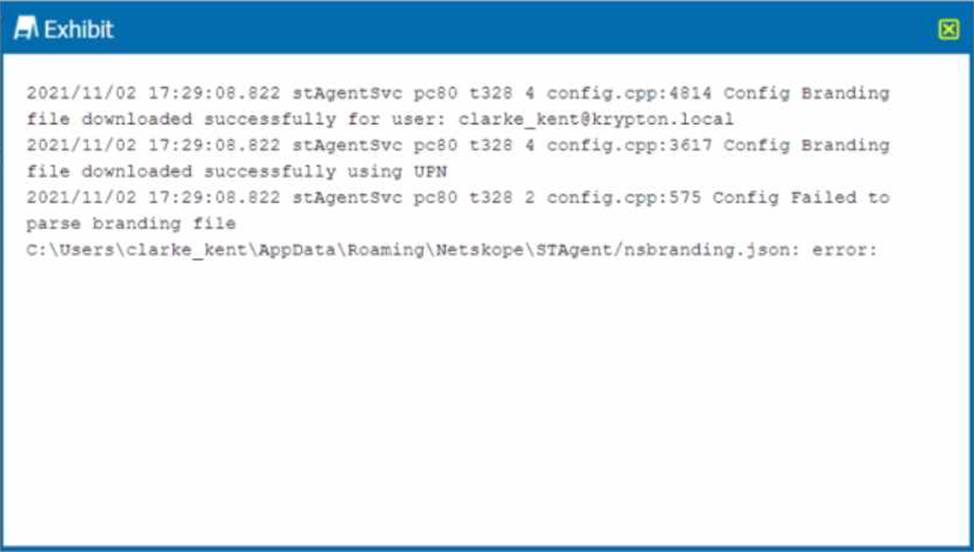
You receive a service request from a user who indicates that their Netskope client is in a disabled state. The exhibit shows an excerpt (rom the affected client nsdebuglog.log.
What is the problem in this scenario?
- A . User authentication failed during IdP-based enrollment.
- B . The Netskope client connection is being decrypted.
- C . Custom installation parameters are incorrectly specified
- D . The user’s account has not been provisioned into Netskope.
B
Explanation:
The problem in this scenario is that the Netskope client connection is being decrypted by a network security device. This is evident from the log message “ERROR SSL certificate verification failed: self signed certificate in certificate chain”. This means that the Netskope client is receiving a certificate that is not issued by Netskope, but by a device that is intercepting and decrypting the traffic between the client and the Netskope cloud. This can cause the client to fail to download the required configuration and remain in a disabled state1. Therefore, option B is correct and the other options are incorrect.
Reference: Troubleshooting Netskope Client – Netskope Knowledge Portal, Using Netskope Client – Netskope Knowledge Portal