
Netskope NSK101 Practice Exams
Last updated on Oct 22,2026- Exam Code: NSK101
- Exam Name: Netskope Certified Cloud Security Administrator (NCCSA)
- Certification Provider: Netskope
- Latest update: Oct 22,2026
According to Netskope. what are two preferred methods to report a URL miscategorization? (Choose two.)
- A . Use www.netskope.com/url-lookup.
- B . Use the URL Lookup page in the dashboard.
- C . Email [email protected].
- D . Tag Netskope on Twitter.
A, B
Explanation:
According to Netskope, two preferred methods to report a URL miscategorization are: use www.netskope.com/url-lookup and use the URL Lookup page in the dashboard. The first method allows you to visit www.netskope.com/url-lookup in your browser and enter any URL that you want to check or report for miscategorization. You will see the current category assigned by Netskope for that URL and you can submit a request to change it if you think it is incorrect. The second method allows you to use the URL Lookup page in the dashboard of your Netskope platform tenant and enter any URL that you want to check or report for miscategorization. You will see the current category assigned by Netskope for that URL and you can submit a request to change it if you think it is incorrect. Emailing [email protected] or tagging Netskope on Twitter are not preferred methods to report a URL miscategorization, as they are not designed for this purpose and may not be as efficient or effective as using the dedicated tools provided by Netskope.
Reference: [Netskope URL Lookup], Netskope Security Cloud Operation & Administration (NSCO&A) – Classroom Course, Module 8: Skope IT, Lesson 2: Page Events.
Which two technologies form a part of Netskope’s Threat Protection module? (Choose two.)
- A . log parser
- B . DLP
- C . sandbox
- D . heuristics
C, D
Explanation:
To protect your users from malicious scripts that may be downloaded from websites, you need to use technologies that can detect and prevent malware, ransomware, phishing, and other advanced threats in web traffic. Two technologies that form a part of Netskope’s Threat Protection module, which is a feature in the Netskope platform that provides these capabilities, are sandbox and heuristics. Sandbox is a technology that allows Netskope to analyze suspicious files or URLs in a virtual environment isolated from the rest of the network. It simulates the execution of the files or URLs and observes their behavior and impact on the system. It then generates a verdict based on the
analysis and blocks any malicious files or URLs from reaching your users or devices. Heuristics is a technology that allows Netskope to identify unknown or emerging threats based on their characteristics or patterns, rather than relying on predefined signatures or rules. It uses machine learning and artificial intelligence to analyze various attributes of files or URLs, such as file type, size, entropy, metadata, code structure, etc., and assigns a risk score based on the analysis. It then blocks any files or URLs that exceed a certain risk threshold from reaching your users or devices. A log parser or DLP are not technologies that form a part of Netskope’s Threat Protection module, as they are more related to discovering cloud applications or protecting sensitive data.
Reference: [Netskope Threat Protection], Netskope Security Cloud Operation & Administration (NSCO&A) – Classroom Course, Module 9: Threat Protection.
Click the Exhibit button.
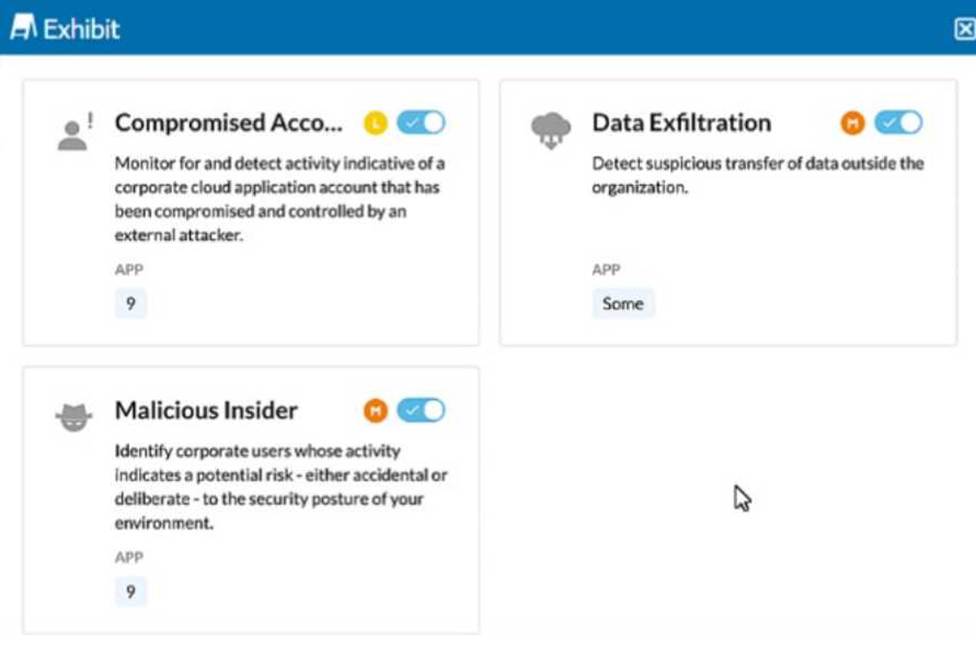
The exhibit shows security rules that are part of which component of the Netskope platform?
- A . Real-time Protection
- B . Advanced Malware Protection
- C . Security Posture
- D . Behavior Analytics
D
Explanation:
The exhibit displays rules related to detecting compromised accounts, data exfiltration, and malicious insiders. These types of activities are typically analyzed and detected through user behavior analytics, which involves monitoring and analyzing the behavior of users to identify anomalies that may indicate security incidents or threats.
Behavior Analytics is a component of the Netskope platform that focuses on identifying potential security risks based on user behavior. This includes monitoring for compromised accounts, data exfiltration, and identifying malicious insiders. These analytics help in proactively identifying and mitigating threats by analyzing patterns and anomalies in user activities.
Reference: The exhibit showing rules related to compromised accounts, data exfiltration, and malicious insiders aligns with the capabilities provided by Behavior Analytics.
Documentation from the Netskope Knowledge Portal on the behavior analytics capabilities supports this identification.
What correctly defines the Zero Trust security model?
- A . least privilege access
- B . multi-layered security
- C . strong authentication
- D . double encryption
A
Explanation:
The term that correctly defines the Zero Trust security model is least privilege access. The Zero Trust security model is a modern security strategy based on the principle: never trust, always verify. Instead of assuming everything behind the corporate firewall is safe, the Zero Trust model assumes breach and verifies each request as though it originates from an open network. One of the core principles of the Zero Trust model is to use least privilege access, which means granting users or systems only the minimum level of access they need to perform their tasks, and only for a limited time. This helps reduce the attack surface and minimize the impact of a potential breach.
Reference: Zero Trust Security – microsoft.comWhat is Zero Trust Security? Principles of the Zero Trust Model
How does a cloud security solution achieve visibility into TLS/SSL-protected Web traffic?
- A . by altering the TLS handshake and forcing the website to use a weak encryption algorithm which can be brute-forced
- B . by altering the TLS handshake and forcing the website to use insecure (HTTP) access
- C . by performing the TLS handshake on behalf of the website and replacing the site’s certificate with its own
- D . by using government-issued universal decryption keys for the ciphers
C
Explanation:
TLS/SSL Inspection:
Cloud security solutions achieve visibility into TLS/SSL-protected web traffic through a process known as TLS/SSL interception or inspection.
How It Works:
The security solution acts as an intermediary (man-in-the-middle) during the TLS handshake.
When a user initiates a connection to a TLS/SSL-protected website, the security solution intercepts this connection.
It completes the TLS handshake with the user’s device using its own certificate, and simultaneously performs the handshake with the destination website.
Certificate Replacement:
The security solution decrypts the traffic, inspects it, and then re-encrypts it before forwarding it to the destination website.
The user’s browser trusts the security solution’s certificate, which replaces the original website’s certificate.
Security Implications:
This method allows the security solution to inspect encrypted traffic for threats or policy violations while maintaining secure communication.
Reference: Detailed explanations and implementation steps can be found in Netskope documentation on SSL/TLS inspection.
Digital Experience Management (DEM) allows an administrator to monitor which two areas? (Choose two.)
- A . User activities
- B . Bandwidth consumption
- C . Information on triggered policies
- D . Client steering data
BD
Explanation:
Digital Experience Management (DEM) in Netskope allows administrators to monitor the following areas:
Bandwidth consumption: DEM provides insights into how much bandwidth is being used by different applications and services, helping administrators to optimize network performance and ensure efficient use of resources.
Client steering data: DEM collects data on how traffic is being steered through the Netskope infrastructure, including details about routing decisions, performance metrics, and user experiences. This helps administrators understand the impact of their steering policies and make adjustments to improve performance.
User activities (option A) and information on triggered policies (option C) are more directly related to other features such as activity logs and policy enforcement dashboards rather than DEM.
Reference: Netskope documentation on Digital Experience Management.
Guides on monitoring and optimizing network performance using DEM.
Digital Experience Management (DEM) allows an administrator to monitor which two areas? (Choose two.)
- A . User activities
- B . Bandwidth consumption
- C . Information on triggered policies
- D . Client steering data
BD
Explanation:
Digital Experience Management (DEM) in Netskope allows administrators to monitor the following areas:
Bandwidth consumption: DEM provides insights into how much bandwidth is being used by different applications and services, helping administrators to optimize network performance and ensure efficient use of resources.
Client steering data: DEM collects data on how traffic is being steered through the Netskope infrastructure, including details about routing decisions, performance metrics, and user experiences. This helps administrators understand the impact of their steering policies and make adjustments to improve performance.
User activities (option A) and information on triggered policies (option C) are more directly related to other features such as activity logs and policy enforcement dashboards rather than DEM.
Reference: Netskope documentation on Digital Experience Management.
Guides on monitoring and optimizing network performance using DEM.
You want to take into account some recent adjustments to CCI scoring that were made in your Netskope tenant.
In this scenario, which two CCI aspects in the Ul would be used in a real-time protection policy? (Choose two.)
- A . App Tag
- B . CCL
- C . App Score
- D . GDPR Readiness
A, C
Explanation:
To take into account some recent adjustments to CCI scoring that were made in your Netskope tenant, you can use the App Tag and App Score aspects in the UI to create a real-time protection policy. The App Tag is a label that indicates the level of enterprise readiness of a cloud app based on its CCI score. The App Score is a numerical value that represents the CCI score of a cloud app based on various criteria such as security, auditability, and business continuity. You can use these aspects to filter cloud apps by their CCI ratings and apply policies accordingly. For example, you can create a policy that blocks access to cloud apps with an App Tag of Poor or an App Score below 50.
Reference: Netskope Cloud Confidence IndexCreating Real-Time Policies for Cloud Applications
When accessing an encrypted website (HTTPS), what is a reason why you might receive a "certificate not trusted" browser message?
- A . A certificate authority is installed on the server.
- B . A self-signed certificate is installed on the server.
- C . A public certificate is installed on the server.
- D . There is no certificate installed on the server.
B
Explanation:
When accessing an encrypted website (HTTPS), a "certificate not trusted" message in the browser usually occurs because the certificate presented by the website is not issued by a trusted Certificate Authority (CA). A common scenario for this is when a self-signed certificate is installed on the server. Self-signed certificates are not signed by a CA that is recognized by the browser, so the browser cannot verify the authenticity of the certificate, leading to the "certificate not trusted" message.
Reference: "If the SSL certificate is self-signed, the browser will not trust the certificate because it has not been issued by a trusted CA.".
In which scenario would you use a SAML reverse proxy?
- A . When the API-enabled protection exceeds the Cloud App API usage limits and cannot be used anymore.
- B . When the organization wants to perform inline inspection of cloud application traffic for roaming users that do not have the Netskope agent installed.
- C . When there are multiple SAML IdPs in use and the SAML reverse proxy can help federate them all together.
- D . When PAC files or explicit proxies can be used to steer traffic to the Netskope platform.
C
Explanation:
A SAML reverse proxy is a service that acts as an intermediary between a SAML service provider (SP) and one or more SAML identity providers (IdPs). It can perform various functions, such as authentication, authorization, load balancing, caching, etc. One scenario where you would use a SAML reverse proxy is when there are multiple SAML IdPs in use and the SAML reverse proxy can help federate them all together. For example, suppose you have an internal application that needs to authenticate users from different domains or organizations, each with their own SAML IdP. Instead of configuring the application to trust each IdP separately, you can use a SAML reverse proxy to act as a single SP for the application and a single IdP for the users. The SAML reverse proxy can then redirect the users to their respective IdPs for authentication and relay the SAML assertions back to the application. This way, you can simplify the integration and management of multiple SAML IdPs and provide a seamless user experience.
Reference: SAML Reverse ProxyWhat is application proxy & SAML SSO?