
Microsoft MD-102 Practice Exams
Last updated on Nov 16,2026- Exam Code: MD-102
- Exam Name: Endpoint Administrator
- Certification Provider: Microsoft
- Latest update: Nov 16,2026
Testlet 1
Case study
Overview
Contoso, Ltd. is a consulting company that has a main office in Montreal and two branch offices in Seattle and New York.
Contoso has the users and computers shown in the following table.

The company has IT, human resources (HR), legal (LEG), marketing (MKG), and finance (FIN) departments.
Contoso recently purchased a Microsoft 365 subscription.
The company is opening a new branch office in Phoenix. Most of the users in the Phoenix office will work from home.
Existing Environment
The network contains an Active Directory domain named contoso.com that is synced to Azure AD.
All member servers run Windows Server 2016. All laptops and desktop computers run Windows 10 Enterprise.
The computers are managed by using Microsoft Configuration Manager. The mobile devices are managed by using Microsoft Intune.
The naming convention for the computers is the department acronym, followed by a hyphen, and then four numbers, for example FIN-6785. All the computers are joined to the on-premises Active Directory domain.
Each department has an organizational unit (OU) that contains a child OU named Computers. Each computer account is in the Computers OU of its respective department.
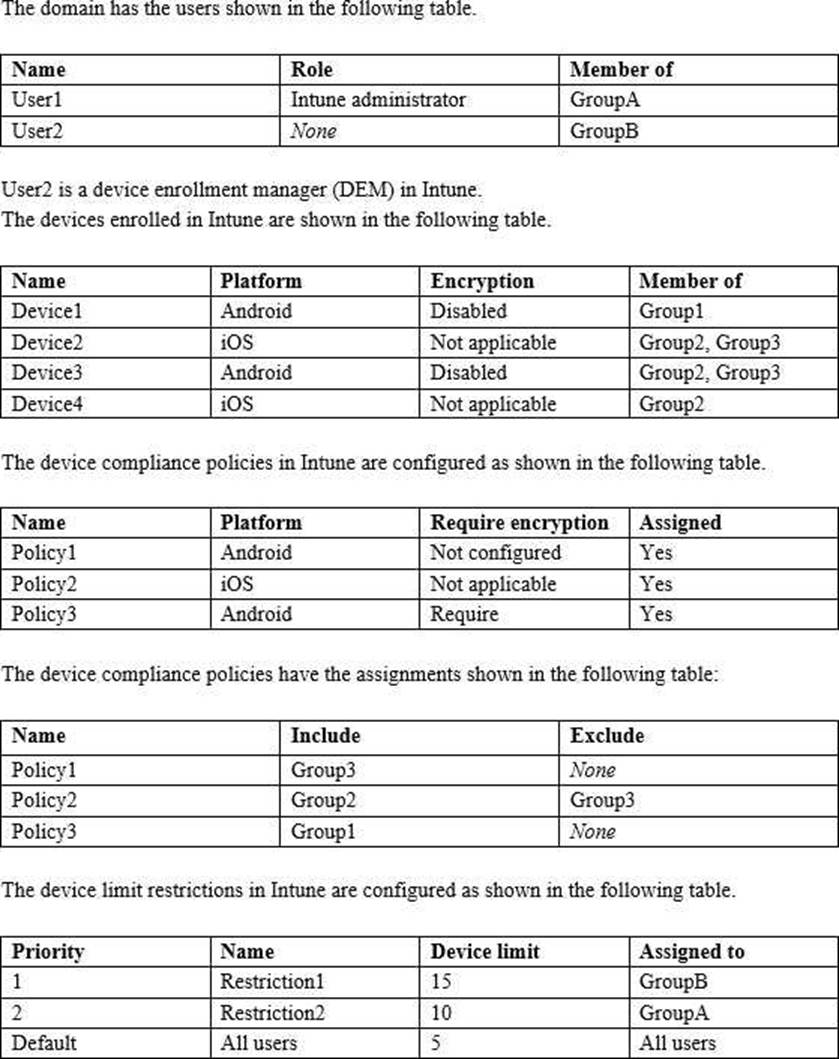
Intune Configuration
Requirements
Planned changes
Contoso plans to implement the following changes:
– Provide new computers to the Phoenix office users. The new computers have Windows 10 Pro preinstalled and were purchased already.
– Implement co-management for the computers.
Technical Requirements
Contoso must meet the following technical requirements:
– Ensure that the users in a group named Group4 can only access Microsoft Exchange Online from devices that are enrolled in Intune.
– Deploy Windows 10 Enterprise to the computers of the Phoenix office users by using Windows Autopilot.
– Create a provisioning package for new computers in the HR department.
– Block iOS devices from sending diagnostic and usage telemetry data.
– Use the principle of least privilege whenever possible.
– Enable the users in the MKG department to use App1.
– Pilot co-management for the IT department.
You need to prepare for the deployment of the Phoenix office computers.
What should you do first?
- A . Generalize the computers and configure the Device settings from the Microsoft Entra admin center.
- B . Extract the serial number of each computer to an XML file and upload the file from the Microsoft Intune admin center.
- C . Extract the hardware ID information of each computer to a CSV file and upload the file from the Microsoft Intune admin center.
- D . Generalize the computers and configure the Mobility (MDM and MAM) settings from the Microsoft Entra admin center.
- E . Extract the serial number information of each computer to a CSV file and upload the file from the Microsoft Intune admin center.
Testlet 1
Case study
Overview
Contoso, Ltd. is a consulting company that has a main office in Montreal and two branch offices in Seattle and New York.
Contoso has the users and computers shown in the following table.
The company has IT, human resources (HR), legal (LEG), marketing (MKG), and finance (FIN) departments.
Contoso recently purchased a Microsoft 365 subscription.
The company is opening a new branch office in Phoenix. Most of the users in the Phoenix office will work from home.
Existing Environment
The network contains an Active Directory domain named contoso.com that is synced to Azure AD.
All member servers run Windows Server 2016. All laptops and desktop computers run Windows 10 Enterprise.
The computers are managed by using Microsoft Configuration Manager. The mobile devices are managed by using Microsoft Intune.
The naming convention for the computers is the department acronym, followed by a hyphen, and then four numbers, for example FIN-6785. All the computers are joined to the on-premises Active Directory domain.
Each department has an organizational unit (OU) that contains a child OU named Computers. Each computer account is in the Computers OU of its respective department.
Intune Configuration
Requirements
Planned changes
Contoso plans to implement the following changes:
– Provide new computers to the Phoenix office users. The new computers have Windows 10 Pro preinstalled and were purchased already.
– Implement co-management for the computers.
Technical Requirements
Contoso must meet the following technical requirements:
– Ensure that the users in a group named Group4 can only access Microsoft Exchange Online from devices that are enrolled in Intune.
– Deploy Windows 10 Enterprise to the computers of the Phoenix office users by using Windows Autopilot.
– Create a provisioning package for new computers in the HR department.
– Block iOS devices from sending diagnostic and usage telemetry data.
– Use the principle of least privilege whenever possible.
– Enable the users in the MKG department to use App1.
– Pilot co-management for the IT department.
You need to prepare for the deployment of the Phoenix office computers.
What should you do first?
- A . Generalize the computers and configure the Device settings from the Microsoft Entra admin center.
- B . Extract the serial number of each computer to an XML file and upload the file from the Microsoft Intune admin center.
- C . Extract the hardware ID information of each computer to a CSV file and upload the file from the Microsoft Intune admin center.
- D . Generalize the computers and configure the Mobility (MDM and MAM) settings from the Microsoft Entra admin center.
- E . Extract the serial number information of each computer to a CSV file and upload the file from the Microsoft Intune admin center.
Testlet 1
Case study
Overview
Contoso, Ltd. is a consulting company that has a main office in Montreal and two branch offices in Seattle and New York.
Contoso has the users and computers shown in the following table.
The company has IT, human resources (HR), legal (LEG), marketing (MKG), and finance (FIN) departments.
Contoso recently purchased a Microsoft 365 subscription.
The company is opening a new branch office in Phoenix. Most of the users in the Phoenix office will work from home.
Existing Environment
The network contains an Active Directory domain named contoso.com that is synced to Azure AD.
All member servers run Windows Server 2016. All laptops and desktop computers run Windows 10 Enterprise.
The computers are managed by using Microsoft Configuration Manager. The mobile devices are managed by using Microsoft Intune.
The naming convention for the computers is the department acronym, followed by a hyphen, and then four numbers, for example FIN-6785. All the computers are joined to the on-premises Active Directory domain.
Each department has an organizational unit (OU) that contains a child OU named Computers. Each computer account is in the Computers OU of its respective department.
Intune Configuration
Requirements
Planned changes
Contoso plans to implement the following changes:
– Provide new computers to the Phoenix office users. The new computers have Windows 10 Pro preinstalled and were purchased already.
– Implement co-management for the computers.
Technical Requirements
Contoso must meet the following technical requirements:
– Ensure that the users in a group named Group4 can only access Microsoft Exchange Online from devices that are enrolled in Intune.
– Deploy Windows 10 Enterprise to the computers of the Phoenix office users by using Windows Autopilot.
– Create a provisioning package for new computers in the HR department.
– Block iOS devices from sending diagnostic and usage telemetry data.
– Use the principle of least privilege whenever possible.
– Enable the users in the MKG department to use App1.
– Pilot co-management for the IT department.
You need to prepare for the deployment of the Phoenix office computers.
What should you do first?
- A . Generalize the computers and configure the Device settings from the Microsoft Entra admin center.
- B . Extract the serial number of each computer to an XML file and upload the file from the Microsoft Intune admin center.
- C . Extract the hardware ID information of each computer to a CSV file and upload the file from the Microsoft Intune admin center.
- D . Generalize the computers and configure the Mobility (MDM and MAM) settings from the Microsoft Entra admin center.
- E . Extract the serial number information of each computer to a CSV file and upload the file from the Microsoft Intune admin center.
Testlet 1
Case study
Overview
Contoso, Ltd. is a consulting company that has a main office in Montreal and two branch offices in Seattle and New York.
Contoso has the users and computers shown in the following table.
The company has IT, human resources (HR), legal (LEG), marketing (MKG), and finance (FIN) departments.
Contoso recently purchased a Microsoft 365 subscription.
The company is opening a new branch office in Phoenix. Most of the users in the Phoenix office will work from home.
Existing Environment
The network contains an Active Directory domain named contoso.com that is synced to Azure AD.
All member servers run Windows Server 2016. All laptops and desktop computers run Windows 10 Enterprise.
The computers are managed by using Microsoft Configuration Manager. The mobile devices are managed by using Microsoft Intune.
The naming convention for the computers is the department acronym, followed by a hyphen, and then four numbers, for example FIN-6785. All the computers are joined to the on-premises Active Directory domain.
Each department has an organizational unit (OU) that contains a child OU named Computers. Each computer account is in the Computers OU of its respective department.
Intune Configuration
Requirements
Planned changes
Contoso plans to implement the following changes:
– Provide new computers to the Phoenix office users. The new computers have Windows 10 Pro preinstalled and were purchased already.
– Implement co-management for the computers.
Technical Requirements
Contoso must meet the following technical requirements:
– Ensure that the users in a group named Group4 can only access Microsoft Exchange Online from devices that are enrolled in Intune.
– Deploy Windows 10 Enterprise to the computers of the Phoenix office users by using Windows Autopilot.
– Create a provisioning package for new computers in the HR department.
– Block iOS devices from sending diagnostic and usage telemetry data.
– Use the principle of least privilege whenever possible.
– Enable the users in the MKG department to use App1.
– Pilot co-management for the IT department.
You need to prepare for the deployment of the Phoenix office computers.
What should you do first?
- A . Generalize the computers and configure the Device settings from the Microsoft Entra admin center.
- B . Extract the serial number of each computer to an XML file and upload the file from the Microsoft Intune admin center.
- C . Extract the hardware ID information of each computer to a CSV file and upload the file from the Microsoft Intune admin center.
- D . Generalize the computers and configure the Mobility (MDM and MAM) settings from the Microsoft Entra admin center.
- E . Extract the serial number information of each computer to a CSV file and upload the file from the Microsoft Intune admin center.
Testlet 1
Case study
Overview
Contoso, Ltd. is a consulting company that has a main office in Montreal and two branch offices in Seattle and New York.
Contoso has the users and computers shown in the following table.
The company has IT, human resources (HR), legal (LEG), marketing (MKG), and finance (FIN) departments.
Contoso recently purchased a Microsoft 365 subscription.
The company is opening a new branch office in Phoenix. Most of the users in the Phoenix office will work from home.
Existing Environment
The network contains an Active Directory domain named contoso.com that is synced to Azure AD.
All member servers run Windows Server 2016. All laptops and desktop computers run Windows 10 Enterprise.
The computers are managed by using Microsoft Configuration Manager. The mobile devices are managed by using Microsoft Intune.
The naming convention for the computers is the department acronym, followed by a hyphen, and then four numbers, for example FIN-6785. All the computers are joined to the on-premises Active Directory domain.
Each department has an organizational unit (OU) that contains a child OU named Computers. Each computer account is in the Computers OU of its respective department.
Intune Configuration
Requirements
Planned changes
Contoso plans to implement the following changes:
– Provide new computers to the Phoenix office users. The new computers have Windows 10 Pro preinstalled and were purchased already.
– Implement co-management for the computers.
Technical Requirements
Contoso must meet the following technical requirements:
– Ensure that the users in a group named Group4 can only access Microsoft Exchange Online from devices that are enrolled in Intune.
– Deploy Windows 10 Enterprise to the computers of the Phoenix office users by using Windows Autopilot.
– Create a provisioning package for new computers in the HR department.
– Block iOS devices from sending diagnostic and usage telemetry data.
– Use the principle of least privilege whenever possible.
– Enable the users in the MKG department to use App1.
– Pilot co-management for the IT department.
You need to prepare for the deployment of the Phoenix office computers.
What should you do first?
- A . Generalize the computers and configure the Device settings from the Microsoft Entra admin center.
- B . Extract the serial number of each computer to an XML file and upload the file from the Microsoft Intune admin center.
- C . Extract the hardware ID information of each computer to a CSV file and upload the file from the Microsoft Intune admin center.
- D . Generalize the computers and configure the Mobility (MDM and MAM) settings from the Microsoft Entra admin center.
- E . Extract the serial number information of each computer to a CSV file and upload the file from the Microsoft Intune admin center.
Testlet 1
Case study
Overview
Contoso, Ltd. is a consulting company that has a main office in Montreal and two branch offices in Seattle and New York.
Contoso has the users and computers shown in the following table.
The company has IT, human resources (HR), legal (LEG), marketing (MKG), and finance (FIN) departments.
Contoso recently purchased a Microsoft 365 subscription.
The company is opening a new branch office in Phoenix. Most of the users in the Phoenix office will work from home.
Existing Environment
The network contains an Active Directory domain named contoso.com that is synced to Azure AD.
All member servers run Windows Server 2016. All laptops and desktop computers run Windows 10 Enterprise.
The computers are managed by using Microsoft Configuration Manager. The mobile devices are managed by using Microsoft Intune.
The naming convention for the computers is the department acronym, followed by a hyphen, and then four numbers, for example FIN-6785. All the computers are joined to the on-premises Active Directory domain.
Each department has an organizational unit (OU) that contains a child OU named Computers. Each computer account is in the Computers OU of its respective department.
Intune Configuration
Requirements
Planned changes
Contoso plans to implement the following changes:
– Provide new computers to the Phoenix office users. The new computers have Windows 10 Pro preinstalled and were purchased already.
– Implement co-management for the computers.
Technical Requirements
Contoso must meet the following technical requirements:
– Ensure that the users in a group named Group4 can only access Microsoft Exchange Online from devices that are enrolled in Intune.
– Deploy Windows 10 Enterprise to the computers of the Phoenix office users by using Windows Autopilot.
– Create a provisioning package for new computers in the HR department.
– Block iOS devices from sending diagnostic and usage telemetry data.
– Use the principle of least privilege whenever possible.
– Enable the users in the MKG department to use App1.
– Pilot co-management for the IT department.
You need to prepare for the deployment of the Phoenix office computers.
What should you do first?
- A . Generalize the computers and configure the Device settings from the Microsoft Entra admin center.
- B . Extract the serial number of each computer to an XML file and upload the file from the Microsoft Intune admin center.
- C . Extract the hardware ID information of each computer to a CSV file and upload the file from the Microsoft Intune admin center.
- D . Generalize the computers and configure the Mobility (MDM and MAM) settings from the Microsoft Entra admin center.
- E . Extract the serial number information of each computer to a CSV file and upload the file from the Microsoft Intune admin center.
You have a Windows 10 device named Computer1 enrolled in Microsoft Intune.
You need to configure Computer1 as a public workstation that will run a single customer-facing, full-screen application.
Which configuration profile type template should you use in Microsoft Intune admin center?
E. Shared multi-user device
F. Device restrictions
G. Kiosk
H. Endpoint protection
DRAG DROP
You have a Microsoft 365 subscription that contains two users named User1 and User2.
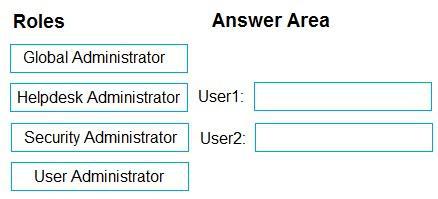
You need to ensure that the users can perform the following tasks:
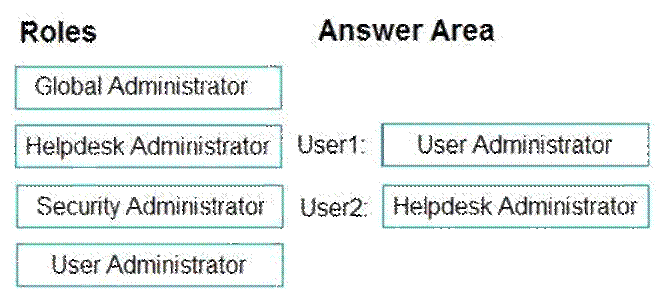
User1 must be able to create groups and manage users.

User2 must be able to reset passwords for nonadministrative users.
The solution must use the principle of least privilege.
Which role should you assign to each user? To answer, drag the appropriate roles to the correct users. Each role may be used once, more than once, or not at all. You may need to drag the split bar between panes or scroll to view content. NOTE: Each correct selection is worth one point.
Select and Place:
You have a Microsoft 365 subscription that contains a user named User1 and uses Microsoft Intune Suite.
You use Microsoft Intune to manage devices that run Windows 11.
User provides remote support for 75 devices in the marketing department.
You need to add User1 to the Remote Desktop Users group on each marketing department device.
What should you configure?
- A . an app configuration policy
- B . a device compliance policy
- C . an account protection policy
- D . a device configuration profile
You have a Microsoft 365 E5 subscription.
You need to configure the automated investigation and response (AIR) remediation level for a device named Device1 to require approval for all folders.
What should you create?
E. a security group
F. a device group
G. an administrative unit
H. an action group