
Microsoft DP-600 Practice Exams
Last updated on Oct 01,2026- Exam Code: DP-600
- Exam Name: Implementing Analytics Solutions Using Microsoft Fabric
- Certification Provider: Microsoft
- Latest update: Oct 01,2026
HOTSPOT
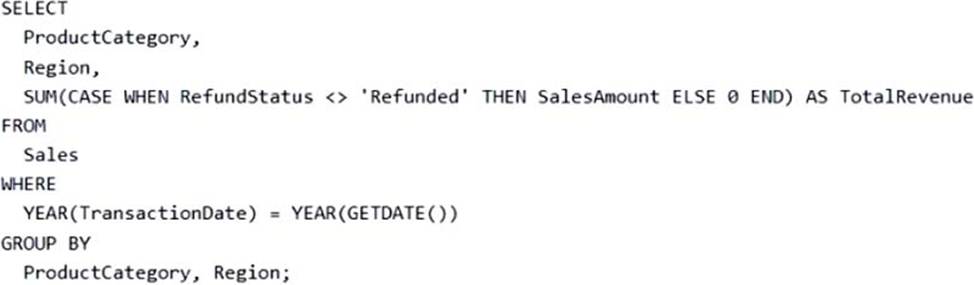
You have the following T-SQL statement.
For each of the following statements, select Yes if the statement is true. Otherwise, select No. NOTE: Each correct selection is worth one point. Hot Area:
Explanation:
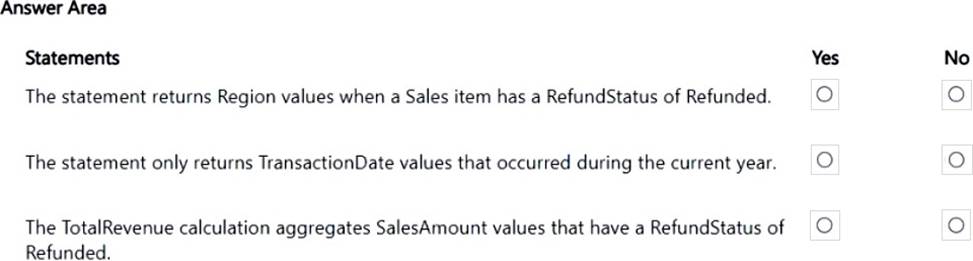
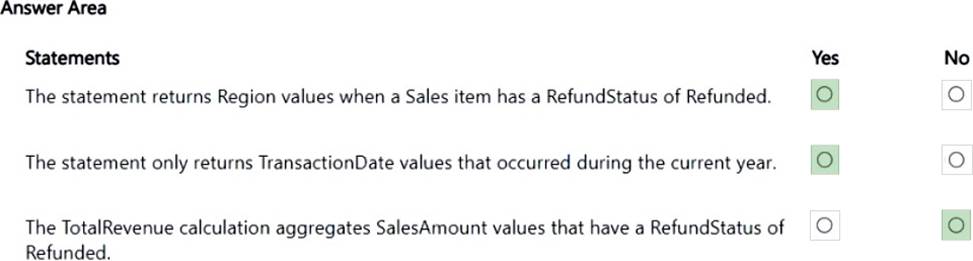
Box 1: Yes
Yes – The statement returns Region values when a Sales item has a RefundStatus of Refunded.
As per code: WHEN RefundStatus <> ‘Refunded’ SalesAmount ELSE 0 END It returns Region values for Sales item regardless what the RefundStatus is.
Box 2: Yes
Yes – The statement only returns TransactionDate values that occurred during the current year.
As per code: WHERE YEAR(TransactionDate) = YEAR(GETDATE())
Box 3: No
No: The TotalRevenue calculation aggregates SalesAmount values that have a RefundStatus of Refunded.
As per code: WHEN RefundStatus <> ‘Refunded’ SalesAmount ELSE 0 END
The TotalRevenue calculation aggregates SalesAmount values that have a RefundStatus other than Refunded.
HOTSPOT
You have the following T-SQL statement.
For each of the following statements, select Yes if the statement is true. Otherwise, select No. NOTE: Each correct selection is worth one point. Hot Area:
Explanation:
Box 1: Yes
Yes – The statement returns Region values when a Sales item has a RefundStatus of Refunded.
As per code: WHEN RefundStatus <> ‘Refunded’ SalesAmount ELSE 0 END It returns Region values for Sales item regardless what the RefundStatus is.
Box 2: Yes
Yes – The statement only returns TransactionDate values that occurred during the current year.
As per code: WHERE YEAR(TransactionDate) = YEAR(GETDATE())
Box 3: No
No: The TotalRevenue calculation aggregates SalesAmount values that have a RefundStatus of Refunded.
As per code: WHEN RefundStatus <> ‘Refunded’ SalesAmount ELSE 0 END
The TotalRevenue calculation aggregates SalesAmount values that have a RefundStatus other than Refunded.
Note: This question is part of a series of questions that present the same scenario. Each question in the series contains a unique solution that might meet the stated goals. Some question sets might have more than one correct solution, while others might not have a correct solution.
After you answer a question in this section, you will NOT be able to return to it. As a result, these questions will not appear in the review screen.
You have a Fabric tenant that contains a new semantic model in OneLake.
You use a Fabric notebook to read the data into a Spark DataFrame.
You need to evaluate the data to calculate the min, max, mean, and standard deviation values for all the string and numeric columns.
Solution: You use the following PySpark expression:
df.describe().show()
Does this meet the goal?
- A . Yes
- B . No
Note: This question is part of a series of questions that present the same scenario. Each question in the series contains a unique solution that might meet the stated goals. Some question sets might have more than one correct solution, while others might not have a correct solution.
After you answer a question in this section, you will NOT be able to return to it. As a result, these questions will not appear in the review screen.
You have a Fabric tenant that contains a new semantic model in OneLake.
You use a Fabric notebook to read the data into a Spark DataFrame.
You need to evaluate the data to calculate the min, max, mean, and standard deviation values for all the string and numeric columns.
Solution: You use the following PySpark expression:
df.describe().show()
Does this meet the goal?
- A . Yes
- B . No
Note: This section contains one or more sets of questions with the same scenario and problem. Each question presents a unique solution to the problem. You must determine whether the solution meets the stated goals. More than one solution in the set might solve the problem. It is also possible that none of the solutions in the set solve the problem.
After you answer a question in this section, you will NOT be able to return. As a result, these questions do not appear on the Review Screen.
Your network contains an on-premises Active Directory Domain Services (AD DS) domain named contoso.com that syncs with a Microsoft Entra tenant by using Microsoft Entra Connect.
You have a Fabric tenant that contains a semantic model.
You enable dynamic row-level security (RLS) for the model and deploy the model to the Fabric service.
You query a measure that includes the USERNAME() function, and the query returns a blank result.
You need to ensure that the measure returns the user principal name (UPN) of a user.
Solution: You update the measure to use the USEROBJECTID() function.
Does this meet the goal?
- A . Yes
- B . No
B
Explanation:
This function returns the unique identifier (Object ID) of the user in Azure Active Directory. While this can be useful for certain scenarios, it does not return the UPN, which is what you need.
You have a Fabric tenant that contains a warehouse.
You use a dataflow to load a new dataset from OneLake to the warehouse.
You need to add a PowerQuery step to identify the maximum values for the numeric columns.
Which function should you include in the step?
- A . Table.MaxN
- B . Table.Max
- C . Table.Range
- D . Table.Profile
You have a Fabric tenant that contains a warehouse.
You use a dataflow to load a new dataset from OneLake to the warehouse.
You need to add a PowerQuery step to identify the maximum values for the numeric columns.
Which function should you include in the step?
- A . Table.MaxN
- B . Table.Max
- C . Table.Range
- D . Table.Profile
Implement and manage semantic models
Testlet 2
Case study
This is a case study. Case studies are not timed separately. You can use as much exam time as you would like to complete each case. However, there may be additional case studies and sections on this exam. You must manage your time to ensure that you are able to complete all questions included on this exam in the time provided.
To answer the questions included in a case study, you will need to reference information that is provided in the case study. Case studies might contain exhibits and other resources that provide more information about the scenario that is described in the case study. Each question is independent of the other questions in this case study.
At the end of this case study, a review screen will appear. This screen allows you to review your answers and to make changes before you move to the next section of the exam. After you begin a new section, you cannot return to this section.
To start the case study
To display the first question in this case study, click the Next button. Use the buttons in the left pane to explore the content of the case study before you answer the questions. Clicking these buttons displays information such as business requirements, existing environment, and problem statements. If the case study has an All Information tab, note that the information displayed is identical to the information displayed on the subsequent tabs. When you are ready to answer a question, click the Question button to return to the question.
Overview
Contoso, Ltd. is a US-based health supplements company. Contoso has two divisions named Sales and Research. The Sales division contains two departments named Online Sales and Retail Sales. The Research division assigns internally developed product lines to individual teams of researchers and analysts.
Existing Environment
Identity Environment
Contoso has a Microsoft Entra tenant named contoso.com. The tenant contains two groups named ResearchReviewersGroup1 and ResearchReviewersGroup2.
Data Environment
Contoso has the following data environment:
– The Sales division uses a Microsoft Power BI Premium capacity.
– The semantic model of the Online Sales department includes a fact table named Orders that uses Import made. In the system of origin, the OrderID value represents the sequence in which orders are created.
– The Research department uses an on-premises, third-party data warehousing product.
– Fabric is enabled for contoso.com.
– An Azure Data Lake Storage Gen2 storage account named storage1 contains Research division data for a product line named Productline1. The data is in the delta format.
– A Data Lake Storage Gen2 storage account named storage2 contains Research division data for a product line named Productline2. The data is in the CSV format.
Requirements
Planned Changes
Contoso plans to make the following changes:
– Enable support for Fabric in the Power BI Premium capacity used by the Sales division.
– Make all the data for the Sales division and the Research division available in Fabric.
– For the Research division, create two Fabric workspaces named Productline1ws and Productline2ws.
– In Productline1ws, create a lakehouse named Lakehouse1.
– In Lakehouse1, create a shortcut to storage1 named ResearchProduct.
Data Analytics Requirements
Contoso identifies the following data analytics requirements:
– All the workspaces for the Sales division and the Research division must support all Fabric experiences.
– The Research division workspaces must use a dedicated, on-demand capacity that has per-minute billing.
– The Research division workspaces must be grouped together logically to support OneLake data hub filtering based on the department name.
– For the Research division workspaces, the members of ResearchReviewersGroup1 must be able to read lakehouse and warehouse data and shortcuts by using SQL endpoints.
– For the Research division workspaces, the members of ResearchReviewersGroup2 must be able to read lakehouse data by using Lakehouse explorer.
– All the semantic models and reports for the Research division must use version control that supports branching.
Data Preparation Requirements
Contoso identifies the following data preparation requirements:
– The Research division data for Productline1 must be retrieved from Lakehouse1 by using Fabric notebooks.
– All the Research division data in the lakehouses must be presented as managed tables in Lakehouse explorer.
Semantic Model Requirements
Contoso identifies the following requirements for implementing and managing semantic models:
– The number of rows added to the Orders table during refreshes must be minimized.
– The semantic models in the Research division workspaces must use Direct Lake mode.
General Requirements
Contoso identifies the following high-level requirements that must be considered for all solutions:
– Follow the principle of least privilege when applicable.
– Minimize implementation and maintenance effort when possible.
What should you use to implement calculation groups for the Research division semantic models?
- A . Microsoft Power BI Desktop
- B . the Power BI service
- C . DAX Studio
- D . Tabular Editor
HOTSPOT
You have a Fabric tenant that contains a warehouse named WH1.
You have source data in a CSV file that has the following fields:
– SalesTransactionID
– SaleDate
– CustomerCode
– CustomerName
– CustomerAddress
– ProductCode
– ProductName
– Quantity
– UnitPrice
You plan to implement a star schema for the tables in WH1. The dimension tables in WH1 will implement Type 2 slowly changing dimension (SCD) logic.
You need to design the tables that will be used for sales transaction analysis and load the source data.
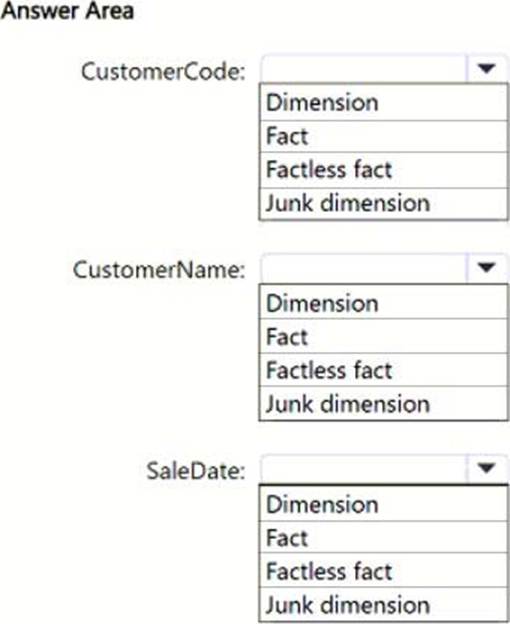
Which type of target table should you specify for the CustomerName, CustomerCode, and SaleDate fields? To answer, select the appropriate options in the answer area. NOTE: Each correct selection is worth one point.
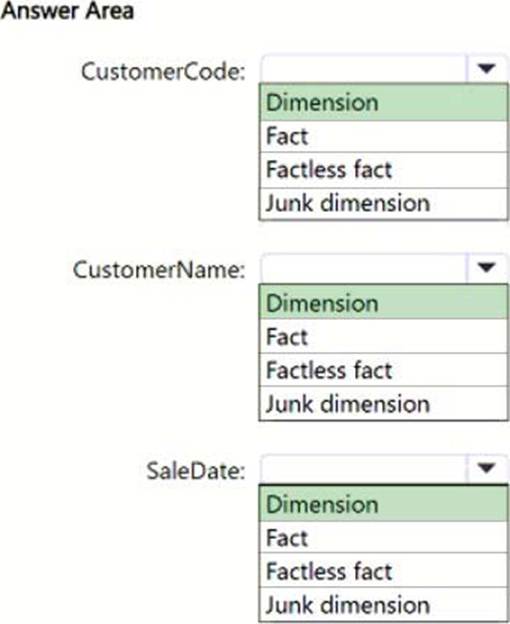
Explanation:
CustomerCode: Dimension – This field serves as a unique identifier for customers, providing context in the star schema.
CustomerName: Dimension – Similar to CustomerCode, this field provides descriptive attributes about the customer, making it part of the dimension table.
SaleDate: Dimension – Similar to CustomerCode, this field provides descriptive attributes about the customer, making it part of the dimension table.
You have a Fabric tenant that contains a workspace named Workspace1.
You plan to deploy a semantic model named Model1 by using the XMLA endpoint.
You need to optimize the deployment of Model1. The solution must minimize how long it takes to deploy Model1.
What should you do in Workspace1?
- A . Select Small semantic model storage format.
- B . Select Users can edit data models in the Power BI service.
- C . Set Enable Cache for Shortcuts to On.
- D . Select Large semantic model storage format.
D
Explanation:
The Large semantic model storage format is designed for handling large and complex datasets, improving the efficiency of operations like loading, processing, and deploying models. It is optimized for scalability and performance, which helps minimize the deployment time for large models.