
Microsoft DP-600 Practice Exams
Last updated on Oct 02,2026- Exam Code: DP-600
- Exam Name: Implementing Analytics Solutions Using Microsoft Fabric
- Certification Provider: Microsoft
- Latest update: Oct 02,2026
You have a Fabric tenant that contains a workspace named Workspace1. Workspace1 contains a single semantic model that has two Microsoft Power BI reports.
You have a Microsoft 365 subscription that contains a data loss prevention (DLP) policy named DLP1.
You need to apply DLP1 to the items in Workspace1.
What should you do?
- A . Create a workspace identity.
- B . Apply a certified endorsement to the semantic model.
- C . Apply sensitivity labels to the semantic model and reports.
- D . Apply a master data endorsement to the semantic model.
C
Explanation:
Data loss prevention for Power BI
Microsoft Purview DLP policies for Power BI
A DLP policy for Power BI is set up in the Microsoft Purview compliance portal. It can detect sensitive data in a semantic model that’s been published to a Premium workspace in the Power BI service.
Type of sensitive data
A DLP policy for Power BI that’s set up in the Microsoft Purview compliance portal can be based on either a sensitivity label or a sensitive information type.
Sensitivity label
You can use sensitivity labels to classify content, ranging from less sensitive to more sensitive.
When a DLP policy for Power BI is invoked, a sensitivity label rule checks semantic models (that are published to the Power BI service) for the presence of a certain sensitivity label.
Reference: https://learn.microsoft.com/en-us/power-bi/guidance/powerbi-implementation-planning-data-loss-prevention
Maintain a data analytics solution
Testlet 2
Case study
This is a case study. Case studies are not timed separately. You can use as much exam time as you would like to complete each case. However, there may be additional case studies and sections on this exam. You must manage your time to ensure that you are able to complete all questions included on this exam in the time provided.
To answer the questions included in a case study, you will need to reference information that is provided in the case study. Case studies might contain exhibits and other resources that provide more information about the scenario that is described in the case study. Each question is independent of the other questions in this case study.
At the end of this case study, a review screen will appear. This screen allows you to review your answers and to make changes before you move to the next section of the exam. After you begin a new section, you cannot return to this section.
To start the case study
To display the first question in this case study, click the Next button. Use the buttons in the left pane to explore the content of the case study before you answer the questions. Clicking these buttons displays information such as business requirements, existing environment, and problem statements. If the case study has an All Information tab, note that the information displayed is identical to the information displayed on the subsequent tabs. When you are ready to answer a question, click the Question button to return to the question.
Overview
Litware, Inc. is a manufacturing company that has offices throughout North America. The analytics team at Litware contains data engineers, analytics engineers, data analysts, and data scientists.
Existing Environment
Fabric Environment
Litware has been using a Microsoft Power BI tenant for three years. Litware has NOT enabled any Fabric capacities and features.
Available Data
Litware has data that must be analyzed as shown in the following table.
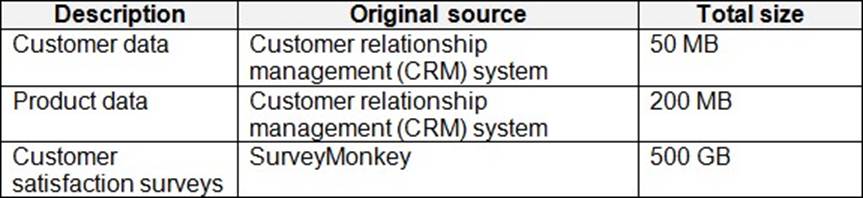
The Product data contains a single table and the following columns.
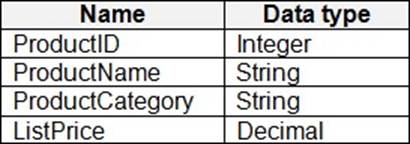
The customer satisfaction data contains the following tables:
– Survey
– Question
– Response
For each survey submitted, the following occurs:
– One row is added to the Survey table.
– One row is added to the Response table for each question in the survey.
The Question table contains the text of each survey question. The third question in each survey response is an overall satisfaction score. Customers can submit a survey after each purchase.
User Problems
The analytics team has large volumes of data, some of which is semi-structured. The team wants to use Fabric to create a new data store.
Product data is often classified into three pricing groups: high, medium, and low. This logic is implemented in several databases and semantic models, but the logic does NOT always match across implementations.
Requirements
Planned Changes
Litware plans to enable Fabric features in the existing tenant. The analytics team will create a new data store as a proof of concept (PoC). The remaining Litware users will only get access to the Fabric features once the PoC is complete. The PoC will be completed by using a Fabric trial capacity.
The following three workspaces will be created:
– AnalyticsPOC: Will contain the data store, semantic models, reports pipelines, dataflow, and notebooks used to populate the data store
– DataEngPOC: Will contain all the pipelines, dataflows, and notebooks used to populate OneLake
– DataSciPOC: Will contain all the notebooks and reports created by the data scientists
The following will be created in the AnalyticsPOC workspace:
– A data store (type to be decided)
– A custom semantic model
– A default semantic model
– Interactive reports
The data engineers will create data pipelines to load data to OneLake either hourly or daily depending on the data source. The analytics engineers will create processes to ingest, transform, and load the data to the data store in the AnalyticsPOC workspace daily. Whenever possible, the data engineers will use low-code tools for data ingestion. The choice of which data cleansing and transformation tools to use will be at the data engineers’ discretion.
All the semantic models and reports in the Analytics POC workspace will use the data store as the sole data source.
Technical Requirements
The data store must support the following:
– Read access by using T-SQL or Python
– Semi-structured and unstructured data
– Row-level security (RLS) for users executing T-SQL queries
Files loaded by the data engineers to OneLake will be stored in the Parquet format and will meet Delta Lake specifications.
Data will be loaded without transformation in one area of the AnalyticsPOC data store. The data will then be cleansed, merged, and transformed into a dimensional model.
The data load process must ensure that the raw and cleansed data is updated completely before populating the dimensional model.
The dimensional model must contain a date dimension. There is no existing data source for the date dimension. The Litware fiscal year matches the calendar year. The date dimension must always contain dates from 2010 through the end of the current year.
The product pricing group logic must be maintained by the analytics engineers in a single location. The pricing group data must be made available in the data store for T-SQL queries and in the default semantic model.
The following logic must be used:
– List prices that are less than or equal to 50 are in the low pricing group.
– List prices that are greater than 50 and less than or equal to 1,000 are in the medium pricing group.
– List prices that are greater than 1,000 are in the high pricing group.
Security Requirements
Only Fabric administrators and the analytics team must be able to see the Fabric items created as part of the PoC.
Litware identifies the following security requirements for the Fabric items in the AnalyticsPOC workspace:
– Fabric administrators will be the workspace administrators.
– The data engineers must be able to read from and write to the data store. No access must be granted to datasets or reports.
– The analytics engineers must be able to read from, write to, and create schemas in the data store. They also must be able to create and share semantic models with the data analysts and view and modify all reports in the workspace.
– The data scientists must be able to read from the data store, but not write to it. They will access the data by using a Spark notebook
– The data analysts must have read access to only the dimensional model objects in the data store. They also must have access to create Power BI reports by using the semantic models created by the analytics engineers.
– The date dimension must be available to all users of the data store.
– The principle of least privilege must be followed.
Both the default and custom semantic models must include only tables or views from the dimensional model in the data store.
Litware already has the following Microsoft Entra security groups:
– FabricAdmins: Fabric administrators
– AnalyticsTeam: All the members of the analytics team
– DataAnalysts: The data analysts on the analytics team
– DataScientists: The data scientists on the analytics team
– DataEngineers: The data engineers on the analytics team
– AnalyticsEngineers: The analytics engineers on the analytics team
Report Requirements
The data analysts must create a customer satisfaction report that meets the following requirements:
– Enables a user to select a product to filter customer survey responses to only those who have purchased that product.
– Displays the average overall satisfaction score of all the surveys submitted during the last 12 months up to a selected date.
– Shows data as soon as the data is updated in the data store.
– Ensures that the report and the semantic model only contain data from the current and previous year.
– Ensures that the report respects any table-level security specified in the source data store.
– Minimizes the execution time of report queries.
HOTSPOT
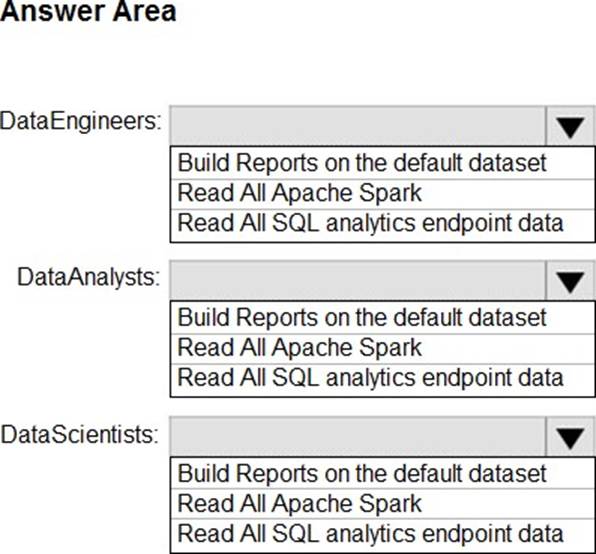
You need to assign permissions for the data store in the AnalyticsPOC workspace. The solution must meet the security requirements.
Which additional permissions should you assign when you share the data store? To answer, select the appropriate options in the answer area. NOTE: Each correct selection is worth one point.
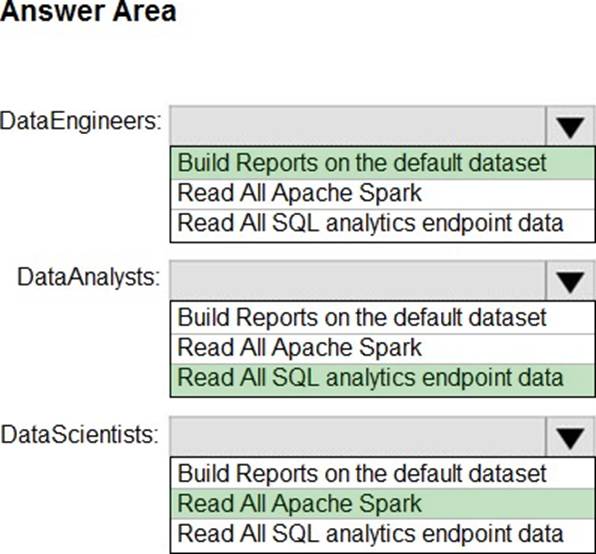
Explanation:
Box 1: Build Reports on the default dataset
DataEngineers
Scenario: Litware identifies the following security requirements for the Fabric items in the AnalyticsPOC workspace:
* The analytics engineers must be able to read from, write to, and create schemas in the data store. They also must be able to create and share semantic models with the data analysts and view and modify all reports in the workspace.
Box 2: Read All SQL analytics endpoint data
DataAnalyst
* The data analysts must have read access to only the dimensional model objects in the data store. They also must have access to create Power BI reports by using the semantic models created by the analytics engineers.
Box 3: Read All Apache Spark
DataScientists
* The data scientists must be able to read from the data store, but not write to it. They will access the data by using a Spark notebook.
Maintain a data analytics solution
You have source data in a folder on a local computer.
You need to create a solution that will use Fabric to populate a data store.
The solution must meet the following requirements:
– Support the use of dataflows to load and append data to the data store.
– Ensure that Delta tables are V-Order optimized and compacted automatically.
Which two types of data stores should you use? Each correct answer presents a complete solution. NOTE: Each correct selection is worth one point.
- A . a lakehouse
- B . an Azure SQL database
- C . a warehouse
- D . a KQL database
AC
Explanation:
Delta Lake table format interoperability
In Microsoft Fabric, the Delta Lake table format is the standard for analytics. Delta Lake is an open-source storage layer that brings ACID (Atomicity, Consistency, Isolation, Durability) transactions to big data and analytics workloads.
All Fabric experiences generate and consume Delta Lake tables, driving interoperability and a unified product experience. Delta Lake tables produced by one compute engine, such as *Synapse Data warehouse* or Synapse Spark, can be consumed by any other engine, such as Power BI. When you ingest data into Fabric, Fabric stores it as Delta tables by default. You can easily integrate external data containing Delta Lake tables by using OneLake shortcuts.
The following matrix shows key Delta Lake features and their support on each Fabric capability.
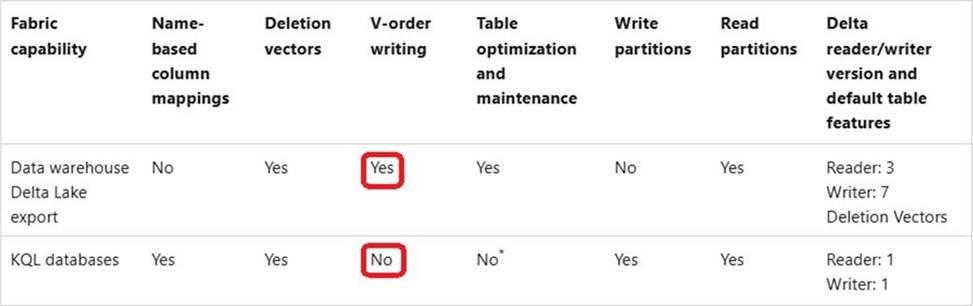
Etc.
Reference: https://learn.microsoft.com/en-us/fabric/get-started/delta-lake-interoperability
You have an Amazon Web Services (AWS) subscription that contains an Amazon Simple Storage Service (Amazon S3) bucket named bucket1.
You have a Fabric tenant that contains a lakehouse named LH1.
In LH1, you plan to create a OneLake shortcut to bucket1.
You need to configure authentication for the connection.
Which two values should you provide? Each correct answer presents part of the solution. NOTE: Each correct selection is worth one point.
- A . the shared access signature (SAS) token
- B . the secret access key
- C . the access ID
- D . the access key ID
- E . the certificate thumbprint
BD
Explanation:
the secret access key
The secret access key is used in conjunction with the access key ID to authenticate requests to AWS services, including S3.
the access key ID
The access key ID is a unique identifier associated with the AWS account or IAM user that you will use to authenticate requests to the S3 bucket.
You have an Amazon Web Services (AWS) subscription that contains an Amazon Simple Storage Service (Amazon S3) bucket named bucket1.
You have a Fabric tenant that contains a lakehouse named LH1.
In LH1, you plan to create a OneLake shortcut to bucket1.
You need to configure authentication for the connection.
Which two values should you provide? Each correct answer presents part of the solution. NOTE: Each correct selection is worth one point.
- A . the shared access signature (SAS) token
- B . the secret access key
- C . the access ID
- D . the access key ID
- E . the certificate thumbprint
BD
Explanation:
the secret access key
The secret access key is used in conjunction with the access key ID to authenticate requests to AWS services, including S3.
the access key ID
The access key ID is a unique identifier associated with the AWS account or IAM user that you will use to authenticate requests to the S3 bucket.
You have a Fabric workspace that contains a DirectQuery semantic model. The model queries a data source that has 500 million rows.
You have a Microsoft Power Bi report named Report1 that uses the model. Report1 contains visuals on multiple pages.
You need to reduce the query execution time for the visuals on all the pages.
What are two features that you can use? Each correct answer presents a complete solution. NOTE: Each correct answer is worth one point.
- A . user-defined aggregations
- B . automatic aggregation
- C . query caching
- D . OneLake integration
You have a Fabric tenant that contains a lakehouse named Lakehouse1.
You need to prevent new tables added to Lakehouse1 from being added automatically to the default semantic model of the lakehouse.
What should you configure?
- A . the SQL analytics endpoint settings
- B . the semantic model settings
- C . the workspace settings
- D . the Lakehouse1 settings
A
Explanation:
Default Power BI semantic models in Microsoft Fabric Sync the default Power BI semantic model
Previously we auto added all tables and views in the Warehouse to the default Power BI semantic model. Based on feedback, we have modified the default behavior to not automatically add tables and views to the default Power BI semantic model. This change will ensure the background sync will not get triggered. This will also disable some actions like "New Measure", "Create Report", "Analyze in Excel".
If you want to change this default behavior, you can:
You have a Fabric tenant.
You are creating a Fabric Data Factory pipeline.
You have a stored procedure that returns the number of active customers and their average sales for the current month.
You need to add an activity that will execute the stored procedure in a warehouse. The returned values must be available to the downstream activities of the pipeline.
Which type of activity should you add?
- A . Switch
- B . KQL
- C . Append variable
- D . Lookup
D
Explanation:
Lookup Activity
Lookup Activity can be used to read or look up a record/ table name/ value from any external source. This output can further be referenced by succeeding activities.
Note: Lookup activity can retrieve a dataset from any of the data sources supported by data factory and Synapse pipelines. You can use it to dynamically determine which objects to operate on in a subsequent activity, instead of hard coding the object name. Some object examples are files and tables.
Lookup activity reads and returns the content of a configuration file or table. It also returns the result of executing a query or stored procedure. The output can be a singleton value or an array of attributes, which can be consumed in a subsequent copy, transformation, or control flow activities like ForEach activity.
Incorrect:
* Append variable
Append Variable activity in Azure Data Factory and Synapse Analytics
Use the Append Variable activity to add a value to an existing array variable defined in a Data Factory or Synapse Analytics pipeline
* Copy data
In Data Pipeline, you can use the Copy activity to copy data among data stores located in the cloud.
After you copy the data, you can use other activities to further transform and analyze it. You can also use the Copy activity to publish transformation and analysis results for business intelligence (BI) and application consumption.
* KQL
The KQL activity in Data Factory for Microsoft Fabric allows you to run a query in Kusto Query Language (KQL) against an Azure Data Explorer instance.
* Switch
The Switch activity in Microsoft Fabric provides the same functionality that a switch statement provides in programming languages. It evaluates a set of activities corresponding to a case that matches the condition evaluation.
Reference:
https://learn.microsoft.com/en-us/azure/data-factory/control-flow-lookup-activity
https://learn.microsoft.com/en-us/azure/data-factory/control-flow-append-variable-activity
You have a Fabric tenant.
You are creating a Fabric Data Factory pipeline.
You have a stored procedure that returns the number of active customers and their average sales for the current month.
You need to add an activity that will execute the stored procedure in a warehouse. The returned values must be available to the downstream activities of the pipeline.
Which type of activity should you add?
- A . Switch
- B . KQL
- C . Append variable
- D . Lookup
D
Explanation:
Lookup Activity
Lookup Activity can be used to read or look up a record/ table name/ value from any external source. This output can further be referenced by succeeding activities.
Note: Lookup activity can retrieve a dataset from any of the data sources supported by data factory and Synapse pipelines. You can use it to dynamically determine which objects to operate on in a subsequent activity, instead of hard coding the object name. Some object examples are files and tables.
Lookup activity reads and returns the content of a configuration file or table. It also returns the result of executing a query or stored procedure. The output can be a singleton value or an array of attributes, which can be consumed in a subsequent copy, transformation, or control flow activities like ForEach activity.
Incorrect:
* Append variable
Append Variable activity in Azure Data Factory and Synapse Analytics
Use the Append Variable activity to add a value to an existing array variable defined in a Data Factory or Synapse Analytics pipeline
* Copy data
In Data Pipeline, you can use the Copy activity to copy data among data stores located in the cloud.
After you copy the data, you can use other activities to further transform and analyze it. You can also use the Copy activity to publish transformation and analysis results for business intelligence (BI) and application consumption.
* KQL
The KQL activity in Data Factory for Microsoft Fabric allows you to run a query in Kusto Query Language (KQL) against an Azure Data Explorer instance.
* Switch
The Switch activity in Microsoft Fabric provides the same functionality that a switch statement provides in programming languages. It evaluates a set of activities corresponding to a case that matches the condition evaluation.
Reference:
https://learn.microsoft.com/en-us/azure/data-factory/control-flow-lookup-activity
https://learn.microsoft.com/en-us/azure/data-factory/control-flow-append-variable-activity
You have a Fabric tenant.
You are creating a Fabric Data Factory pipeline.
You have a stored procedure that returns the number of active customers and their average sales for the current month.
You need to add an activity that will execute the stored procedure in a warehouse. The returned values must be available to the downstream activities of the pipeline.
Which type of activity should you add?
- A . Switch
- B . KQL
- C . Append variable
- D . Lookup
D
Explanation:
Lookup Activity
Lookup Activity can be used to read or look up a record/ table name/ value from any external source. This output can further be referenced by succeeding activities.
Note: Lookup activity can retrieve a dataset from any of the data sources supported by data factory and Synapse pipelines. You can use it to dynamically determine which objects to operate on in a subsequent activity, instead of hard coding the object name. Some object examples are files and tables.
Lookup activity reads and returns the content of a configuration file or table. It also returns the result of executing a query or stored procedure. The output can be a singleton value or an array of attributes, which can be consumed in a subsequent copy, transformation, or control flow activities like ForEach activity.
Incorrect:
* Append variable
Append Variable activity in Azure Data Factory and Synapse Analytics
Use the Append Variable activity to add a value to an existing array variable defined in a Data Factory or Synapse Analytics pipeline
* Copy data
In Data Pipeline, you can use the Copy activity to copy data among data stores located in the cloud.
After you copy the data, you can use other activities to further transform and analyze it. You can also use the Copy activity to publish transformation and analysis results for business intelligence (BI) and application consumption.
* KQL
The KQL activity in Data Factory for Microsoft Fabric allows you to run a query in Kusto Query Language (KQL) against an Azure Data Explorer instance.
* Switch
The Switch activity in Microsoft Fabric provides the same functionality that a switch statement provides in programming languages. It evaluates a set of activities corresponding to a case that matches the condition evaluation.
Reference:
https://learn.microsoft.com/en-us/azure/data-factory/control-flow-lookup-activity
https://learn.microsoft.com/en-us/azure/data-factory/control-flow-append-variable-activity