
Microsoft AZ-204 Practice Exams
Last updated on Nov 16,2026- Exam Code: AZ-204
- Exam Name: Developing Solutions for Microsoft Azure
- Certification Provider: Microsoft
- Latest update: Nov 16,2026
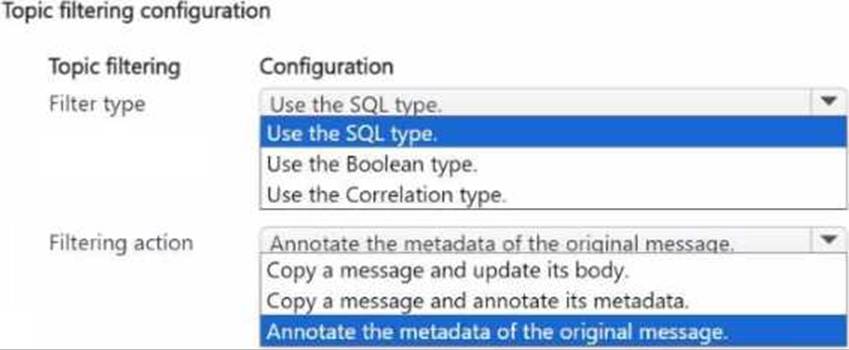
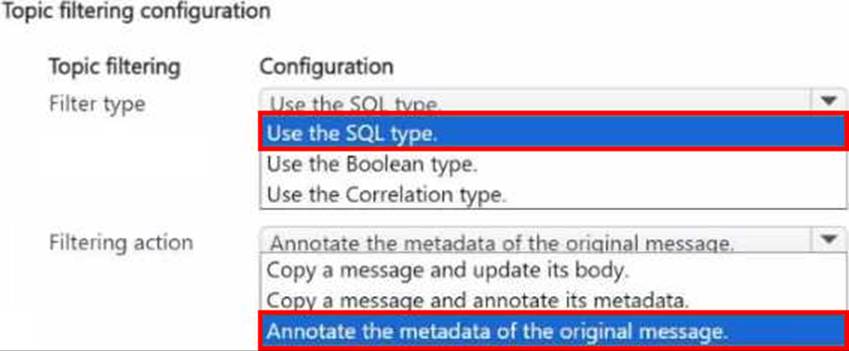
You have an Azure Service Bus namespace that contains a topic named Topic 1.
You plan to create a subscription named Sub1 to Topic 1. In Sub1, you plan to filter messages from Topic1 based on their system properties and apply an action that will annotate each filtered message.
You need to configure the filtering.
How should you configure the filtering? To answer, select the appropriate options in the answer area. NOTE Each correct selection is worth one point.
DRAG DROP
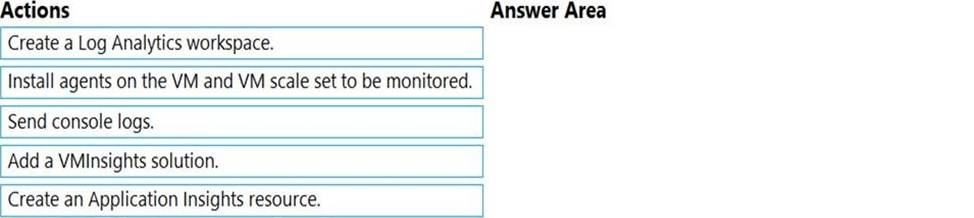
You develop an application. You plan to host the application on a set of virtual machines (VMs) in Azure.
You need to configure Azure Monitor to collect logs from the application.
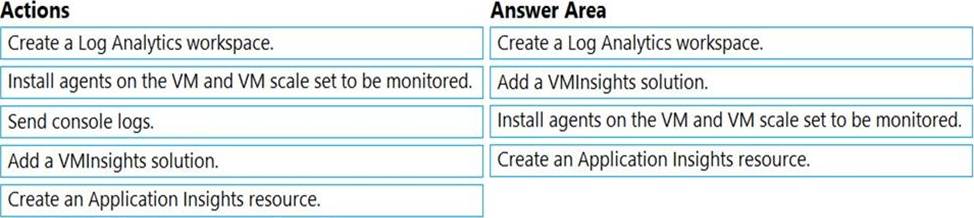
Which four actions should you perform in sequence? To answer, move the appropriate actions from the list of actions to the answer area and arrange them in the correct order.
Explanation:
Step 1: Create a Log Analytics workspace.
First create the workspace.
Step 2: Add a VMInsights solution.
Before a Log Analytics workspace can be used with VM insights, it must have the VMInsights solution installed.
Step 3: Install agents on the VM and VM scale set to be monitored.
Prior to onboarding agents, you must create and configure a workspace. Install or update the Application Insights Agent as an extension for Azure virtual machines and VM scalet sets.
Step 4: Create an Application Insights resource
Sign in to the Azure portal, and create an Application Insights resource.
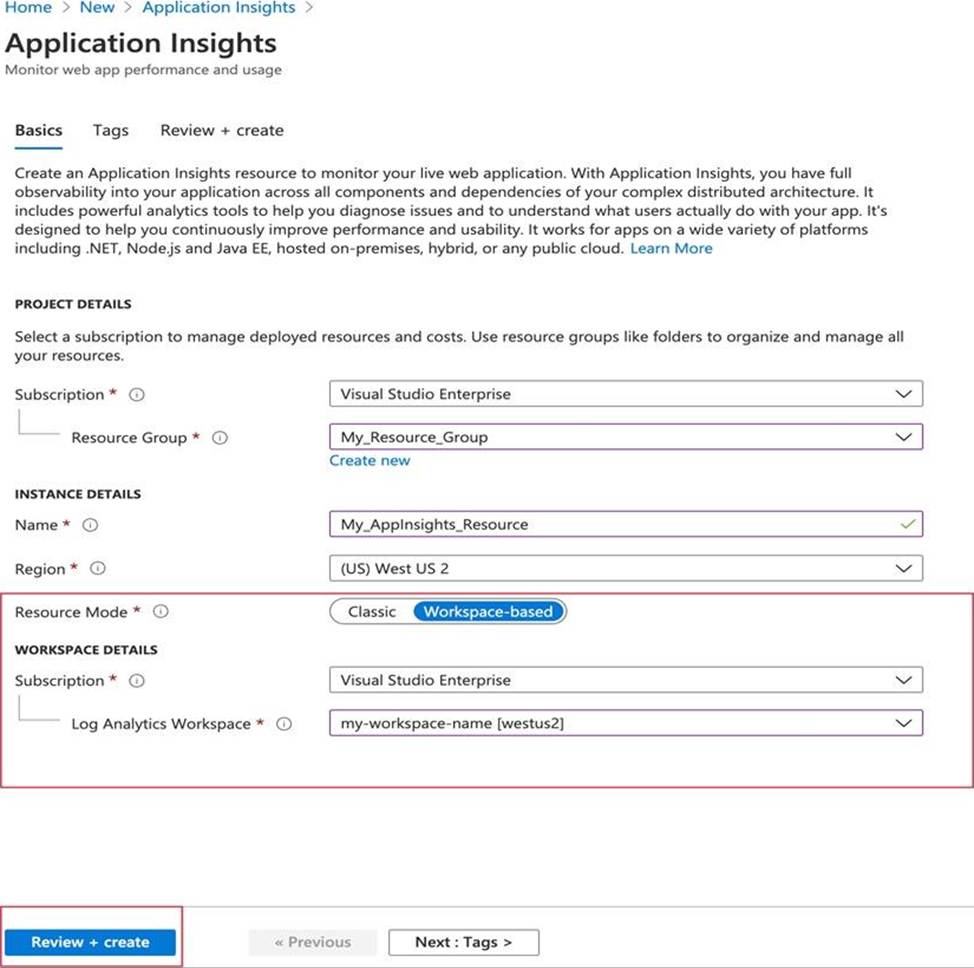
Once a workspace-based Application Insights resource has been created, configuring monitoring is relatively straightforward.
Reference:
https://docs.microsoft.com/en-us/azure/azure-monitor/vm/vminsights-configure-workspace
https://docs.microsoft.com/en-us/azure/azure-monitor/app/create-workspace-resource
HOTSPOT
You develop a news and blog content delivery app for Windows devices.
A notification must arrive on a user’s device when there is a new article available for them to view.
You need to implement push notifications.
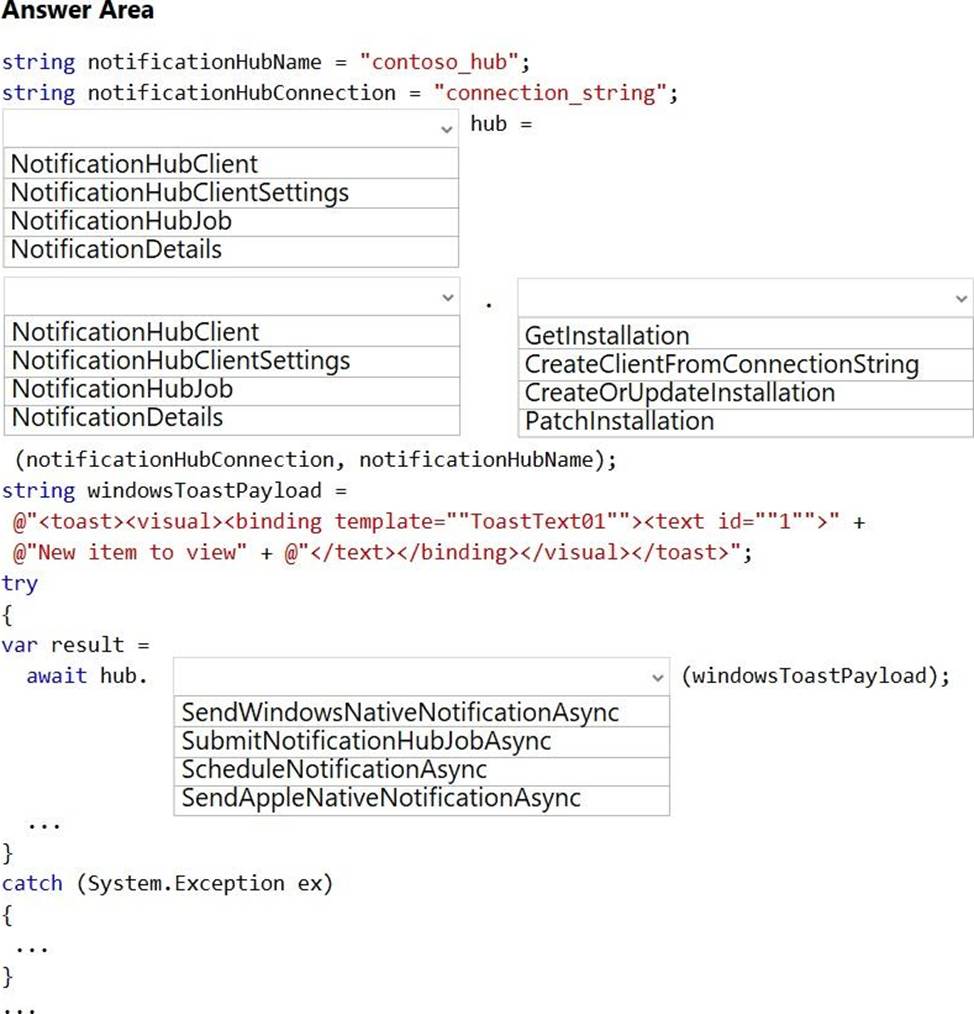
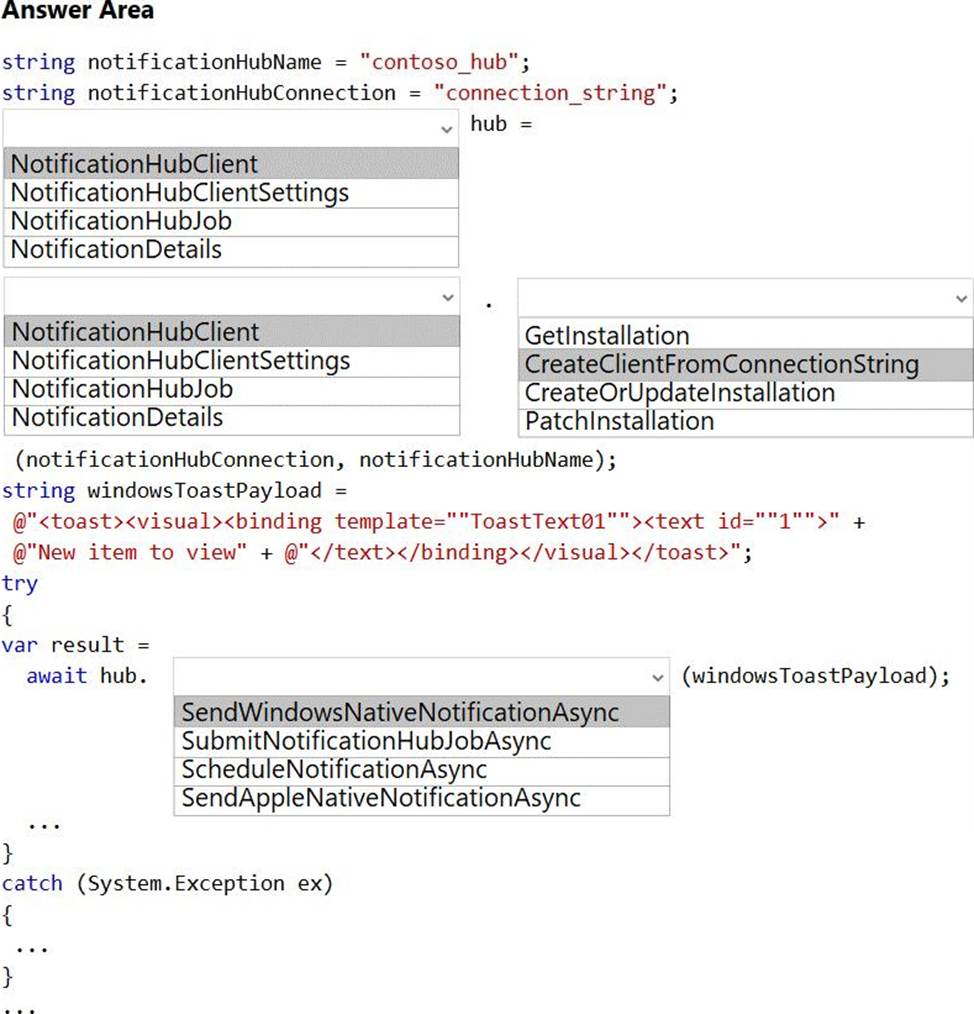
How should you complete the code segment? To answer, select the appropriate options in the answer area. NOTE: Each correct selection is worth one point.
Explanation:
Box 1: NotificationHubClient
Box 2: NotificationHubClient
Box 3: CreateClientFromConnectionString
// Initialize the Notification Hub
NotificationHubClient hub =
NotificationHubClient.CreateClientFromConnectionString(listenConnString, hubName);
Box 4: SendWindowsNativeNotificationAsync
Send the push notification.
var result = await hub.SendWindowsNativeNotificationAsync(windowsToastPayload);
Reference: https://docs.microsoft.com/en-us/azure/notification-hubs/notification-hubs-push-notification-registration-management
https://github.com/MicrosoftDocs/azure-docs/blob/master/articles/app-service-mobile/app-service-mobile-windows-store-dotnet-get-started-push.md
HOTSPOT
You develop a news and blog content delivery app for Windows devices.
A notification must arrive on a user’s device when there is a new article available for them to view.
You need to implement push notifications.
How should you complete the code segment? To answer, select the appropriate options in the answer area. NOTE: Each correct selection is worth one point.
Explanation:
Box 1: NotificationHubClient
Box 2: NotificationHubClient
Box 3: CreateClientFromConnectionString
// Initialize the Notification Hub
NotificationHubClient hub =
NotificationHubClient.CreateClientFromConnectionString(listenConnString, hubName);
Box 4: SendWindowsNativeNotificationAsync
Send the push notification.
var result = await hub.SendWindowsNativeNotificationAsync(windowsToastPayload);
Reference: https://docs.microsoft.com/en-us/azure/notification-hubs/notification-hubs-push-notification-registration-management
https://github.com/MicrosoftDocs/azure-docs/blob/master/articles/app-service-mobile/app-service-mobile-windows-store-dotnet-get-started-push.md
HOTSPOT
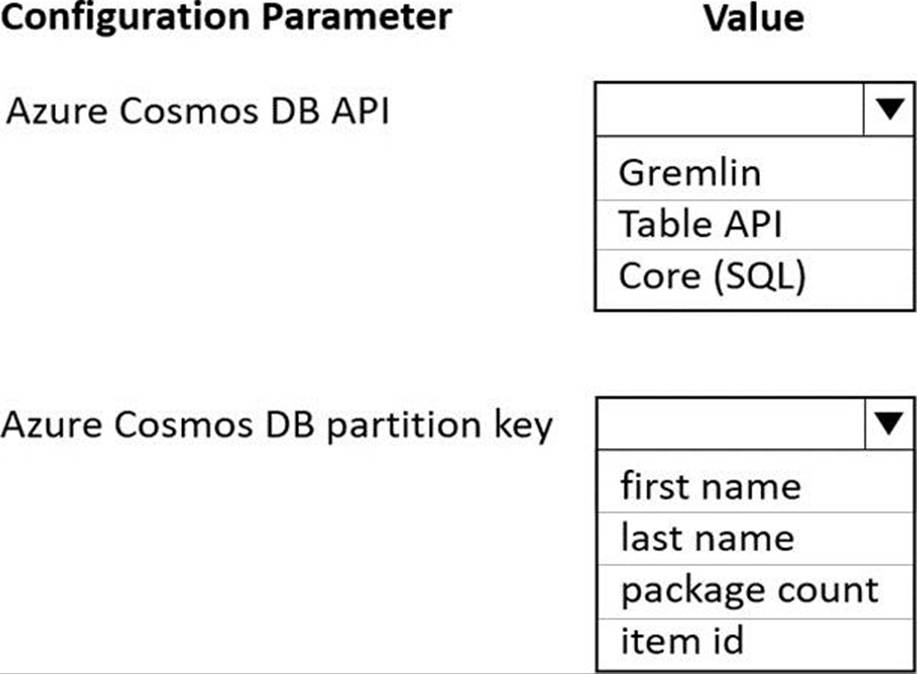
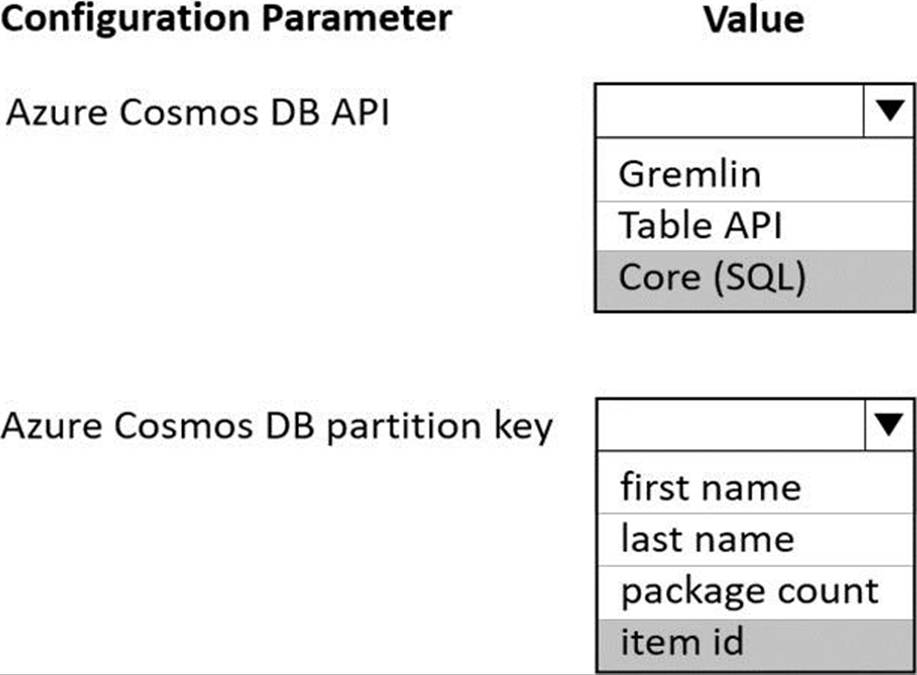
You are developing an application to collect the following telemetry data for delivery drivers: first name, last name, package count, item id, and current location coordinates. The app will store the data in Azure Cosmos DB.
You need to configure Azure Cosmos DB to query the data.
Which values should you use? To answer, select the appropriate options in the answer area. NOTE: Each correct selection is worth one point.
Explanation:
Box 1: Core (SQL)
Core (SQL) API stores data in document format. It offers the best end-to-end experience as we have full control over the interface, service, and the SDK client libraries. SQL API supports analytics and offers performance isolation between operational and analytical workloads.
Box 2: item id item id is a unique identifier and is suitable for the partition key.
Reference:
https://docs.microsoft.com/en-us/azure/cosmos-db/choose-api
https://docs.microsoft.com/en-us/azure/cosmos-db/partitioning-overview
Note: This question is part of a series of questions that present the same scenario. Each question in the series contains a unique solution. Determine whether the solution meets the stated goals.
You are developing and deploying several ASP.Net web applications to Azure App Service. You plan to save session state information and HTML output.
You must use a storage mechanism with the following requirements:
• Share session state across all ASP.NET web applications
• Support controlled, concurrent access to the same session state data for multiple readers and a single writer
• Save full HTTP responses for concurrent requests
You need to store the information.
Proposed Solution: Add the web applications to Docker containers. Deploy the containers. Deploy the containers to Azure Kubernetes Service (AKS).
Does the solution meet the goal?
- A . Yes
- B . No
B
Explanation:
Instead use Azure Cache for Redis.
Note: Azure Cache for Redis provides a session state provider that you can use to store your session state in-memory with Azure Cache for Redis instead of a SQL Server database. To use the caching session state provider, first configure your cache, and then configure your ASP.NET application for cache using the Azure Cache for Redis Session State NuGet package.
Reference: https://docs.microsoft.com/en-us/azure/azure-cache-for-redis/cache-aspnet-session-state-provider
DRAG DROP
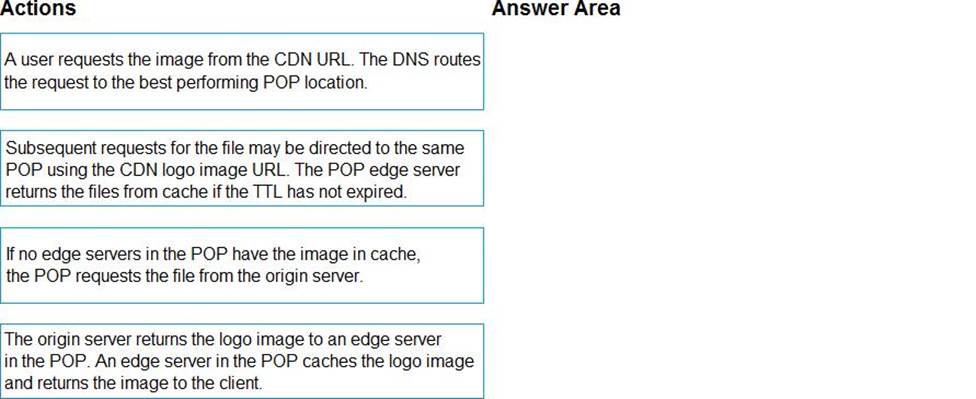
Your company has several websites that use a company logo image. You use Azure Content Delivery Network (CDN) to store the static image.
You need to determine the correct process of how the CDN and the Point of Presence (POP) server will distribute the image and list the items in the correct order.
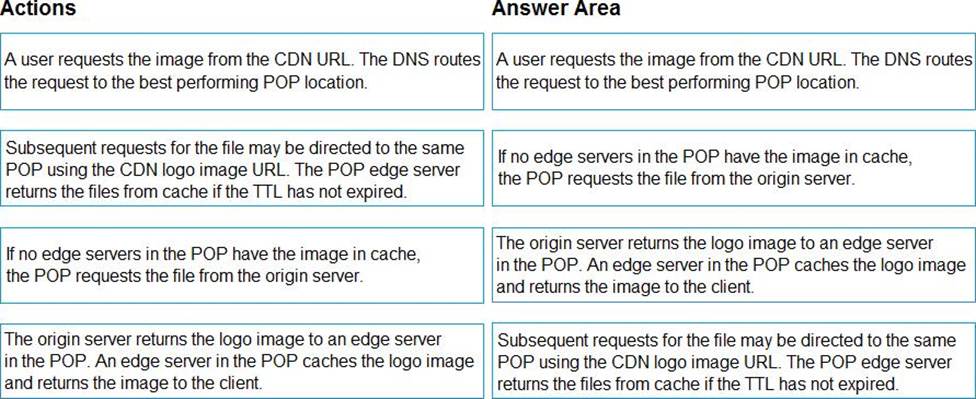
In which order do the actions occur? To answer, move all actions from the list of actions to the answer area and arrange them in the correct order.
Explanation:
Step 1: A user requests the image..
A user requests a file (also called an asset) by using a URL with a special domain name, such as <endpoint name>.azureedge.net. This name can be an endpoint hostname or a custom domain. The DNS routes the request to the best performing POP location, which is usually the POP that is geographically closest to the user.
Step 2: If no edge servers in the POP have the..
If no edge servers in the POP have the file in their cache, the POP requests the file from the origin server. The origin server can be an Azure Web App, Azure Cloud Service, Azure Storage account, or any publicly accessible web server.
Step 3: The origin server returns the..
The origin server returns the file to an edge server in the POP.
An edge server in the POP caches the file and returns the file to the original requestor (Alice). The file remains cached on the edge server in the POP until the time-to-live (TTL) specified by its HTTP headers expires. If the origin server didn’t specify a TTL, the default TTL is seven days.
Step 4: Subsequent requests for..
Additional users can then request the same file by using the same URL that the original user used, and can also be directed to the same POP.
If the TTL for the file hasn’t expired, the POP edge server returns the file directly from the cache. This process results in a faster, more responsive user experience.
Reference: https://docs.microsoft.com/en-us/azure/cdn/cdn-overview
You are updating an application that stores data on Azure and uses Azure Cosmos DB for storage. The application stores data in multiple documents associated with a single username.
The application requires the ability to update multiple documents for a username in a single ACID operation.
You need to configure Azure Cosmos DB.
Which two actions should you perform? Each correct answer presents part of the solution. NOTE: Each correct selection is worth one point.
- A . Configure Azure Cosmos DB to use the Azure Cosmos DB for Apache Gremlin API.
- B . Configure Azure Cosmos DB to use the Azure Cosmos DB for MongoDB API.
- C . Create a collection sharded on username to store documents.
- D . Create an unsharded collection to store documents.
You are updating an application that stores data on Azure and uses Azure Cosmos DB for storage. The application stores data in multiple documents associated with a single username.
The application requires the ability to update multiple documents for a username in a single ACID operation.
You need to configure Azure Cosmos DB.
Which two actions should you perform? Each correct answer presents part of the solution. NOTE: Each correct selection is worth one point.
- A . Configure Azure Cosmos DB to use the Azure Cosmos DB for Apache Gremlin API.
- B . Configure Azure Cosmos DB to use the Azure Cosmos DB for MongoDB API.
- C . Create a collection sharded on username to store documents.
- D . Create an unsharded collection to store documents.
DRAG DROP
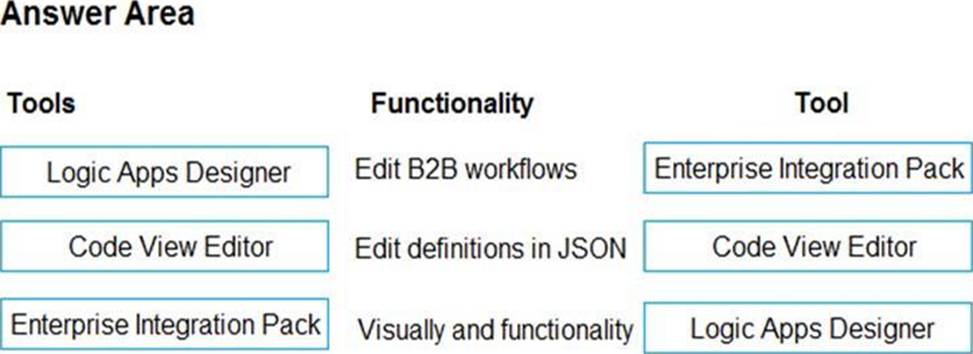
You manage several existing Logic Apps.
You need to change definitions, add new logic, and optimize these apps on a regular basis.
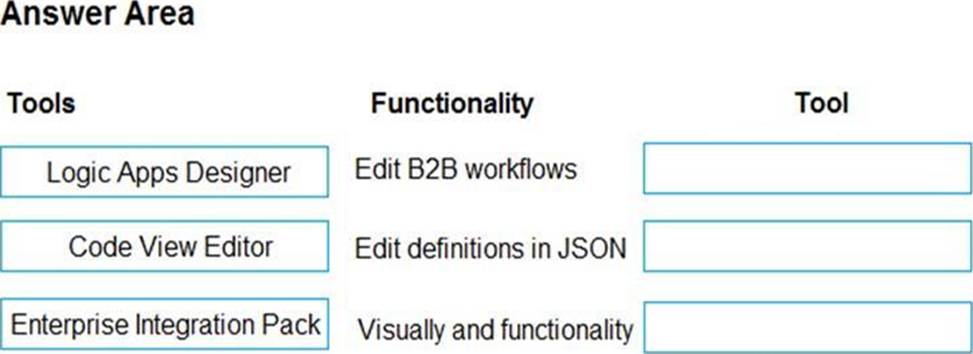
What should you use? To answer, drag the appropriate tools to the correct functionalities. Each tool may be used once, more than once, or not at all. You may need to drag the split bar between panes or scroll to view content. NOTE: Each correct selection is worth one point.
Explanation:
Box 1: Enterprise Integration Pack
After you create an integration account that has partners and agreements, you are ready to create a business to business (B2B) workflow for your logic app with the Enterprise Integration Pack.
Box 2: Code View Editor
To work with logic app definitions in JSON, open the Code View editor when working in the Azure portal or in Visual Studio, or copy the definition into any editor that you want.
Box 3: Logical Apps Designer
You can build your logic apps visually with the Logic Apps Designer, which is available in the Azure portal through your browser and in Visual Studio.
Reference:
https://docs.microsoft.com/en-us/azure/logic-apps/logic-apps-enterprise-integration-b2b
https://docs.microsoft.com/en-us/azure/logic-apps/logic-apps-author-definitions
https://docs.microsoft.com/en-us/azure/logic-apps/logic-apps-overview