
Microsoft AZ-204 Practice Exams
Last updated on Nov 16,2026- Exam Code: AZ-204
- Exam Name: Developing Solutions for Microsoft Azure
- Certification Provider: Microsoft
- Latest update: Nov 16,2026
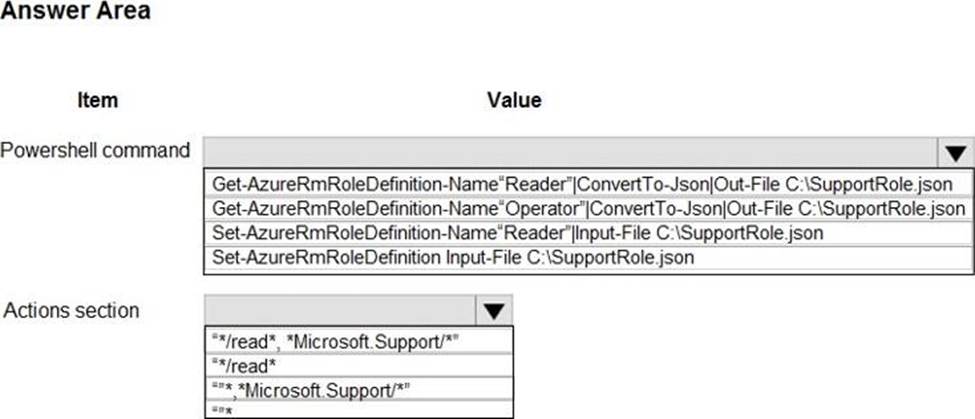
HOTSPOT
Your company is migrating applications to Azure. The IT department must allow internal developers to communicate with Microsoft support.
The service agents of the IT department must only have view resources and create support ticket permissions to all subscriptions. A new custom role must be created by reusing a default role definition and changing the permissions.
You need to create the custom role.
To answer, select the appropriate options in the answer area. NOTE: Each correct selection is worth one point.
Explanation:
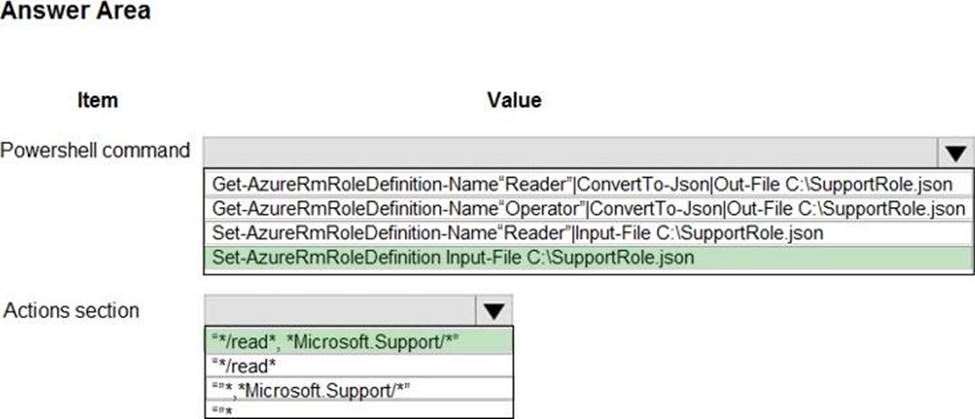
Box 1: Set-AzureRmRoleDefinition Input-File C:SupportRole.json
The Set-AzureRmRoleDefinition cmdlet updates an existing custom role in Azure Role-Based Access Control. Provide the updated role definition as an input to the command as a JSON file or a PSRoleDefinition object.
The role definition for the updated custom role MUST contain the Id and all other required properties of the role even if they are not updated: DisplayName, Description, Actions, AssignableScope
Box 2: "*/read*."* Microsoft.Support/*"
Microsoft.Support/* Create and manage support tickets
"Microsoft.Support" role definition azure
Incorrect Answers:
Get-AzureRmRoleDefinition. The Get-AzureRmRoleDefinition command does not have an action section.
First, use the Get-AzureRmRoleDefinition command to retrieve the custom role that you wish to modify. Then, modify the properties that you wish to change. Finally, save the role definition using the Set-AzureRmRoleDefinition command.
Reference: https://docs.microsoft.com/en-us/azure/role-based-access-control/custom-roles-powershell
You need to securely access inventory items when developing the Inventory Items API.
What are three possible ways to achieve this goal? Each correct answer presents a complete solution. NOTE: Each correct selection is worth one point.
- A . Create a custom Microsoft Entra role
Assign the custom role to the Azure Cosmos DB account Update the function app to use certificate-based authentication. - B . Create a SQL role definition under the Azure Cosmos DB account.
Create a user-assigned managed identity and assign the identity to the function app.
Assign the user-assigned managed identity the SQL role definition.
Update the function app code to implement the DefaultAzurecredential class and reference the user-assigned managed identity. - C . Create a system-assigned managed identity for the function app with read access to secrets in Azure Key Vault. Store the Azure Cosmos DB primary key and URI in Azure Key Vault as secrets.
Use function app settings to reference the secret values. - D . Create a custom Microsoft Entra role. Assign the custom role to Azure Key Vault. Assign the custom role to the function app.
Reference the custom role in the function app code when accessing Azure Key Vault values. - E . Create a SQL role definition under the Azure Cosmos DB account. Assign the role to the function app’s system-assigned managed identity. Programmatically access the Azure Cosmos OB keys from
the function app.
You need to securely access inventory items when developing the Inventory Items API.
What are three possible ways to achieve this goal? Each correct answer presents a complete solution. NOTE: Each correct selection is worth one point.
- A . Create a custom Microsoft Entra role
Assign the custom role to the Azure Cosmos DB account Update the function app to use certificate-based authentication. - B . Create a SQL role definition under the Azure Cosmos DB account.
Create a user-assigned managed identity and assign the identity to the function app.
Assign the user-assigned managed identity the SQL role definition.
Update the function app code to implement the DefaultAzurecredential class and reference the user-assigned managed identity. - C . Create a system-assigned managed identity for the function app with read access to secrets in Azure Key Vault. Store the Azure Cosmos DB primary key and URI in Azure Key Vault as secrets.
Use function app settings to reference the secret values. - D . Create a custom Microsoft Entra role. Assign the custom role to Azure Key Vault. Assign the custom role to the function app.
Reference the custom role in the function app code when accessing Azure Key Vault values. - E . Create a SQL role definition under the Azure Cosmos DB account. Assign the role to the function app’s system-assigned managed identity. Programmatically access the Azure Cosmos OB keys from
the function app.
You deploy an Azure App Service web app. You create an app registration for the app in Azure Active Directory (Azure AD) and Twitter. the app must authenticate users and must use SSL for all communications. The app must use Twitter as the identity provider. You need to validate the Azure AD request in the app code.
What should you validate?
- A . HTTP response code
- B . ID token header
- C . ID token signature
- D . Tenant ID
Note: This question is part of a series of questions that present the same scenario. Each question in the series contains a unique solution that might meet the stated goals. Some question sets might have more than one correct solution, while others might not have a correct solution.
After you answer a question in this section, you will NOT be able to return to it. As a result, these questions will not appear in the review screen.
You are developing an Azure Service application that processes queue data when it receives a message from a mobile application. Messages may not be sent to the service consistently.
You have the following requirements:
✑ Queue size must not grow larger than 80 gigabytes (GB).
✑ Use first-in-first-out (FIFO) ordering of messages.
✑ Minimize Azure costs.
You need to implement the messaging solution.
Solution: Use the .Net API to add a message to an Azure Storage Queue from the mobile application.
Create an Azure VM that is triggered from Azure Storage Queue events.
Does the solution meet the goal?
- A . Yes
- B . No
B
Explanation:
Don’t use a VM, instead create an Azure Function App that uses an Azure Service Bus Queue trigger.
Reference: https://docs.microsoft.com/en-us/azure/azure-functions/functions-create-storage-queue-triggered-function
Note: This question is part of a series of questions that present the same scenario. Each question in the series contains a unique solution that might meet the stated goals. Some question sets might have more than one correct solution, while others might not have a correct solution.
After you answer a question in this section, you will NOT be able to return to it. As a result, these questions will not appear in the review screen.
You are developing an Azure solution to collect point-of-sale (POS) device data from 2,000 stores located throughout the world. A single device can produce 2 megabytes (MB) of data every 24 hours. Each store location has one to five devices that send data.
You must store the device data in Azure Blob storage. Device data must be correlated based on a device identifier. Additional stores are expected to open in the future.
You need to implement a solution to receive the device data.
Solution: Provision an Azure Service Bus. Configure a topic to receive the device data by using a correlation filter.
Does the solution meet the goal?
- A . Yes
- B . No
A
Explanation:
A message is raw data produced by a service to be consumed or stored elsewhere. The Service Bus is for high-value enterprise messaging, and is used for order processing and financial transactions.
Reference: https://docs.microsoft.com/en-us/azure/event-grid/compare-messaging-services
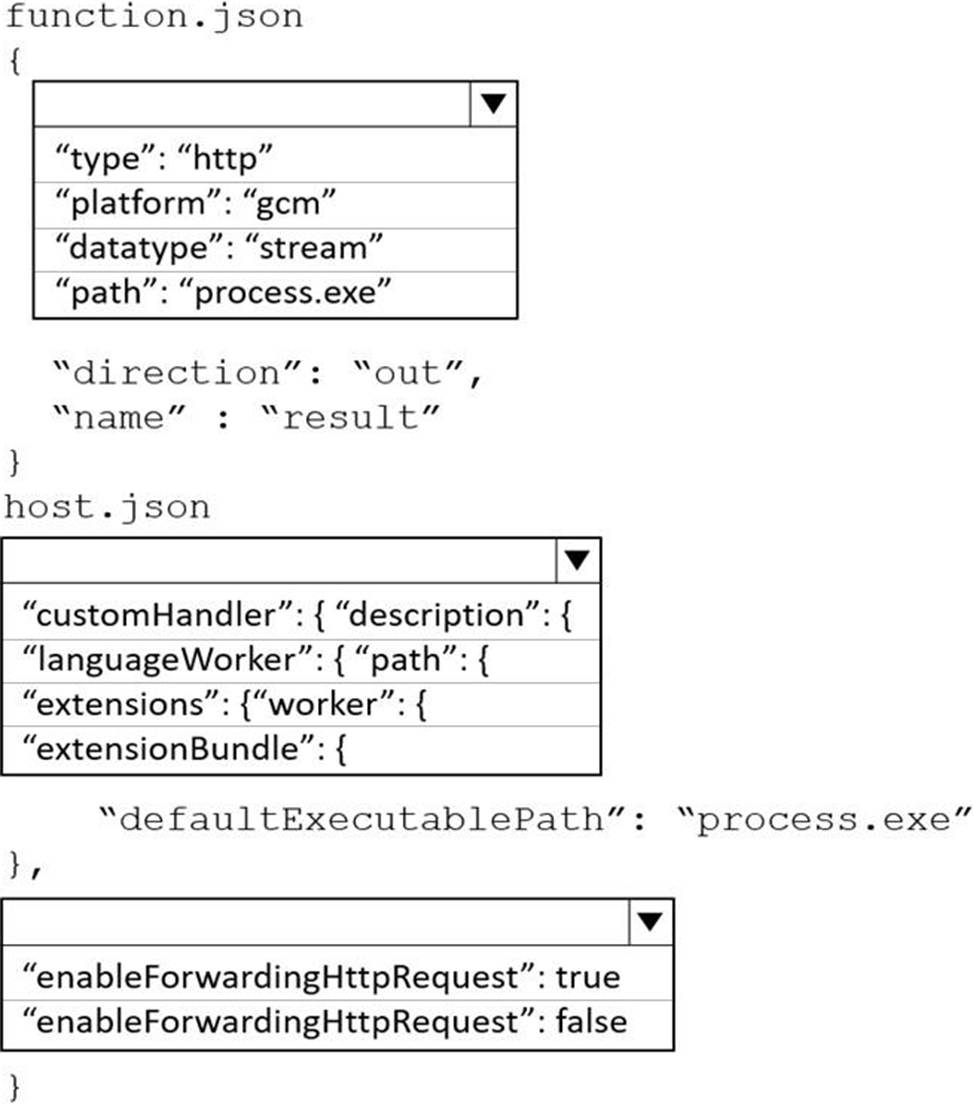
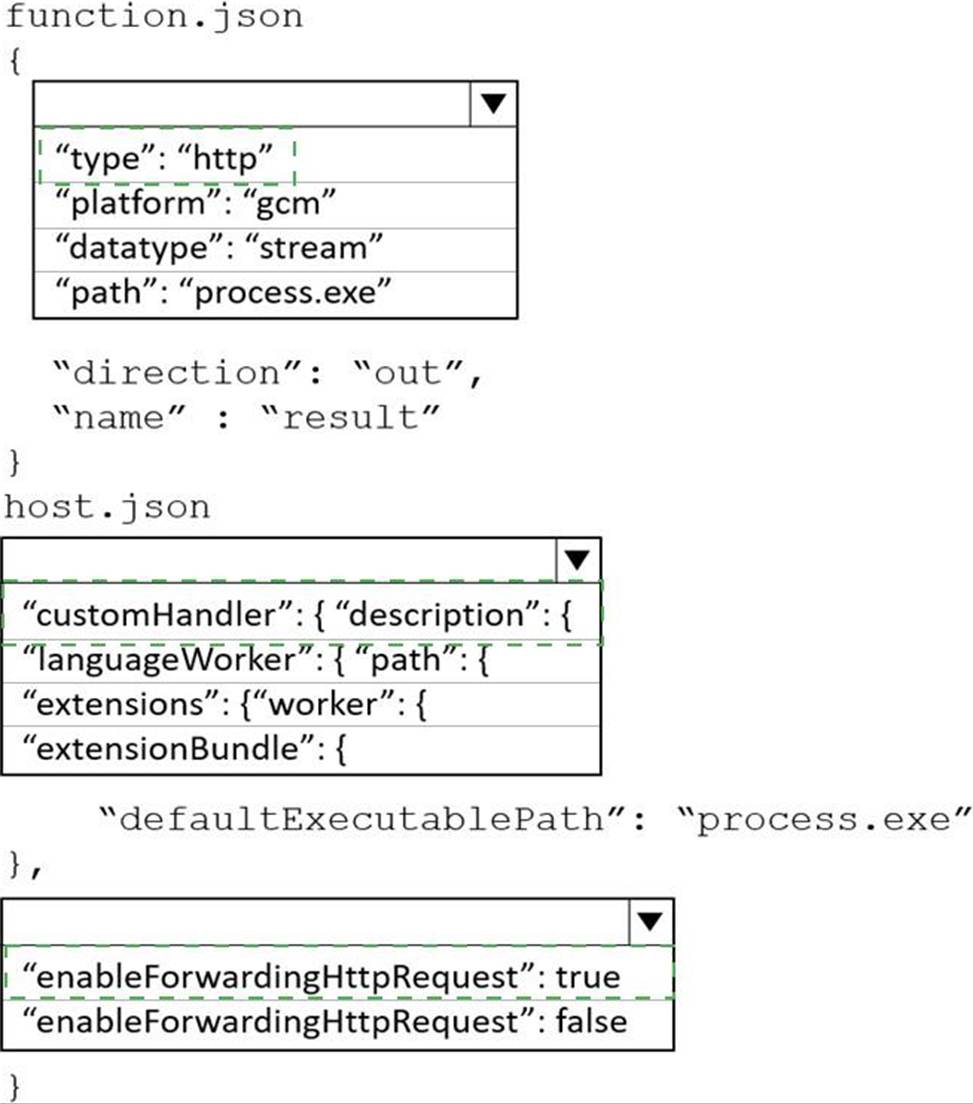
HOTSPOT
You have an Azure Web app that uses Cosmos DB as a data store.
You create a CosmosDB container by running the following PowerShell script:
$resourceGroupName = "testResourceGroup"
$accountName = "testCosmosAccount"
$databaseName = "testDatabase"
$containerName = "testContainer"
$partitionKeyPath = "/EmployeeId"
$autoscaleMaxThroughput = 5000
New-AzCosmosDBSqlContainer
-ResourceGroupName $resourceGroupName
-AccountName $accountName
-DatabaseName $databaseName
-Name $containerName
-PartitionKeyKind Hash
-PartitionKeyPath $partitionKeyPath
-AutoscaleMaxThroughput $autoscaleMaxThroughput
You create the following queries that target the container:
SELECT * FROM c WHERE c.EmployeeId > ‘12345’
SELECT * FROM c WHERE c.UserID = ‘12345’
For each of the following statements, select Yes if the statement is true. Otherwise, select No. NOTE: Each correct selection is worth one point.
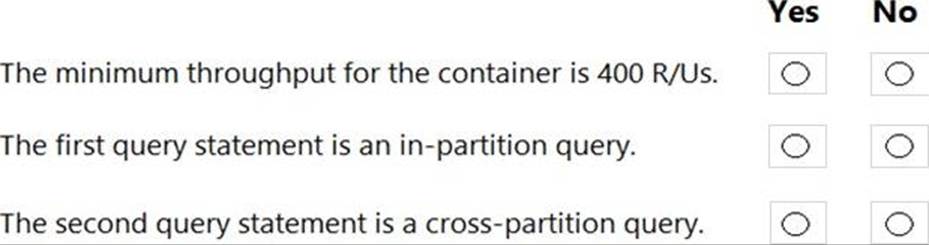
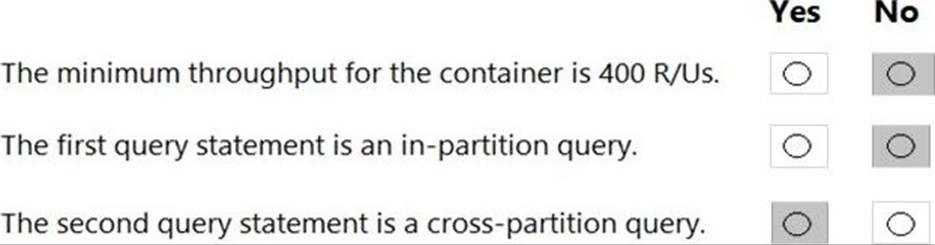
Explanation:
Box 1: No
You set the highest, or maximum RU/s Tmax you don’t want the system to exceed. The system automatically scales the throughput T such that 0.1* Tmax <= T <= Tmax.
In this example we have autoscaleMaxThroughput = 5000, so the minimum throughput for the container is 500 R/Us.
Box 2: No
First query: SELECT * FROM c WHERE c.EmployeeId > ‘12345’
Here’s a query that has a range filter on the partition key and won’t be scoped to a single physical partition. In order to be an in-partition query, the query must have an equality filter that includes the partition key:
SELECT * FROM c WHERE c.DeviceId > ‘XMS-0001’
Box 3: Yes
Example of In-partition query:
Consider the below query with an equality filter on DeviceId. If we run this query on a container partitioned on DeviceId, this query will filter to a single physical partition.
SELECT * FROM c WHERE c.DeviceId = ‘XMS-0001’
Reference:
https://docs.microsoft.com/en-us/azure/cosmos-db/how-to-choose-offer
https://docs.microsoft.com/en-us/azure/cosmos-db/how-to-query-container
You need to grant access to the retail store location data for the inventory service development effort.
What should you use?
- A . Azure AD access token
- B . Azure RBAC role
- C . Azure AD ID token
- D . Shared access signature (SAS) token
- E . Azure AD refresh token
You need to grant access to the retail store location data for the inventory service development effort.
What should you use?
- A . Azure AD access token
- B . Azure RBAC role
- C . Azure AD ID token
- D . Shared access signature (SAS) token
- E . Azure AD refresh token