
Microsoft AZ-204 Practice Exams
Last updated on Nov 16,2026- Exam Code: AZ-204
- Exam Name: Developing Solutions for Microsoft Azure
- Certification Provider: Microsoft
- Latest update: Nov 16,2026
Note: This question is part of a series of questions that present the same scenario. Each question in the series contains a unique solution that might meet the stated goals. Some question sets might have more than one correct solution, while others might not have a correct solution.
After you answer a question in this section, you will NOT be able to return to it. As a result, these questions will not appear on the review screen.
You are implementing an application by using Azure Event Grid to push near-real-time information to customers.
You have the following requirements:
• You must send events to thousands of customers that include hundreds of various event types.
• The events must be filtered by event type before processing.
• Authentication and authorization must be handled by using Microsoft Entra ID.
• The events must be published to a single endpoint.
You need to implement Azure Event Grid.
Solution: Publish events to a partner topic. Create an event subscription for each customer.
Does the solution meet the goal?
- A . Yes
- B . No
DRAG DROP
A company backs up all manufacturing data to Azure Blob Storage. Admins move blobs from hot storage to archive tier storage every month.
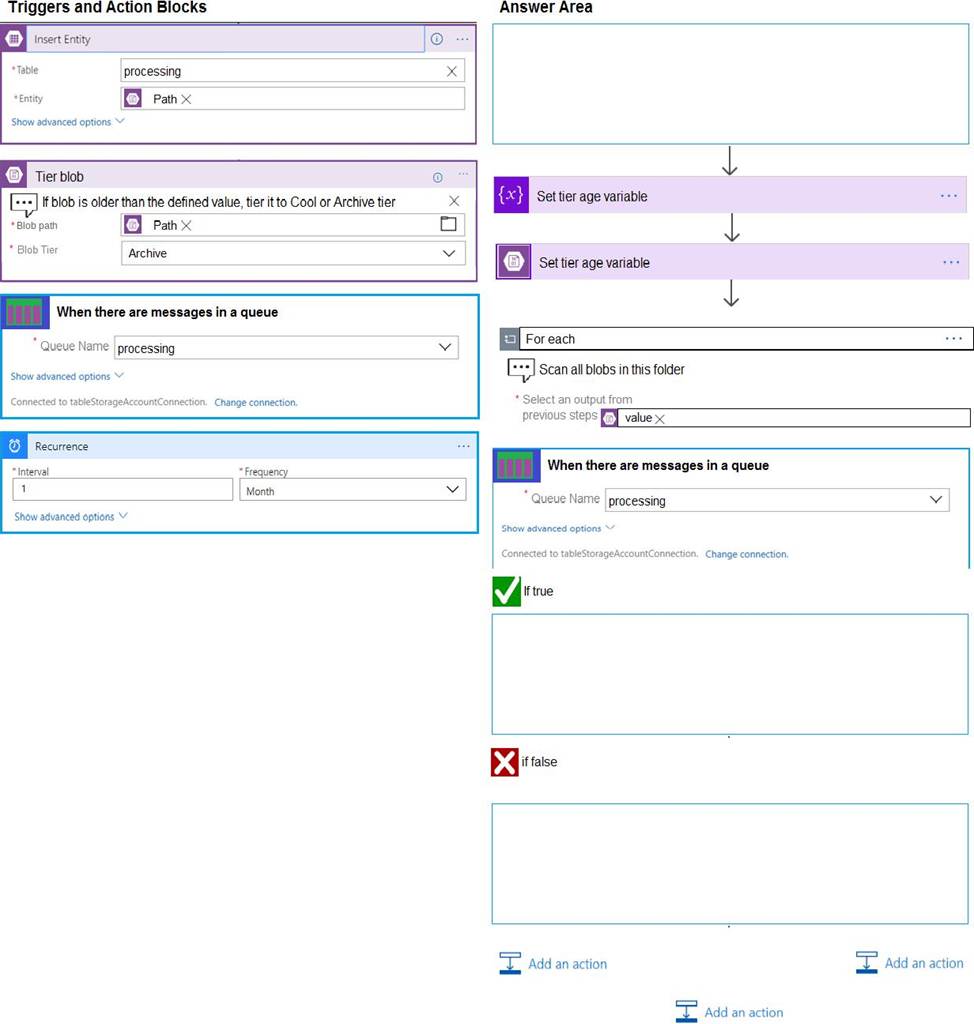
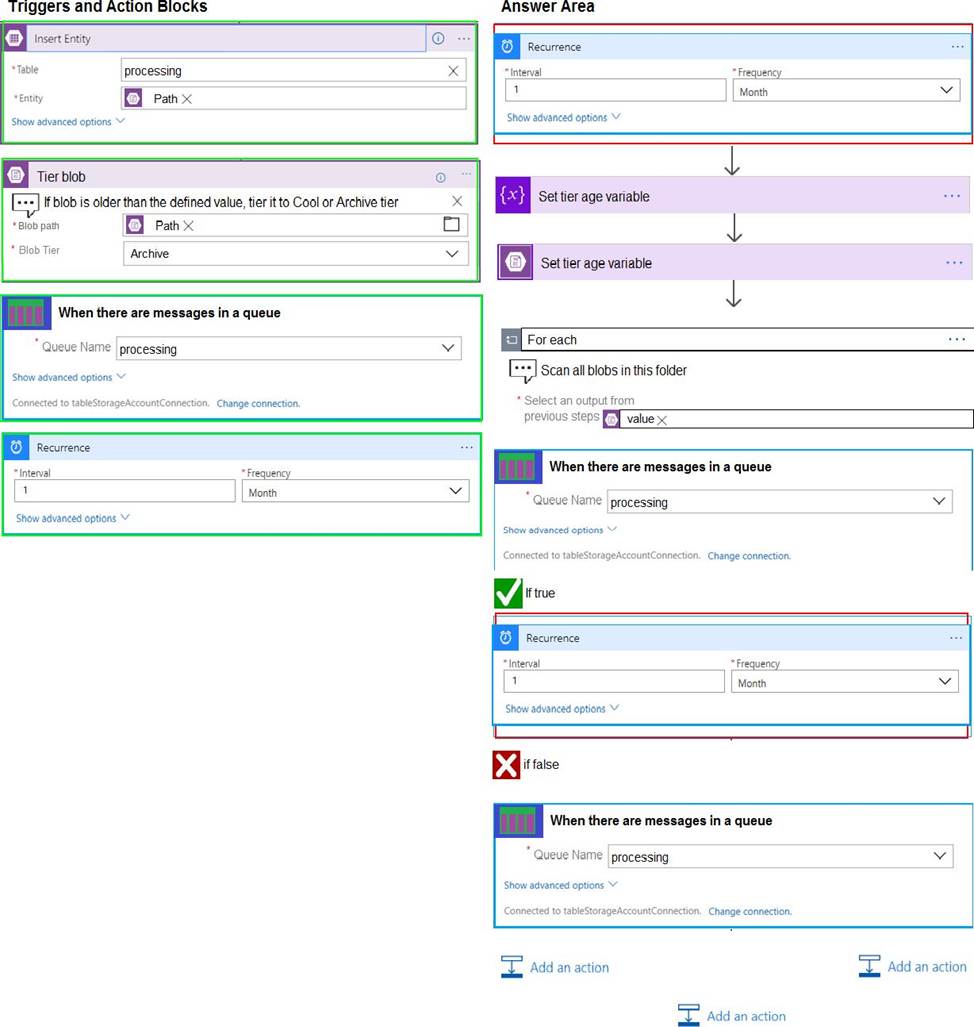
You must automatically move blocks to Archive tier after they have not been accessed for 180 days. The path for any item that is not archived must be placed in an existing queue. This operation must be performed automatically once a month. You set the value of TierAgeInDays to 180.
How should you configure the Logic App? To answer, drag the appropriate triggers or action blocks to the correct trigger or action slots. Each trigger or action block may be used once, more than once, or not at all. You may need to drag the split bar between panes or scroll to view content. NOTE: Each correct selection is worth one point.
Explanation:
Box 1: Recurrence
Box 2: Insert Entity
Box 3 (if true): Tier Blob
Box 4: (if false):
Leave blank.
Reference: https://docs.microsoft.com/en-us/azure/logic-apps/logic-apps-perform-data-operations
You are building a B2B web application that uses Azure B2B collaboration for authentication Paying customers authenticate to Azure B2B using federation
The application allows users to sign up for trial accounts using any email address
When a user converts to a paying customer, the data associated with the teal should be kept, but the user must authenticate using federation
You need to update the user in Azure Active Directory (Azure AD) when they convert to a paying customer
Which Graph API parameter is used to change authentication from one-time passé odes to federation?
- A . uscrFlowType
- B . Status
- C . invittdUstr
- D . resetRedemption
You are building a B2B web application that uses Azure B2B collaboration for authentication Paying customers authenticate to Azure B2B using federation
The application allows users to sign up for trial accounts using any email address
When a user converts to a paying customer, the data associated with the teal should be kept, but the user must authenticate using federation
You need to update the user in Azure Active Directory (Azure AD) when they convert to a paying customer
Which Graph API parameter is used to change authentication from one-time passé odes to federation?
- A . uscrFlowType
- B . Status
- C . invittdUstr
- D . resetRedemption
You are building a B2B web application that uses Azure B2B collaboration for authentication Paying customers authenticate to Azure B2B using federation
The application allows users to sign up for trial accounts using any email address
When a user converts to a paying customer, the data associated with the teal should be kept, but the user must authenticate using federation
You need to update the user in Azure Active Directory (Azure AD) when they convert to a paying customer
Which Graph API parameter is used to change authentication from one-time passé odes to federation?
- A . uscrFlowType
- B . Status
- C . invittdUstr
- D . resetRedemption
DRAG DROP
You are developing an Azure solution to collect inventory data from thousands of stores located around the world. Each store location will send the inventory data hourly to an Azure Blob storage account for processing.
The solution must meet the following requirements:
✑ Begin processing when data is saved to Azure Blob storage.
✑ Filter data based on store location information.
✑ Trigger an Azure Logic App to process the data for output to Azure Cosmos DB.
✑ Enable high availability and geographic distribution.
✑ Allow 24-hours for retries.
✑ Implement an exponential back off data processing.
You need to configure the solution.
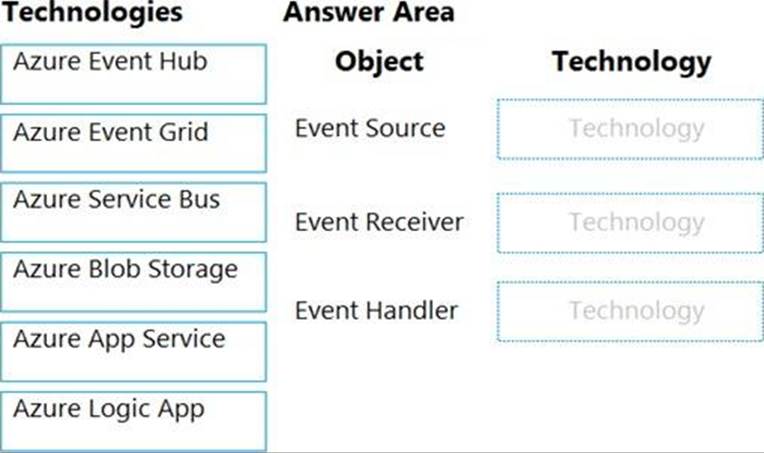
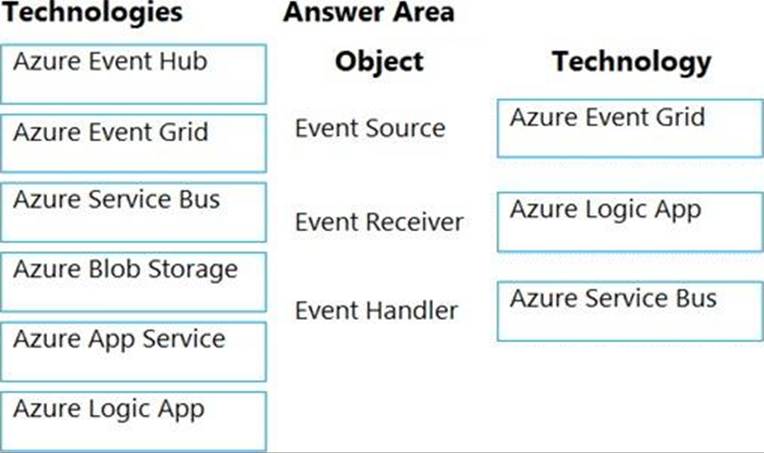
What should you implement? To answer, select the appropriate options in the answer area. NOTE: Each correct selection is worth one point.
Explanation:
Box 1: Azure Event Grid
Blob storage events are pushed using Azure Event Grid to subscribers such as Azure Functions, Azure Logic Apps, or even to your own http listener. Event Grid provides reliable event delivery to your applications through rich retry policies and dead-lettering.
Box 2: Azure Logic App
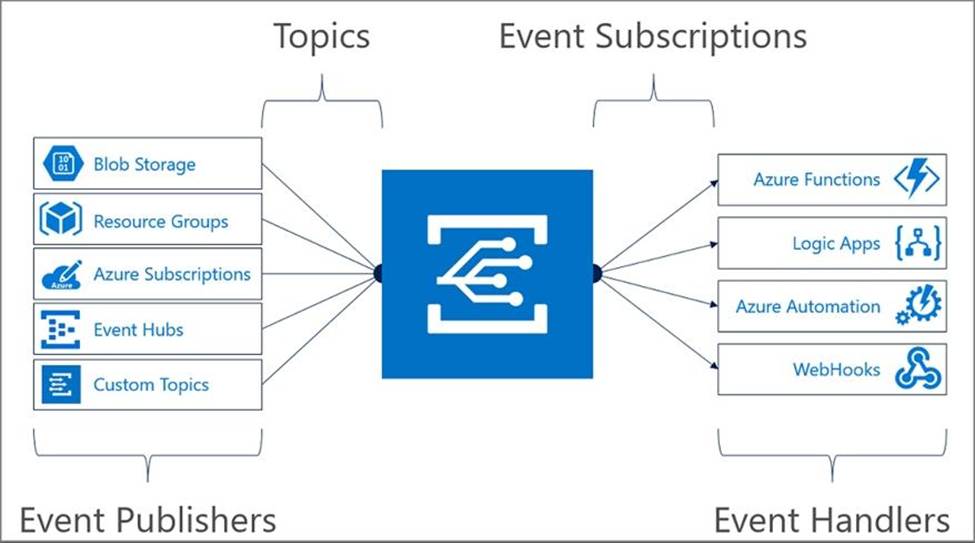
Event Grid uses event subscriptions to route event messages to subscribers. This image illustrates the relationship between event publishers, event subscriptions, and event handlers.
Box 3: Azure Service Bus
The Event Grid service doesn’t store events. Instead, events are stored in the Event Handlers, including ServiceBus, EventHubs, Storage Queue, WebHook endpoint, or many other supported Azure Services.
Reference:
https://docs.microsoft.com/en-us/azure/storage/blobs/storage-blob-event-overview
https://docs.microsoft.com/en-us/java/api/overview/azure/messaging-eventgrid-readme
HOTSPOT
You are preparing to deploy a Python website to an Azure Web App using a container. The solution will use multiple containers in the same container group.
The Dockerfile that builds the container is as follows:

You build a container by using the following command.
The Azure Container Registry instance named images is a private registry.

The user name and password for the registry is admin.
The Web App must always run the same version of the website regardless of future builds.
You need to create an Azure Web App to run the website.
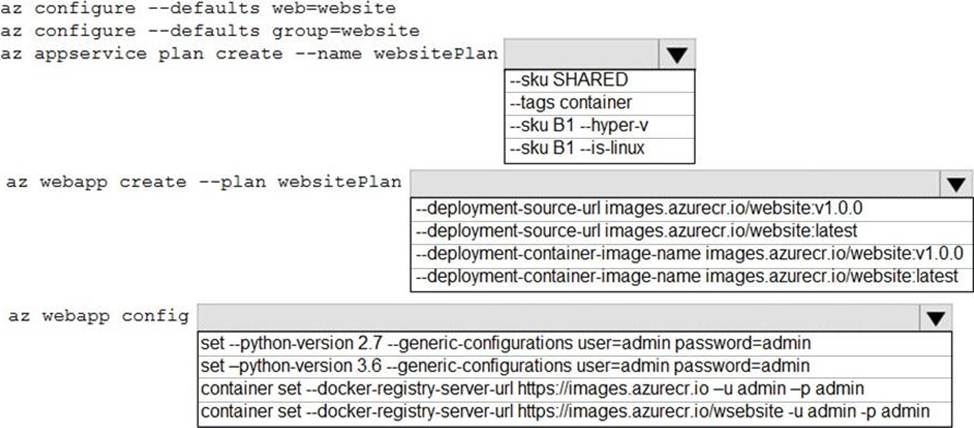
How should you complete the commands? To answer, select the appropriate options in the answer area. NOTE: Each correct selection is worth one point.
Explanation:
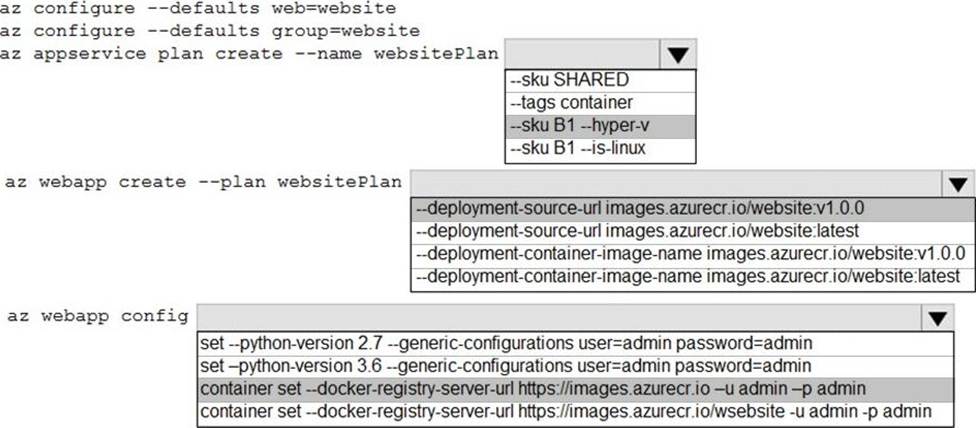
Box 1: –SKU B1 –hyper-v
–hyper-v
Host web app on Windows container.
Box 2: –deployment-source-url images.azurecr.io/website:v1.0.0 –deployment-source-url -u
Git repository URL to link with manual integration.
The Web App must always run the same version of the website regardless of future builds.
Incorrect:
–deployment-container-image-name -i
Linux only. Container image name from Docker Hub, e.g. publisher/image-name:tag.
Box 3: az webapp config container set -url https://images.azurecr.io -u admin -p admin
az webapp config container set
Set a web app container’s settings.
Paremeter: –docker-registry-server-url -r
The container registry server url.
The Azure Container Registry instance named images is a private registry.
Example:
az webapp config container set –docker-registry-server-url
https://{azure-container-registry-name}.azurecr.io
Reference: https://docs.microsoft.com/en-us/cli/azure/appservice/plan
DRAG DROP
You are developing an Azure-hosted application that must use an on-premises hardware security module (HSM) key.
The key must be transferred to your existing Azure Key Vault by using the Bring Your Own Key (BYOK) process.
You need to securely transfer the key to Azure Key Vault.
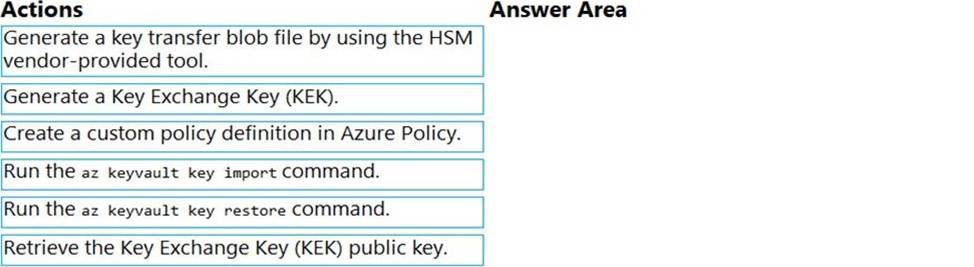
Which four actions should you perform in sequence? To answer, move the appropriate actions from the list of actions to the answer area and arrange them in the correct order.
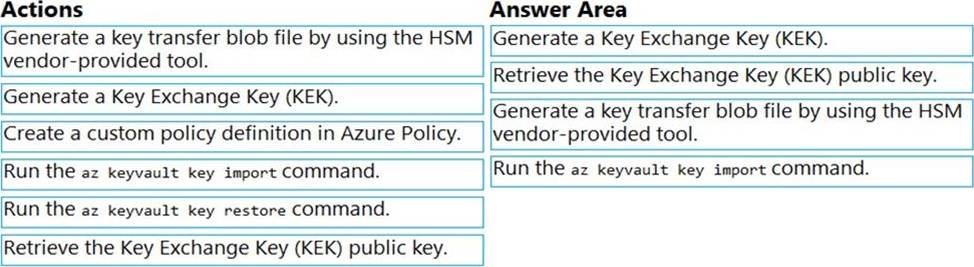
Explanation:
To perform a key transfer, a user performs following steps:
✑ Generate KEK.
✑ Retrieve the public key of the KEK.
✑ Using HSM vendor provided BYOK tool – Import the KEK into the target HSM and exports the Target Key protected by the KEK.
✑ Import the protected Target Key to Azure Key Vault.
Step 1: Generate a Key Exchange Key (KEK).
Step 2: Retrieve the Key Exchange Key (KEK) public key.
Step 3: Generate a key transfer blob file by using the HSM vendor-provided tool. Generate key transfer blob using HSM vendor provided BYOK tool
Step 4: Run the az keyvault key import command Upload key transfer blob to import HSM-key.
Customer will transfer the Key Transfer Blob (".byok" file) to an online workstation and then run a az keyvault key import command to import this blob as a new HSM-backed key into Key Vault.
To import an RSA key use this command:
az keyvault key import
Reference: https://docs.microsoft.com/en-us/azure/key-vault/keys/byok-specification
You are a developer for a SaaS company that offers many web services.
All web services for the company must meet the following requirements:
✑ Use API Management to access the services
✑ Use OpenID Connect for authentication
✑ Prevent anonymous usage
A recent security audit found that several web services can be called without any authentication.
Which API Management policy should you implement?
- A . jsonp
- B . authentication-certificate
- C . check-header
- D . validate-jwt
D
Explanation:
Add the validate-jwt policy to validate the OAuth token for every incoming request.
Incorrect Answers:
A: The jsonp policy adds JSON with padding (JSONP) support to an operation or an API to allow cross-domain calls from JavaScript browser-based clients. JSONP is a method used in JavaScript programs to request data from a server in a different domain. JSONP bypasses the limitation enforced by most web browsers where access to web pages must be in the same domain.
JSONP – Adds JSON with padding (JSONP) support to an operation or an API to allow cross-domain calls from JavaScript browser-based clients.
Reference: https://docs.microsoft.com/en-us/azure/api-management/api-management-howto-protect-backend-with-aad
You are developing an Azure Function App that runs in an App Service Plan. The Azure Function is triggered by a Timer object. You observe that the Azure Function does not reliably trigger when scheduled.
Which two actions should you perform?
- A . Verify that Always On is enabled.
- B . Modify the trigger to use a SignaIR trigger.
- C . Ensure that the function has a retry configured.
- D . Modify the trigger to use Consumption mode instead of the App Service plan.