
Microsoft AZ-204 Practice Exams
Last updated on Nov 16,2026- Exam Code: AZ-204
- Exam Name: Developing Solutions for Microsoft Azure
- Certification Provider: Microsoft
- Latest update: Nov 16,2026
HOTSPOT
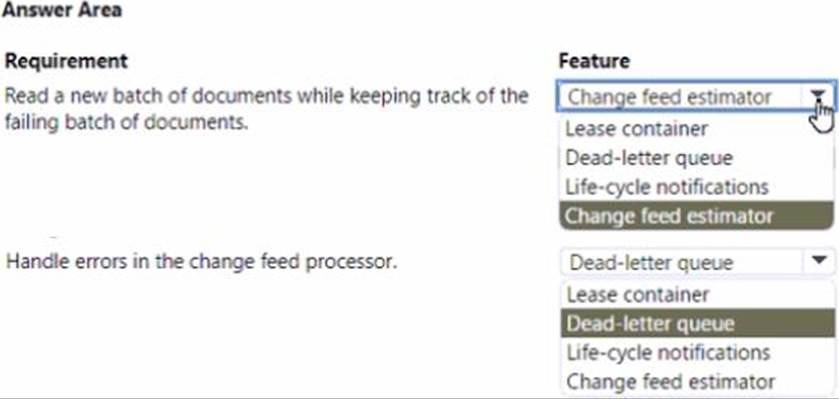
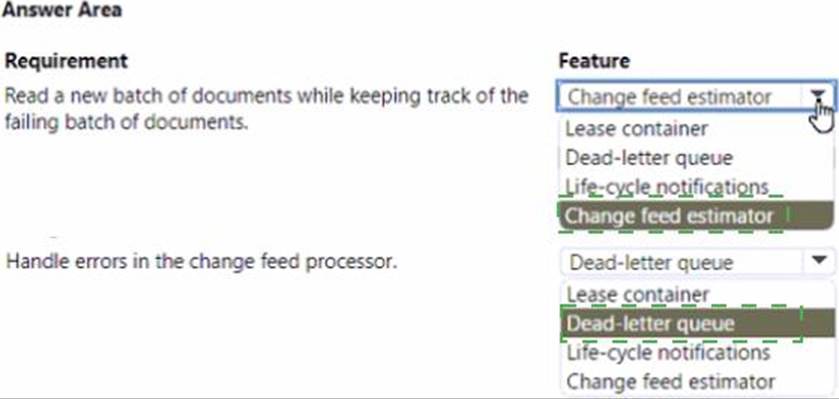
You implement an Azure solution to include Azure Cosmos DB. the latest Azure Cosmos DB SDK, and the Azure Cosmos DB for NoSQL API. You also implement a change feed processor on a new container instance by using the Azure Functions trigger for Azure Cosmos DB.
A large batch of documents continues to fail when reading one of the documents in the batch. The same batch of documents is continuously retried by the triggered function and a new batch of documents must be read.
You need to implement the change feed processor to read the documents.
Which feature should you implement? To answer, select the appropriate features in the answer area. NOTE: Each correct selection is worth one point.
You need to support local development testing for developers.
Which tool should you use?
- A . Azurite
- B . Azure Storage Emulator
- C . SQL Server Management Studio (SSMS)
- D . Azure Storage Explorer
A company uses Azure SQL Database to store data for an app. The data includes sensitive information.
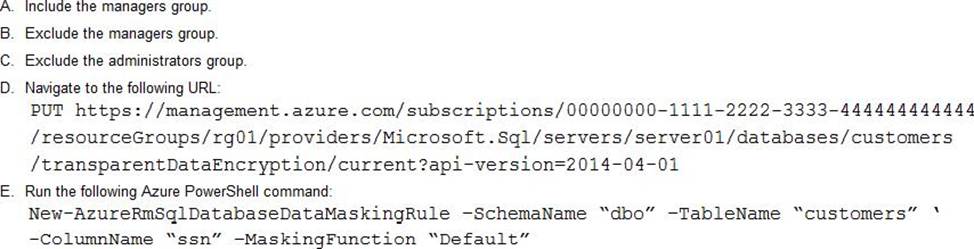
You need to implement measures that allow only members of the managers group to see sensitive information.
Which two actions should you perform? Each correct answer presents part of the solution. NOTE: Each correct selection is worth one point.
- A . Option A
- B . Option B
- C . Option C
- D . Option D
- E . Option E
BE
Explanation:
Dynamic data masking helps prevent unauthorized access to sensitive data by enabling customers to designate how much of the sensitive data to reveal with minimal impact on the application layer.
SQL users excluded from masking – A set of SQL users or AAD identities that get unmasked data in the SQL query results.
Note: The New-AzureRmSqlDatabaseDataMaskingRule cmdlet creates a data masking rule for an Azure SQL database.
Reference: https://docs.microsoft.com/en-us/powershell/module/azurerm.sql/new-azurermsqldatabasedatamaskingrule?view=azurermps-6.13.0
Note: This question is part of a series of questions that present the same scenario. Each question in the series contains a unique solution that might meet the stated goals. Some question sets might have more than one correct solution, while others might not have a correct solution.
After you answer a question in this section, you will NOT be able to return to it. As a result, these questions will not appear on the review screen.
You have an Azure App Service web app named WebApp1 and an Azure Functions app named Function 1. WebApp1 is associated with an Application Insights instance named appinsights1.
You configure a web test and a corresponding alert for WebApp1 in appinsight1l. Each alert triggers a delivery of email to your mailbox.
You need to ensure that each alert also triggers execution of Function1.
Solution: Configure an Azure Monitor action group.
Does the solution meet the goal?
- A . Yes
- B . No
DRAG DROP
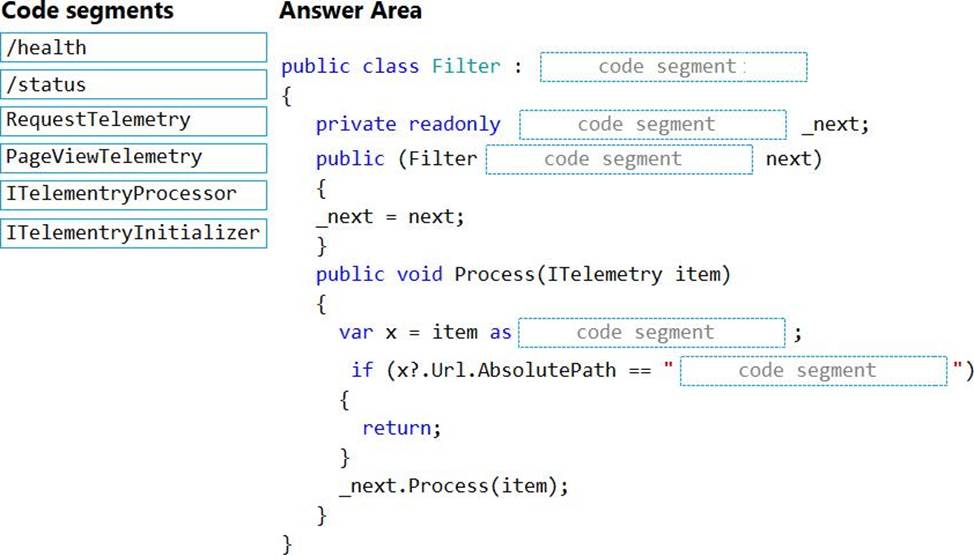
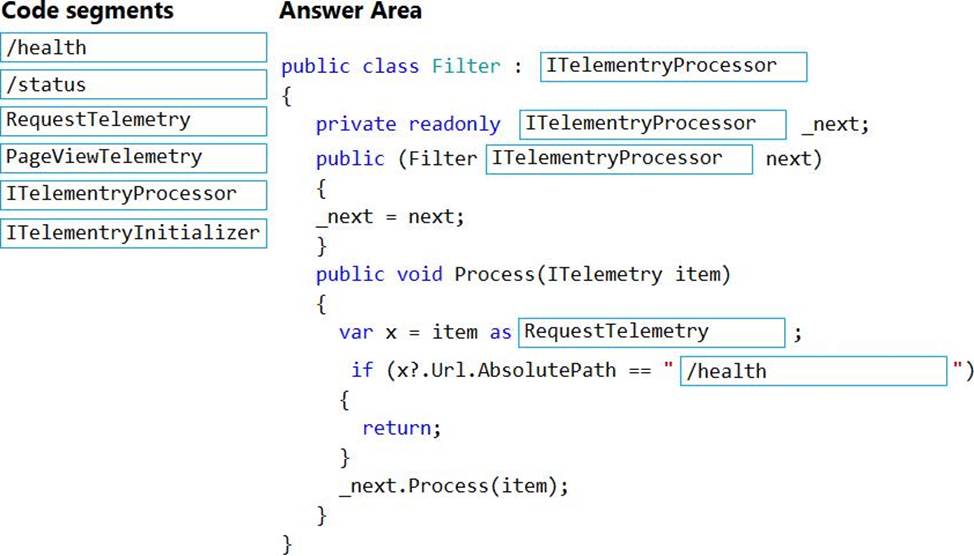
You need to implement telemetry for non-user actions.
How should you complete the Filter class? To answer, drag the appropriate code segments to the correct locations. Each code segment may be used once, more than once, or not at all. You may need to drag the split bar between panes or scroll to view content. NOTE: Each correct selection is worth one point.
Explanation:
Scenario: Exclude non-user actions from Application Insights telemetry.
Box 1: ITelemetryProcessor
To create a filter, implement ITelemetryProcessor. This technique gives you more direct control over what is included or excluded from the telemetry stream.
Box 2: ITelemetryProcessor
Box 3: ITelemetryProcessor
Box 4: RequestTelemetry
Box 5: /health
To filter out an item, just terminate the chain.
Reference: https://docs.microsoft.com/en-us/azure/azure-monitor/app/api-filtering-sampling
You need to ensure receipt processing occurs correctly.
What should you do?
- A . Use blob properties to prevent concurrency problems
- B . Use blob SnapshotTime to prevent concurrency problems
- C . Use blob metadata to prevent concurrency problems
- D . Use blob leases to prevent concurrency problems
D
Explanation:
You can create a snapshot of a blob. A snapshot is a read-only version of a blob that’s taken at a point in time. Once a snapshot has been created, it can be read, copied, or deleted, but not modified. Snapshots provide a way to back up a blob as it appears at a moment in time.
Scenario: Processing is performed by an Azure Function that uses version 2 of the Azure Function runtime. Once processing is completed, results are stored in Azure Blob Storage and an Azure SQL database. Then, an email summary is sent to the user with a link to the processing report. The link to the report must remain valid if the email is forwarded to another user.
Reference: https://docs.microsoft.com/en-us/rest/api/storageservices/creating-a-snapshot-of-a-blob
DRAG DROP
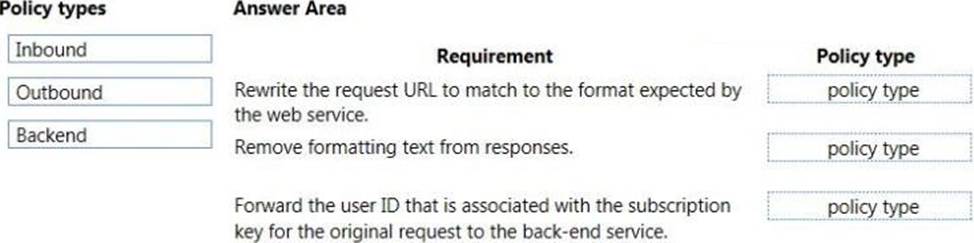
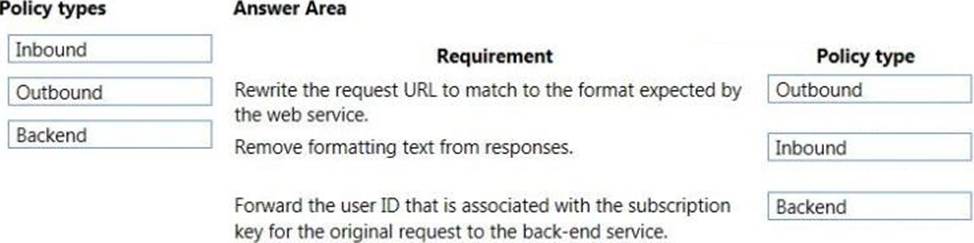
You have an application that provides weather forecasting data to external partners. You use Azure API Management to publish APIs.
You must change the behavior of the API to meet the following requirements:
• Support alternative input parameters.
• Remove formatting text from responses.
• Provide additional context to back-end services.
Which types of policies should you implement? To answer, drag the policy types to the correct scenarios. Each policy type may be used once, more than once, or not at all. You may need to drag the split bar between panes or scroll to view content. NOTE: Each correct selection is worth one point.
DRAG DROP
You have an application that provides weather forecasting data to external partners. You use Azure API Management to publish APIs.
You must change the behavior of the API to meet the following requirements:
• Support alternative input parameters.
• Remove formatting text from responses.
• Provide additional context to back-end services.
Which types of policies should you implement? To answer, drag the policy types to the correct scenarios. Each policy type may be used once, more than once, or not at all. You may need to drag the split bar between panes or scroll to view content. NOTE: Each correct selection is worth one point.
DRAG DROP
You are developing an application to securely transfer data between on-premises file systems and Azure Blob storage. The application stores keys, secrets, and certificates in Azure Key Vault. The application uses the Azure Key Vault APIs.
The application must allow recovery of an accidental deletion of the key vault or key vault objects.
Key vault objects must be retained for 90 days after deletion.
You need to protect the key vault and key vault objects.
Which Azure Key Vault feature should you use? To answer, drag the appropriate features to the correct actions. Each feature may be used once, more than once, or not at all. You may need to drag the split bar between panes or scroll to view content. NOTE: Each correct selection is worth one point.


Explanation:
Box 1: Soft delete
When soft-delete is enabled, resources marked as deleted resources are retained for a specified period (90 days by default). The service further provides a mechanism for recovering the deleted object, essentially undoing the deletion.
Box 2: Purge protection
Purge protection is an optional Key Vault behavior and is not enabled by default. Purge protection can only be enabled once soft-delete is enabled.
When purge protection is on, a vault or an object in the deleted state cannot be purged until the retention period has passed. Soft-deleted vaults and objects can still be recovered, ensuring that the retention policy will be followed.
Reference: https://docs.microsoft.com/en-us/azure/key-vault/general/soft-delete-overview
DRAG DROP
You are developing an application to securely transfer data between on-premises file systems and Azure Blob storage. The application stores keys, secrets, and certificates in Azure Key Vault. The application uses the Azure Key Vault APIs.
The application must allow recovery of an accidental deletion of the key vault or key vault objects.
Key vault objects must be retained for 90 days after deletion.
You need to protect the key vault and key vault objects.
Which Azure Key Vault feature should you use? To answer, drag the appropriate features to the correct actions. Each feature may be used once, more than once, or not at all. You may need to drag the split bar between panes or scroll to view content. NOTE: Each correct selection is worth one point.
Explanation:
Box 1: Soft delete
When soft-delete is enabled, resources marked as deleted resources are retained for a specified period (90 days by default). The service further provides a mechanism for recovering the deleted object, essentially undoing the deletion.
Box 2: Purge protection
Purge protection is an optional Key Vault behavior and is not enabled by default. Purge protection can only be enabled once soft-delete is enabled.
When purge protection is on, a vault or an object in the deleted state cannot be purged until the retention period has passed. Soft-deleted vaults and objects can still be recovered, ensuring that the retention policy will be followed.
Reference: https://docs.microsoft.com/en-us/azure/key-vault/general/soft-delete-overview