
Microsoft AZ-204 Practice Exams
Last updated on Oct 01,2026- Exam Code: AZ-204
- Exam Name: Developing Solutions for Microsoft Azure
- Certification Provider: Microsoft
- Latest update: Oct 01,2026
Note: This question is part of a series of questions that present the same scenario. Each question in the series contains a unique solution that might meet the stated goals. Some question sets might have more than one correct solution, while others might not have a correct solution.
After you answer a question in this question, you will NOT be able to return to it. As a result, these questions will not appear in the review screen.
You are developing a website that will run as an Azure Web App. Users will authenticate by using their Azure Active Directory (Azure AD) credentials.
You plan to assign users one of the following permission levels for the website: admin, normal, and reader. A user’s Azure AD group membership must be used to determine the permission level. You need to configure authorization.
Solution:
• Create a new Azure AD application’s manifest, set value of the groupMembershipClaims option to All.
• In the website, use the value of the groups claim from the JWI for the user to determine permissions.
Does the solution meet the goal?
- A . Yes
- B . No
A
Explanation:
To configure Manifest to include Group Claims in Auth Token
DRAG DROP
You are preparing to deploy an Azure virtual machine (VM) based application.
The VMs that run the application have the following requirements:
• When a VM is provisioned the firewall must be automatically configured before it can access Azure resources.
• Supporting services must be installed by using an Azure PowerShell script that is stored in Azure Storage
You need to ensure that the requirements are met.
Which features should you use? To answer, drag the appropriate features to the correct requirements.


Explanation:
Reference:
https://docs.microsoft.com/en-us/azure/automation/automation-hybrid-runbook-worker
https://docs.microsoft.com/en-us/azure/virtual-machines/windows/run-command
DRAG DROP
You are preparing to deploy an Azure virtual machine (VM) based application.
The VMs that run the application have the following requirements:
• When a VM is provisioned the firewall must be automatically configured before it can access Azure resources.
• Supporting services must be installed by using an Azure PowerShell script that is stored in Azure Storage
You need to ensure that the requirements are met.
Which features should you use? To answer, drag the appropriate features to the correct requirements.
Explanation:
Reference:
https://docs.microsoft.com/en-us/azure/automation/automation-hybrid-runbook-worker
https://docs.microsoft.com/en-us/azure/virtual-machines/windows/run-command
DRAG DROP
You are preparing to deploy an Azure virtual machine (VM) based application.
The VMs that run the application have the following requirements:
• When a VM is provisioned the firewall must be automatically configured before it can access Azure resources.
• Supporting services must be installed by using an Azure PowerShell script that is stored in Azure Storage
You need to ensure that the requirements are met.
Which features should you use? To answer, drag the appropriate features to the correct requirements.
Explanation:
Reference:
https://docs.microsoft.com/en-us/azure/automation/automation-hybrid-runbook-worker
https://docs.microsoft.com/en-us/azure/virtual-machines/windows/run-command
DRAG DROP
You are developing an application to retrieve user profile information. The application will use the Microsoft Graph SDK.
The app must retrieve user profile information by using a Microsoft Graph API call.
You need to call the Microsoft Graph API from the application.
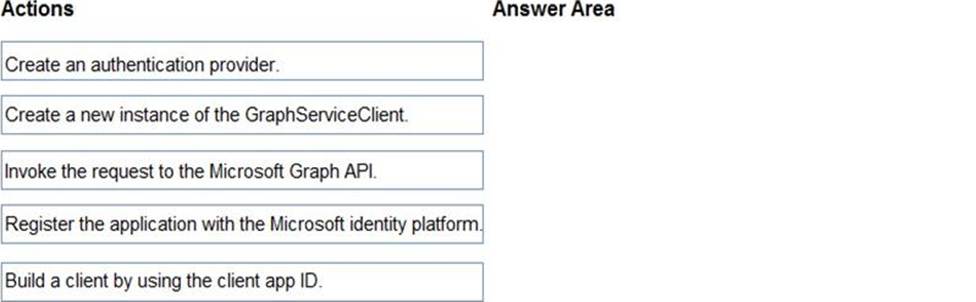
In which order should you perform the actions? To answer, move all actions from the list of actions to the answer area and arrange them in the correct order.
Explanation:
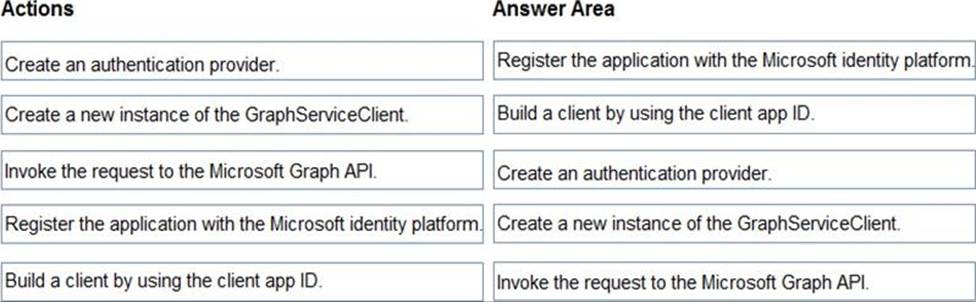
Step 1: Register the application with the Microsoft identity platform.
To authenticate with the Microsoft identity platform endpoint, you must first register your app at the Azure app registration portal
Step 2: Build a client by using the client app ID
Step 3: Create an authentication provider
Create an authentication provider by passing in a client application and graph scopes.
Code example:
DeviceCodeProvider authProvider = new DeviceCodeProvider(publicClientApplication, graphScopes);
// Create a new instance of GraphServiceClient with the authentication provider. GraphServiceClient graphClient = new GraphServiceClient(authProvider);
Step 4: Create a new instance of the GraphServiceClient
Step 5: Invoke the request to the Microsoft Graph API
Reference:
https://docs.microsoft.com/en-us/graph/auth-v2-service
https://docs.microsoft.com/en-us/graph/sdks/create-client
A company is implementing a publish-subscribe (Pub/Sub) messaging component by using Azure Service Bus. You are developing the first subscription application.
In the Azure portal you see that messages are being sent to the subscription for each topic. You create and initialize a subscription client object by supplying the correct details, but the subscription application is still not consuming the messages.
You need to ensure that the subscription client processes all messages.
Which code segment should you use?
- A . await subscriptionClient.AddRuleAsync(new RuleDescription (RuleDescription.DefaultRuleName, new TrueFilter()));
- B . subscriptionClient = new SubscriptionClient(ServiceBusConnectionString,
TopicName, SubscriptionName); - C . await subscriptionClient.CloseAsync();
- D . subscriptionClient.RegisterMessageHandler(ProcessMessagesAsync,
messageHandlerOptions);
D
Explanation:
Using topic client, call RegisterMessageHandler which is used to receive messages continuously from the entity. It registers a message handler and begins a new thread to receive messages. This handler is waited on every time a new message is received by the receiver.
subscriptionClient.RegisterMessageHandler(ReceiveMessagesAsync, messageHandlerOptions);
Reference: https://www.c-sharpcorner.com/article/azure-service-bus-topic-and-subscription-pub-sub/
DRAG DROP
You develop software solutions for a mobile delivery service. You are developing a mobile app that users can use to order from a restaurant in their area.
The app uses the following workflow:
✑ A driver selects the restaurants from which they will deliver orders.
✑ Orders are sent to all available drivers in an area.
✑ Only orders for the selected restaurants will appear for the driver.
✑ The first driver to accept an order removes it from the list of available orders.
You need to implement an Azure Service Bus solution.
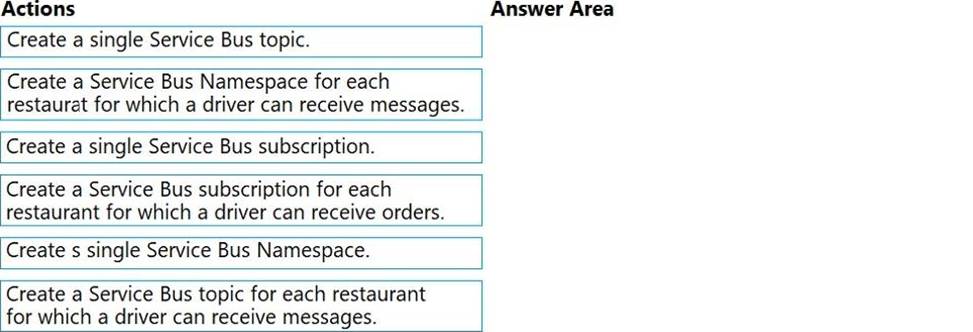
Which three actions should you perform in sequence? To answer, move the appropriate actions from the list of actions to the answer area and arrange them in the correct order.
Explanation:
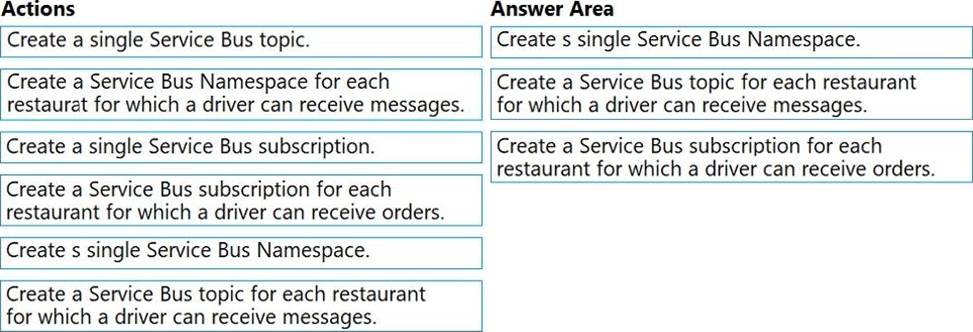
Box 1: Create a single Service Bus Namespace
To begin using Service Bus messaging entities in Azure, you must first create a namespace with a name that is unique across Azure. A namespace provides a scoping container for addressing Service Bus resources within your application.
Box 2: Create a Service Bus Topic for each restaurant for which a driver can receive messages.
Create topics.
Box 3: Create a Service Bus subscription for each restaurant for which a driver can receive orders.
Topics can have multiple, independent subscriptions.
Reference: https://docs.microsoft.com/en-us/azure/service-bus-messaging/service-bus-messaging-overview
HOTSPOT
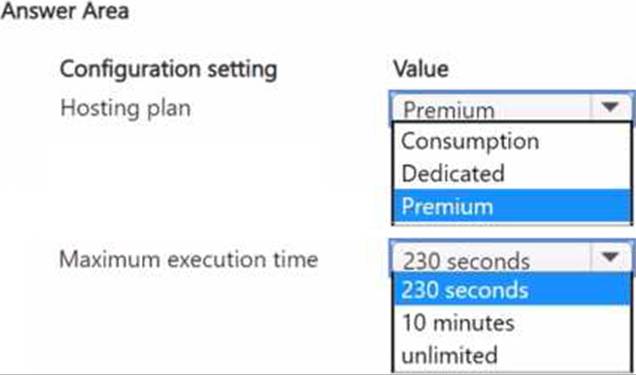
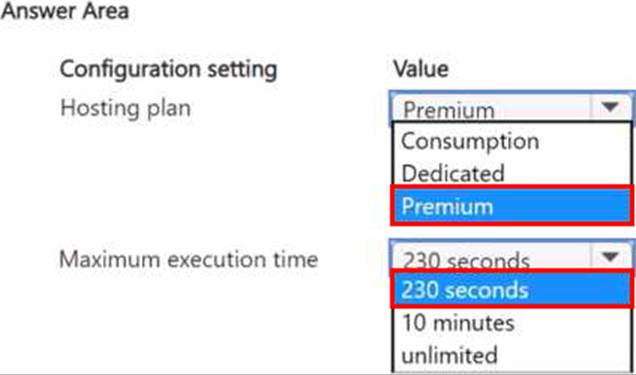
You plan to develop an Azure Functions app with an Azure Blob Storage trigger. The app will be used infrequently, with a limited duration of individual executions.
The app must meet the following requirements:
• Event-driven scaling
• Support for deployment slots
• Minimize costs
You need to identify the hosting plan and the maximum duration when executing the app.
Which configuration setting values should you use? To answer, select the appropriate values in the answer area. NOTE: Each correct selection is worth one point.
HOTSPOT
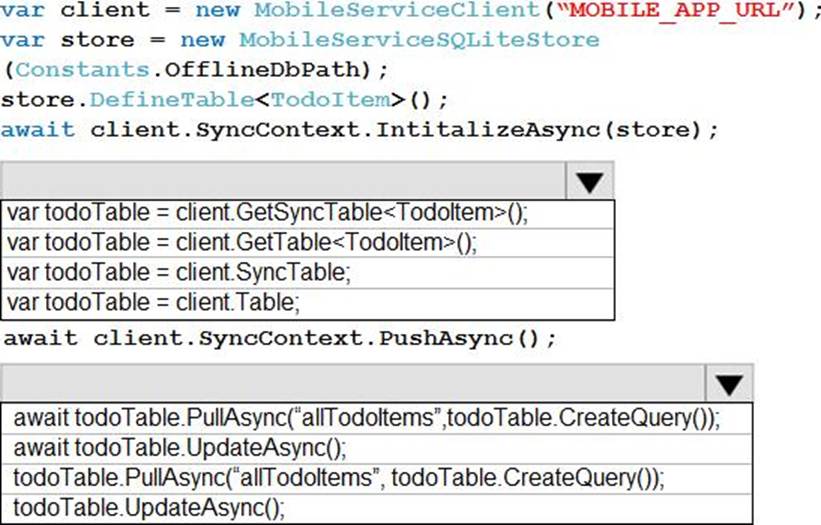
A company is developing a mobile app for field service employees using Azure App Service Mobile Apps as the backend.
The company’s network connectivity varies throughout the day. The solution must support offline use and synchronize changes in the background when the app is online app.
You need to implement the solution.
How should you complete the code segment? To answer, select the appropriate options in the answer area. NOTE: Each correct selection is worth one point.
Explanation:
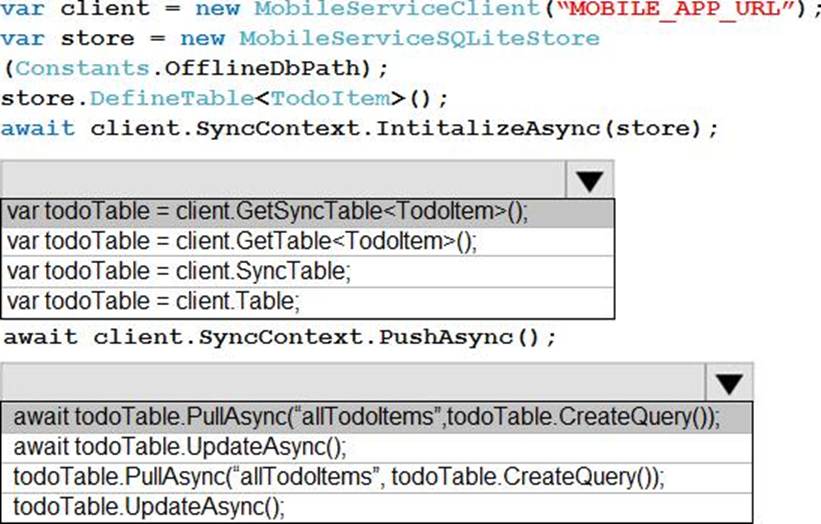
Box 1: var todoTable = client GetSyncTable<TodoItem>()
To setup offline access, when connecting to your mobile service, use the method GetSyncTable instead of GetTable (example):
IMobileServiceSyncTable todoTable = App.MobileService.GetSyncTable(); /
Box 2: await todoTable.PullAsync("allTodoItems",todo.Table.CreateQuery());
Your app should now use IMobileServiceSyncTable (instead of IMobileServiceTable) for CRUD operations. This will save changes to the local database and also keep a log of the changes. When the app is ready to synchronize its changes with the Mobile Service, use the methods PushAsync and PullAsync (example):
await App.MobileService.SyncContext.PushAsync();
await todoTable.PullAsync();
Reference: https://azure.microsoft.com/es-es/blog/offline-sync-for-mobile-services/
DRAG DROP
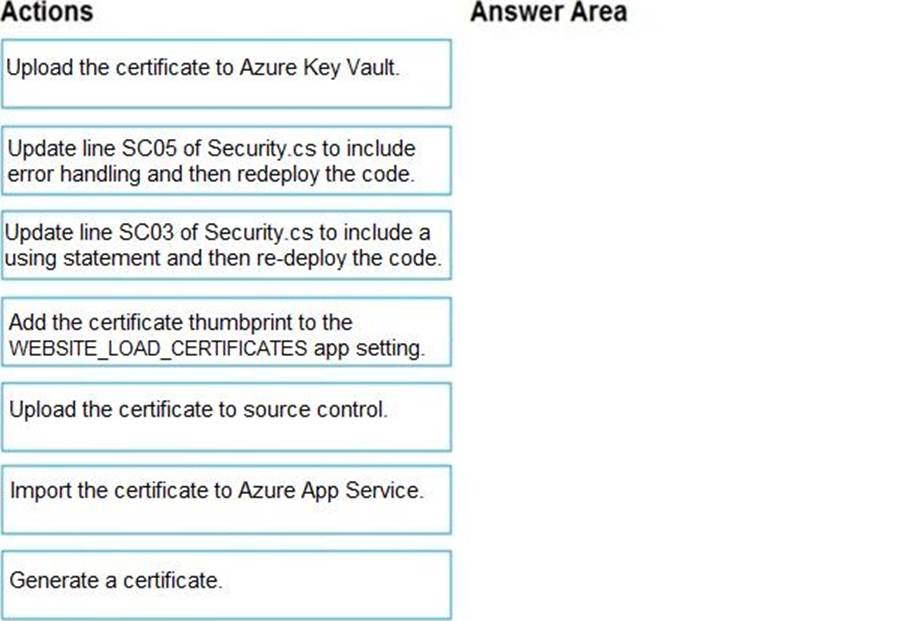
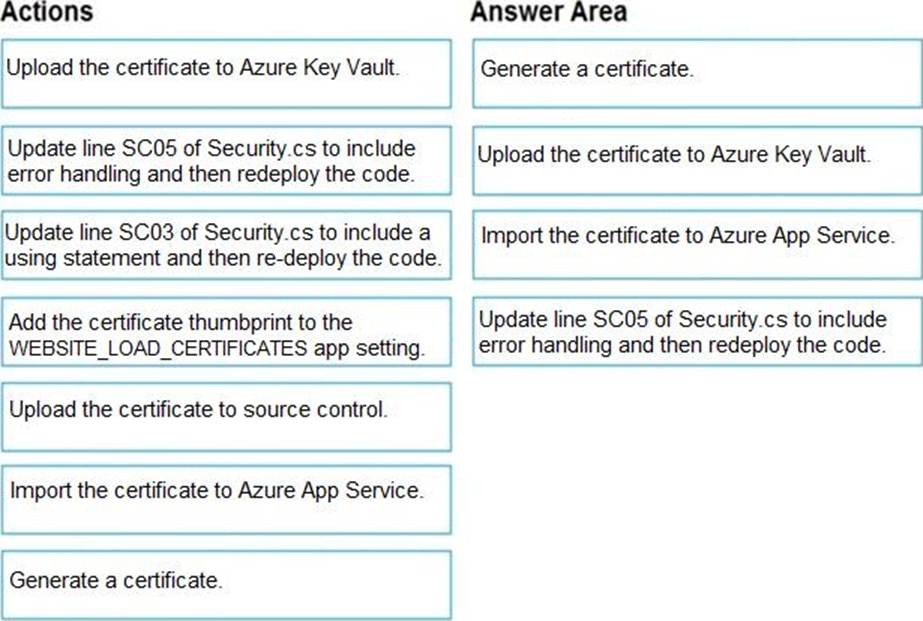
You need to correct the corporate website error.
Which four actions should you recommend be performed in sequence? To answer, move the appropriate actions from the list of actions to the answer area and arrange them in the correct order.
Explanation:
Scenario: Corporate website
While testing the site, the following error message displays:
CryptographicException: The system cannot find the file specified.
Step 1: Generate a certificate
Step 2: Upload the certificate to Azure Key Vault
Scenario: All SSL certificates and credentials must be stored in Azure Key Vault.
Step 3: Import the certificate to Azure App Service
Step 4: Update line SCO5 of Security.cs to include error handling and then redeploy the code
Reference: https://docs.microsoft.com/en-us/azure/app-service/configure-ssl-certificate