
Microsoft AZ-140 Practice Exams
Last updated on Nov 16,2026- Exam Code: AZ-140
- Exam Name: Configuring and Operating Microsoft Azure Virtual Desktop
- Certification Provider: Microsoft
- Latest update: Nov 16,2026
You plan to deploy Windows Virtual Desktop to meet the department requirements shown in the following table.

You plan to use Windows Virtual Desktop host pools with load balancing and autoscaling.
You need to recommend a host pool design that meets the requirements. The solution must minimize costs.
What is the minimum number of host pools you should recommend?
- A . 1
- B . 2
- C . 3
- D . 4
C
Explanation:
Reference: https://docs.microsoft.com/en-us/azure/virtual-desktop/create-host-pools-azure-marketplace
3 Host Pools – The RemoteApp can be joinned inside the IT Multi-Session desktop or the Engineering. https://docs.microsoft.com/en-us/azure/virtual-desktop/manage-app-groups The default app group created for a new Azure Virtual Desktop host pool also publishes the full desktop. In addition, you can create one or more RemoteApp application groups for the host pool.
HOTSPOT
You have an Azure subscription that contains a hybrid Azure Active Directory (Azure AD) tenant and two domain-joined Azure virtual machines. The virtual machines run Windows Server 2019 and contain managed disks.
You plan to deploy an Azure Virtual Desktop host pool that will use a Storage Spaces Direct Scale-Out File Server to host user profiles.
You need to ensure that the virtual machines can host the Storage Spaces Direct deployment.
The solution must meet the following requirements:
• Ensure that the user profiles are available if a single server falls.
• Minimize administrative effort.
What should you do? To answer, select the appropriate options In the answer area. NOTE: Each correct selection is worth one point.
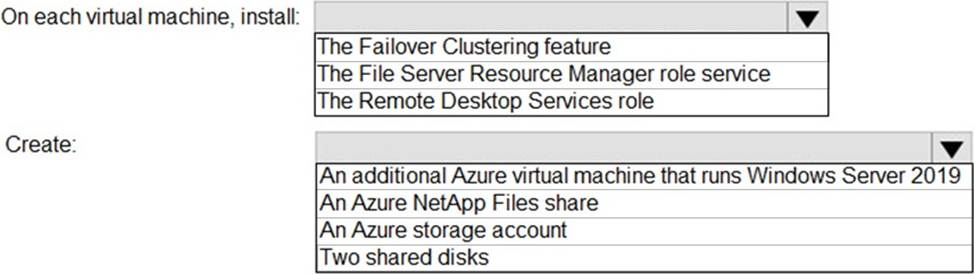
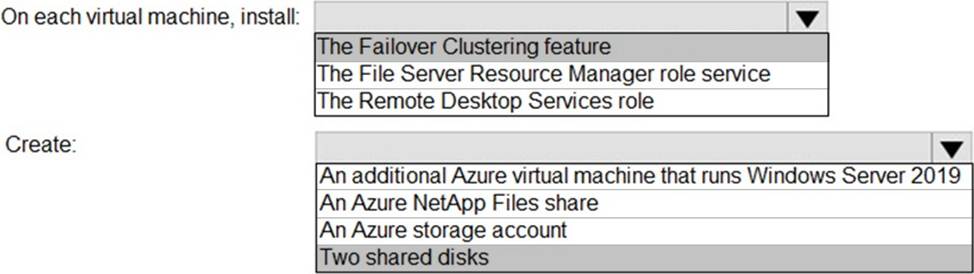
Explanation:
Reference: https://docs.microsoft.com/en-us/windows-server/storage/storage-spaces/deploy-storage-spaces-direct
Note: This question is part of a series of questions that present the same scenario. Each question in the series contains a unique solution that might meet the stated goals. Some question sets might have more than one correct solution, while others might not have a correct solution.
After you answer a question in this section, you will NOT be able to return to it. As a result, these questions will not appear in the review screen.
You have an Azure Virtual Desktop host pool that runs Windows 10 Enterprise multi-session.
User sessions are load-balanced between the session hosts. Idle session timeout is 30 minutes.
You plan to shut down a session host named Host1 to perform routine maintenance.
You need to prevent new user sessions to Host1 without disconnecting active user sessions.
Solution: From the host pool, you remove Host1 from the session host list.
Does this meet the goal?
- A . Yes
- B . No
B
Explanation:
Reference: https://docs.microsoft.com/en-us/azure/virtual-desktop/drain-mode
You plan to deploy Windows Virtual Desktop. The deployment will use existing virtual machines.
You create a Windows Virtual Desktop host pool.
You need to ensure that you can add the virtual machines to the host pool.
What should you do first?
- A . Register the Microsoft.DesktopVirtualization provider.
- B . Generate a registration key.
- C . Run the Invoke-AzVMRunCommand cmdlet.
- D . Create a role assignment.
B
Explanation:
Reference: https://docs.microsoft.com/en-us/azure/virtual-desktop/create-host-pools-azure-marketplace
Note: This question is part of a series of questions that present the same scenario. Each question in the series contains a unique solution that might meet the stated goals. Some question sets might have more than one correct solution, while others might not have a correct solution.
After you answer a question in this section, you will NOT be able to return to it. As a result, these questions will not appear in the review screen.
You have a W indows Virtual Desktop host pool named Pool1 that is integrated with an Azure Active Directory Domain Services (Azure AD DS) managed domain.
You need to configure idle session timeout settings for users that connect to the session hosts in Pool1.
Solution: From an Azure AD DS-joined computer, you modify the AADDC Computer GPO settings.
Does that meet the goal?
- A . Yes
- B . No
You have a Windows Virtual Desktop host pool that runs Windows 10 Enterprise multi-session.
You need to configure automatic scaling of the host pool to meet the following requirements:
Distribute new user sessions across all running session hosts.
Automatically start a new session host when concurrent user sessions exceed 30 users per host.
What should you include in the solution?
- A . an Azure Automation account and the depth-first load balancing algorithm
- B . an Azure Automation account and the breadth-first load balancing algorithm
- C . an Azure load balancer and the breadth-first load balancing algorithm
- D . an Azure load balancer and the depth-first load balancing algorithm
B
Explanation:
For the scenario described, you need a solution that automatically scales out the number of session hosts based on the number of concurrent user sessions. Azure Virtual Desktop (AVD) supports two types of load-balancing algorithms:
Depth-first: This algorithm fills up one session host to its maximum capacity before moving on to the next one. This approach doesn’t distribute new sessions evenly and therefore doesn’t meet the requirement to distribute new user sessions across all running session hosts.
Breadth-first: This algorithm distributes new sessions across all available session hosts in the host pool. This approach meets the requirement to distribute new user sessions across all running session hosts.
Since you need to automatically start a new session host when concurrent user sessions exceed a certain number per host, Azure Automation can be used to automate this scaling process based on a predefined threshold of concurrent sessions.
Therefore, the solution should include:
B. an Azure Automation account and the breadth-first load balancing algorithm
This combination will ensure that new user sessions are distributed across all running session hosts and that new session hosts are automatically started when the threshold of 30 concurrent user sessions per host is reached.
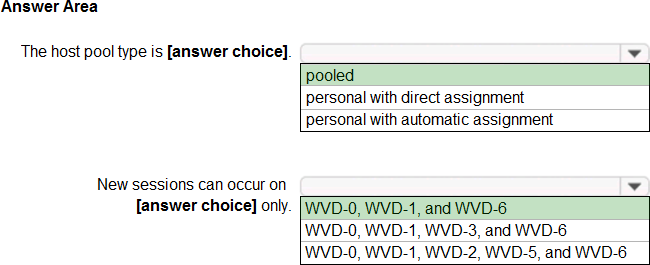
HOTSPOT
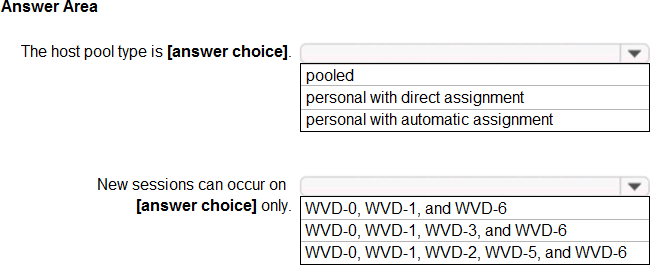
You have a Windows Virtual Desktop host pool that has a max session limit of 15. Disconnected sessions are signed out immediately.
The session hosts for the host pool are shown in the following exhibit.
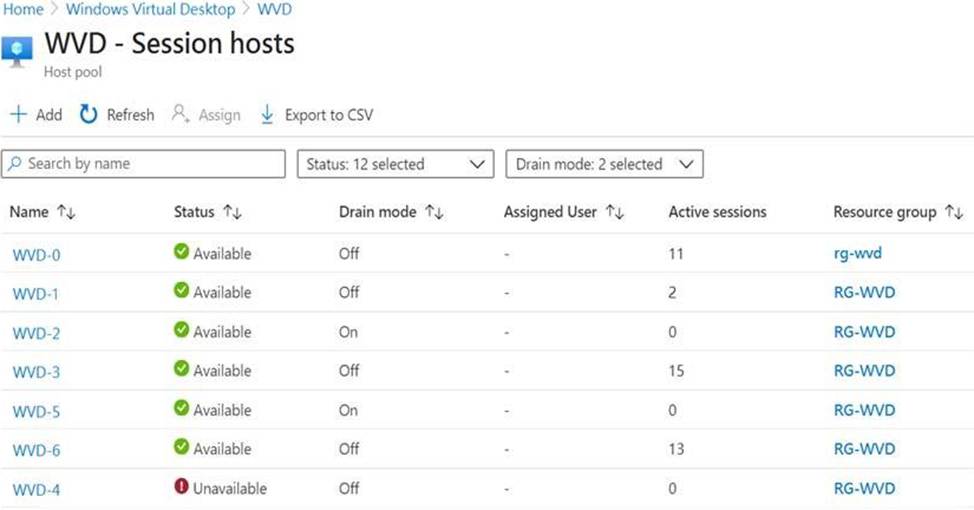
Use the drop-down menus to select the answer choice that completes each statement based on the information presented in the graphic. NOTE: Each correct selection is worth one point.
Explanation:
Reference: https://docs.microsoft.com/en-us/azure/virtual-desktop/set-up-scaling-script
You deploy a Azure Virtual Desktop host pool named Pooll.
You have an Azure Storage account named store 1 that stores FSLogix profile containers in a share named profiles. You need to configure the path to the storage containers for the session hosts Which path should you use?
- A . https://store1.file.core.windows.net/profiles
- B . \store1.file.core.windows.netprofiles
- C . \store1.blob.core.windows.netprofiles
- D . https://store1 blob.core windows.net/profiles
You have a Windows Virtual Desktop host pool named Pool1 that runs Windows 10 Enterprise multi-
session hosts.
You need to use Performance Monitor to troubleshoot a low frame quality issue that is affecting a current use session to Pool1.
What should you run to retrieve the user session ID?
- A . Get-ComputerInfo
- B . qwinsta
- C . whoami
- D . Get-LocalUser
B
Explanation:
Reference: https://docs.microsoft.com/en-us/azure/virtual-desktop/troubleshoot-vm-configuration