
Microsoft AZ-140 Practice Exams
Last updated on Nov 16,2026- Exam Code: AZ-140
- Exam Name: Configuring and Operating Microsoft Azure Virtual Desktop
- Certification Provider: Microsoft
- Latest update: Nov 16,2026
You have a Azure Virtual Desktop deployment.
In Azure Advisor, you discover the following recommendation related to Azure Virtual Desktop:
• Impact Medium
• Description: No validation environment enabled
• Potential Benefit Ensure business continuity through AVD service deployments
• Impacted Resource:’ Host Pool
What can you validate by implementing the recommendations?
- A . Capacity requirements of the session hosts
- B . Security settings of Azure Virtual Desktop
- C . Preview features for Azure Virtual Desktop
- D . Azure Site Recovery failover of the session hosts
C
Explanation:
Azure Advisor is a personalized cloud consultant that helps you follow best practices to optimize your Azure deployments. When it recommends enabling a validation environment for Azure Virtual Desktop (AVD), it’s referring to setting up an environment where you can test out new features, updates, or changes before rolling them out to your production environment.
The option that best matches the description of ensuring business continuity through AVD service deployments by enabling a validation environment would be:
C. Preview features for Azure Virtual Desktop
This is because a validation environment is commonly used to assess new features or updates in a non-production environment to ensure that they do not disrupt the service when implemented in production. This helps maintain business continuity by preventing untested changes from affecting end-users. It’s not specifically for testing capacity, security settings, or Azure Site Recovery failover, although those could also benefit indirectly from having a validation environment.
You have a new Azure subscription that uses Azure Virtual Desktop.
You need to ensure that users who connect to Azure Virtual Desktop sessions reauthenticate every six hours.
What should you do first?
- A . Configure multi-factor authentication (MFA).
- B . Configure an authentication methods policy.
- C . Disable Security defaults.
- D . Create a Conditional Access policy.
DRAG DROP
You have an Azure Virtual Desktop deployment.
You plan to use a Conditional Access policy to enforce multi-factor authentication (MFA) when users connect to the deployment.
The solution must meet the following requirements:
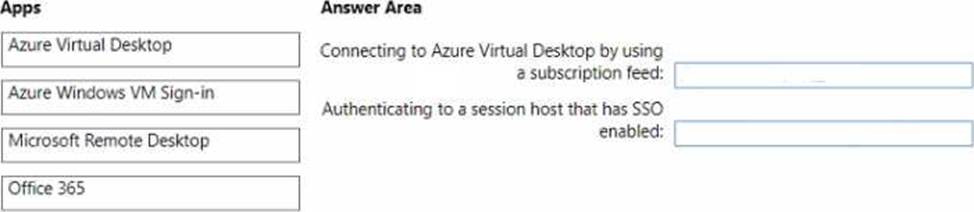
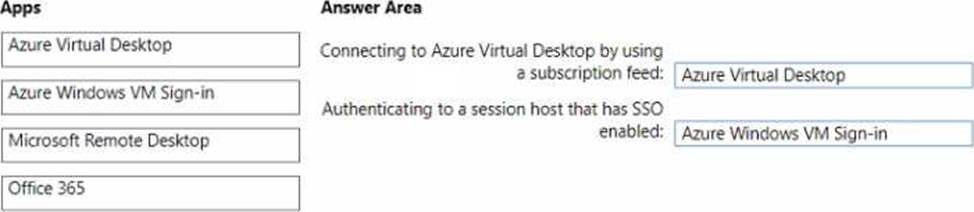
• Enforce MFA when a user connects to Azure Virtual Desktop by using a subscription feed.
• Enforce MFA when a user authenticates to a session host that has single sign-on (SSO) enabled.
You need to identify which cloud apps to use for the Conditional Access policy.
Which app should you use for each requirement? To answer, drag the appropriate apps to the correct requirements. Each app may be used once, more than once, or not at all. You may need to drag the split bar between panes or scroll to view content. NOTE: Each correct selection is worth one point.
You have a Windows Virtual Desktop deployment.
You need to provide external users with access to the deployment. The external users have computers that run Windows 10 Pro and Windows 10 Enterprise. The users do not have the ability to install applications.
What should you recommend that the users use to connect to the deployment?
- A . Microsoft Edge
- B . RemoteApp and Desktop Connection
- C . Remote Desktop Manager
- D . Remote Desktop Connection
A
Explanation:
Reference:
https://docs.microsoft.com/en-us/azure/active-directory/governance/entitlement-management-external-users
https://docs.microsoft.com/en-us/azure/virtual-desktop/connect-web
You have an Azure Virtual Desktop host pool. The pool contains session hosts that run Windows 10 Enterprise multi-session.
You connect to a Remote Desktop session on Pool1 and discover an issue with the frequency of screen updates.
You need to identify whether the issue relates to insufficient server, network, or client resources. The solution must minimize how long it takes to identify the resource type.
What should you do?
- A . From within the current session, use the Azure Virtual Desktop Experience Estimator.
- B . From Azure Cloud Shell, run the Get-AzOperationalInsightsWorkspaceUsage cmdlet and specify the DefaultProfile parameter.
- C . From Azure Cloud Shell, run the Get-AzWvdUserSession cmdlet and specify the UserSessionId parameter.
- D . From within the current session, use Performance Monitor to display the values of all the RemoteFX Graphics(*)Frames Skipped/Second counters.
D
Explanation:
Reference: https://docs.microsoft.com/en-us/azure/virtual-desktop/remotefx-graphics-performance-counters
DRAG DROP
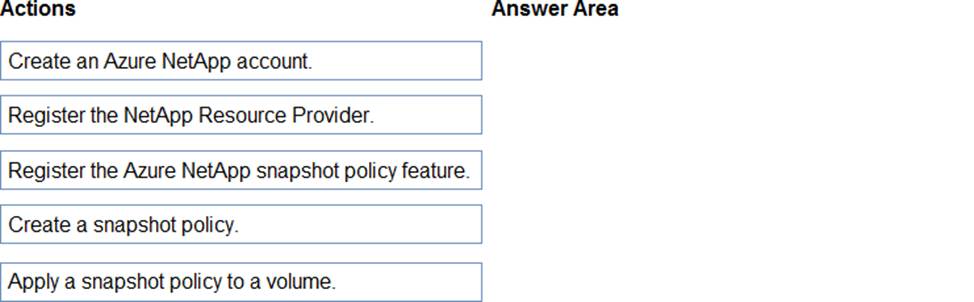
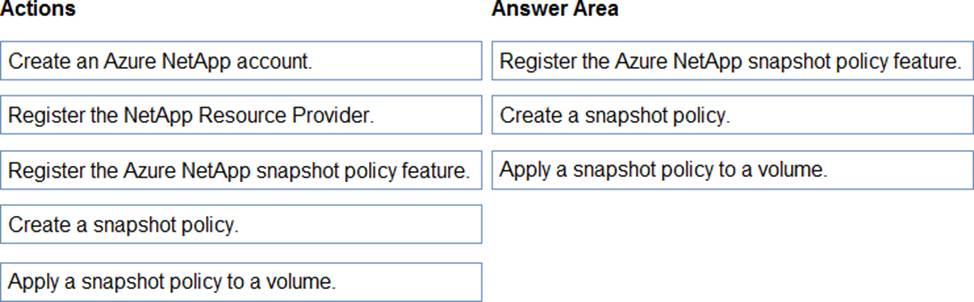
You have a Windows Virtual Desktop host pool named Pool1. Pool1 contains session hosts that use FSLogix profile containers hosted in Azure NetApp Files volumes.
You need to back up profile files by using snapshots.
Which three actions should you perform in sequence? To answer, move the appropriate actions from the list of actions to the answer area and arrange them in the correct order.
Explanation:
Reference: https://docs.microsoft.com/en-us/azure/azure-netapp-files/azure-netapp-files-manage-snapshots
HOTSPOT
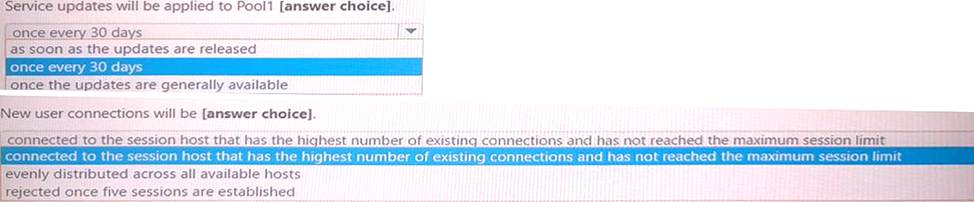
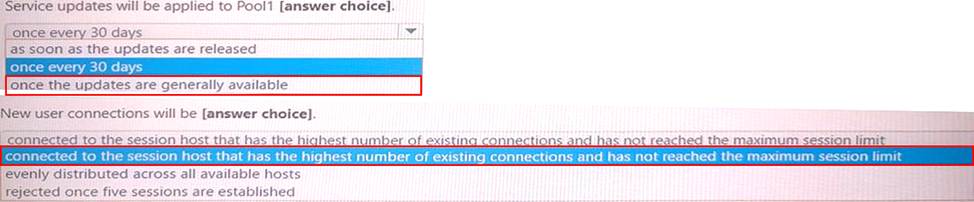
You have an Azure Virtual Desktop deployment that contains a host pool named Pool1. Pool1 contains two session hosts.
Pool1 is configured as shown in the following exhibit.
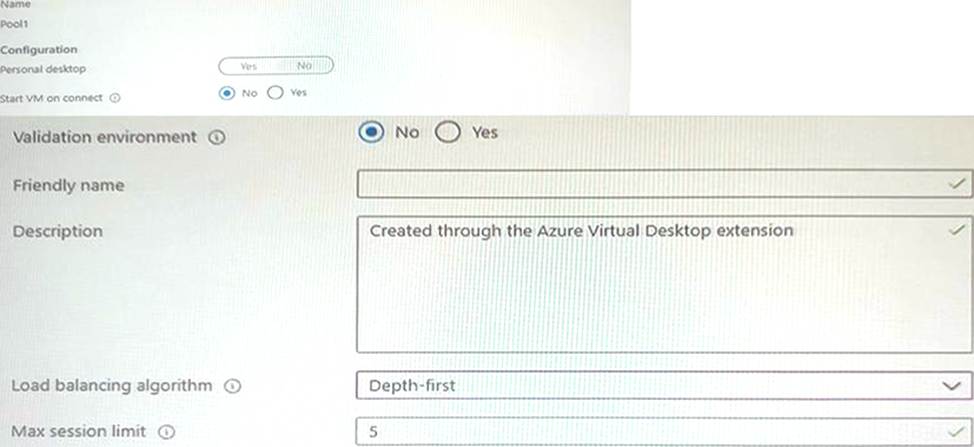
Use the drop-down menus to select the answer choice that completes each statement based on the information presented in the graphic. NOTE: Each correct selection is worth one point.
You need to configure the user settings of Admin1 to meet the user profile requirements.
What should you do?
- A . Modify the membership of the FSLogix ODFC Exclude List group.
- B . Modify the membership of the FSLogix Profile Exclude List group.
- C . Modify the HKLMSOFTWAREFSLogixProfiles registry settings.
- D . Modify the HKLMSOFTWAREFSLogixODFC registry settings.
C
Explanation:
This action allows you to set up the FSLogix profile behavior specific to Admin1, according to the requirements set forth by the organization. It will enable you to define where Admin1’s profile container will be stored and how it will be managed by FSLogix.
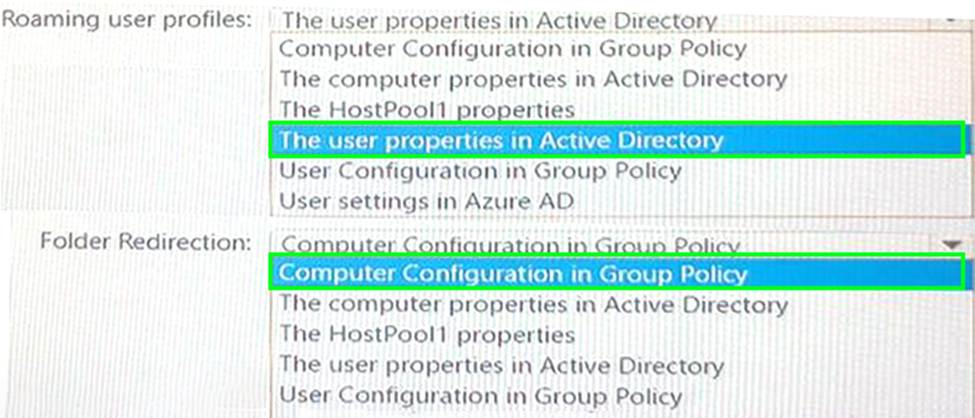
HOTSPOT
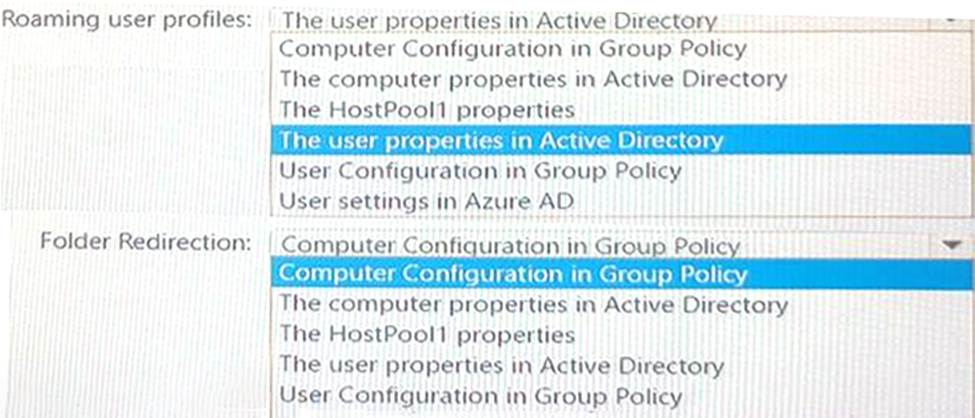
Your on-premises network contains an Active Directory domain named contoso.com that syncs with Azure AD.
You deploy an Azure Virtual Desktop pooled host pool named HostPool1 that contains five hybrid-joined session hosts.
You need to ensure that all the user sessions of HostPool1 meet the following requirements:
• Users must use roaming user profiles.
• Users must use Folder Redirection.
The solution must minimize administrative effort.
What should you use to meet each requirement? To answer, select the appropriate options in the answer area. NOTE: Each correct selection is worth one point.
Note: This question is part of a series of questions that present the same scenario. Each question in the series contains a unique solution that might meet the stated goals. Some question sets might have more than one correct solution, while others might not have a correct solution.
After you answer a question in this section, you will NOT be able to return to it. As a result, these questions will not appear in the review screen.
You have the following:
✑ A Microsoft 365 E5 tenant
✑ An on-premises Active Directory domain
✑ A hybrid Azure Active Directory (Azure AD) tenant
✑ An Azure Active Directory Domain Services (Azure AD DS) managed domain
✑ An Azure Virtual Desktop deployment
The Azure Virtual Desktop deployment contains personal desktops that are hybrid joined to the on-premises domain and enrolled in Microsoft Intune.
You need to configure the security settings for the Microsoft Edge browsers on the personal desktops.
Solution: You configure a compliance policy in Intune.
Does this meet the goal?
- A . Yes
- B . No
B
Explanation:
You need to configure a Configuration Profile in Intune or use Group Policy.