
Microsoft AZ-120 Practice Exams
Last updated on Nov 16,2026- Exam Code: AZ-120
- Exam Name: Planning and Administering Microsoft Azure for SAP Workloads
- Certification Provider: Microsoft
- Latest update: Nov 16,2026
You have an SAP production landscape on-premises and an SAP development landscape on Azure. You deploy a network virtual appliance to act as a firewall between the Azure subnet and the on-premises network.
Solution: You configure route filters for Microsoft peering.
Does this meet the goal?
- A . Yes
- B . No
DRAG DROP
You have an on-premises SAP environment that runs on SUSE Linux Enterprise Server (SLES) servers and Oracle. The version of the SAP ERP system is 6.06 and the version of the portal is SAP NetWeaver 7.3.
You need to recommend a migration strategy to migrate the SAP ERP system and the portal to Azure.
The solution must be hosted on SAP HANA.
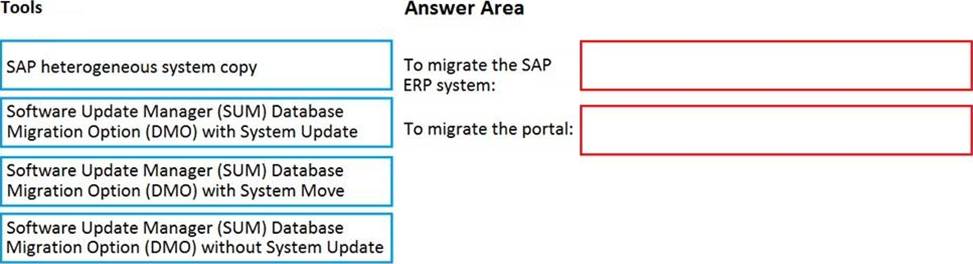
What should you recommend? To answer, drag the appropriate tools to the correct components. Each tool may be used once, more than once, or not at all. You may need to drag the split bar between panes or scroll to view content. NOTE: Each correct selection is worth one point.
Explanation:
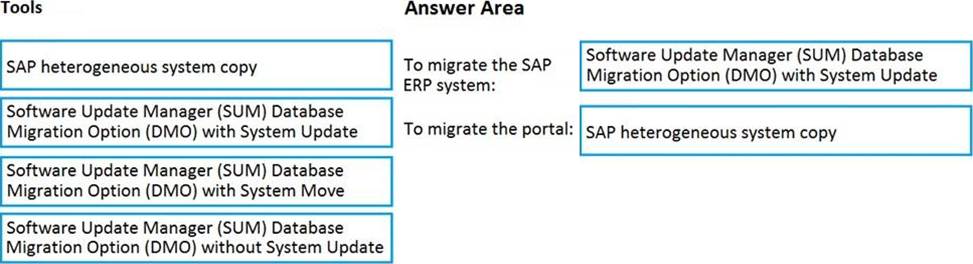
1) SUM+DMO+System update.
2) Heterogeneous system copy.
Reference: https://blogs.sap.com/2017/10/05/your-sap-on-azure-part-2-dmo-with-system-move/
You have an on-premises third-party enterprise resource planning (ERP) system that uses Microsoft SQL Server 2016. You plan to migrate the ERP system to SAP Business Suite on SAP HANA on Azure virtual machines. You need to identify the appropriate sizing for Business Suite on HANA.
What should you use?
- A . SAP Quick Sizer for HANA Cloud
- B . SAP Cloud Platform Cockpit
- C . HANA Cockpit
- D . SAP Quick Sizer for HANA
A
Explanation:
If a customer runs non-SAP systems, the only way of Sizing the required Hardware for SAP HANA is the Quick-Sizer tool.
HANA-based Cloud Quick Sizer: Please use this version, if the product that you want to size shall run in the Cloud; e.g. SAP S/4HANA Cloud and SAP Data Warehouse Cloud.
Reference: https://www.sap.com/about/benchmark/sizing.html#quick-sizer
You are deploying SAP Fiori lo an SAP environment on Azure.
You are configuring SAML 2.0 for an SAP Fiori instance named FPP that uses client 100 to authenticate to an Azure Active Directory (Azure AD) tenant.
Which provider name should you use to ensure that the Azure AD tenant recognizes the SAP fiori instance?
- A . ldap://FPP
- B . https://FPP
- C . ldap://FPP-100
- D . https://FPP100
D
Explanation:
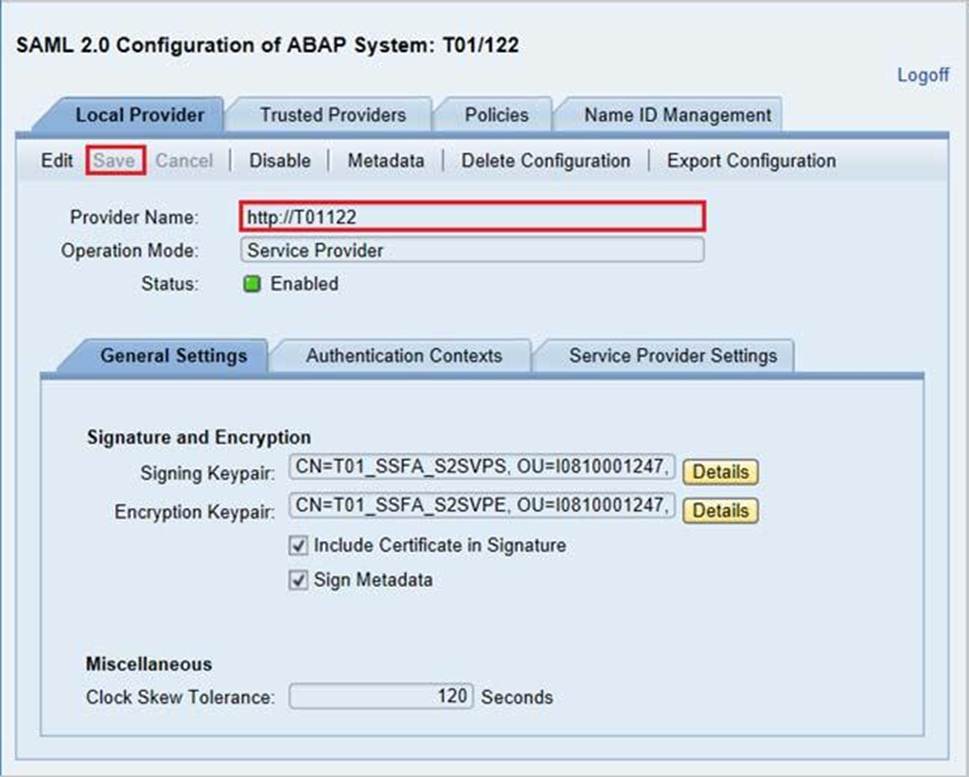
By default, the provider name is in the format <sid><client>. Azure AD expects the name in the format <protocol>://<name>. We recommend that you maintain the provider name as https://<sid><client> so you can configure multiple SAP Fiori ABAP engines in Azure AD.
Example:
Reference: https://docs.microsoft.com/en-us/azure/active-directory/saas-apps/sap-fiori-tutorial
DRAG DROP
You plan to deploy SAP on Azure.
The deployment must meet the following requirements:
• Support failover to another Azure region in the event of a regional outage.
• Minimize data loss during a failover.
• Minimize costs.
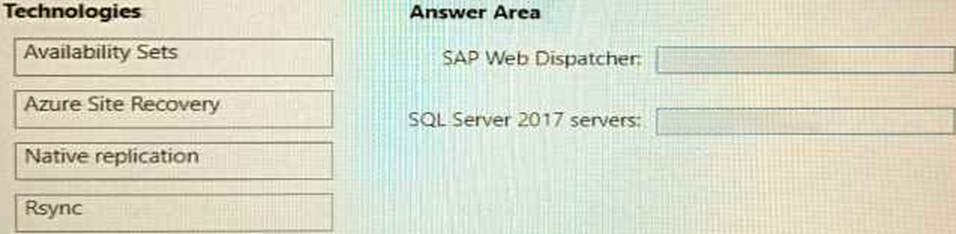
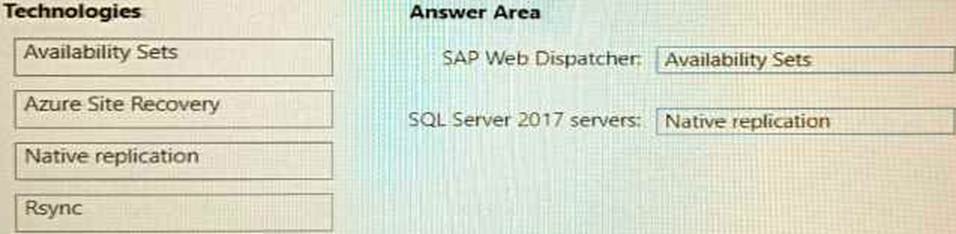
Which fault tolerance technology should you choose for the SAP Web Dispatcher and the Microsoft SQL Server 2017 servers to meet the requirements? To answer, drag the appropriate technologies to. The correct targets. Each technology may be used once, more than once, or not at all. You may need to drag the split bar between panes or scroll to view content. NOTE: Each correct selection is worth one point.
You deploy an SAP production landscape on Azure virtual machines that run SUSE Linux Enterprise Server (SLES).
You need to generate a report that details performance differences between instances of an SAP AS ABAP system.
What should you use?
- A . JMeter
- B . Micro Focus LoadRunner
- C . SAP UI5 SpeedtestTool
- D . ABAPmeter
D
Explanation:
Use ABAPMETER in NetWeaver AS ABAP when you want to test the general performance/health of each instance in a NetWeaver AS ABAP system.
Reference: https://userapps.support.sap.com/sap/support/knowledge/en/2879613
DRAG DROP
You have an SAP ERP Central Component (SAP ECO deployment on Azure virtual machines. The virtual machines run Windows Server 2022 and are members of an Active Directory domain named contoso.com.
You install SAP GUI on an Azure virtual machine named VM1 that runs Windows 10.
You need to ensure that contoso.com users can sign in to SAP ECC via SAP GUI on VM1 by using their domain credentials.
What should you do? To answer, drag the appropriate components to the correct tasks. Each component may be used once, more than once, or not at all. You may need to drag the split bar between panes or scroll to view content.


You have highly available deployment of SAP NetWeaver on Azure that uses a third-party solution for clustering ABAP SAP Central Services (ASCS) components.
You need to recommend a solution to reduce the cost of shared storage for the components.
What should you include in the recommendation?
- A . Azure NetApp Files
- B . Azure shared disks
- C . Azure Data Share
- D . Storage Spaces Direct
You have an Azure subscription. The subscription contains a virtual machine named Server1 that runs Windows Server and hosts SAP Central Services (SCS). To Server1. you deploy the new version of the Azure VM Extension for SAP solutions. You need to validate whether the extension is collecting performance metrics.
What should you do on Server1?
- A . From Microsoft Edge, navigate to http://127.0.0.1:11812/azure4sap/metrics.
- B . Run the Get-AzMetric cmdlet.
- C . Run the Get-AzVMDiagnosticsExtension cmdlet.
- D . From Microsoft Edge, navigate to http://169.254.169.254/metadata/instance?api-version=2021-
02-01.
You ate planning an SAP on Azure deployment.
You need to recommend a storage access solution that meets the following requirements;
• Provides a common file share that will be accessed by virtual machines that run either Red Hat Enterprise Linux (RHEL) or Windows Server 2022.
• Ensures that each virtual machine uses its native sharing protocol to access the common file share.
Which type of storage should you include in the recommendation?
- A . a standard storage account file share
- B . Azure NetApp Files in dual protocol mode
- C . a premium storage account file share
- D . Azure NetApp Files in NFSv4.1 mode