
Microsoft AZ-120 Practice Exams
Last updated on Oct 01,2026- Exam Code: AZ-120
- Exam Name: Planning and Administering Microsoft Azure for SAP Workloads
- Certification Provider: Microsoft
- Latest update: Oct 01,2026
Note: This question is part of a series of questions that present the same scenario. Each question in the series contains a unique solution that might meet the stated goals. Some question sets might have more than one correct solution, while others might not have a correct solution.
After you answer a question in this section, you will NOT be able to return to it. As a result, these questions will not appear in the review screen.
You have a complex SAP environment that has both ABAP- and Java-based systems. The current on-premises landscapes are based on SAP NetWeaver 7.0 (Unicode and Non-Unicode) running on Windows Server and Microsoft SQL Server.
You need to migrate the SAP environment to a HANA-certified Azure environment.
Solution: You migrate SAP to Azure by using Azure Site Recovery, and then you upgrade to SAP NetWeaver 7.4.
Does this meet the goal?
- A . Yes
- B . No
B
Explanation:
We need upgrade to SAP NetWeaver 7.4 before the migration.
Reference: https://docs.microsoft.com/en-us/azure/site-recovery/vmware-azure-architecture
You have an on-premises SAP environment hosted on VMware VSphere that uses Microsoft SQL Server as the database platform.
You plan to migrate the environment to Azure. The database platform will remain the same.
You need gather information to size the target Azure environment for the migration.
What should you use?
- A . the SAP EarlyWatch report
- B . Azure Advisor
- C . the SAP HANA sizing report
- D . Azure Monitor
A
Explanation:
https://azure.microsoft.com/nl-nl/blog/sap-on-azure-architecture-designing-for-performance-and-scalability/
"For existing on-premises systems, you should reference system configuration and resource utilization data. The system utilization information is collected by the SAP OS Collecto
HOTSPOT
You are planning the deployment of a three-tier SAP landscape on Azure that will use SAP HANA.
The solution must meet the following requirements:
✑ Network latency between SAP NetWeaver and HANA must be minimized.
✑ An SAP production landscape on Azure must be supported.
✑ Network performance must be validated regularly.
What should you include in the solution? To answer, select the appropriate options in the answer area. NOTE: Each correct selection is worth one point.
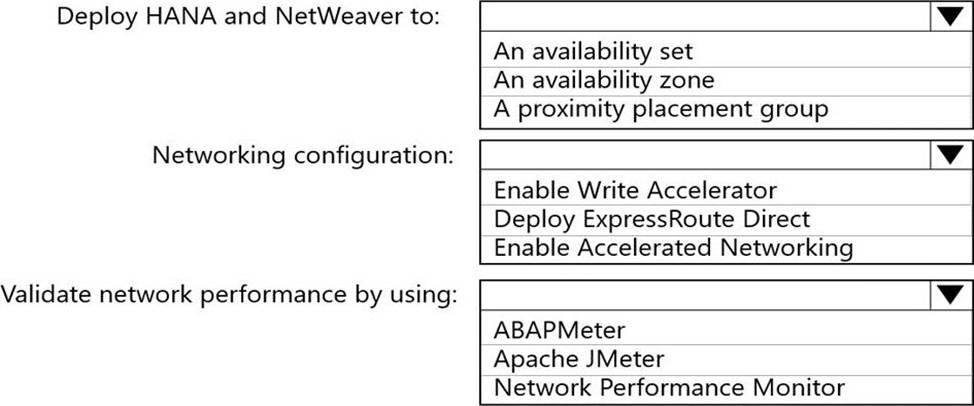
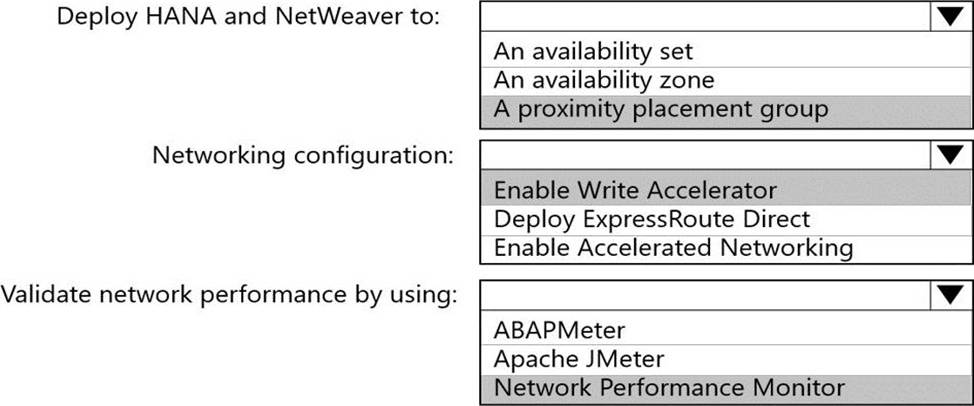
Explanation:
Box 1: A proximity placement group
Azure offers proximity placement groups. Proximity placement groups can be used to force grouping of different VM types into a single Azure datacenter to optimize the network latency between these different VM types to the best possible. In the process of deploying the first VM into such a proximity placement group, the VM gets bound to a specific datacenter.
Note: SAP applications based on the SAP NetWeaver or SAP S/4HANA architecture are sensitive to network latency between the SAP application tier and the SAP database tier. This sensitivity is the result of most of the business logic running in the application layer. Because the SAP application layer runs the business logic, it issues queries to the database tier at a high frequency, at a rate of thousands or tens of thousands per second. In most cases, the nature of these queries is simple. They can often be run on the database tier in 500 microseconds or less.
Box 2: Enable Accelerated Networking
To further reduce network latency between Azure VMs, we recommend that you choose Azure Accelerated Networking. Use it when you deploy Azure VMs for an SAP workload, especially for the SAP application layer and the SAP DBMS layer.
Box 3: Network Performance Monitor
Network Performance Monitor (NPM) – a cloud-based network monitoring solution for cloud-only, on-premises, and hybrid networking environments.
Network Performance Monitor offers three broad capabilities:
✑ Performance Monitor: You can monitor network connectivity across cloud deployments and on-premises locations, multiple data centers, and branch offices and mission-critical multitier applications or microservices. With Performance Monitor, you can detect network issues before users complain.
✑ Service Connectivity Monitor
✑ ExpressRoute Monitor
Note 2: Azure Monitor for SAP Solutions is an Azure-native monitoring product for anyone running their SAP landscapes on Azure. It works with both SAP on Azure Virtual Machines and SAP on Azure Large Instances.
Reference:
https://docs.microsoft.com/en-us/azure/virtual-machines/workloads/sap/sap-proximity-placement-scenarios
https://docs.microsoft.com/en-us/azure/virtual-machines/workloads/sap/dbms_guide_general
https://techcommunity.microsoft.com/t5/running-sap-applications-on-the/sap-on-azure-general-update-march-2019/ba-p/377456
You have an on-premises SAP landscape that contains a 20-TB IBM DB2 database. The database contains large tables that are optimized for read operations via secondary indexes.
You plan to migrate the database platform to SQL Server on Azure virtual machines.
You need to recommend a database migration approach that minimizes the time of the export stage.
What should you recommend?
- A . SAP Database Migration Option (DMO) in parallel transfer mode
- B . table splitting
- C . log shipping
- D . deleting secondary indexes
D
Explanation:
Secondary indexes for very large tables can be removed from the STR file and built ONLINE with scripts after the main portion of the import has finished and post processing tasks such as configuring STMS are occurring.
Reference: https://techcommunity.microsoft.com/t5/running-sap-applications-on-the/very-large-database-
migration-to-azure-8211-recommendations/ba-p/368146
You have an Azure subscription. The subscription contains a virtual machine named VM1 that runs SAP HANA and a user named User1. User1 is assigned the Virtual Machine Contributor role of VM1.
You need to prevent User1 from placing VM1 in the Stopped (deallocated) state. User1 must be able to restart the operating system on VM1.
What should you do?
- A . Assign an Azure Policy definition to the resource group that contains VM1.
- B . Create a resource lock on VM1.
- C . Configure the Desired State Configuration (DSC) extension on VM1.
- D . Assign User1 the Virtual Machine User Login rote for VM1.
HOTSPOT
You have an on-premises datacenter.
You have an Azure subscription named Sub1 that contains a virtual network named VNet1.
The datacenter is connected to VNet1 by using an ExpressRoute circuit.
You have an SAP RISE managed workload.
You need to integrate Sub1 with the managed workload.
The solution must meet the following requirements:
• Minimize latency between the managed workload and the datacenter.
• Restrict the network ports that can be used between the managed workload and VNet1.
• Minimize costs.
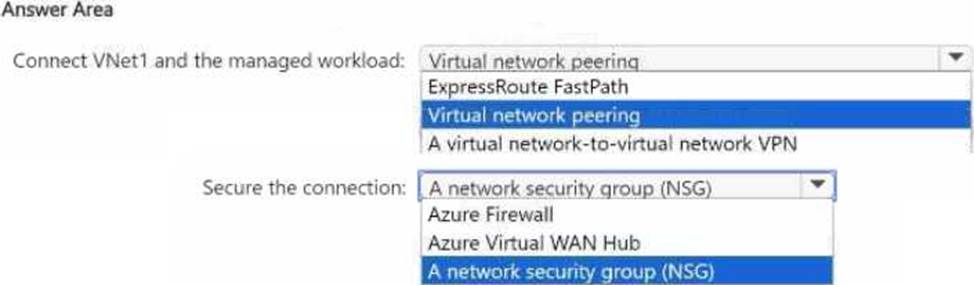
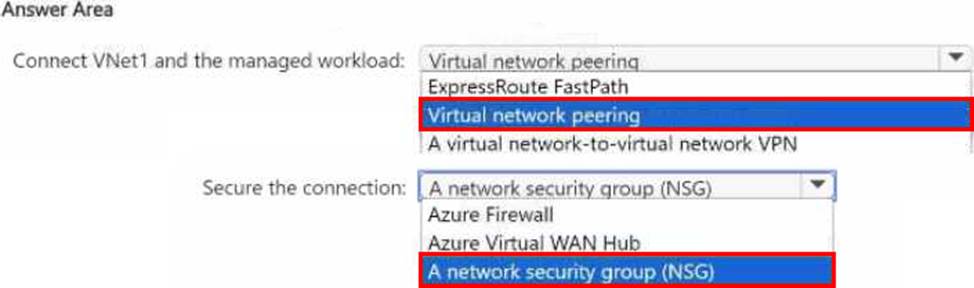
What should you use to connect VNet1 and the managed workload, and what should you use to secure the connection? To answer, select the appropriate options in the answer area.
HOTSPOT
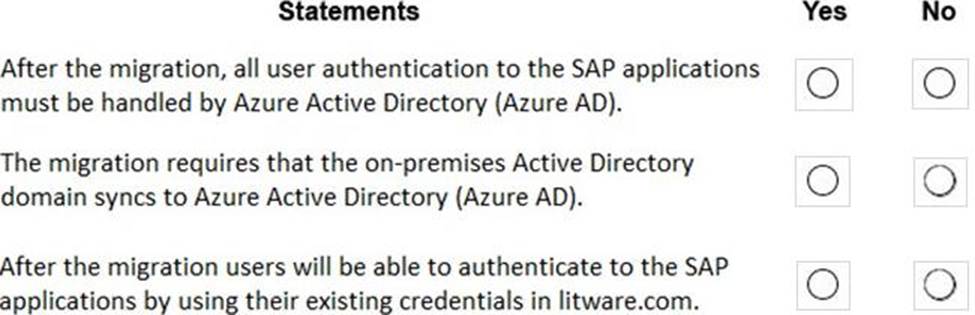
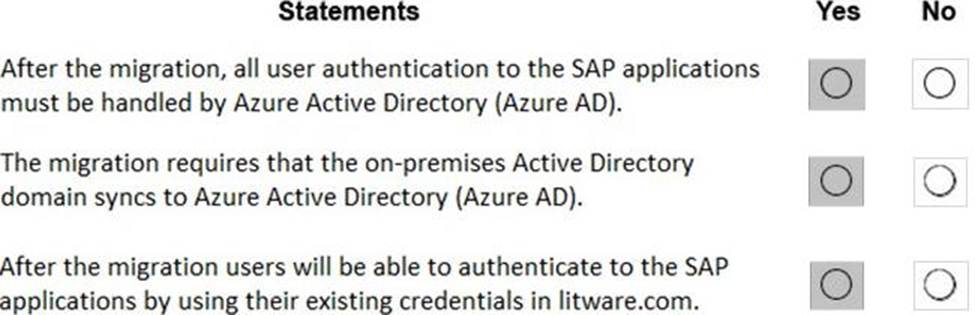
For each of the following statements, select Yes if the statement is true. Otherwise, select No. NOTE: Each correct selection is worth one point.
Explanation:
In a Hybrid-IT scenario, Active Directory from on-premises can be extended to serve as the authentication mechanism through an Azure deployed domain controller (as well as potentially using the integrated DNS).
It is important to distinguish between traditional Active Directory Servers and Microsoft Azure Active Directory that provides only a subset of the traditional on-premises AD offering. This subset include Identity and Access Management, but does not have the full AD schema or services that many 3rd party application take advantage of. While Azure Active Directory IS a requirement to establish authentication for the Azure virtual machines in use, and it can synchronize users with customers’ on-premises AD, the two are explicitly different and customers will likely continue to require full Active Directory servers deployed in Microsoft Azure.
Reference: https://www.suse.com/media/guide/sap_hana_on_azure_101.pdf
HOTSPOT
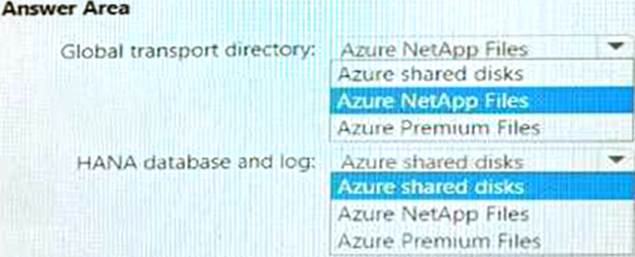
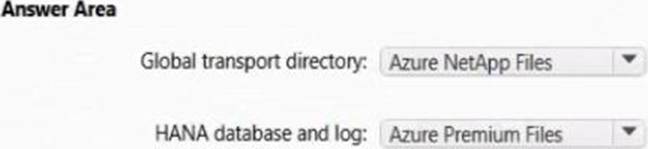
You plan to deploy a scale-out SAP HANA deployment on Azure virtual machines that will contain a standby node.
You need to recommend a storage solution for the deployment.
What should you recommend? To answer, select the appropriate options in the answer area. NOTE: Each correct selection is worth one point
You have an SAP environment on Azure.
our on-promises network connects to Azure by using a site-to-site VPN connection.
6u need to alert technical support if the network bandwidth usage between the on-premises network and Azure exceeds 900 Mbps 10 minutes.
What should you use?
- A . Azure Network Watcher
- B . NIPING
- C . Azure Monitor
- D . Azure Enhanced Monitoring for SAP
C
Explanation:
You set up alerts on Azure VPN Gateway metrics. Azure Monitor provides the ability to set up alerts for Azure resources. You can set up alerts for virtual network gateways of the "VPN" type.
Metric: AverageBandwidth: Average combined bandwidth utilization of all site-to-site connections on the gateway.
Reference: https://docs.microsoft.com/bs-latn-ba/azure/vpn-gateway/vpn-gateway-howto-setup-alerts-virtual-network-gateway-metric
You are building an SAP environment by using Azure Resource Manager templates. The SAP environment will use Linux virtual machines.
You need to correlate the LUN of the data disks in the template to the volume of the virtual machines.
Which command should you run/
- A . Is /dev/ disk/azure/root
- B . Is /dev/ disk/azure/scsil
- C . Tree /dev/ disk/azure/root
- D . Tree /dev/disk/azure/resource