
Juniper JN0-281 Practice Exams
Last updated on Oct 22,2026- Exam Code: JN0-281
- Exam Name: Data Center, Associate (JNCIA-DC)
- Certification Provider: Juniper
- Latest update: Oct 22,2026
Question #61
Within your router, you want to verify that you are learning routes from a remote BGP peer at IP address 10.10.100.1.
Which command would satisfy the requirement?
- A . show route receive-protocol bgp 10.10.100.1
- B . show route protocol bgp table inet.0 10.10.100.1
- C . show route advertise-protocol bgp 10.10.100.1
- D . show route protocol bgp source-gateway 10.10.100.1
Correct Answer: A
A
Explanation:
To verify that your router is learning routes from a remote BGP peer at a specific IP address (e.g., 10.10.100.1), the correct command to use is show route receive-protocol bgp.
Step-by-Step Breakdown:
BGP Route Learning:
The show route receive-protocol bgp command displays the routes that have been received from a specified BGP peer. This helps in confirming that the remote peer is sending routes correctly and that your router is receiving them.
Command Example:
show route receive-protocol bgp 10.10.100.1
This will show all routes that have been received from the BGP peer with IP address 10.10.100.1.
Juniper
Reference: BGP Route Verification: Use this command to troubleshoot and verify that routes from a specific BGP peer are being received.
A
Explanation:
To verify that your router is learning routes from a remote BGP peer at a specific IP address (e.g., 10.10.100.1), the correct command to use is show route receive-protocol bgp.
Step-by-Step Breakdown:
BGP Route Learning:
The show route receive-protocol bgp command displays the routes that have been received from a specified BGP peer. This helps in confirming that the remote peer is sending routes correctly and that your router is receiving them.
Command Example:
show route receive-protocol bgp 10.10.100.1
This will show all routes that have been received from the BGP peer with IP address 10.10.100.1.
Juniper
Reference: BGP Route Verification: Use this command to troubleshoot and verify that routes from a specific BGP peer are being received.
Question #62
Which operation mode command will display the mapping between the VLAN ID and ports on a switch?
- A . show route
- B . show ethernet-switching table
- C . show interfaces terse
- D . show vlans
Correct Answer: D
D
Explanation:
To display the mapping between VLAN IDs and ports on a Juniper switch, the show vlans command is used.
Step-by-Step Breakdown:
VLAN Information:
The show vlans command displays detailed information about VLAN configurations, including the VLAN ID, associated interfaces (ports), and VLAN membership.
Command Example:
show vlans
This command will provide an output listing each VLAN, its ID, and the interfaces associated with the VLAN, enabling network engineers to quickly verify VLAN to port mappings.
Juniper
Reference: VLAN Verification: Use the show vlans command to verify which VLANs are configured on the switch and the ports that are members of those VLANs.
D
Explanation:
To display the mapping between VLAN IDs and ports on a Juniper switch, the show vlans command is used.
Step-by-Step Breakdown:
VLAN Information:
The show vlans command displays detailed information about VLAN configurations, including the VLAN ID, associated interfaces (ports), and VLAN membership.
Command Example:
show vlans
This command will provide an output listing each VLAN, its ID, and the interfaces associated with the VLAN, enabling network engineers to quickly verify VLAN to port mappings.
Juniper
Reference: VLAN Verification: Use the show vlans command to verify which VLANs are configured on the switch and the ports that are members of those VLANs.
Question #63
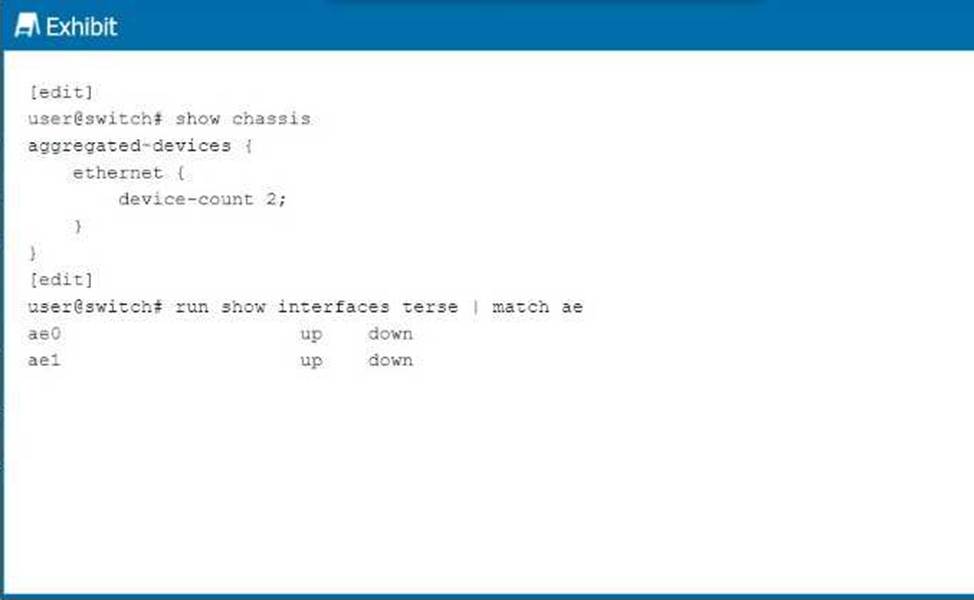
Referring to the exhibit, you notice that after committing the configuration, the ae0 and ae1 interfaces appear in a link down state.
Which statement is correct in this scenario?
- A . No operational interfaces have been added to the LAG interfaces.
- B . No traffic is traversing the LAG interfaces.
- C . The LAG interfaces are in a passive state.
- D . The LAG interfaces are in aggressive mode.
Correct Answer: A
A
Explanation:
In the exhibit, the ae0 and ae1 interfaces are in a link down state. This occurs when no physical
interfaces (member interfaces) have been added to the LAG (Link Aggregation Group) interfaces, or
the member interfaces are not operational.
Step-by-Step Breakdown:
LAG Configuration:
A LAG interface (aggregated Ethernet interface) is a logical interface that combines multiple physical interfaces for redundancy and increased bandwidth. The LAG will only be operational if at least one member interface is active and configured correctly. No Operational Member Interfaces:
If no member interfaces are added or if the member interfaces are down, the LAG will remain in a down state, as shown in the exhibit for ae0 and ae1. Resolution:
Verify that physical interfaces have been added to the LAG using commands like:
LAG Interface Status: In Juniper, the link status of the LAG depends on its member interfaces, which must be operational for the LAG to function.
A
Explanation:
In the exhibit, the ae0 and ae1 interfaces are in a link down state. This occurs when no physical
interfaces (member interfaces) have been added to the LAG (Link Aggregation Group) interfaces, or
the member interfaces are not operational.
Step-by-Step Breakdown:
LAG Configuration:
A LAG interface (aggregated Ethernet interface) is a logical interface that combines multiple physical interfaces for redundancy and increased bandwidth. The LAG will only be operational if at least one member interface is active and configured correctly. No Operational Member Interfaces:
If no member interfaces are added or if the member interfaces are down, the LAG will remain in a down state, as shown in the exhibit for ae0 and ae1. Resolution:
Verify that physical interfaces have been added to the LAG using commands like:
LAG Interface Status: In Juniper, the link status of the LAG depends on its member interfaces, which must be operational for the LAG to function.
Question #64
Exhibit:
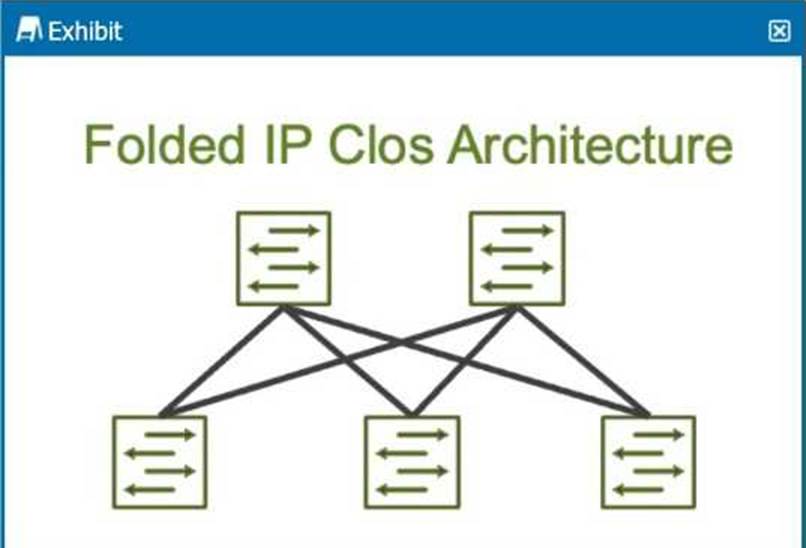
How many stages are shown in the exhibit?
- A . 2
- B . 5
- C . 6
- D . 3
Correct Answer: D
D
Explanation:
The exhibit shows a Folded IP Clos Architecture, which is also referred to as a 3-stage Clos network design. This architecture typically consists of two layers of switches: Spine Layer: The top row of switches.
Leaf Layer: The bottom row of switches.
Step-by-Step Breakdown:
Clos Architecture:
A 3-stage Clos network has two types of devices: spine and leaf. In this design, each leaf switch connects to every spine switch, providing a high level of redundancy and load balancing.
Stage Explanation
Stage 1: The first set of leaf switches.
Stage 2: The spine switches.
Stage 3: The second set of leaf switches.
The Folded Clos architecture shown here effectively "folds" the 3-stage design by combining the ingress and egress leaf layers into one, reducing it to two visible layers, but still maintaining the overall 3-stage architecture.
Juniper
Reference: IP Clos Architecture: The 3-stage Clos design is commonly used in modern data centers for high availability, redundancy, and scalability.
D
Explanation:
The exhibit shows a Folded IP Clos Architecture, which is also referred to as a 3-stage Clos network design. This architecture typically consists of two layers of switches: Spine Layer: The top row of switches.
Leaf Layer: The bottom row of switches.
Step-by-Step Breakdown:
Clos Architecture:
A 3-stage Clos network has two types of devices: spine and leaf. In this design, each leaf switch connects to every spine switch, providing a high level of redundancy and load balancing.
Stage Explanation
Stage 1: The first set of leaf switches.
Stage 2: The spine switches.
Stage 3: The second set of leaf switches.
The Folded Clos architecture shown here effectively "folds" the 3-stage design by combining the ingress and egress leaf layers into one, reducing it to two visible layers, but still maintaining the overall 3-stage architecture.
Juniper
Reference: IP Clos Architecture: The 3-stage Clos design is commonly used in modern data centers for high availability, redundancy, and scalability.
Question #65
How does OSPF calculate the best path to a particular prefix?
- A . It finds the path with the numerically lowest cost.
- B . It finds the path with the shortest autonomous system path.
- C . It finds the path with the least number of hops.
- D . It finds the path with the numerically lowest route preference.
Correct Answer: A
A
Explanation:
OSPF (Open Shortest Path First) calculates the best path based on the cost of the route, which is derived from the bandwidth of the interfaces along the path.
Step-by-Step Breakdown:
OSPF Path Selection:
OSPF assigns a cost to each link, typically based on the link’s bandwidth (higher bandwidth equals lower cost).
The OSPF algorithm computes the shortest path to a destination by adding the costs of all links in the path. The path with the numerically lowest total cost is chosen as the best path.
Cost Calculation:
The OSPF cost can be manually adjusted or automatically calculated using the default formula: Cost=Reference BandwidthLink Bandwidthtext{Cost} = frac{text{Reference Bandwidth}}{text{Link Bandwidth}}Cost=Link BandwidthReference Bandwidth Juniper
Reference: OSPF Best Path Selection: OSPF selects the path with the lowest cumulative cost, ensuring efficient use of higher-bandwidth links in Junos networks.
A
Explanation:
OSPF (Open Shortest Path First) calculates the best path based on the cost of the route, which is derived from the bandwidth of the interfaces along the path.
Step-by-Step Breakdown:
OSPF Path Selection:
OSPF assigns a cost to each link, typically based on the link’s bandwidth (higher bandwidth equals lower cost).
The OSPF algorithm computes the shortest path to a destination by adding the costs of all links in the path. The path with the numerically lowest total cost is chosen as the best path.
Cost Calculation:
The OSPF cost can be manually adjusted or automatically calculated using the default formula: Cost=Reference BandwidthLink Bandwidthtext{Cost} = frac{text{Reference Bandwidth}}{text{Link Bandwidth}}Cost=Link BandwidthReference Bandwidth Juniper
Reference: OSPF Best Path Selection: OSPF selects the path with the lowest cumulative cost, ensuring efficient use of higher-bandwidth links in Junos networks.
Question #66
Which static routing parameter will silently drop the packet if it is set as the next hop?
- A . Reject
- B . Resolve
- C . Readvertise
- D . Discard
Correct Answer: D
D
Explanation:
When the discard option is configured as the next hop for a static route, it silently drops any packets that match the route without sending any notification to the sender.
Step-by-Step Breakdown:
Discard Behavior:
If a route uses the discard next hop, the router drops the packet without generating any ICMP message or error back to the sender. This is useful for creating null routes to prevent routing loops or blackhole traffic intentionally.
Reject vs. Discard:
The reject next hop, in contrast, drops the packet but sends an ICMP Destination Unreachable message back to the source.
Juniper
Reference: Static Route Behavior: In Junos, the discard option ensures packets matching a static route are dropped silently, providing a way to discard traffic without alerting the source.
D
Explanation:
When the discard option is configured as the next hop for a static route, it silently drops any packets that match the route without sending any notification to the sender.
Step-by-Step Breakdown:
Discard Behavior:
If a route uses the discard next hop, the router drops the packet without generating any ICMP message or error back to the sender. This is useful for creating null routes to prevent routing loops or blackhole traffic intentionally.
Reject vs. Discard:
The reject next hop, in contrast, drops the packet but sends an ICMP Destination Unreachable message back to the source.
Juniper
Reference: Static Route Behavior: In Junos, the discard option ensures packets matching a static route are dropped silently, providing a way to discard traffic without alerting the source.