
Juniper JN0-231 Practice Exams
Last updated on Oct 22,2026- Exam Code: JN0-231
- Exam Name: Security - Associate (JNCIA-SEC)
- Certification Provider: Juniper
- Latest update: Oct 22,2026
What are two characteristics of a null zone? (Choose two.)
- A . The null zone is configured by the super user.
- B . By default, all unassigned interfaces are placed in the null zone.
- C . All ingress and egress traffic on an interface in a null zone is permitted.
- D . When an interface is deleted from a zone, it is assigned back to the null zone.
You want to block executable files ("exe) from being downloaded onto your network.
Which UTM feature would you use in this scenario?
- A . IPS
- B . Web filtering
- C . content filtering
- D . antivirus
B
Explanation:
According to the Juniper Networks official JNCIA-SEC Exam Guide, web filtering is a feature used to control access to web content, including the ability to block specific types of files.
In the scenario mentioned, you want to block executable files from being downloaded, which can be accomplished by using web filtering. The feature allows administrators to configure policies that block specific file types, including "exe" files, from being downloaded.
Reference:
Juniper Networks JNCIA-SEC Exam Guide: https://www.juniper.net/training/certification/certification-exam-guides/jncia-sec-exam-guide/
Click the Exhibit button.
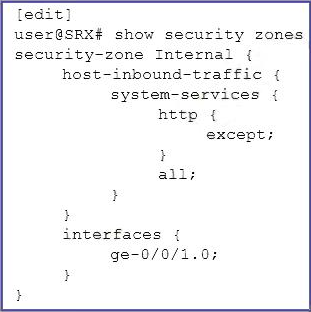
What is the purpose of the host-inbound-traffic configuration shown in the exhibit?
- A . to permit host inbound HTTP traffic and deny all other traffic on the internal security zone
- B . to deny and log all host inbound traffic on the internal security zone, except for HTTP traffic
- C . to permit all host inbound traffic on the internal security zone, but deny HTTP traffic
- D . to permit host inbound HTTP traffic on the internal security zone
Which two traffic types are considered exception traffic and require some form of special handling by the PFE? (Choose two.)
- A . SSH sessions
- B . ICMP reply messages
- C . HTTP sessions
- D . traceroute packets
Which two non-configurable zones exist by default on an SRX Series device? (Choose two.)
- A . Junos-host
- B . functional
- C . null
- D . management
A,C
Explanation:
Junos-host and null are two non-configurable zones that exist by default on an SRX Series device. Junos-host is the default zone for all internal interfaces and services, such as management and other loopback interfaces. The null zone is used to accept all traffic that is not explicitly accepted by other security policies, and is the default zone for all unclassified traffic. Both zones cannot be modified or deleted.
References:
https://www.juniper.net/documentation/en_US/junos/topics/task/configuration/security-zones-overview.html
https://www.juniper.net/documentation/en_US/junos/topics/reference/configuration-statement/security-zones-default-zone-configuration.html
What are two features of the Juniper ATP Cloud service? (Choose two.)
- A . sandbox
- B . malware detection
- C . EX Series device integration
- D . honeypot
You are assigned a project to configure SRX Series devices to allow connections to your webservers. The webservers have a private IP address, and the packets must use NAT to be accessible from the
Internet. You do not want the webservers to initiate connections with external update servers on the Internet using the same IP address as customers use to access them.
Which two NAT types must be used to complete this project? (Choose two.)
- A . static NAT
- B . hairpin NAT
- C . destination NAT
- D . source NAT
Which two statements are correct about global policies? (Choose two.)
- A . Global policies are evaluated after default policies.
- B . Global policies do not have to reference zone context.
- C . Global policies are evaluated before default policies.
- D . Global policies must reference zone contexts.
B,C
Explanation:
Global policies are used to define rules for traffic that is not associated with any particular zone. This type of policy is evaluated first, before any rules related to specific zones are evaluated.
For more detailed information about global policies, refer to the Juniper Networks Security Policy Overview guide, which can be found at https://www.juniper.net/documentation/en_US/junos/topics/reference/security-policy-overview.html. The guide provides an overview of the Juniper Networks security policy architecture, as well as detailed descriptions of the different types of policies and how they are evaluated.
What is the main purpose of using screens on an SRX Series device?
- A . to provide multiple ports for accessing security zones
- B . to provide an alternative interface into the CLI
- C . to provide protection against common DoS attacks
- D . to provide information about traffic patterns traversing the network
C
Explanation:
The main purpose of using screens on an SRX Series device is to provide protection against common Denial of Service (DoS) attacks. Screens help prevent network resources from being exhausted or unavailable by filtering or blocking network traffic based on predefined rules. The screens are implemented as part of the firewall function on the SRX Series device, and they help protect against various types of DoS attacks, such as TCP SYN floods, ICMP floods, and UDP floods.
Reference: https://www.juniper.net/documentation/en_US/junos/topics/concept/security-srx-series-firewall-screen-dos.html
Which feature would you use to protect clients connected to an SRX Series device from a SYN flood attack?
- A . security policy
- B . host inbound traffic
- C . application layer gateway
- D . screen option
D
Explanation:
A screen option in the SRX Series device can be used to protect clients connected to the device from a SYN flood attack. Screens are security measures that you can use to protect your network from various types of attacks, including SYN floods. A screen option specifies a set of rules to match against incoming packets, and it can take specific actions such as discarding, logging, or allowing the packets based on the rules.
Reference:
Juniper Networks SRX Series Services Gateway Screen Configuration Guide: https://www.juniper.net/documentation/en_US/junos/topics/topic-map/security-screen-configuring.html