
HashiCorp HCVA0-003 Practice Exams
Last updated on Oct 22,2026- Exam Code: HCVA0-003
- Exam Name: HashiCorp Certified: Vault Associate (003)Exam
- Certification Provider: HashiCorp
- Latest update: Oct 22,2026
Your organization audited an essential application and found it isn’t securely storing data. For added security, auditors recommended encrypting all data before storing it in a backend database, and the application server should not store encryption keys locally.
Which secrets engine meets these requirements?
- A . PKI secrets engine
- B . SSH secrets engine
- C . Transit secrets engine
- D . Cubbyhole secrets engine
C
Explanation:
Comprehensive and Detailed In-Depth
The Transit secrets engine encrypts data without local key storage. The Vault documentation states: "The Transit secrets engine allows you to send cleartext data to Vault to be encrypted. Vault will encrypt the data with the referenced encryption key, which is stored locally, and returns the ciphertext to the application. Although the encryption keys in the Transit secrets engine are exportable, they are generally kept in Vault."
― Transit Tutorial
C: Correct. Meets encryption and key security needs:
"It allows applications to encrypt data before storing it in a backend database and decrypt it when needed, without storing encryption keys locally."
― Vault Secrets: Transit
A: PKI is for certificates.
B: SSH is for SSH credentials.
D: Cubbyhole is for temporary storage.
Reference: Transit Tutorial Vault Secrets: Transit
Your organization has applications in a primary data center and a secondary warm-standby site. You want to configure Vault replication between the primary and secondary clusters. If the primary fails over to the secondary, the applications must interact with Vault without re-authenticating.
What type of Vault replication would you use?
- A . Performance Replication
- B . Integrated Storage
- C . Disaster Recovery Replication
- D . Vault Secrets Operator
C
Explanation:
Comprehensive and Detailed In-Depth
Vault Enterprise supports two replication types: Performance Replication and Disaster Recovery (DR) Replication. The key requirement here is that applications must continue interacting with Vault without re-authenticating during a failover from the primary to the secondary cluster. DR Replication is designed for this exact scenario. It replicates all data, including tokens and leases, from the primary cluster to the secondary cluster. When the secondary is promoted to primary during a failover, the existing tokens remain valid, allowing applications to seamlessly continue operations without re-authentication.
Performance Replication, while improving scalability and performance by replicating data across clusters, manages its own tokens and leases on each secondary cluster. Tokens from the primary are not replicated, so a failover would invalidate existing tokens, requiring applications to re-authenticate―failing the requirement. Integrated Storage is a storage backend, not a replication type, and doesn’t address failover behavior. The Vault Secrets Operator is a Kubernetes tool for secret management, unrelated to cluster replication. According to Vault’s DR Replication documentation, it ensures continuity of token validity, making it the correct choice.
Reference: Disaster Recovery Replication Tutorial
Performance Replication Tutorial
Vault Replication Overview
Which of the following are valid types of tokens available in Vault? (Select five)
- A . Primary token
- B . Batch token
- C . Orphan service token
- D . Service token
- E . Root token
- F . Periodic service token
B, C, D, E, F
Explanation:
Comprehensive and Detailed In-Depth
Vault supports several token types, each with distinct characteristics:
B. Batch token: "Batch tokens are encrypted binary large objects (blobs) that carry just enough information for authentication." They are lightweight and non-renewable.
C. Orphan service token: "Orphan tokens are not children of their parent; therefore, do not expire when their parent does." A valid subtype of service tokens.
D. Service token: "Service token is the general token that most people talk about when referring to a token in Vault." The standard token type.
E. Root token: "Root tokens are the most powerful tokens in Vault and have full control." Created
during initialization.
F. Periodic service token: "Periodic service tokens have a TTL, but no max TTL," renewing
automatically for long-running tasks.
Incorrect Option:
Vault supports which type of configuration for source limited token?
- A . Cloud-bound tokens
- B . Domain-bound tokens
- C . CIDR-bound tokens
- D . Certificate-bound tokens
C
Explanation:
Vault supports CIDR-bound tokens, which are tokens that can only be used from a specific set of IP addresses or network ranges. This is a way to limit the scope and exposure of a token in case it is compromised or leaked. CIDR-bound tokens can be created by specifying the bound_cidr_list parameter when creating or updating a token role, or by using the -bound-cidr option when creating a token using the vault token create command. CIDR-bound tokens can also be created by some auth methods, such as AWS or Kubernetes, that can automatically bind the tokens to the source IP or network of the client.
Reference: Token – Auth Methods | Vault | HashiCorp Developer, vault token create – Command | Vault | HashiCorp Developer
Which of these are a benefit of using the Vault Agent?
- A . Vault Agent allows for centralized configuration of application secrets engines
- B . Vault Agent will auto-discover which authentication mechanism to use
- C . Vault Agent will enforce minimum levels of encryption an application can use
- D . Vault Agent will manage the lifecycle of cached tokens and leases automatically
D
Explanation:
Vault Agent is a client daemon that provides the following features: Auto-Auth – Automatically authenticate to Vault and manage the token renewal process for locally-retrieved dynamic secrets.
API Proxy – Allows Vault Agent to act as a proxy for Vault’s API, optionally using (or forcing the use of) the Auto-Auth token.
Caching – Allows client-side caching of responses containing newly created tokens and responses containing leased secrets generated off of these newly created tokens. The agent also manages the renewals of the cached tokens and leases.
Templating – Allows rendering of user-supplied templates by Vault Agent, using the token generated by the Auto-Auth step.
Process Supervisor Mode – Runs a child process with Vault secrets injected as environment variables. One of the benefits of using the Vault Agent is that it will manage the lifecycle of cached tokens and leases automatically. This means that the agent will handle the token renewal and revocation logic, as well as the lease renewal and revocation logic for the secrets that are cached by the agent. This reduces the burden on the application developers and operators, and ensures that the tokens and secrets are always valid and up-to-date.
Reference: Vault Agent | Vault | HashiCorp Developer, Caching – Vault Agent | Vault | HashiCorp Developer
What type of Vault token does not have a TTL (Time to Live)?
- A . Child tokens
- B . Parent tokens
- C . Service tokens
- D . Root tokens
- E . Batch tokens
D
Explanation:
Comprehensive and Detailed in Depth
Root tokens in Vault are unique in lacking a TTL. The HashiCorp Vault documentation states: "Non-root tokens are associated with a TTL, which determines for how long a token is valid. Root tokens are not associated with a TTL, and therefore, do not expire." It provides an example: "For example, notice that the value for token_duration is the infinity symbol, meaning it lives forever," as seen in a vault login output for a root token.
The docs elaborate: "Root tokens are tokens with an infinite TTL that have the ‘root’ policy attached to them. Because of their power, it is strongly recommended that they be used only as necessary and then immediately revoked when no longer needed." In contrast: Child tokens (A) inherit TTLs from parents.
Parent tokens (B) typically have TTLs unless they are root.
Service tokens (C) have configurable TTLs for ongoing use.
Batch tokens (E) have fixed TTLs for ephemeral tasks.
Thus, D (Root tokens) is correct.
Reference: HashiCorp Vault Documentation – Tokens: Token Time to Live
A developer has requested access to manage secrets at the path kv/apps/webapp01.
You create the policy below which gives them the proper access:
path "kv/apps/webapp01" {
capabilities = ["read", "create", "update", "list"]
}
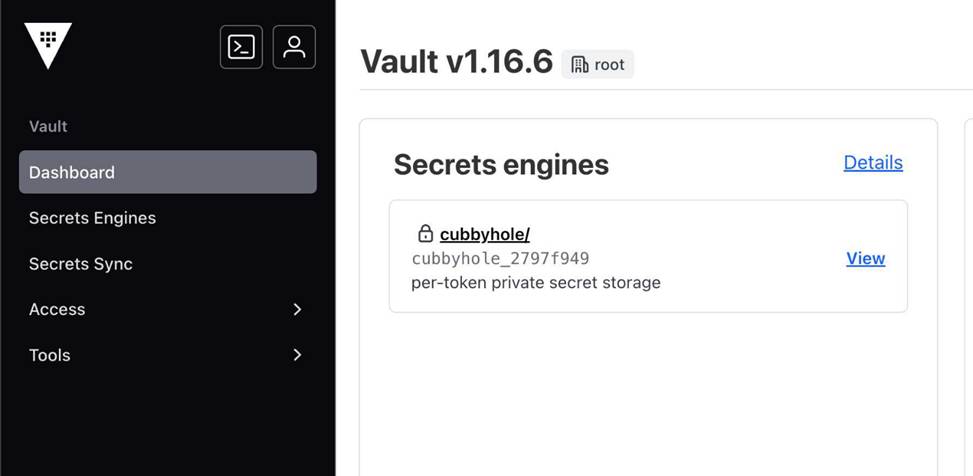
However, when the developer logs in to the Vault UI, they see the following screenshot and cannot access the desired secret.
Why can’t the developer see the secrets they need?
- A . The Vault UI isn’t enabled for the developer, therefore they will only see the default options
- B . The key/value secrets engine isn’t available in the Vault UI, therefore the developer should use a different Vault interface instead
- C . The policy doesn’t permit list access to the paths prior to the secret so the Vault UI doesn’t display the mount path
- D . The secrets are stored under the cubbyhole secrets engine, so the developer should browse to that secrets engine
C
Explanation:
Comprehensive and Detailed In-Depth
The Vault UI requires list permissions on parent paths to navigate mounts.
The Vault documentation states:
"When you are using the UI, you will likely need to add additional LIST permissions to the mount (sys/mounts) and then LIST for every path up to the desired secret."
― Vault API: sys/mounts
C: Correct. The policy lacks list on kv/ or kv/apps/, so the UI can’t display kv/:
"The policy doesn’t permit list access to the paths prior to the secret so the Vault UI doesn’t display the mount path."
― Vault Tutorials: Policies
A: Incorrect; the UI isn’t user-specific.
B: Incorrect; KV is available in the UI.
D: Incorrect; the path is kv/, not cubbyhole.
Reference: Vault API: sys/mounts
Vault Tutorials: Policies
You need to write a Vault operator policy and give the users access to perform administrative actions in Vault.
What path is used for Vault backend functions?
- A . /security
- B . /admin
- C . /vault
- D . /system
- E . /sys
- F . /backend
E
Explanation:
Comprehensive and Detailed in Depth
The correct path for Vault backend functions, which include administrative actions, is /sys. The HashiCorp Vault documentation confirms: "All backend system functions live in the /sys backend. Policies should take /sys into account when users need to administer Vault configurations." This path hosts endpoints for system-level operations like mounting secrets engines, managing policies, and sealing/unsealing Vault.
Paths like /security, /admin, /vault, /system, and /backend are not standard for Vault’s system backend. Only /sys provides the necessary administrative capabilities, making E the correct answer.
Reference: HashiCorp Vault Documentation – System Backend
A large organization uses Vault for various use cases with multiple auth methods enabled. A user can authenticate via LDAP, OIDC, or a local userpass account, but they receive different policies for each method and often need to log out and back in for different actions.
What can be configured in Vault to ensure users have consistent policies regardless of their authentication method?
- A . Enable the SSH secrets engine and instruct the user to obtain credentials using the new secrets engine
- B . Create a new entity and map the aliases from each of the available auth methods
- C . Assign the default policy to the user’s policy used by each auth method
- D . Provide the user with an AppRole role-id and secret-id for authentication
B
Explanation:
Comprehensive and Detailed In-Depth
In HashiCorp Vault, when a user authenticates via multiple methods (e.g., LDAP, OIDC, userpass), each authentication method generates a distinct token with its own set of policies based on the configuration of that auth method. This can lead to inconsistent access levels depending on how the user logs in. To address this and ensure consistent policies across all authentication methods, Vault’s Identity system can be utilized. Specifically, creating an entity and mapping aliases from each authentication method to that entity allows Vault to associate a single logical identity with the user, regardless of how they authenticate.
An entity in Vault represents a single identity (e.g., a user or application) and can have multiple aliases tied to different auth methods. Each alias links the authentication method’s identifier (e.g., LDAP username, OIDC subject) to the entity. Policies can then be assigned directly to the entity, ensuring that all tokens generated for that entity―across any auth method―inherit the same set of policies. This eliminates the need for users to log out and back in to switch contexts, as their access remains consistent.
Option A (SSH secrets engine) is unrelated, as it manages SSH credentials, not policy consistency across auth methods.
Option C (assigning the default policy) doesn’t guarantee consistency, as the
default policy might not include all required permissions and doesn’t unify policies across methods.
Option D (AppRole) is a machine-oriented auth method and doesn’t solve the multi-method human user scenario. The correct approach, as per Vault’s Identity documentation, is to leverage entities and aliases.
Reference: Vault Identity Documentation
Vault Entities and Aliases Tutorial
In regards to the Transit secrets engine, which of the following is true given the following command and output (select three):
$ vault write encryption/encrypt/creditcard plaintext=$(base64 <<< "1234 5678 9101 1121")
Key: ciphertext Value:
vault:v3:cZNHVx+sxdMErXRSuDa1q/pz49fXTn1PScKfhf+PIZPvy8xKfkytpwKcbC0fF2U=
- A . The Transit secrets engine is mounted at the encryption path
- B . The name of the keyring used to encrypt the data is creditcard
- C . There are at least three data keys associated with this keyring
- D . The data was written to the encryption path, which is provided by default when enabling the Transit secrets engine
A, B, C
Explanation:
Comprehensive and Detailed in Depth
A: The command uses encryption/encrypt/creditcard, indicating the Transit engine is mounted at encryption/. Correct.
B: The endpoint creditcard specifies the key name used for encryption. Correct.
C: The output vault:v3: shows key version 3, implying at least three versions (v1, v2, v3) after rotations. Correct.
D: The default path for Transit is transit/, not encryption/. This is a custom mount, not default. Incorrect.
Overall Explanation from Vault Docs:
“The Transit engine encrypts data at a specified key name… Key versions (e.g., v3) indicate rotations.”
Reference: https://developer.hashicorp.com/vault/docs/secrets/transit