
HashiCorp HCVA0-003 Practice Exams
Last updated on Oct 22,2026- Exam Code: HCVA0-003
- Exam Name: HashiCorp Certified: Vault Associate (003)Exam
- Certification Provider: HashiCorp
- Latest update: Oct 22,2026
Which of the following vault lease operations uses a lease _ id as an argument? Choose two correct answers.
- A . renew
- B . revoke -prefix
- C . create
- D . describe
- E . revoke
AE
Explanation:
The vault lease operations that use a lease_id as an argument are renew and revoke. The renew operation allows a client to extend the validity of a lease associated with a secret or a token. The revoke operation allows a client to terminate a lease immediately and invalidate the secret or the token. Both operations require a lease_id as an argument to identify the lease to be renewed or revoked. The lease_id can be obtained from the response of reading a secret or creating a token, or from the vault lease list command. The other operations, revoke-prefix, create, and describe, do not use a lease_id as an argument. The revoke-prefix operation allows a client to revoke all secrets or tokens generated under a given prefix. The create operation allows a client to create a new lease for a secret. The describe operation allows a client to view information about a lease, such as its TTL, policies, and metadata.
Reference: Lease, Renew, and Revoke | Vault | HashiCorp Developer, vault lease – Command | Vault | HashiCorp Developer
Assuming default configurations, which of the following operations require a threshold of key shares to perform? (Select three)
- A . Rotating the Vault encryption key to adhere to internal security policies
- B . Unsealing Vault after a scheduled maintenance to install patches
- C . Generating a new root token as a break-glass procedure
- D . Creating a new set of recovery keys due to an employee leaving the organization
B, C, D
Explanation:
Comprehensive and Detailed In-Depth
Certain operations require unseal keys:
B. Unsealing: "Unsealing the Vault requires a threshold of unseal keys."
C. Root Token: "Generating a new root token requires a threshold of unseal keys."
D. Recovery Keys: "Changing the unseal/recovery keys requires the current threshold."
Incorrect Option:
Kyle enabled the database secrets engine for dynamic credentials. Amy, the senior DBA, accidentally deleted the database users created by Vault, disrupting client applications.
How can Kyle manually remove the leases in Vault?
- A . No action is required since the leases will eventually expire and be revoked
- B . Obtain the individual lease IDs from the application logs and remove them using the vault lease revoke command
- C . Use the command vault lease revoke -force flag to delete the leases
- D . Revoke all of the leases associated with the entire database secrets engine to be sure they are all removed
C
Explanation:
Comprehensive and Detailed In-Depth
To clean up disrupted leases:
C. vault lease revoke -force: "Using the vault lease revoke -force flag is the correct way to manually remove leases in Vault." With -prefix, it targets specific leases (e.g., vault lease revoke -force -prefix database/creds/<role>). "This is meant for recovery situations where the secret was manually removed."
Incorrect Options:
A: Waiting risks ongoing issues. "May take time and could cause disruptions."
B: Inaccurate; -force is needed. "Not a valid approach without -force."
D: Too broad, affects other leases. "May impact other valid credentials."
Reference: https://developer.hashicorp.com/vault/docs/commands/lease/revoke
You need to connect to and manage a new HCP Vault cluster using the Vault CLI on your laptop.
What environment variables should you set to establish connectivity?
- A . VAULT_CLIENT_KEY=<path-to-key-file>, VAULT_TOKEN=<token-here>
- B . VAULT_NAMESPACE=root, VAULT_REDIRECT_ADDR=<cluster-address>
- C . VAULT_ADDR=https://<cluster-address>:8200, VAULT_NAMESPACE=admin
- D . VAULT_TOKEN=<token-here>, VAULT_CLUSTER_ADDR=https://<cluster-address>:8200
C
Explanation:
Comprehensive and Detailed in Depth
To connect to an HCP Vault cluster using the Vault CLI, you need to set VAULT_ADDR and
VAULT_NAMESPACE. The HashiCorp Vault documentation states: "You can use environment variables
to configure the CLI globally. For example, export VAULT_ADDR=’http://localhost:8200′ sets the
address of your Vault server globally." For HCP Vault, the default port is 8200, and the default
namespace is "admin," so VAULT_ADDR=https://<cluster-address>:8200 and
VAULT_NAMESPACE=admin are required. A token (via VAULT_TOKEN) is also needed for
authentication but is typically set after initial connectivity.
VAULT_CLIENT_KEY isn’t a standard variable for CLI connectivity. VAULT_REDIRECT_ADDR and VAULT_CLUSTER_ADDR are not used for this purpose. Thus, C provides the correct variables.
Reference: HashiCorp Vault Documentation – CLI Environment Variables
From the unseal options listed below, select the options you can use if you’re deploying Vault on-premises (select four).
- A . Certificates
- B . Transit
- C . AWS KMS
- D . HSM PKCS11
- E . Key shards
B, C, D, E
Explanation:
Comprehensive and Detailed in Depth
Vault requires unsealing to access encrypted data, and on-premises deployments support various unseal mechanisms. Let’s assess:
A: Certificates
Certificates secure communication (e.g., TLS), not unsealing. Vault’s seal/unseal process uses cryptographic keys, not certificates. Incorrect.
B: Transit
The Transit secrets engine can auto-unseal Vault by managing encryption keys internally. Ideal for on-premises setups avoiding external services. Correct. C: AWS KMS
AWS KMS can auto-unseal Vault if the on-premises cluster has internet access to AWS APIs. Common in hybrid setups. Correct.
D: HSM PKCS11
Hardware Security Modules (HSM) with PKCS11 support secure key storage and auto-unsealing on-premises. Correct.
E: Key shards
Shamir’s Secret Sharing splits the master key into shards, the default manual unseal method for all Vault clusters. Correct.
Overall Explanation from Vault Docs:
“Vault supports multiple seal types… Key shards (Shamir) is the default… Auto-unseal options like Transit, AWS KMS, and HSM (PKCS11) are viable for on-premises if configured with access to required services.” Certificates are not an unseal mechanism.
Reference: https://developer.hashicorp.com/vault/docs/configuration/seal
Which of the following features are not available in the Vault Community version?
- A . Cloud KMS auto-unseal
- B . Single sign-on support
- C . Event notifications and filtering
- D . Multi-factor authentication (auth)
- E . Dynamic secrets engines
- F . HSM auto-unseal
F
Explanation:
Comprehensive and Detailed in Depth
The HSM auto-unseal feature is not available in the Vault Community version; it is exclusive to the Enterprise edition. The HashiCorp Vault documentation states: "Within the Vault family of products, there are two editions offered by HashiCorp – Vault Community Edition and Vault Enterprise. Enterprise offers other features to enable use cases such as disaster recovery, sync secrets from Vault to other cloud service providers, and advanced event management." Specifically, HSM (Hardware Security Module) auto-unseal is listed as an Enterprise-only feature, requiring additional licensing. The docs clarify: "Both community and enterprise editions offer similar capabilities to enable secrets management," including Cloud KMS auto-unseal, single sign-on support, event notifications and filtering, multi-factor authentication, and dynamic secrets engines. However, "HSM auto-unseal provides a higher level of security by using Hardware Security Modules (HSMs) to automatically unseal the Vault," exclusive to Enterprise. Thus, F is correct.
Reference: HashiCorp Vault Documentation – Available Vault Editions
When using Integrated Storage, which of the following should you do to recover from possible data loss?
- A . Failover to a standby node
- B . Use snapshot
- C . Use audit logs
- D . Use server logs
B
Explanation:
Integrated Storage is a Raft-based storage backend that allows Vault to store its data internally without relying on an external storage system. It also enables Vault to run in high availability mode with automatic leader election and failover. However, Integrated Storage is not immune to data loss or corruption due to hardware failures, network partitions, or human errors. Therefore, it is recommended to use the snapshot feature to backup and restore the Vault data periodically or on demand. A snapshot is a point-in-time capture of the entire Vault data, including the encrypted secrets, the configuration, and the metadata. Snapshots can be taken and restored using the vault operator raft snapshot command or the sys/storage/raft/snapshot API endpoint. Snapshots are encrypted and can only be restored with a quorum of unseal keys or recovery keys. Snapshots are also portable and can be used to migrate data between different Vault clusters or storage backends.
Reference:
https://developer.hashicorp.com/vault/docs/concepts/integrated-storage1, https://developer.hashicorp.com/vault/docs/commands/operator/raft/snapshot2, https://developer.hashicorp.com/vault/api-docs/system/storage/raft/snapshot3
You are using Azure Key Vault for the auto-unseal configuration on your cluster. After the Vault service restarts, what command must you run to unseal Vault?
- A . You don’t need to run a command when using auto-unseal
- B . vault operator members
- C . vault operator unseal
- D . vault operator init
A
Explanation:
Comprehensive and Detailed in Depth
When using Azure Key Vault for auto-unseal, no manual command is required to unseal Vault after a service restart. The HashiCorp Vault documentation states: "Vault supports opt-in automatic unsealing via cloud technologies: AliCloud KMS, AWS KMS, Azure Key Vault, Google Cloud KMS, and OCI KMS. This feature enables operators to delegate the unsealing process to trusted cloud providers to ease operations in the event of partial failure and to aid in the creation of new or ephemeral clusters." Specifically, for Azure Key Vault, "the auto-unseal feature automatically handles the unsealing process," eliminating the need for manual intervention.
The documentation further explains: "When configured with auto-unseal, Vault will automatically unseal itself upon startup using the configured key management service, provided the necessary permissions and credentials are in place." Options like vault operator unseal are for manual unsealing, vault operator members lists cluster members, and vault operator init initializes Vault― none apply to auto-unseal scenarios. Thus, A is correct.
Reference: HashiCorp Vault Documentation – Auto Unseal with Azure Key Vault HashiCorp Vault Documentation – Seal Concepts: Auto Unseal
You logged into the Vault CLI and attempted to enable an auth method, but you received this error message.

What can you do to resolve the error and configure Vault? (Error: dial tcp 127.0.0.1:8200: connect: connection refused)
- A . Restart the Vault service on this node
- B . Ask an admin to grant you permission to enable the userpass auth method
- C . Change ‘userpass’ to ‘username and password’
- D . Set the VAULT_ADDR environment variable to HTTP
D
Explanation:
Comprehensive and Detailed in Depth
A: Connection refused isn’t a service issue here. Incorrect.
B: Permissions don’t cause connection errors. Incorrect.
C: Invalid syntax change. Incorrect.
D: Default VAULT_ADDR is HTTPS; if TLS is off, set to http://127.0.0.1:8200. Correct. Overall Explanation from Vault Docs:
“If TLS is disabled, set VAULT_ADDR to http://127.0.0.1:8200 to avoid connection errors…”
Reference: https://developer.hashicorp.com/vault/docs/commands#vault_addr
The key/value v2 secrets engine is enabled at secret/ See the following policy:
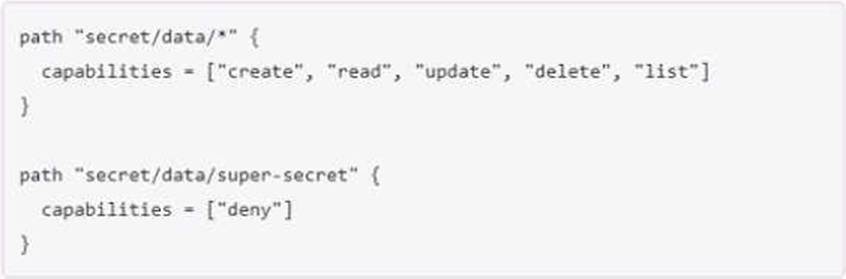
Which of the following operations are permitted by this policy? Choose two correct answers.
- A . vault kv get secret/webapp1
- B . vault kv put secret/webapp1 apikey-"ABCDEFGHI] K123M"
- C . vault kv metadata get secret/webapp1
- D . vault kv delete secret/super-secret
- E . vault kv list secret/super-secret
AC
Explanation:
The policy shown in the image is:
path “secret/data/webapp1” { capabilities = [“create”, “read”, “update”, “delete”, “list”] } path “secret/data/super-secret” { capabilities = [“deny”] }
This policy grants or denies access to the key/value v2 secrets engine mounted at secret/ according to the following rules:
The path “secret/data/webapp1” has the capabilities of “create”, “read”, “update”, “delete”, and “list”. This means that the policy allows performing any of these operations on the secrets stored under this path. The data/ prefix is used to access the actual secret data in the key/value v2 secrets engine5. Therefore, the policy permits the operation of vault kv get secret/webapp1, which reads the secret data at secret/data/webapp16.
The path “secret/data/super-secret” has the capability of “deny”. This means that the policy denies performing any operation on the secrets stored under this path. The policy overrides any other policy that might grant access to this path. Therefore, the policy does not permit the operations of vault kv delete secret/super-secret and vault kv list secret/super-secret, which delete and list the secret data at secret/data/super-secret respectively6.
The policy does not explicitly define any rules for the path “secret/metadata”. The metadata/ prefix is used to access the metadata of the secrets in the key/value v2 secrets engine, such as the number of versions, the deletion status, the creation time, etc5. By default, if the policy grants any of the capabilities of “create”, “read”, “update”, or “delete” on the data/ path, it also grants the same capabilities on the corresponding metadata/ path7. Therefore, the policy permits the operation of vault kv metadata get secret/webapp1, which reads the metadata of the secret at secret/metadata/webapp18.
Reference: 5(https://developer.hashicorp.com/vault/docs/secrets/kv/kv-v2), [6]6, 7(https://developer.hashicorp.com/vault/docs/secrets/kv/kv-v2), [8]8