
HashiCorp HCVA0-003 Practice Exams
Last updated on Oct 22,2026- Exam Code: HCVA0-003
- Exam Name: HashiCorp Certified: Vault Associate (003)Exam
- Certification Provider: HashiCorp
- Latest update: Oct 22,2026
What is the default method of authentication after first initializing Vault?
- A . TLS certificates
- B . GitHub
- C . Admin account
- D . Tokens
- E . AppRole
- F . Userpass
D
Explanation:
Comprehensive and Detailed in Depth
After initializing Vault, the default authentication method is Tokens, specifically the root token. The HashiCorp Vault documentation states: "After initializing, Vault provides the user the root token, which is the only way to log in to Vault in order to configure additional auth methods." This root token is generated during initialization and serves as the initial means of authentication until other methods are configured.
The documentation further explains under the "Token Authentication" section: "Tokens are the core method for authentication within Vault. Upon initialization, a root token is created which can be used to configure Vault further." TLS certificates, GitHub, AppRole, and Userpass require additional setup, and there’s no default Admin account method. Thus, D (Tokens) is correct.
Reference: HashiCorp Vault Documentation – Token Authentication
You want to encrypt a credit card number using the Transit secrets engine. You enter the following command and receive an error.
What can you do to ensure that the credit card number is properly encrypted and the ciphertext is returned?
$ vault write -format=json transit/encrypt/creditcards plaintext="1234 5678 9101 1121"
Error: * illegal base64 data at input byte 4
- A . The plain text data needs to be encoded to base64
- B . The token used to issue the encryption request does not have the appropriate permissions
- C . Credit card numbers are not supported using the Transit secrets engine since it is considered sensitive data
- D . The credit card number should not include spaces
A
Explanation:
Comprehensive and Detailed in Depth
The error indicates a problem with the plaintext input format. Let’s analyze:
A: The Transit engine requires plaintext to be base64-encoded for safe transport, as it may include non-text data. The error illegal base64 data occurs because "1234 5678 9101 1121" isn’t base64-encoded. Correct: use plaintext=$(base64 <<< "1234 5678 9101 1121").
B: Permission errors would return a 403, not a base64 error. Incorrect.
C: Transit supports encrypting sensitive data like credit card numbers. Incorrect.
D: Spaces aren’t the issue; the format must be base64. Incorrect.
Overall Explanation from Vault Docs:
“When you send data to Vault for encryption, it must be base64-encoded plaintext… This ensures safe transport of binary or text data.”
Reference: https://developer.hashicorp.com/vault/docs/secrets/transit#usage
You are performing a high number of authentications in a short amount of time. You’re experiencing slow throughput for token generation.
How would you solve this problem?
- A . Increase the time-to-live on service tokens
- B . Implement batch tokens
- C . Establish a rate limit quota
- D . Reduce the number of policies attached to the tokens
B
Explanation:
Batch tokens are a type of tokens that are not persisted in Vault’s storage backend, but are encrypted blobs that carry enough information to perform Vault actions. Batch tokens are extremely lightweight and scalable, and can improve the throughput for token generation. Batch tokens are suitable for high-volume and ephemeral workloads, such as containers or serverless functions, that require short-lived and non-renewable tokens. Batch tokens can be created by using the -type=batch flag in the vault token create command, or by configuring the token_type parameter in the auth method’s role or mount options. Batch tokens have some limitations compared to service tokens, such as the lack of renewal, revocation, listing, accessor, and cubbyhole features. Therefore, batch tokens should be used with caution and only when the trade-offs are acceptable.
Reference: https://developer.hashicorp.com/vault/tutorials/tokens/batch-tokens1, https://developer.hashicorp.com/vault/docs/commands/token/create2, https://developer.hashicorp.com/vault/docs/concepts/tokens#token-types3
True or False? After rotating a transit encryption key, all data encrypted with the previous version must be rewrapped or re-encrypted with the new key.
- A . True
- B . False
B
Explanation:
Comprehensive and Detailed In-Depth
False. When a transit encryption key is rotated in Vault (e.g., via vault write -f
transit/keys/<key_name>/rotate), the new key version becomes the default for future encryptions, but data encrypted with previous versions remains decryptable without rewrapping or re-encryption. Vault maintains a keyring with all versions, and the ciphertext prefix (e.g., vault:v1:) indicates which version was used, allowing automatic decryption with the corresponding key. This seamless handling simplifies key management and avoids mandatory data re-encryption post-rotation. Only if you set a min_decryption_version to archive older keys would rewrapping be needed, but that’s optional, not default behavior.
Option A is incorrect per Vault’s Transit documentation, which notes that old data can still be decrypted without immediate action after rotation.
Reference: Transit Secrets Engine Usage
Key Version Management
You have ciphertext stored in an Amazon S3 bucket encrypted by the key named prod-customer. Will Vault decrypt this data with the command vault write transit/decrypt/prod-customer ciphertext="vault:v4:Xa1f9FIJtn13em/Wb7QCsXsU/kCOn7…" given this output?
$ vault read transit/keys/prod-customer
Key Value
— —–
…
keys map[4:1549347108 5:1549347109 6:1549347110] latest_version 6
min_available_version 0 min_decryption_version 4 min_encryption_version 0
Will Vault decrypt this data for you by running the following command?
$ vault write transit/decrypt/prod-customer ciphertext="vault:v4:Xa1f9FIJtn13em/Wb7QCsXsU/kCOn7…"
- A . Yes, because the minimum decryption key configuration is set to 4
- B . No, since the latest version of the key is 6
A
Explanation:
Comprehensive and Detailed In-Depth
Vault can decrypt if the key version is available:
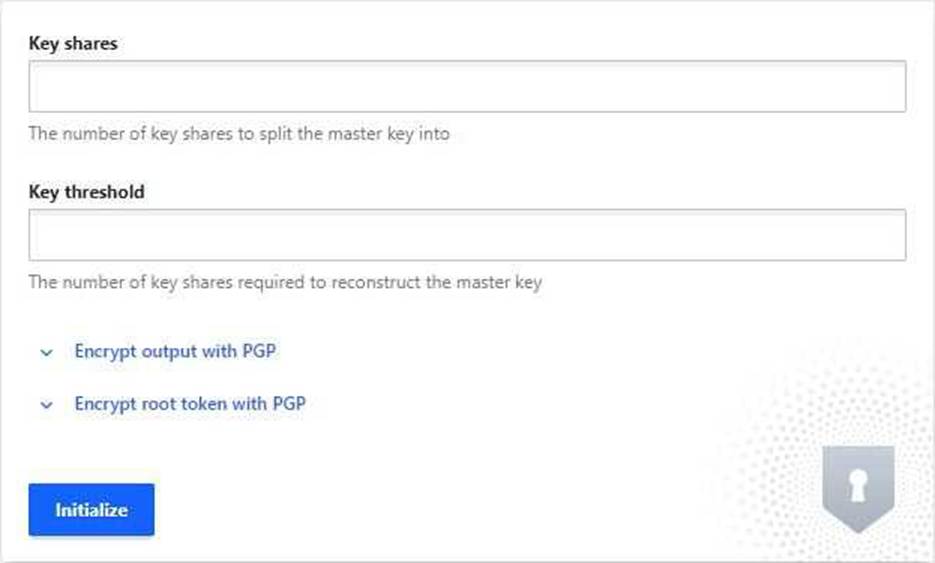
You’ve hit the URL for the Vault UI, but you’re presented with this screen.
Why doesn’t Vault present you with a way to log in?
- A . The Consul storage backend was not configured correctly
- B . Vault needs to be initialized before it can be used
- C . A Vault policy is preventing you from logging in
- D . The Vault configuration file has an incorrect configuration
B
Explanation:
Comprehensive and Detailed in Depth
The initialization page means Vault is new or reset. Let’s evaluate:
A: Storage issues don’t trigger this screen; they’d cause errors post-init. Incorrect.
B: Vault requires initialization (vault operator init) to set up keys and enable login. Correct.
C: Policies apply post-login, not pre-init. Incorrect.
D: Config errors would prevent Vault from starting, not show this screen. Incorrect. Overall Explanation from Vault Docs:
“Before Vault can be used, it must be initialized and unsealed… This screen indicates Vault has not been initialized yet.”
Reference: https://developer.hashicorp.com/vault/docs/commands/operator/init
Your co-worker has asked you to perform certain operations in Vault and has provided you with a token accessor (not the token itself).
What Vault operations would you be allowed to perform using only the provided accessor? (Select three)
- A . Renew the token to extend the TTL
- B . Revoke the token in Vault to make it invalid
- C . Create child tokens associated with the same policies as the related token
- D . Lookup properties of the token, such as the TTL, policies, and metadata
A, B, D
Explanation:
Comprehensive and Detailed In-Depth
A token accessor is a reference to a token, not the token itself, and supports limited operations:
A: vault token renew -accessor <accessor> extends the token’s TTL if renewable, per the token docs.
B: vault token revoke -accessor <accessor> revokes the token, making it invalid, a supported accessor action.
D: vault token lookup -accessor <accessor> displays token properties (e.g., TTL, policies), a key accessor use case.
C: Creating child tokens requires the parent token, not just its accessor, as it involves authentication and policy inheritance, which accessors can’t perform.
Accessors can’t authenticate to Vault for secret access; they’re for management tasks like these, per the tokens documentation.
Reference: Token Accessors Token Commands
Which of the following are replication methods available in Vault Enterprise? Choose two correct answers.
- A . Cluster sharding
- B . Namespaces
- C . Performance Replication
- D . Disaster Recovery Replication
CD
Explanation:
The replication methods available in Vault Enterprise are performance replication and disaster recovery replication. These methods allow critical data to be replicated across clusters to support horizontally scaling and disaster recovery workloads.
Performance replication enables a primary cluster to replicate data to one or more secondary clusters, which can handle client requests and improve performance and availability. Performance replication replicates most Vault data, such as secrets, policies, auth methods, and leases, but not tokens. Performance secondaries generate their own tokens and leases, which are not replicated back to the primary. Performance replication also supports filtering, which allows selective replication of data based on namespaces or paths.
Disaster recovery replication enables a primary cluster to replicate data to one or more secondary clusters, which act as standby clusters in case of a failure or outage of the primary. Disaster recovery replication replicates all Vault data, including tokens and leases, and maintains the same configuration and state as the primary. Disaster recovery secondaries do not handle client requests, but they can be promoted to a primary in a disaster recovery scenario.
Reference: Replication – Vault Enterprise | Vault | HashiCorp Developer, Performance Replication – Vault Enterprise | Vault | HashiCorp Developer, Disaster Recovery Replication – Vault Enterprise | Vault | HashiCorp Developer
True or False? Your organization currently runs all of its workloads on Google Cloud Platform (GCP). Recently, Vault has been deployed, and you need to select an auth method to authenticate your workloads with Vault.
Based on this information, GCP is the only auth method that can be used in your environment.
- A . True
- B . False
B
Explanation:
Comprehensive and Detailed In-Depth
False. Vault supports multiple auth methods, not just platform-specific ones. The Vault documentation states:
"Just because you are using a certain platform does not mean you need to use the related auth method. Vault offers a variety of auth methods that can be used based on the organization’s needs and existing infrastructure, allowing for flexibility and customization in authentication processes."
― Vault Auth Concepts
B: Correct. Options like AppRole, LDAP, or JWT can be used on GCP:
"GCP auth MIGHT be the best option, but it’s not the ONLY option that you can use."
― Vault Auth Concepts
A: Incorrect; Vault isn’t limited to GCP auth on GCP.
Reference: Vault Auth Concepts
True or False? You can create and update Vault policies using the UI.
- A . True
- B . False
A
Explanation:
Comprehensive and Detailed In-Depth
The Vault UI supports policy management: