
HashiCorp HCVA0-003 Practice Exams
Last updated on Oct 22,2026- Exam Code: HCVA0-003
- Exam Name: HashiCorp Certified: Vault Associate (003)Exam
- Certification Provider: HashiCorp
- Latest update: Oct 22,2026
Using the Vault CLI, there are several ways to create a new policy. Select the valid commands (Select three)
- A . vault policy write my-policy – << EOF path "secret/data/*" {
capabilities = ["create", "update"]
}
EOF - B . vault policy create my-policy /tmp/policy.hcl
- C . vault policy write my-policy /tmp/policy.hcl
- D . $ cat user.hcl | vault policy write my-policy –
A, C, D
Explanation:
Comprehensive and Detailed in Depth
Vault provides multiple valid ways to create a policy via the CLI using the vault policy write command. The HashiCorp Vault documentation states: "To write a policy, use the vault policy write command."
The valid methods are:
A: "vault policy write my-policy – << EOF … EOF uses heredoc syntax to inline policy content, which Vault accepts directly."
C: "vault policy write my-policy /tmp/policy.hcl writes a policy from a file, a standard method per the docs: ‘The policy can be read from a file or piped from stdin.’"
D: "cat user.hcl | vault policy write my-policy – pipes policy content from a file via stdin, another documented approach: ‘You can pipe the policy content to the command using -.’"
Option B, vault policy create, is invalid as no such command exists―only vault policy write is used. Thus, A, C, and D are correct.
Reference: HashiCorp Vault Documentation – Policies: Write a Policy
How many Shamir’s key shares are required to unseal a Vault instance?
- A . All key shares
- B . A quorum of key shares
- C . One or more keys
- D . The threshold number of key shares
D
Explanation:
Shamir’s Secret Sharing is a cryptographic algorithm that allows a secret to be split into multiple parts, called key shares, such that a certain number of key shares are required to reconstruct the secret. The number of key shares and the threshold number are configurable parameters that depend on the desired level of security and availability. Vault uses Shamir’s Secret Sharing to protect its master key, which is used to encrypt and decrypt the data encryption key that secures the Vault data. When Vault is initialized, it generates a master key and splits it into a configured number of key shares, which are then distributed to trusted operators. To unseal Vault, the threshold number of key shares must be provided to reconstruct the master key and decrypt the data encryption key. This process ensures that no single operator can access the Vault data without the cooperation of other key holders.
Reference:
https://developer.hashicorp.com/vault/docs/concepts/seal4, https://developer.hashicorp.com/vault/docs/commands/operator/init5, https://developer.hashicorp.com/vault/docs/commands/operator/unseal6
Which of the following is NOT a valid way in which a lease can be revoked in Vault?
- A . Using the user interface (UI)
- B . Automatically when the TTL or Max-TTL expires
- C . Using the API to call the /v1/sys/leases endpoint
- D . Via the CLI using the vault token command
D
Explanation:
Comprehensive and Detailed in Depth
Leases manage dynamic secrets’ lifecycles. Let’s check:
A: UI allows lease revocation. Valid.
B: TTL expiration auto-revokes leases. Valid.
C: API endpoint revokes leases. Valid.
D: vault token manages tokens, not leases directly. Invalid. Overall Explanation from Vault Docs:
“Leases can be revoked via API, UI, CLI (vault lease revoke), or TTL expiry… vault token is for tokens.”
Reference: https://developer.hashicorp.com/vault/docs/concepts/lease
Which statement describes the results of this command: $ vault secrets enable transit
- A . Enables the transit secrets engine at transit path
- B . Requires a root token to execute the command successfully
- C . Enables the transit secrets engine at secret path
- D . Fails due to missing -path parameter
- E . Fails because the transit secrets engine is enabled by default
A
Explanation:
The command vault secrets enable transit enables the transit secrets engine at the transit path. The transit secrets engine is a secrets engine that handles cryptographic functions on data in-transit, such as encryption, decryption, signing, verification, hashing, and random bytes generation. The transit secrets engine does not store the data sent to it, but only performs the requested operations and returns the results. The transit secrets engine can also be viewed as “cryptography as a service” or “encryption as a service”. The command vault secrets enable transit uses the default path of transit for the secrets engine, but this can be changed by using the -path option. For example, vault secrets enable -path=my-transit transit would enable the transit secrets engine at the my-transit path.
Reference: Transit – Secrets Engines | Vault | HashiCorp Developer, vault secrets enable – Command | Vault | HashiCorp Developer
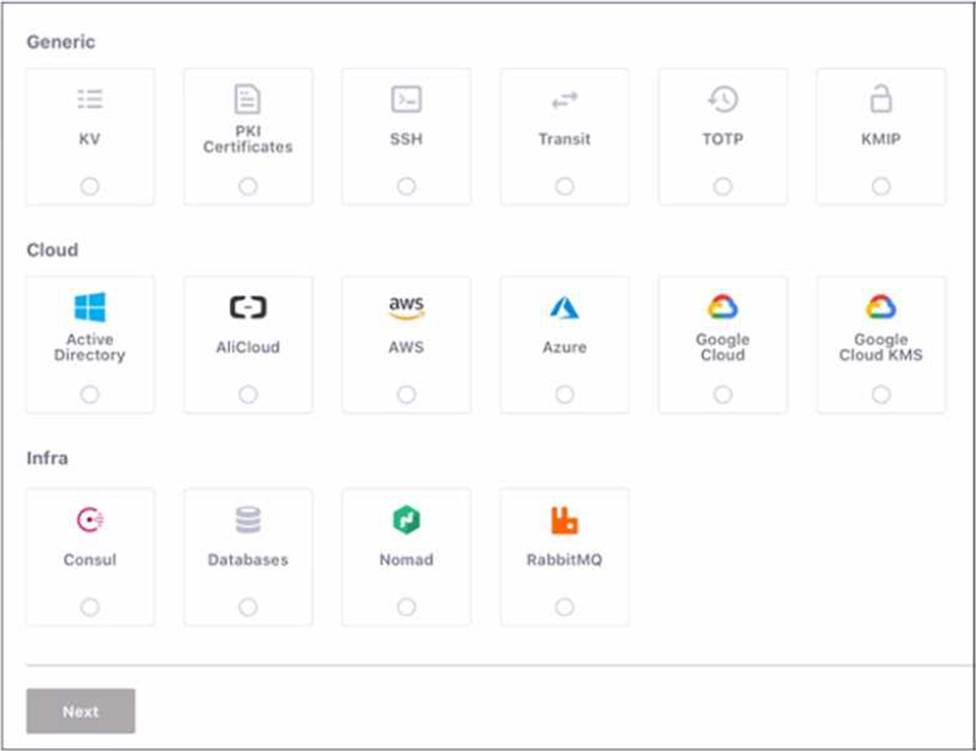
Use this screenshot to answer the question below:
When are you shown these options in the GUI?
- A . Enabling policies
- B . Enabling authentication engines
- C . Enabling secret engines
- D . Enabling authentication methods
D
Explanation:
This screenshot is shown when you are enabling authentication methods in the GUI. Authentication methods are the ways users and applications authenticate with Vault. Vault supports many different authentication methods, including username and password, GitHub, and more. You can enable one or more authentication methods from the grid of options, which are divided into three categories:
Generic, Cloud, and Infra. Each option has a name, a description, and a logo. You can also enable authentication methods using the Vault CLI or API.
Enabling policies, authentication engines, and secret engines are different tasks that are not related to this screenshot. Policies are rules that govern the access to Vault resources, such as secrets, authentication methods, and audit devices. Authentication engines are components of Vault that perform authentication and assign policies to authenticated entities. Secret engines are components of Vault that store, generate, or encrypt data. These tasks have different GUI pages and options than the screenshot.
Reference: [Authentication | Vault | HashiCorp Developer]
[Policies | Vault | HashiCorp Developer]
[Authentication | Vault | HashiCorp Developer]
[Secrets Engines | Vault | HashiCorp Developer]
What header must be included in an API request in order to provide authentication validation?
- A . X-Token-Vault
- B . X-Vault-Token
- C . X-Token-Creds
- D . X-Vault-Creds
B
Explanation:
Comprehensive and Detailed In-Depth
For Vault API authentication:
B. X-Vault-Token: "The token for authentication is set directly as a header for the HTTP API. The header should be either X-Vault-Token: <token> or Authorization: Bearer <token>." This header carries the client token required to validate the request’s authenticity and permissions. Incorrect Options:
Where can you set the Vault seal configuration? Choose two correct answers.
- A . Cloud Provider KMS
- B . Vault CLI
- C . Vault configuration file
- D . Environment variables
- E . Vault API
CD
Explanation:
The Vault seal configuration can be set in two ways: through the Vault configuration file or through environment variables. The Vault configuration file is a text file that contains the settings and options for Vault, such as the storage backend, the listener, the telemetry, and the seal. The seal stanza in the configuration file specifies the seal type and the parameters to use for additional data protection, such as using HSM or Cloud KMS solutions to encrypt and decrypt the root key. The seal configuration can also be set through environment variables, which will take precedence over the values in the configuration file. The environment variables are prefixed with VAULT_SEAL_ and followed by the seal type and the parameter name. For example, VAULT_SEAL_AWSKMS_REGION sets the region for the AWS KMS seal.
Reference: Seals – Configuration | Vault | HashiCorp Developer, Environment Variables | Vault | HashiCorp Developer
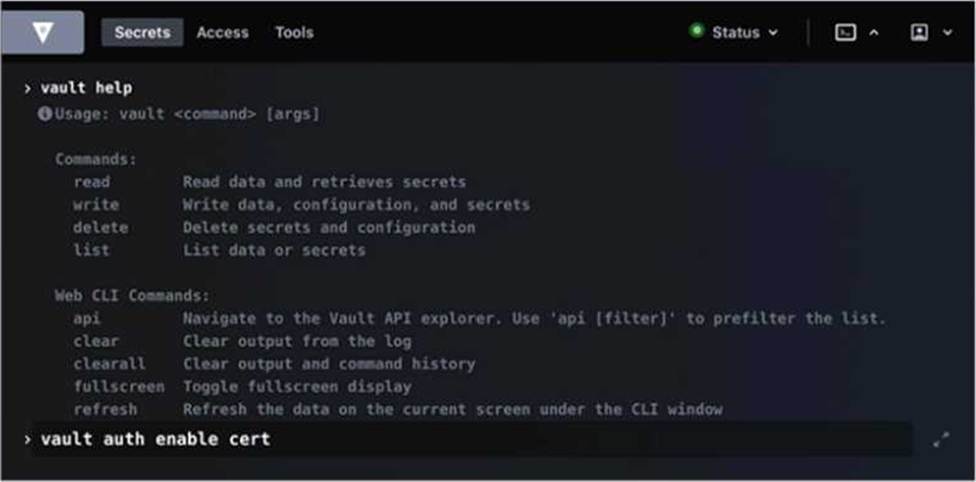
Running the second command in the GUI CLI will succeed.
- A . True
- B . False
B
Explanation:
Running the second command in the GUI CLI will fail. The second command is vault kv put secret/creds passcode=my-long-passcode. This command attempts to write a secret named creds with the value passcode=my-long-passcode to the secret path, which is the default path for the kv secrets engine. However, the kv secrets engine is not enabled at the secret path, as shown by the first command vault secrets list, which lists the enabled secrets engines and their paths. The only enabled secrets engine is the transit secrets engine at the transit path. Therefore, the second command will fail with an error message saying that no secrets engine is mounted at the path secret/. To make the second command succeed, the kv secrets engine must be enabled at the secret path or another path, using the vault secrets enable command. For example, vault secrets enable – path=secret kv would enable the kv secrets engine at the secret path.
Reference: kv – Command | Vault | HashiCorp Developer, vault secrets enable – Command | Vault | HashiCorp Developer
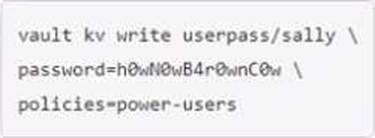
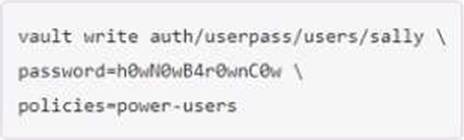
You are using the Vault userpass auth method mounted at auth/userpass.
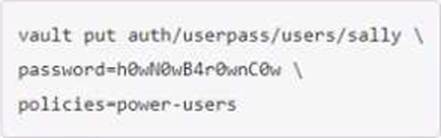
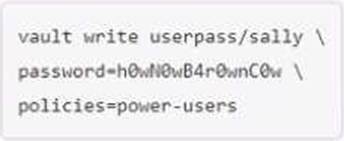
How do you create a new user named "sally" with password "h0wN0wB4r0wnC0w"? This new user will need the power-users policy.
A)
B)
C)
D)
- A . Option A
- B . Option B
- C . Option C
- D . Option D
D
Explanation:
To create a new user named “sally” with password “h0wN0wB4r0wnC0w” and the power-users policy, you would use the Vault userpass auth method mounted at auth/userpass. You would use the following command: “vault write auth/userpass/users/sally password=h0wN0wB4r0wnC0w policies=power-users”. This command would create a new user named “sally” with the specified password and policy.
Reference: [Userpass Auth Method | Vault | HashiCorp Developer]
[Create Vault policies | Vault | HashiCorp Developer]
Which of the following best describes response wrapping?
- A . The response is Base64 encoded, and the user must decode the response to retrieve the cleartext data
- B . Rather than provide a direct response, Vault returns a token and an accessor
- C . Vault responds with an encrypted version of the response, decrypted via transit
- D . Vault inserts the response into a single-use token’s cubbyhole
D
Explanation:
Comprehensive and Detailed In-Depth
Response wrapping secures responses:
D. Cubbyhole: "Vault takes the response and inserts it into the cubbyhole of a single-use token."
Incorrect Options: