
Google Professional Machine Learning Engineer Practice Exams
Last updated on Oct 10,2026- Exam Code: Professional Machine Learning Engineer
- Exam Name: Google Professional Machine Learning Engineer
- Certification Provider: Google
- Latest update: Oct 10,2026
While performing exploratory data analysis on a dataset, you find that an important categorical feature has 5% null values. You want to minimize the bias that could result from the missing values.
How should you handle the missing values?
- A . Remove the rows with missing values, and upsample your dataset by 5%.
- B . Replace the missing values with the feature’s mean.
- C . Replace the missing values with a placeholder category indicating a missing value.
- D . Move the rows with missing values to your validation dataset.
C
Explanation:
The best option for handling missing values in a categorical feature is to replace them with a placeholder category indicating a missing value. This is a type of imputation, which is a method of estimating the missing values based on the observed data. Imputing the missing values with a placeholder category preserves the information that the data is missing, and avoids introducing bias or distortion in the feature distribution. It also allows the machine learning model to learn from the missingness pattern, and potentially use it as a predictor for the target variable.
The other options are not suitable for handling missing values in a categorical feature, because:
Removing the rows with missing values and upsampling the dataset by 5% would reduce the size of the dataset and potentially lose important information. It would also introduce sampling bias and overfitting, as the upsampling process would create duplicate or synthetic observations that do not reflect the true population.
Replacing the missing values with the feature’s mean would not make sense for a categorical feature, as the mean is a numerical measure that does not capture the mode or frequency of the categories. It would also create a new category that does not exist in the original data, and might confuse the machine learning model.
Moving the rows with missing values to the validation dataset would compromise the validity and reliability of the model evaluation, as the validation dataset would not be representative of the test or production data. It would also reduce the amount of data available for training the model, and might introduce leakage or inconsistency between the training and validation datasets.
Reference: Imputation of missing values
Effective Strategies to Handle Missing Values in Data Analysis How to Handle Missing Values of Categorical Variables? Google Cloud launches machine learning engineer certification Google Professional Machine Learning Engineer Certification Professional ML Engineer Exam Guide
Preparing for Google Cloud Certification: Machine Learning Engineer Professional Certificate
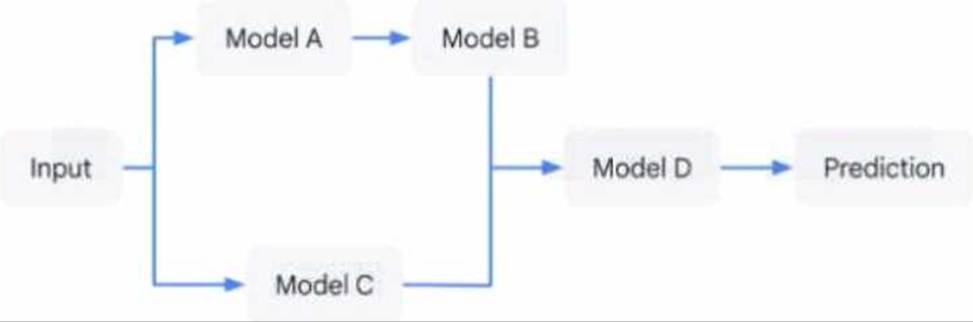
You have developed an application that uses a chain of multiple scikit-learn models to predict the optimal price for your company’s products. The workflow logic is shown in the diagram Members of your team use the individual models in other solution workflows. You want to deploy this workflow while ensuring version control for each individual model and the overall workflow Your application needs to be able to scale down to zero. You want to minimize the compute resource utilization and the manual effort required to manage this solution.
What should you do?
- A . Expose each individual model as an endpoint in Vertex Al Endpoints. Create a custom container endpoint to orchestrate the workflow.
- B . Create a custom container endpoint for the workflow that loads each models individual files Track the versions of each individual model in BigQuery.
- C . Expose each individual model as an endpoint in Vertex Al Endpoints. Use Cloud Run to orchestrate the workflow.
- D . Load each model’s individual files into Cloud Run Use Cloud Run to orchestrate the workflow Track the versions of each individual model in BigQuery.
C
Explanation:
The option C is the most efficient and scalable solution for deploying a machine learning workflow with multiple models while ensuring version control and minimizing compute resource utilization. By exposing each model as an endpoint in Vertex AI Endpoints, it allows for easy versioning and management of individual models. Using Cloud Run to orchestrate the workflow ensures that the application can scale down to zero, thus minimizing resource utilization when not in use. Cloud Run is a service that allows you to run stateless containers on a fully managed environment or on Google Kubernetes Engine. You can use Cloud Run to invoke the endpoints of each model in the workflow and pass the data between them. You can also use Cloud Run to handle the input and output of the workflow and provide an HTTP interface for the application.
Reference: Vertex AI Endpoints documentation
Cloud Run documentation
Preparing for Google Cloud Certification: Machine Learning Engineer Professional Certificate
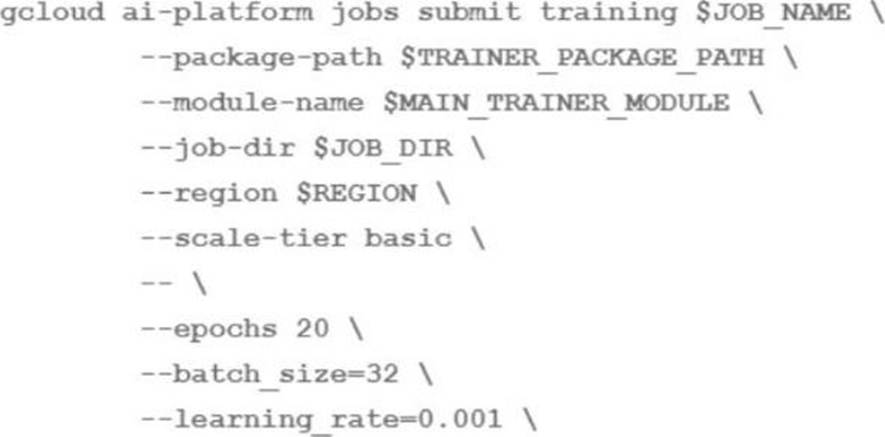
You are training an LSTM-based model on Al Platform to summarize text using the following job submission script:
You want to ensure that training time is minimized without significantly compromising the accuracy of your model.
What should you do?
- A . Modify the ‘epochs’ parameter
- B . Modify the ‘scale-tier’ parameter
- C . Modify the batch size’ parameter
- D . Modify the ‘learning rate’ parameter
B
Explanation:
The training time of a machine learning model depends on several factors, such as the complexity of the model, the size of the data, the hardware resources, and the hyperparameters. To minimize the training time without significantly compromising the accuracy of the model, one should optimize these factors as much as possible.
One of the factors that can have a significant impact on the training time is the scale-tier parameter, which specifies the type and number of machines to use for the training job on AI Platform. The scale-tier parameter can be one of the predefined values, such as BASIC, STANDARD_1, PREMIUM_1, or BASIC_GPU, or a custom value that allows you to configure the machine type, the number of workers, and the number of parameter servers1
To speed up the training of an LSTM-based model on AI Platform, one should modify the scale-tier parameter to use a higher tier or a custom configuration that provides more computational resources, such as more CPUs, GPUs, or TPUs. This can reduce the training time by increasing the parallelism and throughput of the model training. However, one should also consider the trade-off between the training time and the cost, as higher tiers or custom configurations may incur higher charges2
The other options are not as effective or may have adverse effects on the model accuracy. Modifying the epochs parameter, which specifies the number of times the model sees the entire dataset, may reduce the training time, but also affect the model’s convergence and performance. Modifying the batch size parameter, which specifies the number of examples per batch, may affect the model’s stability and generalization ability, as well as the memory usage and the gradient update frequency. Modifying the learning rate parameter, which specifies the step size of the gradient descent optimization, may affect the model’s convergence and performance, as well as the risk of overshooting or getting stuck in local minima3
Reference: 1: Using predefined machine types 2: Distributed training 3: Hyperparameter tuning overview
You built and manage a production system that is responsible for predicting sales numbers. Model accuracy is crucial, because the production model is required to keep up with market changes. Since being deployed to production, the model hasn’t changed; however the accuracy of the model has steadily deteriorated.
What issue is most likely causing the steady decline in model accuracy?
- A . Poor data quality
- B . Lack of model retraining
- C . Too few layers in the model for capturing information
- D . Incorrect data split ratio during model training, evaluation, validation, and test
B
Explanation:
Model retraining is the process of updating an existing machine learning model with new data and parameters to improve its performance and accuracy. Model retraining is essential for maintaining the relevance and validity of the model, especially when the data or the environment changes over time. Model retraining can help to avoid or reduce the effects of model degradation, which is the phenomenon of the model’s predictive performance decreasing as it is tested on new datasets within rapidly evolving environments1.
For the use case of predicting sales numbers, model accuracy is crucial, because the production model is required to keep up with market changes. Market changes can affect the demand, supply, price, and preference of the products, and thus influence the sales numbers. If the model is not retrained with new data that reflects the market changes, it may become outdated and inaccurate, and fail to capture the patterns and trends of the sales numbers. Therefore, the most likely issue that is causing the steady decline in model accuracy is the lack of model retraining.
The other options are not as likely as option B, because they are not directly related to the model’s ability to adapt to market changes.
Option A, poor data quality, may affect the model’s accuracy, but it is not a specific cause of model degradation over time.
Option C, too few layers in the model for capturing information, may affect the model’s complexity and expressiveness, but it is not a specific cause of model degradation over time.
Option D, incorrect data split ratio during model training, evaluation, validation, and test, may affect the model’s generalization and validation, but it is not a specific cause of model degradation over time. Therefore, option B, lack of model retraining, is the best answer for this question.
Reference: Beware Steep Decline: Understanding Model Degradation In Machine Learning Models
You are training and deploying updated versions of a regression model with tabular data by using Vertex Al Pipelines. Vertex Al Training Vertex Al Experiments and Vertex Al Endpoints. The model is deployed in a Vertex Al endpoint and your users call the model by using the Vertex Al endpoint. You want to receive an email when the feature data distribution changes significantly, so you can retrigger the training pipeline and deploy an updated version of your model
What should you do?
- A . Use Vertex Al Model Monitoring Enable prediction drift monitoring on the endpoint. and specify a notification email.
- B . In Cloud Logging, create a logs-based alert using the logs in the Vertex Al endpoint. Configure Cloud Logging to send an email when the alert is triggered.
- C . In Cloud Monitoring create a logs-based metric and a threshold alert for the metric. Configure Cloud Monitoring to send an email when the alert is triggered.
- D . Export the container logs of the endpoint to BigQuery Create a Cloud Function to run a SQL query over the exported logs and send an email. Use Cloud Scheduler to trigger the Cloud Function.
A
Explanation:
Prediction drift is the change in the distribution of feature values or labels over time. It can affect the performance and accuracy of the model, and may require retraining or redeploying the model. Vertex AI Model Monitoring allows you to monitor prediction drift on your deployed models and endpoints, and set up alerts and notifications when the drift exceeds a certain threshold. You can specify an email address to receive the notifications, and use the information to retrigger the training pipeline and deploy an updated version of your model. This is the most direct and convenient way to achieve your goal.
Reference: Vertex AI Model Monitoring
Monitoring prediction drift
Setting up alerts and notifications
You are an ML engineer on an agricultural research team working on a crop disease detection tool to detect leaf rust spots in images of crops to determine the presence of a disease. These spots, which can vary in shape and size, are correlated to the severity of the disease. You want to develop a solution that predicts the presence and severity of the disease with high accuracy.
What should you do?
- A . Create an object detection model that can localize the rust spots.
- B . Develop an image segmentation ML model to locate the boundaries of the rust spots.
- C . Develop a template matching algorithm using traditional computer vision libraries.
- D . Develop an image classification ML model to predict the presence of the disease.
B
Explanation:
The best option for developing a solution that predicts the presence and severity of the disease with high accuracy is to develop an image segmentation ML model to locate the boundaries of the rust spots. Image segmentation is a technique that partitions an image into multiple regions, each corresponding to a different object or semantic category. Image segmentation can be used to detect and localize the rust spots in the images of crops, and measure their shape and size. This information can then be used to determine the presence and severity of the disease, as the rust spots are correlated to the disease symptoms. Image segmentation can also handle the variability of the rust spots, as it does not rely on predefined templates or thresholds. Image segmentation can be implemented using deep learning models, such as U-Net, Mask R-CNN, or DeepLab, which can learn from large-scale datasets and achieve high accuracy and robustness. The other options are not as suitable for developing a solution that predicts the presence and severity of the disease with high accuracy, because:
Creating an object detection model that can localize the rust spots would only provide the bounding boxes of the rust spots, not their exact boundaries. This would result in less precise measurements of the shape and size of the rust spots, and might affect the accuracy of the disease prediction. Object detection models are also more complex and computationally expensive than image segmentation models, as they have to perform both classification and localization tasks.
Developing a template matching algorithm using traditional computer vision libraries would require manually designing and selecting the templates for the rust spots, which might not capture the diversity and variability of the rust spots. Template matching algorithms are also sensitive to noise, occlusion, rotation, and scale changes, and might fail to detect the rust spots in different scenarios. Template matching algorithms are also less accurate and robust than deep learning models, as they do not learn from data.
Developing an image classification ML model to predict the presence of the disease would only provide a binary or categorical output, not the location or severity of the disease. Image classification models are also less informative and interpretable than image segmentation models, as they do not provide any spatial information or visual explanation for the prediction. Image classification models might also suffer from class imbalance or mislabeling issues, as the presence of the disease might not be consistent or clear across the images.
Reference: Image Segmentation | Computer Vision | Google Developers
Crop diseases and pests detection based on deep learning: a review | Plant Methods | Full Text Using Deep Learning for Image-Based Plant Disease Detection
Computer Vision, IoT and Data Fusion for Crop Disease Detection Using … On Using Artificial Intelligence and the Internet of Things for Crop … Crop Disease Detection Using Machine Learning and Computer Vision
You have recently trained a scikit-learn model that you plan to deploy on Vertex Al. This model will support both online and batch prediction. You need to preprocess input data for model inference. You want to package the model for deployment while minimizing additional code What should you do?
- A . 1 Upload your model to the Vertex Al Model Registry by using a prebuilt scikit-learn prediction container
2 Deploy your model to Vertex Al Endpoints, and create a Vertex Al batch prediction job that uses the instanceConfig.inscanceType setting to transform your input data - B . 1 Wrap your model in a custom prediction routine (CPR). and build a container image from the CPR local model
2 Upload your sci-kit learn model container to Vertex Al Model Registry
3 Deploy your model to Vertex Al Endpoints, and create a Vertex Al batch prediction job - C . 1. Create a custom container for your sci-kit learn model,
2 Define a custom serving function for your model
3 Upload your model and custom container to Vertex Al Model Registry
4 Deploy your model to Vertex Al Endpoints, and create a Vertex Al batch prediction job - D . 1 Create a custom container for your sci-kit learn model.
2 Upload your model and custom container to Vertex Al Model Registry
3 Deploy your model to Vertex Al Endpoints, and create a Vertex Al batch prediction job that uses the instanceConfig. instanceType setting to transform your input data
B
Explanation:
The best option for deploying a scikit-learn model on Vertex AI with minimal additional code is to wrap the model in a custom prediction routine (CPR) and build a container image from the CPR local model. Upload your scikit-learn model container to Vertex AI Model Registry. Deploy your model to Vertex AI Endpoints, and create a Vertex AI batch prediction job. This option allows you to leverage the power and simplicity of Google Cloud to deploy and serve a scikit-learn model that supports both online and batch prediction. Vertex AI is a unified platform for building and deploying machine learning solutions on Google Cloud. Vertex AI can deploy a trained scikit-learn model to an online prediction endpoint, which can provide low-latency predictions for individual instances. Vertex AI can also create a batch prediction job, which can provide high-throughput predictions for a large batch of instances. A custom prediction routine (CPR) is a Python script that defines the logic for preprocessing the input data, running the prediction, and postprocessing the output data. A CPR can help you customize the prediction behavior of your model, and handle complex or non-standard data formats. A CPR can also help you minimize the additional code, as you only need to write a few functions to implement the prediction logic. A container image is a package that contains the model, the CPR, and the dependencies. A container image can help you standardize and simplify the deployment process, as you only need to upload the container image to Vertex AI Model Registry, and deploy it to Vertex AI Endpoints. By wrapping the model in a CPR and building a container image from the CPR local model, uploading the scikit-learn model container to Vertex AI Model Registry, deploying the model to Vertex AI Endpoints, and creating a Vertex AI batch prediction job, you can deploy a scikit-learn model on Vertex AI with minimal additional code1.
The other options are not as good as option B, for the following reasons:
Option A: Uploading your model to the Vertex AI Model Registry by using a prebuilt scikit-learn prediction container, deploying your model to Vertex AI Endpoints, and creating a Vertex AI batch prediction job that uses the instanceConfig.instanceType setting to transform your input data would not allow you to preprocess the input data for model inference, and could cause errors or poor performance. A prebuilt scikit-learn prediction container is a container image that is provided by Google Cloud, and contains the scikit-learn framework and the dependencies. A prebuilt scikit-learn prediction container can help you deploy a scikit-learn model without writing any code, but it also limits your customization options. A prebuilt scikit-learn prediction container can only handle standard data formats, such as JSON or CSV, and cannot perform any preprocessing or postprocessing on the input or output data. If your input data requires any transformation or normalization before running the prediction, you cannot use a prebuilt scikit-learn prediction container. The instanceConfig.instanceType setting is a parameter that determines the machine type and the accelerator type for the batch prediction job. The instanceConfig.instanceType setting can help you optimize the performance and the cost of the batch prediction job, but it cannot help you transform your input data2.
Option C: Creating a custom container for your scikit-learn model, defining a custom serving function for your model, uploading your model and custom container to Vertex AI Model Registry, and deploying your model to Vertex AI Endpoints, and creating a Vertex AI batch prediction job would require more skills and steps than using a CPR and a container image. A custom container is a container image that contains the model, the dependencies, and a web server. A custom container can help you customize the prediction behavior of your model, and handle complex or non-standard data formats. A custom serving function is a Python function that defines the logic for running the prediction on the model. A custom serving function can help you implement the prediction logic of your model, and handle complex or non-standard data formats. However, creating a custom container and defining a custom serving function would require more skills and steps than using a CPR and a container image. You would need to write code, build and test the container image, configure the web server, and implement the prediction logic. Moreover, creating a custom container and defining a custom serving function would not allow you to preprocess the input data for model inference, as the custom serving function only runs the prediction on the model3.
Option D: Creating a custom container for your scikit-learn model, uploading your model and custom container to Vertex AI Model Registry, deploying your model to Vertex AI Endpoints, and creating a Vertex AI batch prediction job that uses the instanceConfig.instanceType setting to transform your input data would not allow you to preprocess the input data for model inference, and could cause errors or poor performance. A custom container is a container image that contains the model, the dependencies, and a web server. A custom container can help you customize the prediction behavior of your model, and handle complex or non-standard data formats. However, creating a custom container would require more skills and steps than using a CPR and a container image. You would need to write code, build and test the container image, and configure the web server. The instanceConfig.instanceType setting is a parameter that determines the machine type and the accelerator type for the batch prediction job. The instanceConfig.instanceType setting can help you optimize the performance and the cost of the batch prediction job, but it cannot help you transform your input data23.
Reference: Preparing for Google Cloud Certification: Machine Learning Engineer, Course 3: Production ML
Systems, Week 2: Serving ML Predictions
Google Cloud Professional Machine Learning Engineer Exam Guide, Section 3: Scaling ML models in production, 3.1 Deploying ML models to production
Official Google Cloud Certified Professional Machine Learning Engineer Study Guide, Chapter 6: Production ML Systems, Section 6.2: Serving ML Predictions
Custom prediction routines
Using pre-built containers for prediction
Using custom containers for prediction
Export the batch prediction job outputs from Cloud Storage and import them into BigQuery.
Explanation:
Reasoning: The question asks for a design that serves asynchronous predictions to determine whether a machine part will fail. This means that the predictions do not need to be returned immediately to the sensors, but can be processed in batches and sent to a downstream system for monitoring.
Option B is the only one that uses a streaming data pipeline with Pub/Sub and Dataflow, which can handle real-time data ingestion, processing, and prediction.
Option B also invokes the model for prediction, which is required by the question. The other options either use synchronous predictions (option A), batch predictions (options C and D), or do not invoke the model for prediction (option D).
Reference: You can learn more about the differences between synchronous, asynchronous, and batch predictions in Vertex AI from this document. You can also find examples of how to use Pub/Sub and Dataflow for streaming data pipelines from this tutorial and this codelab.
You work for a manufacturing company. You need to train a custom image classification model to detect product defects at the end of an assembly line Although your model is performing well some images in your holdout set are consistently mislabeled with high confidence. You want to use Vertex Al to understand your model’s results
What should you do?
A)

B)

C)

D)

- A . Option A
- B . Option B
- C . Option C
- D . Option D
C
Explanation:
Vertex Explainable AI is a set of tools and frameworks to help you understand and interpret predictions made by your machine learning models, natively integrated with a number of Google’s products and services1. With Vertex Explainable AI, you can generate feature-based explanations that show how much each input feature contributed to the model’s prediction2. This can help you debug and improve your model performance, and build confidence in your model’s behavior. Feature-based explanations are supported for custom image classification models deployed on Vertex AI Prediction3.
Reference: Explainable AI | Google Cloud
Introduction to Vertex Explainable AI | Vertex AI | Google Cloud
Supported model types for feature-based explanations | Vertex AI | Google Cloud
You work with a team of researchers to develop state-of-the-art algorithms for financial analysis. Your team develops and debugs complex models in TensorFlow. You want to maintain the ease of debugging while also reducing the model training time.
How should you set up your training environment?
- A . Configure a v3-8 TPU VM SSH into the VM to tram and debug the model.
- B . Configure a v3-8 TPU node Use Cloud Shell to SSH into the Host VM to train and debug the model.
- C . Configure a M-standard-4 VM with 4 NVIDIA P100 GPUs SSH into the VM and use Parameter Server Strategy to train the model.
- D . Configure a M-standard-4 VM with 4 NVIDIA P100 GPUs SSH into the VM and use MultiWorkerMirroredStrategy to train the model.
A
Explanation:
A TPU VM is a virtual machine that has direct access to a Cloud TPU device. TPU VMs provide a simpler and more flexible way to use Cloud TPUs, as they eliminate the need for a separate host VM and network setup. TPU VMs also support interactive debugging tools such as TensorFlow Debugger (tfdbg) and Python Debugger (pdb), which can help researchers develop and troubleshoot complex models. A v3-8 TPU VM has 8 TPU cores, which can provide high performance and scalability for training large models. SSHing into the TPU VM allows the user to run and debug the TensorFlow code directly on the TPU device, without any network overhead or data transfer issues.
Reference: 1: TPU VMs Overview
2: TPU VMs Quickstart
3: Debugging TensorFlow Models on Cloud TPUs