
Google Professional Machine Learning Engineer Practice Exams
Last updated on Oct 09,2026- Exam Code: Professional Machine Learning Engineer
- Exam Name: Google Professional Machine Learning Engineer
- Certification Provider: Google
- Latest update: Oct 09,2026
You want to migrate a scikrt-learn classifier model to TensorFlow. You plan to train the TensorFlow classifier model using the same training set that was used to train the scikit-learn model and then compare the performances using a common test set. You want to use the Vertex Al Python SDK to manually log the evaluation metrics of each model and compare them based on their F1 scores and confusion matrices.
How should you log the metrics?
A)

B)

C)

D)

- A . Option A
- B . Option B
- C . Option C
- D . Option D
D
Explanation:
To log the metrics of a machine learning model in TensorFlow using the Vertex AI Python SDK, you should utilize the aiplatform.log_metrics function to log the F1 score and aiplatform.log_classification_metrics function to log the confusion matrix. These functions allow users to manually record and store evaluation metrics for each model, facilitating an efficient comparison based on specific performance indicators like F1 scores and confusion matrices.
Reference: The answer can be verified from official Google Cloud documentation and resources related to Vertex AI and TensorFlow.
Vertex AI Python SDK reference | Google Cloud
Logging custom metrics | Vertex AI
Migrating from scikit-learn to TensorFlow | TensorFlow
You want to migrate a scikrt-learn classifier model to TensorFlow. You plan to train the TensorFlow classifier model using the same training set that was used to train the scikit-learn model and then compare the performances using a common test set. You want to use the Vertex Al Python SDK to manually log the evaluation metrics of each model and compare them based on their F1 scores and confusion matrices.
How should you log the metrics?
A)
B)
C)
D)
- A . Option A
- B . Option B
- C . Option C
- D . Option D
D
Explanation:
To log the metrics of a machine learning model in TensorFlow using the Vertex AI Python SDK, you should utilize the aiplatform.log_metrics function to log the F1 score and aiplatform.log_classification_metrics function to log the confusion matrix. These functions allow users to manually record and store evaluation metrics for each model, facilitating an efficient comparison based on specific performance indicators like F1 scores and confusion matrices.
Reference: The answer can be verified from official Google Cloud documentation and resources related to Vertex AI and TensorFlow.
Vertex AI Python SDK reference | Google Cloud
Logging custom metrics | Vertex AI
Migrating from scikit-learn to TensorFlow | TensorFlow
You work for a retailer that sells clothes to customers around the world. You have been tasked with ensuring that ML models are built in a secure manner. Specifically, you need to protect sensitive customer data that might be used in the models. You have identified four fields containing sensitive data that are being used by your data science team: AGE, IS_EXISTING_CUSTOMER, LATITUDE_LONGITUDE, and SHIRT_SIZE.
What should you do with the data before it is made available to the data science team for training purposes?
- A . Tokenize all of the fields using hashed dummy values to replace the real values.
- B . Use principal component analysis (PCA) to reduce the four sensitive fields to one PCA vector.
- C . Coarsen the data by putting AGE into quantiles and rounding LATITUDE_LONGTTUDE into single precision. The other two fields are already as coarse as possible.
- D . Remove all sensitive data fields, and ask the data science team to build their models using non-sensitive data.
C
Explanation:
The best option for protecting sensitive customer data that might be used in the ML models is to coarsen the data by putting AGE into quantiles and rounding LATITUDE_LONGITUDE into single precision.
This option has the following advantages:
It preserves the utility and relevance of the data for the ML models, as the coarsened data still captures the essential information and patterns that the models need to learn. For example, putting AGE into quantiles can group the customers into different age ranges, which can be useful for predicting their preferences or behavior. Rounding LATITUDE_LONGITUDE into single precision can reduce the precision of the location data, but still retain the general geographic region of the customers, which can be useful for personalizing the recommendations or offers.
It reduces the risk of exposing the personal or private information of the customers, as the coarsened data makes it harder to identify or re-identify the individual customers from the data. For example, putting AGE into quantiles can hide the exact age of the customers, which can be considered sensitive or confidential. Rounding LATITUDE_LONGITUDE into single precision can obscure the exact location of the customers, which can be considered sensitive or confidential. The other options are less optimal for the following reasons:
Option A: Tokenizing all of the fields using hashed dummy values to replace the real values eliminates the utility and relevance of the data for the ML models, as the tokenized data loses all the information and patterns that the models need to learn. For example, tokenizing AGE using hashed dummy values can make the data meaningless and irrelevant, as the models cannot learn anything from the random tokens. Tokenizing LATITUDE_LONGITUDE using hashed dummy values can make the data meaningless and irrelevant, as the models cannot learn anything from the random tokens.
Option B: Using principal component analysis (PCA) to reduce the four sensitive fields to one PCA vector reduces the utility and relevance of the data for the ML models, as the PCA vector may not capture all the information and patterns that the models need to learn. For example, using PCA to reduce AGE, IS_EXISTING_CUSTOMER, LATITUDE_LONGITUDE, and SHIRT_SIZE to one PCA vector can lose some information or introduce noise in the data, as the PCA vector is a linear combination of the original features, which may not reflect their true relationship or importance. Moreover, using PCA to reduce the four sensitive fields to one PCA vector may not reduce the risk of exposing the personal or private information of the customers, as the PCA vector may still be reversible or linkable to the original data, depending on the amount of variance explained by the PCA vector and the availability of the PCA transformation matrix.
Option D: Removing all sensitive data fields, and asking the data science team to build their models using non-sensitive data reduces the utility and relevance of the data for the ML models, as the non-sensitive data may not contain enough information and patterns that the models need to learn.
For example, removing AGE, IS_EXISTING_CUSTOMER, LATITUDE_LONGITUDE, and SHIRT_SIZE from the data can make the data insufficient and unrepresentative, as the models may not be able to learn the factors that influence the customers’ preferences or behavior. Moreover, removing all sensitive data fields from the data may not be necessary or feasible, as the data protection legislation may allow the use of sensitive data for the ML models, as long as the data is processed in a secure and ethical manner, and the customers’ consent and rights are respected.
Reference: Protecting Sensitive Data and AI Models with Confidential Computing | NVIDIA Technical Blog Training machine learning models from sensitive data | Fast Data Science
Securing ML applications. Model security and protection – Medium Security of AI/ML systems, ML model security | Cossack Labs Vulnerabilities, security and privacy for machine learning models
You work for a retailer that sells clothes to customers around the world. You have been tasked with ensuring that ML models are built in a secure manner. Specifically, you need to protect sensitive customer data that might be used in the models. You have identified four fields containing sensitive data that are being used by your data science team: AGE, IS_EXISTING_CUSTOMER, LATITUDE_LONGITUDE, and SHIRT_SIZE.
What should you do with the data before it is made available to the data science team for training purposes?
- A . Tokenize all of the fields using hashed dummy values to replace the real values.
- B . Use principal component analysis (PCA) to reduce the four sensitive fields to one PCA vector.
- C . Coarsen the data by putting AGE into quantiles and rounding LATITUDE_LONGTTUDE into single precision. The other two fields are already as coarse as possible.
- D . Remove all sensitive data fields, and ask the data science team to build their models using non-sensitive data.
C
Explanation:
The best option for protecting sensitive customer data that might be used in the ML models is to coarsen the data by putting AGE into quantiles and rounding LATITUDE_LONGITUDE into single precision.
This option has the following advantages:
It preserves the utility and relevance of the data for the ML models, as the coarsened data still captures the essential information and patterns that the models need to learn. For example, putting AGE into quantiles can group the customers into different age ranges, which can be useful for predicting their preferences or behavior. Rounding LATITUDE_LONGITUDE into single precision can reduce the precision of the location data, but still retain the general geographic region of the customers, which can be useful for personalizing the recommendations or offers.
It reduces the risk of exposing the personal or private information of the customers, as the coarsened data makes it harder to identify or re-identify the individual customers from the data. For example, putting AGE into quantiles can hide the exact age of the customers, which can be considered sensitive or confidential. Rounding LATITUDE_LONGITUDE into single precision can obscure the exact location of the customers, which can be considered sensitive or confidential. The other options are less optimal for the following reasons:
Option A: Tokenizing all of the fields using hashed dummy values to replace the real values eliminates the utility and relevance of the data for the ML models, as the tokenized data loses all the information and patterns that the models need to learn. For example, tokenizing AGE using hashed dummy values can make the data meaningless and irrelevant, as the models cannot learn anything from the random tokens. Tokenizing LATITUDE_LONGITUDE using hashed dummy values can make the data meaningless and irrelevant, as the models cannot learn anything from the random tokens.
Option B: Using principal component analysis (PCA) to reduce the four sensitive fields to one PCA vector reduces the utility and relevance of the data for the ML models, as the PCA vector may not capture all the information and patterns that the models need to learn. For example, using PCA to reduce AGE, IS_EXISTING_CUSTOMER, LATITUDE_LONGITUDE, and SHIRT_SIZE to one PCA vector can lose some information or introduce noise in the data, as the PCA vector is a linear combination of the original features, which may not reflect their true relationship or importance. Moreover, using PCA to reduce the four sensitive fields to one PCA vector may not reduce the risk of exposing the personal or private information of the customers, as the PCA vector may still be reversible or linkable to the original data, depending on the amount of variance explained by the PCA vector and the availability of the PCA transformation matrix.
Option D: Removing all sensitive data fields, and asking the data science team to build their models using non-sensitive data reduces the utility and relevance of the data for the ML models, as the non-sensitive data may not contain enough information and patterns that the models need to learn.
For example, removing AGE, IS_EXISTING_CUSTOMER, LATITUDE_LONGITUDE, and SHIRT_SIZE from the data can make the data insufficient and unrepresentative, as the models may not be able to learn the factors that influence the customers’ preferences or behavior. Moreover, removing all sensitive data fields from the data may not be necessary or feasible, as the data protection legislation may allow the use of sensitive data for the ML models, as long as the data is processed in a secure and ethical manner, and the customers’ consent and rights are respected.
Reference: Protecting Sensitive Data and AI Models with Confidential Computing | NVIDIA Technical Blog Training machine learning models from sensitive data | Fast Data Science
Securing ML applications. Model security and protection – Medium Security of AI/ML systems, ML model security | Cossack Labs Vulnerabilities, security and privacy for machine learning models
You work for a retail company. You have a managed tabular dataset in Vertex Al that contains sales data from three different stores. The dataset includes several features such as store name and sale timestamp. You want to use the data to train a model that makes sales predictions for a new store that will open soon You need to split the data between the training, validation, and test sets
What approach should you use to split the data?
- A . Use Vertex Al manual split, using the store name feature to assign one store for each set.
- B . Use Vertex Al default data split.
- C . Use Vertex Al chronological split and specify the sales timestamp feature as the time vanable.
- D . Use Vertex Al random split assigning 70% of the rows to the training set, 10% to the validation set, and 20% to the test set.
B
Explanation:
The best option for splitting the data between the training, validation, and test sets, using a managed tabular dataset in Vertex AI that contains sales data from three different stores, is to use Vertex AI default data split. This option allows you to leverage the power and simplicity of Vertex AI to automatically and randomly split your data into the three sets by percentage. Vertex AI is a unified platform for building and deploying machine learning solutions on Google Cloud. Vertex AI can support various types of models, such as linear regression, logistic regression, k-means clustering, matrix factorization, and deep neural networks. Vertex AI can also provide various tools and services for data analysis, model development, model deployment, model monitoring, and model governance. A default data split is a data split method that is provided by Vertex AI, and does not require any user input or configuration. A default data split can help you split your data into the training, validation, and test sets by using a random sampling method, and assign a fixed percentage of the data to each set. A default data split can help you simplify the data split process, and works well in most cases. A training set is a subset of the data that is used to train the model, and adjust the model parameters. A training set can help you learn the relationship between the input features and the target variable, and optimize the model performance. A validation set is a subset of the data that is used to validate the model, and tune the model hyperparameters. A validation set can help you evaluate the model performance on unseen data, and avoid overfitting or underfitting. A test set is a subset of the data that is used to test the model, and provide the final evaluation metrics. A test set can help you assess the model performance on new data, and measure the generalization ability of the model. By using Vertex AI default data split, you can split your data into the training, validation, and test sets by using a random sampling method, and assign the following percentages of the data to each set1:

The other options are not as good as option B, for the following reasons:
Option A: Using Vertex AI manual split, using the store name feature to assign one store for each set would not allow you to split your data into representative and balanced sets, and could cause errors or poor performance. A manual split is a data split method that allows you to control how your data is split into sets, by using the ml_use label or the data filter expression. A manual split can help you customize the data split logic, and handle complex or non-standard data formats. A store name feature is a feature that indicates the name of the store where the sales data was collected. A store name feature can help you identify the source of the data, and group the data by store. However, using Vertex AI manual split, using the store name feature to assign one store for each set would not allow you to split your data into representative and balanced sets, and could cause errors or poor performance. You would need to write code, create and configure the ml_use label or the data filter expression, and assign one store for each set. Moreover, this option would not ensure that the data in each set has the same distribution and characteristics as the data in the whole dataset, which could prevent you from learning the general pattern of the data, and cause bias or variance in the model2.
Option C: Using Vertex AI chronological split and specifying the sales timestamp feature as the time variable would not allow you to split your data into representative and balanced sets, and could cause errors or poor performance. A chronological split is a data split method that allows you to split your data into sets based on the order of the data. A chronological split can help you preserve the temporal dependency and sequence of the data, and avoid data leakage. A sales timestamp feature is a feature that indicates the date and time when the sales data was collected. A sales timestamp feature can help you track the changes and trends of the data over time, and capture the seasonality and cyclicality of the data. However, using Vertex AI chronological split and specifying the sales timestamp feature as the time variable would not allow you to split your data into representative and balanced sets, and could cause errors or poor performance. You would need to write code, create and configure the time variable, and split the data by the order of the time variable. Moreover, this option would not ensure that the data in each set has the same distribution and characteristics as the data in the whole dataset, which could prevent you from learning the general pattern of the data, and cause bias or variance in the model3.
Option D: Using Vertex AI random split, assigning 70% of the rows to the training set, 10% to the validation set, and 20% to the test set would not allow you to use the default data split method that is provided by Vertex AI, and could increase the complexity and cost of the data split process. A random split is a data split method that allows you to split your data into sets by using a random sampling method, and assign a custom percentage of the data to each set. A random split can help you split your data into representative and balanced sets, and avoid data leakage. However, using Vertex AI random split, assigning 70% of the rows to the training set, 10% to the validation set, and 20% to the test set would not allow you to use the default data split method that is provided by Vertex AI, and could increase the complexity and cost of the data split process. You would need to write code, create and configure the random split method, and assign the custom percentages to each set. Moreover, this option would not use the default data split method that is provided by Vertex AI, which can simplify the data split process, and works well in most cases1.
Reference: About data splits for AutoML models | Vertex AI | Google Cloud Manual split for unstructured data Mathematical split
You work for a retail company. You have a managed tabular dataset in Vertex Al that contains sales data from three different stores. The dataset includes several features such as store name and sale timestamp. You want to use the data to train a model that makes sales predictions for a new store that will open soon You need to split the data between the training, validation, and test sets
What approach should you use to split the data?
- A . Use Vertex Al manual split, using the store name feature to assign one store for each set.
- B . Use Vertex Al default data split.
- C . Use Vertex Al chronological split and specify the sales timestamp feature as the time vanable.
- D . Use Vertex Al random split assigning 70% of the rows to the training set, 10% to the validation set, and 20% to the test set.
B
Explanation:
The best option for splitting the data between the training, validation, and test sets, using a managed tabular dataset in Vertex AI that contains sales data from three different stores, is to use Vertex AI default data split. This option allows you to leverage the power and simplicity of Vertex AI to automatically and randomly split your data into the three sets by percentage. Vertex AI is a unified platform for building and deploying machine learning solutions on Google Cloud. Vertex AI can support various types of models, such as linear regression, logistic regression, k-means clustering, matrix factorization, and deep neural networks. Vertex AI can also provide various tools and services for data analysis, model development, model deployment, model monitoring, and model governance. A default data split is a data split method that is provided by Vertex AI, and does not require any user input or configuration. A default data split can help you split your data into the training, validation, and test sets by using a random sampling method, and assign a fixed percentage of the data to each set. A default data split can help you simplify the data split process, and works well in most cases. A training set is a subset of the data that is used to train the model, and adjust the model parameters. A training set can help you learn the relationship between the input features and the target variable, and optimize the model performance. A validation set is a subset of the data that is used to validate the model, and tune the model hyperparameters. A validation set can help you evaluate the model performance on unseen data, and avoid overfitting or underfitting. A test set is a subset of the data that is used to test the model, and provide the final evaluation metrics. A test set can help you assess the model performance on new data, and measure the generalization ability of the model. By using Vertex AI default data split, you can split your data into the training, validation, and test sets by using a random sampling method, and assign the following percentages of the data to each set1:
The other options are not as good as option B, for the following reasons:
Option A: Using Vertex AI manual split, using the store name feature to assign one store for each set would not allow you to split your data into representative and balanced sets, and could cause errors or poor performance. A manual split is a data split method that allows you to control how your data is split into sets, by using the ml_use label or the data filter expression. A manual split can help you customize the data split logic, and handle complex or non-standard data formats. A store name feature is a feature that indicates the name of the store where the sales data was collected. A store name feature can help you identify the source of the data, and group the data by store. However, using Vertex AI manual split, using the store name feature to assign one store for each set would not allow you to split your data into representative and balanced sets, and could cause errors or poor performance. You would need to write code, create and configure the ml_use label or the data filter expression, and assign one store for each set. Moreover, this option would not ensure that the data in each set has the same distribution and characteristics as the data in the whole dataset, which could prevent you from learning the general pattern of the data, and cause bias or variance in the model2.
Option C: Using Vertex AI chronological split and specifying the sales timestamp feature as the time variable would not allow you to split your data into representative and balanced sets, and could cause errors or poor performance. A chronological split is a data split method that allows you to split your data into sets based on the order of the data. A chronological split can help you preserve the temporal dependency and sequence of the data, and avoid data leakage. A sales timestamp feature is a feature that indicates the date and time when the sales data was collected. A sales timestamp feature can help you track the changes and trends of the data over time, and capture the seasonality and cyclicality of the data. However, using Vertex AI chronological split and specifying the sales timestamp feature as the time variable would not allow you to split your data into representative and balanced sets, and could cause errors or poor performance. You would need to write code, create and configure the time variable, and split the data by the order of the time variable. Moreover, this option would not ensure that the data in each set has the same distribution and characteristics as the data in the whole dataset, which could prevent you from learning the general pattern of the data, and cause bias or variance in the model3.
Option D: Using Vertex AI random split, assigning 70% of the rows to the training set, 10% to the validation set, and 20% to the test set would not allow you to use the default data split method that is provided by Vertex AI, and could increase the complexity and cost of the data split process. A random split is a data split method that allows you to split your data into sets by using a random sampling method, and assign a custom percentage of the data to each set. A random split can help you split your data into representative and balanced sets, and avoid data leakage. However, using Vertex AI random split, assigning 70% of the rows to the training set, 10% to the validation set, and 20% to the test set would not allow you to use the default data split method that is provided by Vertex AI, and could increase the complexity and cost of the data split process. You would need to write code, create and configure the random split method, and assign the custom percentages to each set. Moreover, this option would not use the default data split method that is provided by Vertex AI, which can simplify the data split process, and works well in most cases1.
Reference: About data splits for AutoML models | Vertex AI | Google Cloud Manual split for unstructured data Mathematical split
You trained a text classification model.
You have the following SignatureDefs:
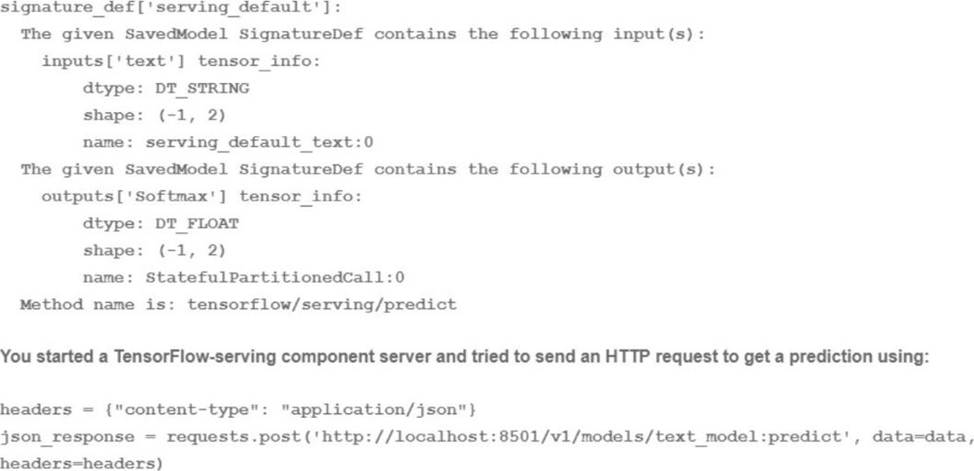
What is the correct way to write the predict request?
- A . data json.dumps({"signature_name": "serving_default’ "instances": [fab’, ‘be1, ‘cd’]]})
- B . data json dumps({"signature_name": "serving_default"! "instances": [[‘a’, ‘b’, "c", ‘d’, ‘e’, ‘f’]]})
- C . data json.dumps({"signature_name": "serving_default, "instances": [[‘a’, ‘b ‘c’1, [d ‘e T]]})
- D . data json dumps({"signature_name": f,serving_default", "instances": [[‘a’, ‘b’], [c ‘d’], [‘e T]]})
D
Explanation:
A predict request is a way to send data to a trained model and get predictions in return. A predict request can be written in different formats, such as JSON, protobuf, or gRPC, depending on the service and the platform that are used to host and serve the model.
A predict request usually contains the following information:
The signature name: This is the name of the signature that defines the inputs and outputs of the model. A signature is a way to specify the expected format, type, and shape of the data that the model can accept and produce. A signature can be specified when exporting or saving the model, or it can be automatically inferred by the service or the platform. A model can have multiple signatures, but only one can be used for each predict request.
The instances: This is the data that is sent to the model for prediction. The instances can be a single instance or a batch of instances, depending on the size and shape of the data. The instances should match the input specification of the signature, such as the number, name, and type of the input tensors.
For the use case of training a text classification model, the correct way to write the predict request is
D. data json.dumps({“signature_name”: “serving_default”, “instances”: [[‘a’, ‘b’], [‘c’, ‘d’], [‘e’, ‘f’]]}) This option involves writing the predict request in JSON format, which is a common and convenient format for sending and receiving data over the web. JSON stands for JavaScript Object Notation, and it is a way to represent data as a collection of name-value pairs or an ordered list of values. JSON can be easily converted to and from Python objects using the json module.
This option also involves using the signature name “serving_default”, which is the default signature name that is assigned to the model when it is saved or exported without specifying a custom signature name. The serving_default signature defines the input and output tensors of the model based on the SignatureDef that is shown in the image. According to the SignatureDef, the model expects an input tensor called “text” that has a shape of (-1, 2) and a type of DT_STRING, and produces an output tensor called “softmax” that has a shape of (-1, 2) and a type of DT_FLOAT. The -1 in the shape indicates that the dimension can vary depending on the number of instances, and the 2 indicates that the dimension is fixed at 2. The DT_STRING and DT_FLOAT indicate that the data type is string and float, respectively.
This option also involves sending a batch of three instances to the model for prediction. Each instance is a list of two strings, such as [‘a’, ‘b’], [‘c’, ‘d’], or [‘e’, ‘f’]. These instances match the input specification of the signature, as they have a shape of (3, 2) and a type of string. The model will process these instances and produce a batch of three predictions, each with a softmax output that has a shape of (1, 2) and a type of float. The softmax output is a probability distribution over the two possible classes that the model can predict, such as positive or negative sentiment.
Therefore, writing the predict request as data json.dumps({“signature_name”: “serving_default”, “instances”: [[‘a’, ‘b’], [‘c’, ‘d’], [‘e’, ‘f’]]}) is the correct and valid way to send data to the text classification model and get predictions in return.
Reference: [json ― JSON encoder and decoder]
You trained a text classification model.
You have the following SignatureDefs:
What is the correct way to write the predict request?
- A . data json.dumps({"signature_name": "serving_default’ "instances": [fab’, ‘be1, ‘cd’]]})
- B . data json dumps({"signature_name": "serving_default"! "instances": [[‘a’, ‘b’, "c", ‘d’, ‘e’, ‘f’]]})
- C . data json.dumps({"signature_name": "serving_default, "instances": [[‘a’, ‘b ‘c’1, [d ‘e T]]})
- D . data json dumps({"signature_name": f,serving_default", "instances": [[‘a’, ‘b’], [c ‘d’], [‘e T]]})
D
Explanation:
A predict request is a way to send data to a trained model and get predictions in return. A predict request can be written in different formats, such as JSON, protobuf, or gRPC, depending on the service and the platform that are used to host and serve the model.
A predict request usually contains the following information:
The signature name: This is the name of the signature that defines the inputs and outputs of the model. A signature is a way to specify the expected format, type, and shape of the data that the model can accept and produce. A signature can be specified when exporting or saving the model, or it can be automatically inferred by the service or the platform. A model can have multiple signatures, but only one can be used for each predict request.
The instances: This is the data that is sent to the model for prediction. The instances can be a single instance or a batch of instances, depending on the size and shape of the data. The instances should match the input specification of the signature, such as the number, name, and type of the input tensors.
For the use case of training a text classification model, the correct way to write the predict request is
D. data json.dumps({“signature_name”: “serving_default”, “instances”: [[‘a’, ‘b’], [‘c’, ‘d’], [‘e’, ‘f’]]}) This option involves writing the predict request in JSON format, which is a common and convenient format for sending and receiving data over the web. JSON stands for JavaScript Object Notation, and it is a way to represent data as a collection of name-value pairs or an ordered list of values. JSON can be easily converted to and from Python objects using the json module.
This option also involves using the signature name “serving_default”, which is the default signature name that is assigned to the model when it is saved or exported without specifying a custom signature name. The serving_default signature defines the input and output tensors of the model based on the SignatureDef that is shown in the image. According to the SignatureDef, the model expects an input tensor called “text” that has a shape of (-1, 2) and a type of DT_STRING, and produces an output tensor called “softmax” that has a shape of (-1, 2) and a type of DT_FLOAT. The -1 in the shape indicates that the dimension can vary depending on the number of instances, and the 2 indicates that the dimension is fixed at 2. The DT_STRING and DT_FLOAT indicate that the data type is string and float, respectively.
This option also involves sending a batch of three instances to the model for prediction. Each instance is a list of two strings, such as [‘a’, ‘b’], [‘c’, ‘d’], or [‘e’, ‘f’]. These instances match the input specification of the signature, as they have a shape of (3, 2) and a type of string. The model will process these instances and produce a batch of three predictions, each with a softmax output that has a shape of (1, 2) and a type of float. The softmax output is a probability distribution over the two possible classes that the model can predict, such as positive or negative sentiment.
Therefore, writing the predict request as data json.dumps({“signature_name”: “serving_default”, “instances”: [[‘a’, ‘b’], [‘c’, ‘d’], [‘e’, ‘f’]]}) is the correct and valid way to send data to the text classification model and get predictions in return.
Reference: [json ― JSON encoder and decoder]
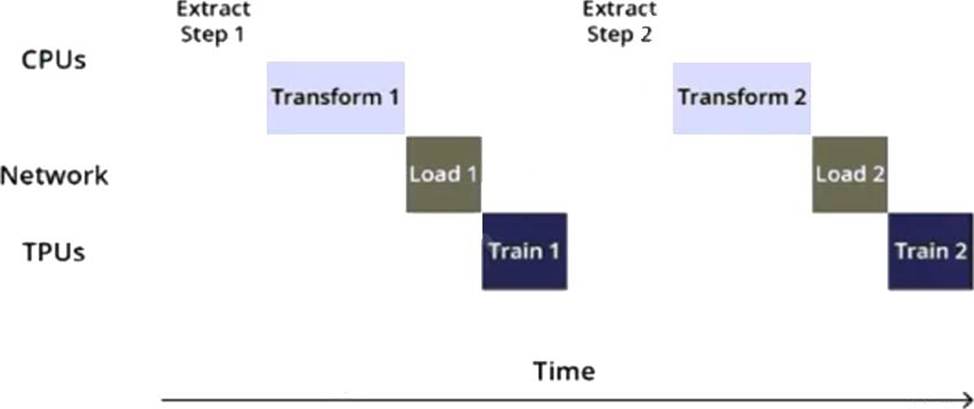
You are training an object detection model using a Cloud TPU v2. Training time is taking longer than expected.
Based on this simplified trace obtained with a Cloud TPU profile, what action should you take to decrease training time in a cost-efficient way?
- A . Move from Cloud TPU v2 to Cloud TPU v3 and increase batch size.
- B . Move from Cloud TPU v2 to 8 NVIDIA V100 GPUs and increase batch size.
- C . Rewrite your input function to resize and reshape the input images.
- D . Rewrite your input function using parallel reads, parallel processing, and prefetch.
D
Explanation:
The trace in the question shows that the training time is taking longer than expected. This is likely due to the input function not being optimized. To decrease training time in a cost-efficient way, the best option is to rewrite the input function using parallel reads, parallel processing, and prefetch. This will allow the model to process the data more efficiently and decrease training time.
Reference: [Cloud TPU Performance Guide]
[Data input pipeline performance guide]
You have deployed a scikit-learn model to a Vertex Al endpoint using a custom model server. You enabled auto scaling; however, the deployed model fails to scale beyond one replica, which led to dropped requests. You notice that CPU utilization remains low even during periods of high load.
What should you do?
- A . Attach a GPU to the prediction nodes.
- B . Increase the number of workers in your model server.
- C . Schedule scaling of the nodes to match expected demand.
- D . Increase the minReplicaCount in your DeployedModel configuration.
B
Explanation:
Auto scaling is a feature that allows you to automatically adjust the number of prediction nodes based on the traffic and load of your deployed model1. However, auto scaling depends on the CPU utilization of your prediction nodes, which is the percentage of CPU resources used by your model server1. If your CPU utilization is low, even during periods of high load, it means that your model server is not fully utilizing the available CPU resources, and thus auto scaling will not trigger more replicas2.
One possible reason for low CPU utilization is that your model server is using a single worker process to handle prediction requests3. A worker process is a subprocess that runs your model code and handles prediction requests3. If you have only one worker process, it can only handle one request at a time, which can lead to dropped requests when the traffic is high3. To increase the CPU utilization and the throughput of your model server, you can increase the number of worker processes, which will allow your model server to handle multiple requests in parallel3.
To increase the number of workers in your model server, you need to modify your custom model server code and use the –workers flag to specify the number of worker processes you want to use3. For example, if you are using a Gunicorn server, you can use the following command to start your model server with four worker processes:
gunicorn –bind :$PORT –workers 4 –threads 1 –timeout 60 main:app
By increasing the number of workers in your model server, you can increase the CPU utilization of your prediction nodes, and thus enable auto scaling to scale beyond one replica.
The other options are not suitable for your scenario, because they either do not address the root cause of low CPU utilization, such as attaching a GPU or scheduling scaling, or they do not enable auto scaling, such as increasing the minReplicaCount, which is a fixed number of nodes that will always run regardless of the traffic1.
Reference: Scaling prediction nodes | Vertex AI | Google Cloud
Troubleshooting | Vertex AI | Google Cloud
Using a custom prediction routine with online prediction | Vertex AI | Google Cloud